Tools for Jira
 Tools for monday.com




Managing a software release is like juggling. You have to keep an eye on team capacity, scope, timeline, blockers, status updates, quality assurance, and stakeholder wishes. One thing slips, and you are in for an unpleasant surprise: a release is delayed, the new update or feature contains bugs, or doesn’t meet executives’ expectations.
Many software teams use Jira as a tried-and-true project management tool. But is it up to the task of addressing the release management challenges? This is the question we will address in this article.
TL;DR
- Jira provides a robust native toolset for release management: Fix version fields and versions, Release hub, Release burndown report, Jira Plans for cross-project releases, and automatic Release notes generation.
- Despite its core strengths, Jira lacks built-in support for release-window capacity management, release-readiness enforcement, and repeatable task templating.
- Setting the definition of done and scope changes rules, automating repeatable tasks, and customizing workflow statuses boost the efficiency of release management in Jira.
What Is Release Management in Jira?
 Definition
Release management in Jira is the process of coordinating how teams plan, build, test, and deploy software releases using Jira’s native tools. Teams group work items under a version with the Fix version field, then move them through the workflow and track progress in the Release hub. The goal is a predictable release without surprises on scope, quality, or timing.
In Jira, the terms “release” and “version” are used interchangeably. A version, as Atlassian puts it, is a point in time for a Jira project. In simpler terms, it is a milestone you can use to organize your work by assigning work items (Jira issues) to a specific version.
Jira’s Native Release Management Tools
Here is a brief overview of what vanilla Jira offers for release management.
| Tool/Feature | Description |
|---|---|
| Version | A set of work items to be delivered with a single release. It has a name, description, start and release dates, and a Driver — release owner, a person responsible for the release from start to finish. Read our article to learn more about what a Jira Version is, as well as why and how teams use it. |
| Fix version | A field used to assign a version to the work item. |
| Release Hub (Releases tab) | A place to manage single-space releases: filter, see status (unreleased, released, archived), monitor progress. |
| Cross-project releases in Jira Plans (Advanced Roadmaps) | Align the work across multiple projects (spaces). Created and edited in the Releases tab of Jira Plans, do not exist outside it. Available in Jira Cloud Premium and Enterprise. |
| Release Burndown report | Shows how much work assigned to the release has been completed and how much is remaining. Requires work items to have estimates. Use cases: assess the team’s working pace, estimate the number of sprints to complete the work for a version. |
| Continuous Integration and Continuous Deployment (CI/CD) integrations | Show the code and deployment status in Jira. The supported CI/CD integrations include Bitbucket, GitHub, GitLab, Jenkins, Azure DevOps, and Bamboo. |
| Release Notes | Generate release notes (summaries) for the work items within a version. Automatically re-created each time the user views them based on the current state of the version. |
| Jira Align | Atlassian enterprise-level planning platform focused on SAFe. Its functionality includes creating and managing release vehicles, which in SAFe represent an actual release to market or to internal end users. |
How to Manage a Release in Jira
Jira supports each stage of the software development lifecycle by helping teams define who does what, track progress, address bugs, and prepare for shipping.
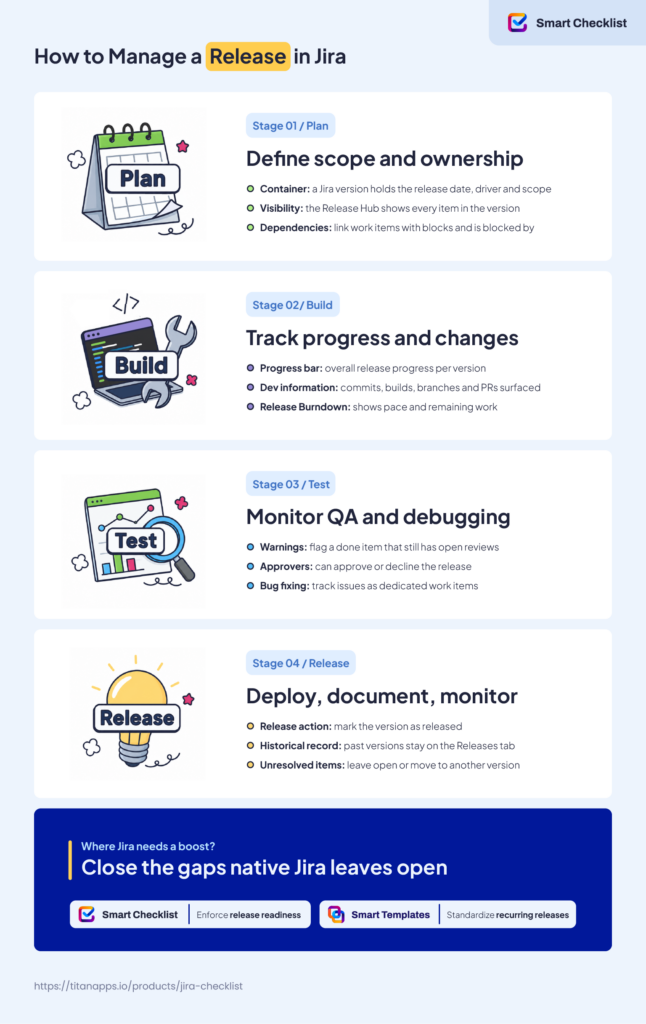
Stage 1 – Plan: Define Scope, Timeline, and Ownership
What happens: the team decides what to build, why, when, and how. Product managers, engineering leads, and stakeholders align on objectives, scope, and timelines.
Release management tasks:
- Set the release objective
- Define scope and release date
- Identify the release owner, stakeholders, and approvers
- Point out known risks and dependencies
How does Jira help? A Jira version is a container for your release. You use it to specify the release date and the Driver and set the scope via the Fix version field. The Release Hub will show all the items attached to the specific version. To map dependencies, you can use work item links such as “blocks” or “is blocked by”. Jira Plans adds a dedicated dependencies view for cross-team work.
For more details, read our guide on planning a product release in Jira.
Stage 2 – Build: Track and Report Progress, Deal with Changes
What happens. Developers write code to support the planned changes, review it, and merge it into the codebase.
Release management tasks:
- Monitor progress against the plan
- Send status updates to stakeholders
- Watch for blockers
- Handle scope changes
How does Jira help? The progress bar for each version reveals the overall progress of the release. With Git and Jira integration, the page also shows development information in a work item: commits, branches, and pull requests. Warnings appear when there is a discrepancy, for instance, when a work item is marked as done but has open reviews. The Release Burndown report shows the team’s pace and remaining work.
Stage 3 – Test: Monitor QA, Manage Debugging
What happens: the product is checked against the requirements. QA engineers run the tests to find bugs, developers fix them, and the cycle continues until the build is deemed shippable.
Release management tasks:
- Track QA completion
- Run the release readiness check
- Verify the scope is complete
- Get stakeholder approval
- Prepare the release notes
- Bug fixing management (release blockers management)
How does Jira help? Warnings in the Release hub flag items that aren’t shippable yet – marked Done but with open pull requests, unreviewed code, or failed builds. Approvers may approve or decline the release, helping ensure everyone is on the same page before it goes live. As for the release notes, Jira can automatically generate a draft from the work items in the version, a list grouped by work item type. Bugs can be tracked as a dedicated work item type assigned to a particular version.
Stage 4 – Release/Deployment: Document, Report, and Monitor
What happens. The validated build goes to production, and users get access to the new software version/feature. The team monitors for early issues and responds to feedback.
Release management tasks:
- Handle unresolved work items
- Publish release notes
- Notify stakeholders and support
- Monitor the release
How does Jira help? You can mark the version as Released directly in the Release Hub. This is when Jira prompts you to handle unresolved work items. You can leave them open or move them to a different version. Previous versions remain accessible on the Releases tab, serving as a historical record.
Thus, native Jira covers the core release management requirements — but not everything. In the next section, you will learn where the gaps sit.
Three Release Management Gaps Jira Leaves Open
Users can’t evaluate capacity directly at the release level, comprehensively enforce release readiness, or template a set of work items in Jira out of the box. Let’s examine these Jira release management limitations and how to deal with them.
No Release-Window-Based Capacity Management
Imagine you lead a team with a three-month release cycle. A stakeholder asks to add a feature six weeks before release. Can it fit without shifting the date?
To know that, ideally you’d need an estimate of your remaining capacity for the release period. Jira Plans offers capacity estimates per sprint (Scrum) or per week (Kanban). However, Jira doesn’t aggregate these into a single release-window view. You can’t see the total remaining capacity across multiple sprints at a glance.
Jira Plans is also gated behind Premium and Enterprise. Teams on Standard or Free tiers can use time-based estimates and story points, but not capacity management. This increases the risk of inaccurate planning and overcommitment.
The technical workaround for Jira Plans would be to simulate the release timeframe using a custom sprint (iteration). This way, Jira will actually show the capacity per release. However, that might not be convenient if you need your “usual” sprints for planning in Jira or you don’t have permission to manage sprints.
There is, however, a more practical approach to assessing a new feature request. Use this formula:
Sprint velocity * N of remaining sprints = Total remaining capacity
Then apply the decision framework:
If the Total remaining capacity is less or equal Current total work remaining + Estimate for the new feature then the feature will fit into the release.
Let’s explain each element:
- Sprint velocity – average amount of work per sprint, calculated based on the last sprints (the Release Burndown report)
- Current total work remaining – the sum of estimates for all unfinished work items assigned to the release version (the Release Burndown report).
- N of remaining sprints – 1) if a release has a fixed end date: (release date – today)/sprint length. 2) if releases ship on a regular rhythm rather than a fixed date: average release length in sprints – minus sprints already spent. Do not use the Release Burndown’s predicted “X of sprints remaining” here, since that number is already derived from the current remaining work.
- Total remaining capacity – the maximum amount of work (e.g., story points) the team is expected to complete before the release date.
Note that Kanban teams can also use this formula, but as the weekly throughput × the number of weeks remaining.
No Built-In Release-Readiness Enforcement
You see the tasks in your version marked as Done. But does it really mean the release is ready? As we’ve mentioned, deployment tool integrations provide some validation capabilities. Still, this functionality doesn’t signal whether the code was properly tested, has all the necessary documentation, etc.
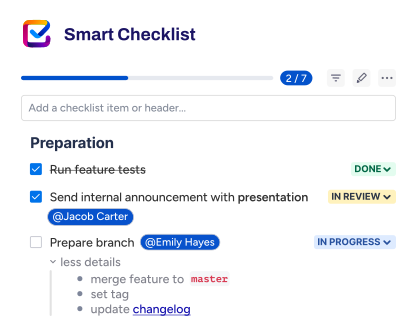
To conduct a comprehensive check, you might need to create a separate release readiness assessment task, with a subtask for each item to address. However, this has the downside of cluttering your board with multiple subtasks, which makes it hard to use. Another way is to add a checklist inside your release readiness assessment task. Jira offers checklist-like action items, but they have limitations. With the Smart Checklist for Jira app by TitanApps, you get a checklist inside a work item where you can:
- Add assignees and due dates
- Use tabs to segment long checklists
- Add details to checklist items
- Add mandatory items that, if unchecked, prevent the work item from being marked as Done (in combination with Jira Workflows)
- Create reusable checklist templates.
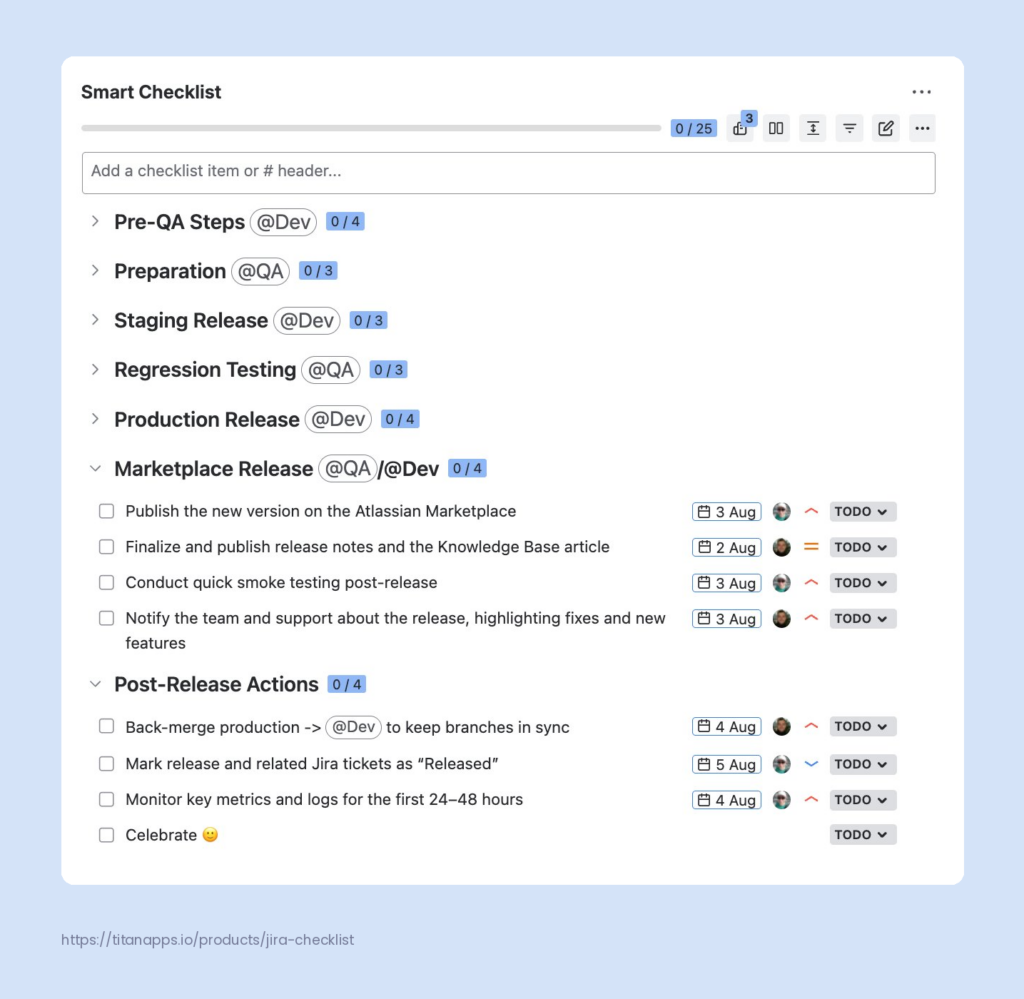
This tool, available on Atlassian Marketplace, will help you make the release management process smoother. Check out our article with the release readiness checklist template to get started.
Note, however, that a release readiness checklist is a process safeguard, not a guarantee of quality. It confirms that agreed steps were completed. It does not replace testing, code review, or stakeholder sign-off.
No Standardized Recurring Task Structure
Release-readiness enforcement is just one task within the broader array of release management. As we’ve mentioned, the whole process has several stages and may involve different users or even teams. Usually, it is too complex to fit into one checklist. Therefore, you’d need to create several work items in Jira, likely an epic for a release, stories or tasks for different stages, and subtasks and/or checklists to cover all the details.
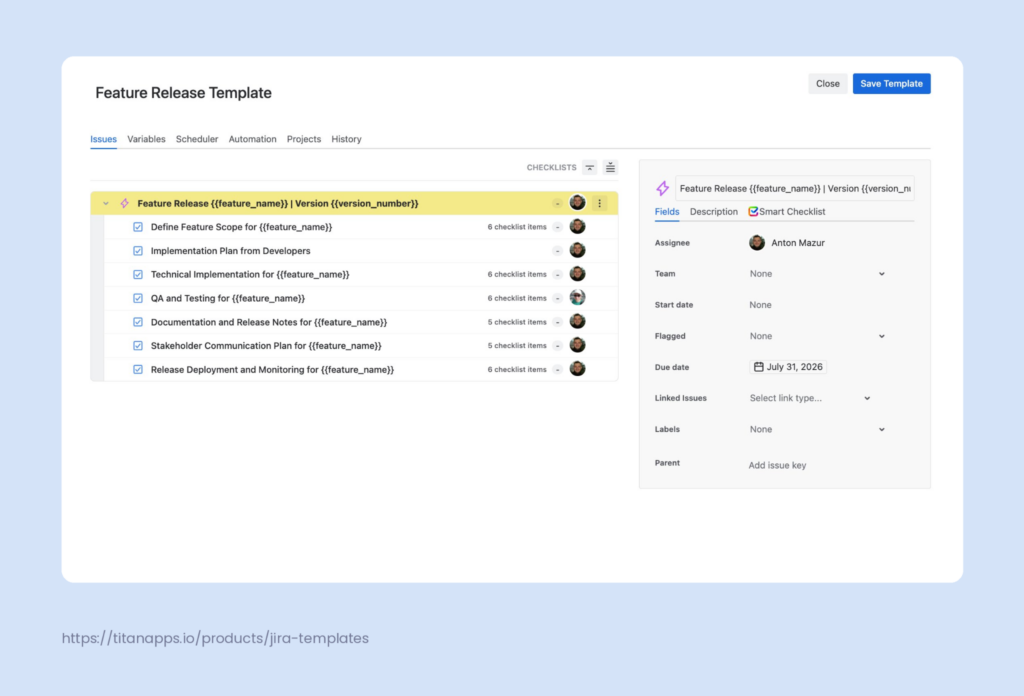
For each new release, you’d have to recreate this set of work items, and there is no native way to save it as a template in Jira. Cloning an old release epic is an option, but you’d need to update all the details manually. Also, cloning doesn’t provide a way to document process changes for the next release – you’d have to rely on your notes elsewhere.
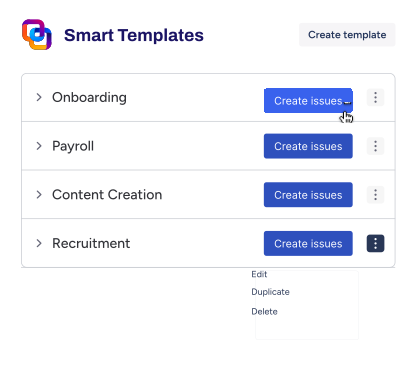
Our Smart Templates for Jira app extends Jira’s capabilities to cover the gap. It allows you to create a reusable template, a set of work items in Jira, with variables to fill in the details that depend on a particular release (e.g., version number). Apply it, specify the dynamic values — and you get a set of tasks tailored for the new release. This way, you ensure your release process is standardized and all critical requirements are accounted for. To see how that works, read our Jira feature release template article.
Jira Release Management Best Practices
Here are some organizational and technical pieces of advice on how to boost Jira release management efficiency:
- Agree on the definition of done. Establish a shared understanding of when a task is considered complete. To ensure transparency and monitor compliance, you can create a checklist with the required criteria and save it as a template. Read our blog to learn more about the definition of done in Agile teams.
- Set a limit for scope changes. The release scope may be updated while the work is in progress, but you have to draw the line somewhere. There are different ways to handle change management. One option is to establish a date after which no new items are added to a version. Another is to prioritize work and define what stays in the release scope — for instance, tasks labeled as “Must” according to the MoSCoW framework.
- Automate processes with rules and Rovo AI. Use Jira automation to avoid tedious and error-prone manual work. For example, you can add rules to create sprints and release versions, assign work items to versions, and automatically resolve work items when the version is released. Or you can automate Jira ticket creation to prepare release notes when a sprint ends. Also, Rovo, an Atlassian AI-powered search, chat, and automation tool, can help with generating release notes.
- Update the workflow statuses. Jira’s default “To do, In progress, Done” trio lacks the granularity the release management requires. You may add statuses such as Ready for testing, Ready for release, and Released to get more information about your release’s progress and what to do next. See our article on custom Jira statuses for more details.
Conclusion: Making Release Management in Jira Work
Jira has rich release management functionality, from versions as release work containers to Rovo AI helping with release notes. It meets the core needs and helps mitigate common risks such as scope creep or unnoticed dependencies. Surely, Jira isn’t flawless, particularly in respect of release-based capacity estimates, ensuring release readiness, and templating repeatable release tasks. However, the right process organization, customization, automation, and third-party tools like Smart Checklists can make release management in Jira easier and more efficient.
FAQ
Is Jira a release management tool?
Partly. While Jira is not a dedicated release management platform, it has a solid set of native release management features: versions, the Release Hub, cross-space releases in Jira Plans, Release Burndown report, etc. They cover the core needs such as planning, progress tracking, and release history. However, it has limitations. For instance, native Jira lacks the features to enforce how the release process runs. Comprehensive release readiness checks or the creation and management of recurring task templates require additional tools.
What is the difference between Fix version and Affects version?
Both are Jira work item fields, but Fix version shows the version in which a specific work increment is released, and Affects versions details the versions that a bug or problem affects. Fix Version is widely used to plan releases, monitor their progress and velocity, and report. Affect Version was created with a specific goal in mind — issue tracking.
Do I need Jira Premium for release management?
No. Versions, Fix version field, the Release hub (Releases tab), CI/CD integrations, release burndown report, and release notes, including Rovo-powered ones, are available on the Standard plan. That is sufficient for the core release management needs. Cross-space releases, however, require Jira Plans, which are available only to Premium and Enterprise users. Jira Align, which supports SAFe release vehicles, is a standalone, enterprise-grade platform. It’s outside the scope of standard release management needs.
How can I track release progress in Jira?
You can use the Release Hub (Releases tab), the Release Burndown report, and Jira Plans to track release progress in Jira. The Release Hub is the primary tool for single-space releases, as it shows the status of all work items in a version. With development tools like GitHub, GitLab, or Bitbucket integrated, you can also see code and deployment status for each work item. The Release Burndown report shows how much work remains and how fast your team is getting through it. Jira Plans lets you track work items from multiple spaces against a shared release timeline.
Can Jira release management integrate with other tools?
Yes. Jira supports a vast number of integrations, some of which are useful for release management. In particular, it has integrations with CI/CD and pipeline-tracking tools such as Jenkins, Bitbucket, GitHub, GitLab, Azure DevOps, and Bamboo. They allow Jira to display commit, build, branch, pull request, and deployment statuses directly on work items and in the Release Hub.