





 Tools for Jira
 Tools for monday.com




Agile vs. Scrum: Key Takeaways
- Agile is a set of values and principles for iterative work, not a single method.
- Scrum is one specific framework for putting Agile into practice, with fixed sprints, defined roles, and set ceremonies.
- The real question is rarely Agile or Scrum, but Scrum versus another Agile framework like Kanban: pick fixed sprints for a steady cadence, and continuous flow when priorities shift often.
- Scrum works best for teams that want structure: fixed sprint lengths, clear roles, and regular ceremonies.
- Jira supports both Agile and Scrum project management, and tools like Smart Checklist and Smart Templates add structure on top: checklists for sprint tasks and Definition of Done, templates for setting up recurring sets of work items without building them from scratch each time.
Why Understanding Agile vs. Scrum Matters
Is Agile the same as Scrum? Some teams answer “Yes”, assuming they are interchangeable. However, Agile is a broad concept that includes multiple frameworks, such as Scrum and Kanban. So when people frame it as “Scrum versus Agile”, they are really asking how one framework fits inside the wider method. That is the relationship of Scrum to Agile: Scrum is a specific way to run Agile, not a competing choice.
Jira supports Agile teams. It provides tools like Scrum boards, Kanban boards, and backlogs to help teams manage their work efficiently. Whether a team follows Scrum, Kanban, or a hybrid model, Jira offers features to track tasks, sprints, and workflows in real time.
This article explains the Agile vs Scrum difference, how Jira supports both approaches, and how teams can use it to optimize their development process.
Key topics covered:
- What is Agile, and how does it work?
- What is Scrum?
- What is the difference between Scrum and Agile?
- How to use Jira for Agile and Scrum projects?
- Best practices for Agile project management in Jira.
Next, we’ll look at Agile as a methodology and its core principles.
What is Agile?
 Definition
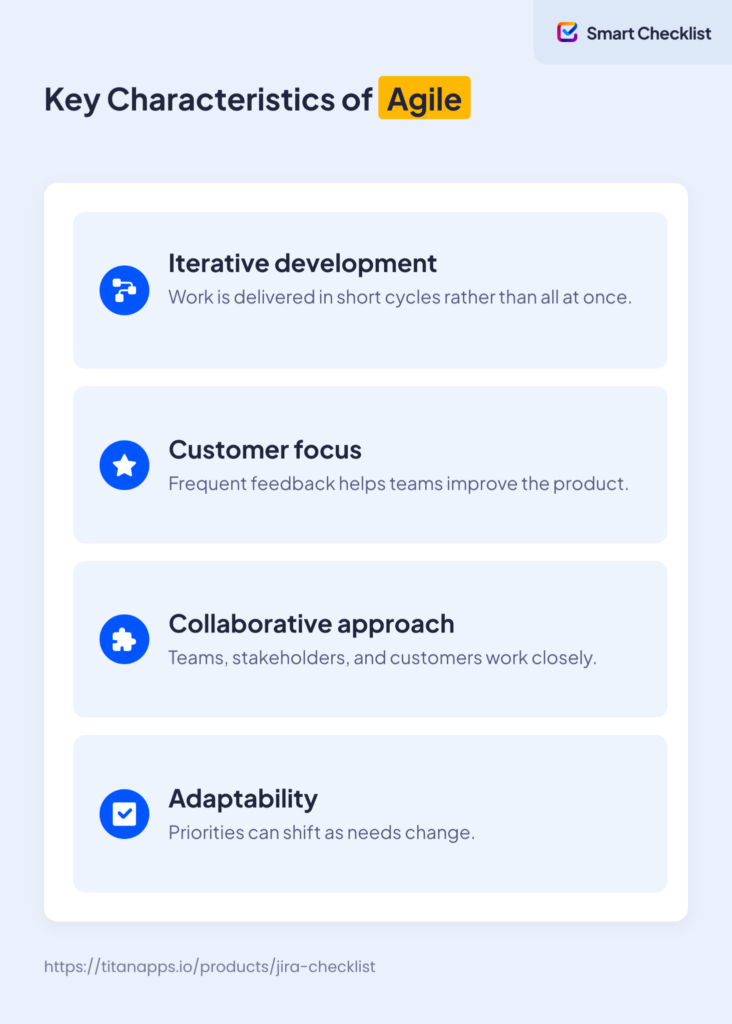
Agile is a project management methodology that focuses on flexibility, collaboration, and iterative development. It helps teams adapt to changing requirements and deliver value faster. Agile is widely used in software development, but it also applies to marketing, HR, and other business functions.
The Agile Philosophy Foundations
Agile is based on the Agile Manifesto, which prioritizes:
- Individuals and interactions over processes and tools.
- Working software over comprehensive documentation.
- Customer collaboration over contract negotiation.
- Responding to change over following a fixed plan.
Unlike traditional project management, Agile teams work in small, iterative cycles. They deliver working features frequently, gather user feedback, and make adjustments as needed.
What Makes a Team Agile?
Agile includes frameworks like Scrum, Kanban, and Extreme Programming (XP). That is why a question like “What is Scrum vs Agile?” rests on a false premise. Scrum is Agile, but Agile is not only Scrum. Each approach within Agile follows Agile principles but has different structures and workflows.
What is Scrum?
Definition
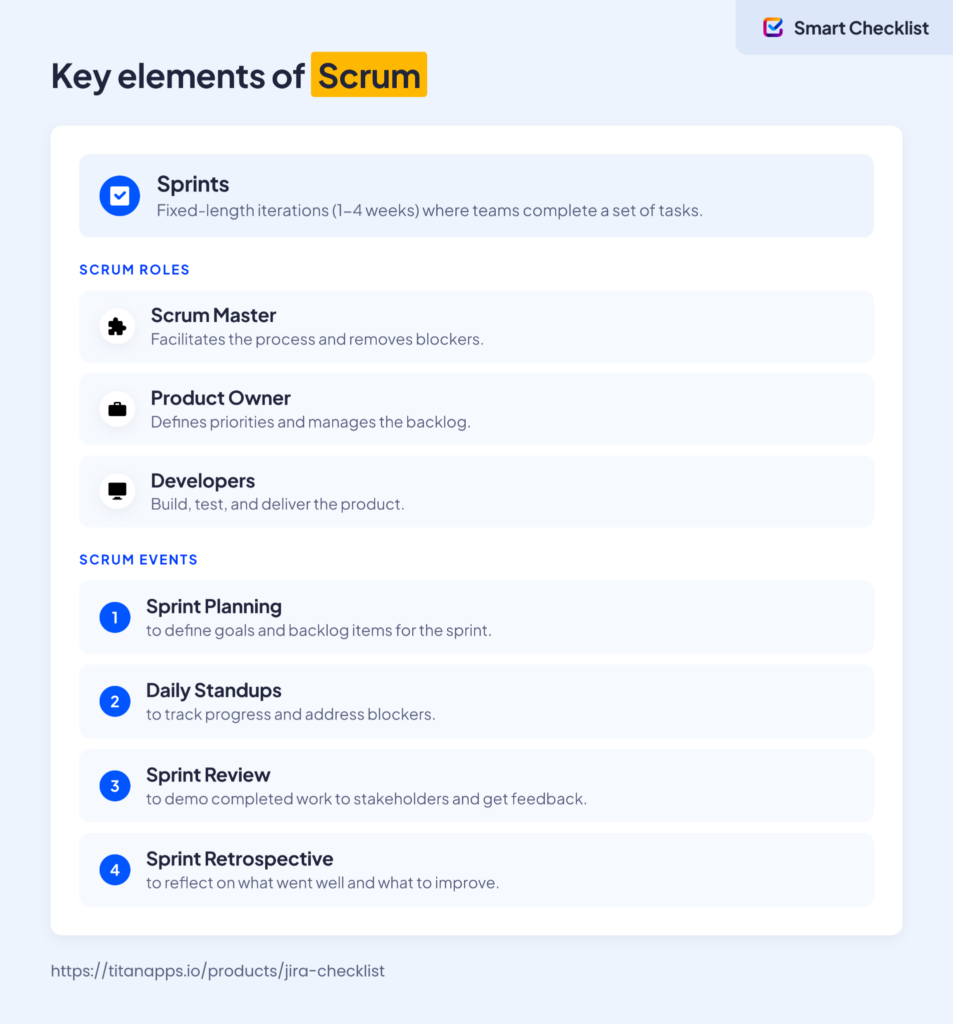
Scrum is an Agile framework that organizes work into structured cycles called sprints. It is designed for small, cross-functional teams working on complex projects. Unlike Agile, which is a broad methodology, Scrum (sometimes referred to as “Scrum methodology”) provides a specific set of rules, roles, and meetings to help teams manage work effectively.
The Cornerstones of Scrum: Roles, Sprints, and Events
Scrum in Jira
Jira supports Scrum with:
- Scrum Boards: Organize tasks into columns such as “To Do,” “In Progress,” and “Done” to visually track workflow.
- Backlog Management: Prioritize, refine, and manage the product backlog to ensure the team works on the most valuable items.
- Sprint Planning Tools: Set sprint goals, define the scope, and assign work items to the team for the sprint.
- Burndown Charts: Track sprint progress by visually showing the work remaining over time.
Scrum is ideal for teams that need structured workflows, clear roles, and predictable timelines.
Key Differences Between Agile and Scrum
Agile is a broad methodology, while Scrum is a structured framework with specific processes.
| What is the difference between Agile and Scrum? | ||
|---|---|---|
| Aspect | Agile | Scrum |
| Definition | A methodology for flexible, iterative development. | A framework within Agile with structured processes. |
| Flexibility | Highly flexible, unites different frameworks (Scrum, Kanban). | Follows a structured approach with fixed-length sprints. |
| Iterations | Work is broken into iterations, but timing is flexible. | Uses sprints (1-4 weeks) to deliver small increments. |
| Team Structure | Teams are cross-functional but without fixed roles. | Defined roles: Scrum Master, Product Owner, Developers (Development Team). |
| Workflow | Adaptable; teams choose their process (Kanban, Scrum, hybrid). | Sprint-based workflow with a backlog, daily standups, and retrospectives. |
| Meetings | Teams decide when and how to meet. | Daily Standups, Sprint Planning, Sprint Reviews, Retrospectives. |
| Best for | Teams needing flexibility in project management. | Teams that prefer structured workflows and time-boxed work cycles. |
| Tools in Jira | Kanban boards, Scrum boards, custom workflows. | Scrum boards, burndown charts. |
How Jira Supports Agile and Scrum
Jira is built for Agile project management and provides tools for Scrum, Kanban, and custom workflows.
- Agile teams can use Kanban boards for continuous work without fixed sprints.
- Scrum teams can manage work in Sprints, track progress with Scrum boards and burndown charts.
- Hybrid teams can use a mix of both frameworks, depending on project needs.
Key Features of Jira for Agile Teams
- Agile Boards: Supports Scrum boards for sprint-based work and Kanban boards for continuous workflows.
- Sprint Planning Tools: Helps teams create, manage, and track sprints with detailed backlog management.
- Burndown Charts & Reports: Provides real-time tracking of sprint progress and work item completion.
- Backlog Management: Teams can prioritize user stories, epics, and sub-tasks to plan upcoming work.
- Automation: Streamlines repetitive tasks, reducing manual work in Agile workflows.
- Timeline view: Helps align team members and stakeholders by mapping out project goals.
What does Jira offer for Scrum Teams?
Scrum teams can use Jira to:
- Plan sprints by selecting work items from the backlog.
- Use Scrum boards to track work from To Do – > In Progress – > Done.
- Monitor sprint progress with burndown charts and sprint reports.
What does Jira offer for Kanban Teams?
Kanban teams benefit from:
- Continuous workflows without fixed sprints.
- Custom columns & work-in-progress (WIP) limits to optimize flow.
- Kanban boards to visualize tasks and track movement through stages.
Jira adapts to different Agile frameworks, making it a versatile project management tool for teams of any size. Read on to learn how to implement Agile in Jira.
Jira Workflow Setup for Agile and Scrum Projects
A well-structured workflow helps Agile teams track progress and manage work efficiently in Jira Software. You can customize work item statuses, transitions, and automation to match your team’s process.
- Configure Jira Workflows. In company-managed spaces, go to Space Settings > Workflows to modify the default workflow or create a new one. In team-managed spaces, go to Space Settings > Work Types, select a work type, then Edit Workflow. Either way, define statuses such as To Do, In Progress, Blocked, Ready for Review, and Done, then set transitions between them to reflect how work actually moves forward.

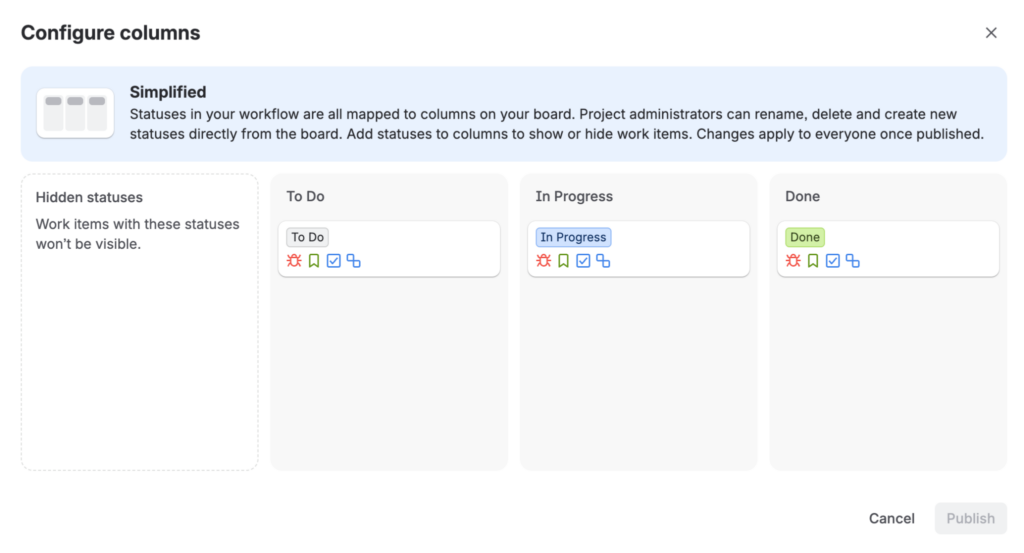
- Add Custom Statuses. Create custom statuses for your team’s specific needs, such as Awaiting QA or Needs Approval. Map these statuses to your Scrum board, or to a Kanban board with WIP limits set on the columns that need them.
- Automate Work Item Transitions. Use Jira automation to move work items when conditions are met. For example, you can build a rule that automatically transitions a work item to Done once all its sub-tasks are complete.
- Link Work Items for Better Tracking. Use dependencies to link related work items, with relationships like blocks, is blocked by, or relates to. This helps you track work across sprints and spot bottlenecks early.
- Integrate with DevOps Tools. Sync Jira with GitHub, Bitbucket, or your CI/CD pipeline, and automate status updates when code is merged or deployed.
Smart Tools by TitanApps: Making Agile, Scrum, and Kanban More Efficient
Agile teams rely on structure and repeatable processes to keep work moving efficiently. Scrum and Kanban frameworks help teams prioritize tasks, manage workflows, and deliver work in small, iterative cycles. However, managing these processes manually in Jira can slow teams down.
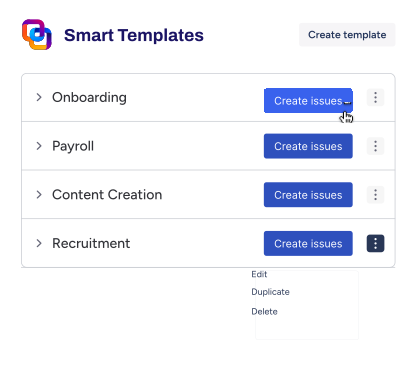
Smart Templates and Smart Checklist provide automation and structure to Agile workflows. With Smart Templates, teams can quickly set up structured Jira work items for repetitive processes without manually creating each component from scratch. This standardizes processes and cuts setup time, leaving more room for the sprint itself.
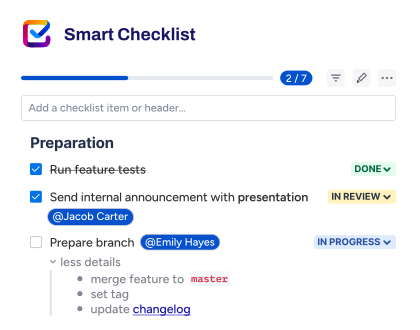
Smart Checklist ensures consistency and accountability by adding checklists to work items and tracking their progress. It helps teams to:
- Avoid cluttering the backlog and board with subtasks.
- Improve sprint efficiency, ensuring work follows the Definition of Ready (DoR) and Definition of Done (DoD).
- Reduce errors by keeping every team member aligned on the same set of requirements.
How Agile Teams Can Benefit from Smart Tools
1. Sprint Execution: Breaking Down Work Without Clutter
Scrum teams often struggle with subtask overload in Jira. And its native action items, inline checkboxes in the work item description, have limited functionality: no formal assignee field, no due dates, no automation, and no JQL support.
Smart Checklist avoids the clutter of subtasks while adding the assignee, due date, and automation support that action items lack. Instead of creating separate subtasks or using action items, teams can use Smart Checklist inside each Jira work item to break down work into clear, actionable steps, with progress visible on the work item itself.
Example: Sprint Execution Checklist for a Development Task
User Story: Add Dark Mode Feature
- Design new UI components.
- Implement theme switcher.
- Write automated tests.
- Test feature across browsers.
- Update documentation.
Pro-tip:
Smart Checklist integrates with Automation for Jira, so you can automatically apply checklists based on a variety of triggers. For example, you can automatically apply checklists to work items based on a work item field value or workflow transition. Last but not least, if you want to stay on top of things, you can also configure a Smart Checklist to show a work item’s checklist progress on your Agile board in company-managed spaces.
2. Definition of Ready (DoR) and Definition of Done (DoD): Standardizing Sprint Workflow
To avoid incomplete or unclear user stories entering a sprint, teams use a Definition of Ready (DoR). To mark work as fully completed, a Definition of Done (DoD) ensures that every task meets quality standards.
Example: Definition of Ready (DoR) Checklist
Before a story is included in a sprint, it must:
- Be clearly defined with user story format: As a [user], I want [goal], so that [benefit].
- Include acceptance criteria.
- Have UI/UX designs attached (if applicable).
- Identify dependencies and risks.
- Be estimated and approved for development.
Example: Definition of Done (DoD) Checklist
A Jira work item is only complete when:
- Code is written and reviewed.
- All bugs have been fixed
- Automated and manual tests are covered by the QA team
- The documentation has been updated
- The build has been pushed to the staging environment
- No tasks remain in To Do status
- Every Acceptance Criteria checklist in each User Story is done
- Product Owner has approved the release.
- Code is officially done and works
Result: Every sprint item meets consistent quality standards before it starts or ends.
You can add the DoD checklist to both the main work item and the child work items:
- For the main work item, include the broad checklist that ensures the user story meets the overall Definition of Done.
- For child work items, add a specific checklist relevant to each sub-task to ensure all detailed steps are covered.
Here’s an example DoD checklist for the main work item:
- Code produced
- Code commented
- Code checked and run against the current version
- Peer reviewed
- Builds without errors
- Unit tests written and passing
- Deployed to the system test environment and passed system tests
- Passed UAT
- Documentation updated
- Remaining hours to task set to 0 and task closed
And here’s an example DoD checklist for a child work item (e.g., development task):
- Development environment set up
- Code implemented
- Code reviewed by a peer
- Unit tests written and passing
- Code pushed to repository
 Pro-tip:
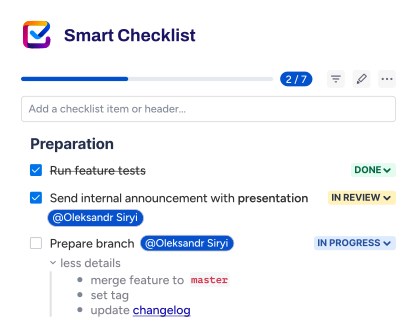
Smart Checklist comes with a selection of Demo checklists. This includes a DoD checklist you can use right away or customize to better fit your exact needs. You can also automate DoD with checklist templates.
3. Launching a New Scrum Project: Streamlining the Setup
Instead of creating each setup task manually, a Scrum Project Setup Template can pre-fill the tasks and checklists your team runs through every time a new Scrum project starts. For an example of this structure, see our project kick-off template for Agile teams, which includes a task hierarchy with checklists for Jira setup, sprint cadence, and workflow standards.
4. Standardizing Repetitive Workflows for Business Teams with Kanban
Kanban is a popular choice among business teams, especially in HR, legal, finance, or operations, because of its continuous flow and flexibility. These teams often manage high volumes of repetitive processes that follow the same steps every time: onboarding a new employee, reviewing contracts, processing invoices, or running performance reviews.
With Smart Templates for Jira, teams can standardize these workflows by turning recurring tasks into reusable work item templates. This saves time, improves consistency, and helps ensure nothing important gets missed.
Example Use Case: Employee Onboarding in HR
Instead of creating a new Jira work item from scratch every time a new hire joins, the HR team can use a pre-built Smart Template:
Template: Employee Onboarding Process
- Work item Summary: Onboard New Employee – {{employee_name}}
- Description: Standard checklist for onboarding a new hire in the {{department}} team.
- Smart Checklist:
- Send welcome email
- Create Jira and Confluence accounts
- Order hardware
- Schedule intro meeting with team
- Assign onboarding mentor
- Share internal HR documentation
You can schedule this template to repeat using Smart Templates’ built-in Scheduler, or trigger it automatically through a webhook, depending on the team’s internal workflow.
See the example below:
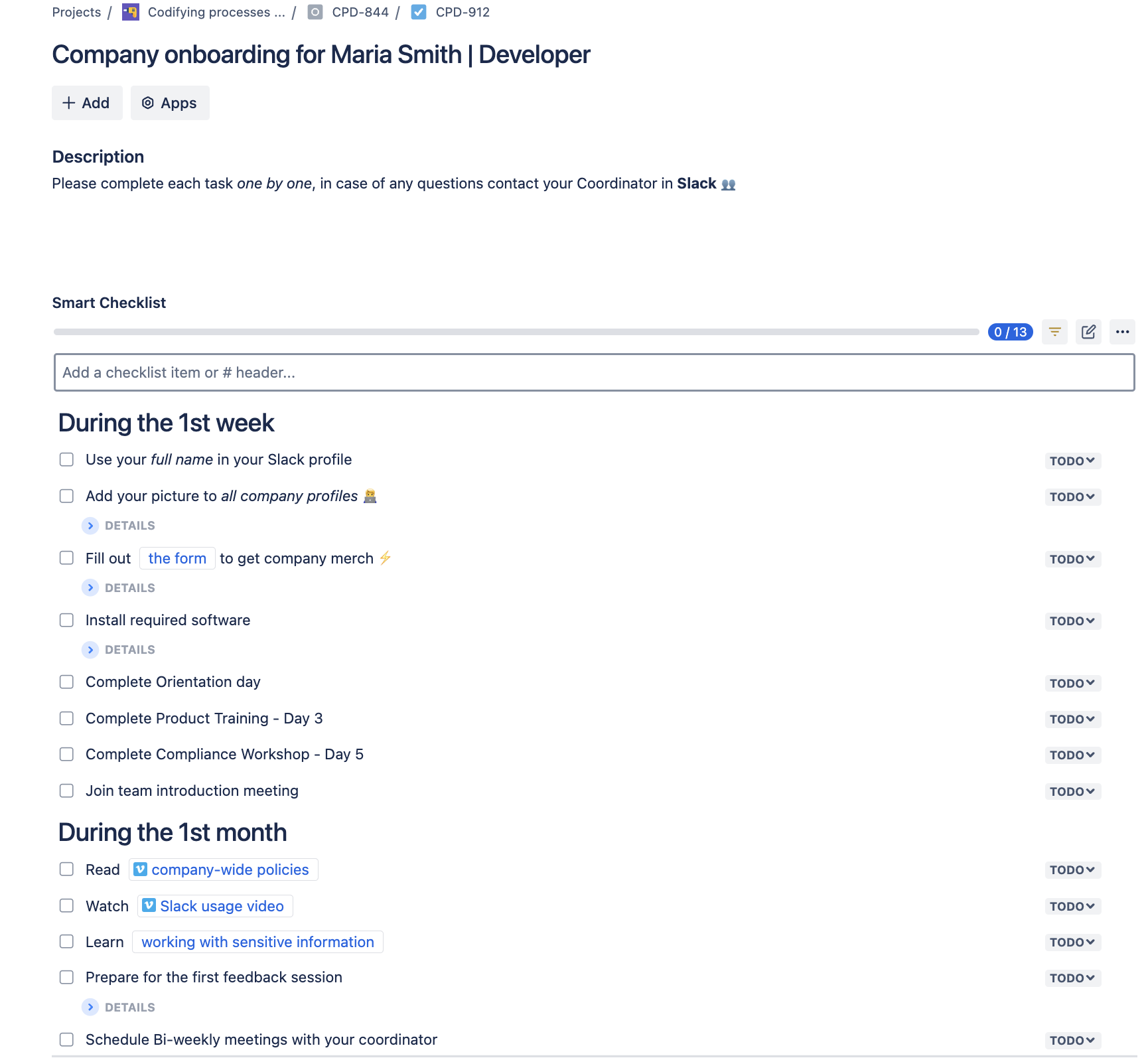
Company onboarding for Maria Smith | Developer
# During the 1st week
- Use your *full name* in your Slack profile
- Add your picture to _all company profiles_
> List of company profiles: Slack, Google account, Jira/Confluence, etc.
- Fill out [the form](http://rw.rw/vimeo.com) to get company merch
> Please state your current address
- Install required software
>VPN setup
>Antivirus installation
- Complete Orientation day
- Complete Product Training - Day 3
- Complete Compliance Workshop - Day 5
- Join team introduction meeting
# During the 1st month
- Read [company-wide policies](https://vimeo.com)
- Watch [Slack usage video](https://vimeo.com)
- Learn [working with sensitive information](https://www.atlassian.com/software/confluence)
- Prepare for the first feedback session
>Purpose: Assess your training progress and role adaptation.
- Schedule Bi-weekly meetings with your coordinator
>Purpose: Review progress on tasks, ask questions
Check out our employee onboarding template guide for role-specific checklists across HR, IT, Legal, and other departments.
Business teams benefit from:
- Faster task creation without repetitive data entry
- Standardized structure and checklists across all requests
- Better collaboration with stakeholders who know what to expect in each work item
Smart Templates give business teams using Kanban a scalable way to manage their recurring processes while keeping their Jira board clean and consistent.

Create templates for entire issue hierarchy or save an existing issue to optimize processes. Pre-fill issue fields, including custom ones to ensure consistency. Add variables to make one template applicable to the whole process.
If you are getting started on implementing Agile in Jira, read our article on how to implement Agile in Jira.
How Smart Templates & Checklists Transform Agile Workflows
- Save Time: Reduce manual setup for repetitive issues
- Improve Consistency: Standardize Agile workflows across teams.
- Track Progress Efficiently: Use checklists instead of cluttered subtasks.
- Enhance Collaboration: Ensure clear expectations with shared issue templates.
- Automate Workflows: Trigger issues and checklists creation based on issue changes.
With Smart Templates and Smart Checklist, Agile teams can focus on development instead of repetitive setup tasks.
How Agile Teams Can Get More From Jira: Best Practices
Agile teams rely on structured workflows and clear priorities to keep projects moving forward. Jira provides the tools, but teams need consistent practices to maintain efficiency.
Here are key best practices for Agile teams using Jira to manage sprints, user stories, and long-term projects.
1. Keep the Backlog Clean and Structured
A cluttered backlog slows down development. Agile teams must prioritize tasks based on impact, urgency, and dependencies.
Best practices for backlog management:
- Keep the backlog refined – review it before each sprint.
- Use labels and custom fields to categorize tasks.
- Break down large user stories into smaller, actionable items.
- Link related work items to track dependencies.
Example: A product team prioritizing a feature launch can rank user stories based on customer impact and technical feasibility.
Tip:
Use Jira’s ranking feature to drag and drop high-priority tasks to the top.
For a deeper look at backlog prioritization and refinement timing, see our guide to Jira backlog management.
2. Run Effective Sprint Planning and Retrospectives
Agile teams work in time-boxed sprints to deliver value incrementally. Sprint planning and retrospectives keep teams aligned and continuously improving.
Sprint planning best practices:
- Define clear sprint goals based on business needs.
- Break work into manageable tasks – avoid vague or oversized work items.
- Assign realistic story points to track workload.
- Use Jira’s Sprint Board to visualize work distribution.
Sprint retrospective best practices:
- Keep discussions focused on what went well and what can be improved.
- Use Jira Reports (burndown charts, velocity) to analyze performance.
- Use Confluence for team collaboration and notes.
Example: A software team holds retrospectives at the end of each sprint to adjust workflows and reduce carryover work.
Tip:
Automate the creation of retrospective templates in Jira with Smart Templates.
3. Use Jira Roadmaps to Align Teams and Stakeholders
Jira’s roadmap tools, the Timeline and Jira Plans (formerly Advanced Roadmaps), give you and your stakeholders one view of work over time, so long-term plans stay tied to business goals. The Timeline shows your work items on a Gantt-style chart within a single project, with sprints, releases, dependencies, and delivery dates in one place.
Best practices for planning on the Timeline:
- Schedule work items with start and due dates, so the plan reflects real delivery windows.
- Map dependencies between work items to see what blocks what before it stalls a sprint.
- Show releases to mark the milestones that matter to stakeholders.
- Filter the timeline by fields like assignee, status, work type, or labels, so each conversation focuses on the right items.
- Update the plan as priorities shift, since the Timeline reflects changes as work items move.
Example: A marketing team plans content, ad campaigns, and launch dates on one Timeline, next to the product work it depends on.
The Timeline covers a single project. To plan across several teams or projects, use Jira Plans. Plans pulls work from multiple boards into one view, where you can model scenarios, track cross-team dependencies, and manage capacity. Note that Plans is available on the Jira Premium and Enterprise tiers.
Tip:
Jira automatically updates roadmaps based on issue progress, keeping teams aligned in real-time.
4. Integrate Jira with Confluence and DevOps Tools
Jira works best when connected to documentation and development pipelines, ensuring smooth collaboration across teams.
Key integrations for Agile teams:
- Confluence: Store sprint goals, user stories, and retrospectives.
- GitHub/GitLab/Bitbucket: Link Jira work items to pull requests for tracking code changes.
- Jenkins: Automate deployment updates linked to Jira tickets.
Example: A software team uses Jira, GitHub, and Jenkins to track development progress, automate builds, and document updates in Confluence.
5. Automate Workflows for Consistency and Efficiency
Automation helps teams reduce manual effort and stay focused on development. Jira’s built-in automation features allow teams to create flows that trigger actions based on work item status, priority, or sprint progress.
Examples of useful Jira automation:
- Move work items to ‘In Progress’ when assigned to a developer.
- Move a work item to ‘Done’ when the checklist is completed.
- Automatically add a templated description for stories (for example, design links and the user-story statement).
- Automatically add DoD checklists to work items based on the work item type or field value.
Example: Automatically create a Confluence page for the retrospective when the sprint is completed.
To learn more about using automation in Jira, read our article on Jira automation best practices.
Jira provides the tools, but successful Agile teams rely on best practices to maximize efficiency. Prioritizing the backlog, planning sprints effectively, using roadmaps for alignment, and integrating Jira with other Atlassian tools are essential steps.
Choosing the Right Agile Approach with Jira
Agile is a mindset, while Scrum is a structured framework within Agile. Teams that want flexibility can adopt Agile principles broadly, while those that need a more defined process with roles and time-boxed iterations can use Scrum. Whichever framework you choose, it is a starting point on your Agile journey, not a final answer. As your team matures, you can adjust the process and the tools to match how you actually work.
Jira supports both approaches by providing Scrum and Kanban boards, sprint planning tools, backlog management, and automation to streamline workflows. Whether your team follows Scrum, Kanban, or a hybrid approach, Jira adapts to different project management needs.
To improve efficiency, teams can extend Jira’s capabilities with Smart Checklist and Smart Templates. These tools help standardize tasks, automate recurring processes, and track performance across sprints and projects.
The choice between Agile and Scrum depends on team structure, project complexity, and workflow preferences. With Jira and the right tools, teams can optimize collaboration, stay aligned, and deliver projects faster.
FAQ: Agile, Scrum, and Jira
What is the difference between Agile, Scrum, and Kanban?
Agile methodology is built on iterative delivery and adapting to change as work progresses. Scrum is an Agile framework with fixed-length sprints, defined roles like the Scrum Master and Product Owner, and set events like sprint planning and retrospectives. Kanban is another Agile framework where, instead of sprints, work flows continuously, guided by work-in-progress (WIP) limits and continuous improvement.
What is the Scaled Agile Framework (SAFe)?
The Scaled Agile Framework (SAFe) is a set of patterns for applying Agile and Lean across a large organization, not just a single team. It builds on Agile foundations like Scrum and adds structure to coordinate many teams, with configurations ranging from Essential SAFe to Full SAFe. If your teams already run Scrum or Kanban in Jira, SAFe is how you align that work at the enterprise level. For full-scale SAFe planning, Atlassian offers Jira Align, an enterprise platform built for frameworks like SAFe.
What is Agile vs Waterfall?
Agile and Waterfall are two project management approaches that differ mainly in how they plan and deliver work. Waterfall is sequential, so each phase, from requirements to design, development, and testing, finishes before the next one starts, with the plan set upfront. Agile is more adaptive: you build in short cycles, gather feedback, and adjust the plan as priorities change. Waterfall suits fixed, well-understood requirements, while Agile suits work where requirements are likely to evolve.
What is Extreme Programming (XP)?
Extreme Programming (XP) is an Agile framework focused on engineering practices that raise software quality. Kent Beck created it in the mid-1990s, and it centers on practices like pair programming, test-driven development, continuous integration, and frequent small releases. Its five values are communication, simplicity, feedback, courage, and respect. Unlike Scrum, which mainly guides how you plan and manage work, XP guides how you build the code, so many teams pair the two.
Is Jira an Agile project management tool?
Yes. Jira is a project management tool built for Agile teams, and it supports Scrum, Kanban, or a hybrid of the two, an approach sometimes called Scrumban. You can plan sprints, organize work into work types such as epics, stories, and tasks, and manage the backlog. Jira also connects to DevOps tools, so planning, tracking, and releases stay in one place.
What is the difference between Scrum and Kanban in Jira?
In Jira, the core difference is that Scrum works in fixed sprints while Kanban runs as a continuous flow. Scrum uses time-boxed sprints and structured roles like the Scrum Master, Product Owner, and Developers, and you track progress on a Scrum board with sprint backlog prioritization and burndown charts. Kanban has no fixed sprints, so you use a Kanban board to move work items from To Do to In Progress to Done, with WIP limits to manage flow.
What is backlog management in Jira?
Backlog management in Jira is the ongoing work of creating, ordering, and refining the items in your project’s backlog. The backlog is a prioritized list of work items such as stories, tasks, and bugs, with the highest-priority items at the top. You refine it regularly, before each sprint, so the most valuable work is ready to pull into the next iteration. Good backlog management keeps the focus on the work that matters most to your users and the business.
How do Jira roadmaps help Agile teams?
Jira roadmaps help you see work over time and keep it aligned with business goals. The Timeline shows work inside a single project, mapping epics, dependencies, milestones, and delivery dates, so everyone shares one view of what is due and when. For work that spans several teams or projects, Jira offers Plans (formerly Advanced Roadmaps), which pulls work from multiple boards into one view to model scenarios, track cross-team dependencies, and manage capacity. Note that Plans is available on the Jira Premium and Enterprise tiers.
Can Jira be used for DevOps workflows?
Yes. Jira supports DevOps workflows by connecting to CI/CD and code tools like Bitbucket, GitHub, GitLab, and Jenkins. Once connected, Jira shows linked branches, commits, pull requests, builds, and deployments against each work item. This gives you one view of progress from development through testing to release.
What other Jira apps can improve management for Agile teams?
Two of our apps extend Jira for Agile teams: Smart Checklist and Smart Templates. With the Smart Checklist app, you define a Definition of Done (DoD), a Definition of Ready (DoR), and acceptance criteria inside a work item, and you can make items mandatory so the work item cannot move on until they are checked off. With Smart Templates, you automate recurring work item creation, so you don’t rebuild the same structure each time.
How can automation improve Agile workflows in Jira?
Jira automation improves Agile workflows by handling routine steps, so you spend less time on manual updates. You can set up automation rules that auto-assign work items, move them through workflow transitions, and notify the right people. Rules can also change a work item’s status on their own, for example, closing a parent work item once its last sub-task is done. This keeps your board accurate and frees the team to focus on delivery.
What is the role of the Scrum Master in a Jira Scrum project?
The Scrum Master keeps the Scrum process running and helps the team work effectively. They facilitate the key Scrum events, including the daily standup, sprint planning, and the retrospective, and they work to clear blockers. In Jira, the Scrum Master often manages the Scrum board, tracks work items, and reviews sprint reports to keep everyone on track.
How do you configure Jira for Agile development?
You configure Jira for Agile development in a few steps. First, set up a Scrum or Kanban board to match how your team works. Next, define your work types, such as epics, stories, tasks, and sub-tasks, and enable the backlog so you can plan and prioritize. Then tailor your workflow statuses and columns to your process, and add automation rules to move and update work items on their own.
What are the benefits of Jira integrations with Confluence and DevOps tools?
They keep your documentation and code in sync with your work items. With Confluence, you document sprint goals, retrospectives, and product roadmaps, and you can link a Confluence page directly to a sprint. With DevOps tools like Bitbucket, GitHub, and GitLab, you get real-time work item tracking and version control inside your development pipeline.