Tools for Jira
 Tools for monday.com



When every team runs projects differently, leaders lose visibility, handoffs become unpredictable, and people rebuild the same plans from scratch. But the usual fix – adding more reviews, approvals, and required fields – can make delivery even slower.
The goal is not to make every team work identically. To standardize project work across teams without creating more bottlenecks, define a small shared operating model, encode it in reusable templates, and let teams adapt the details within clear boundaries. This guide shows how to do that step by step.
Why project standardization often becomes a bottleneck
Standardization fails when it is treated as central control. A PMO or operations team designs one comprehensive process, requires every project to follow it, and reviews every exception. The process may look consistent on paper, but it creates three practical problems:
- Teams wait for approval before starting routine work.
- Required fields grow even when they do not improve a decision.
- Local teams create shadow spreadsheets or side channels to keep moving.
The better approach is to standardize only the parts that need to be comparable across teams. These are usually ownership, major statuses, dependency visibility, handoff conditions, risk escalation, and the definition of done. Team-specific execution details can remain flexible.
1. Define the minimum viable project standard
Start with the decisions people need to make across projects. Do not begin with a long list of fields or a detailed workflow diagram. Ask what information another team, a project sponsor, or a portfolio lead must be able to understand without scheduling a meeting.
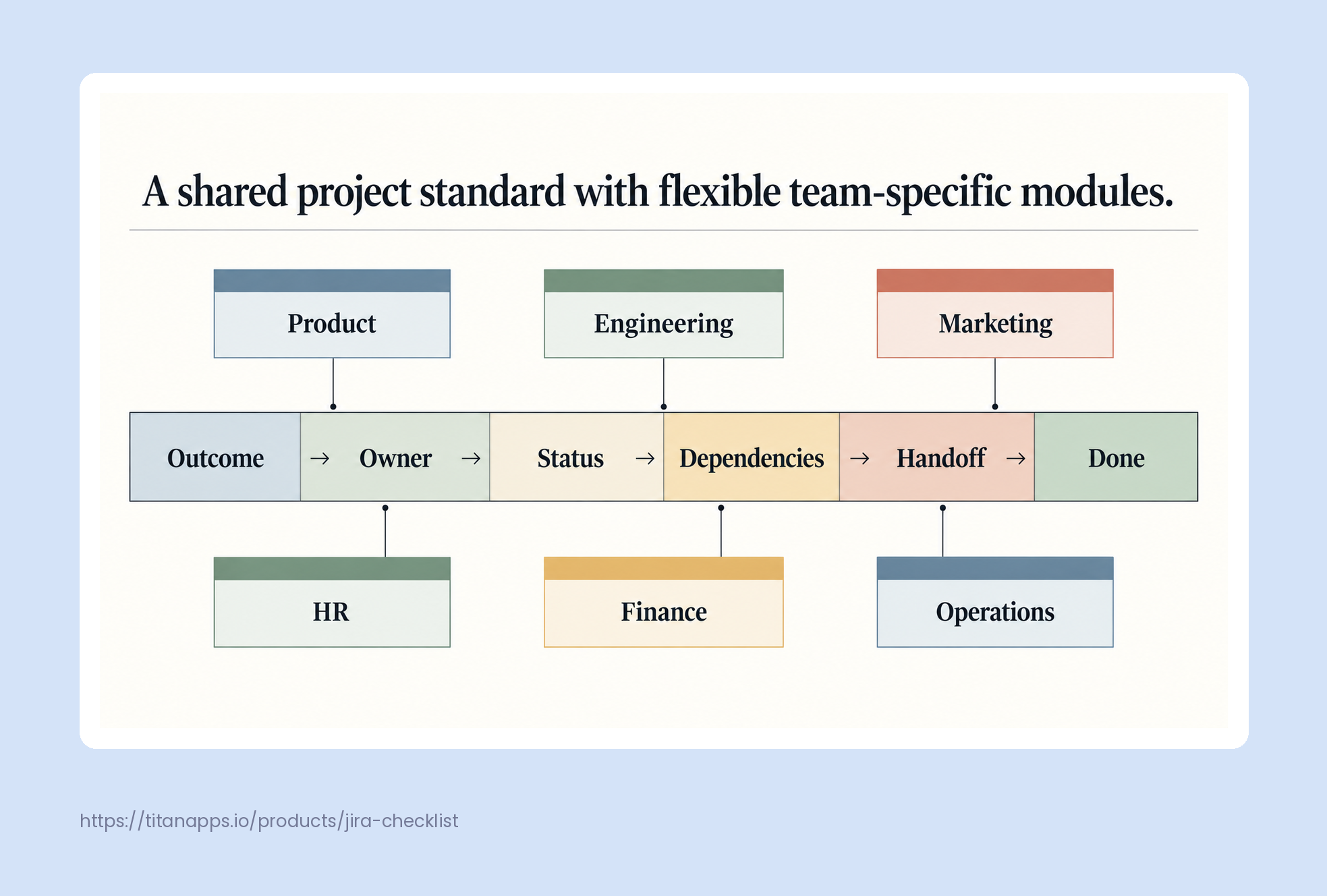
A minimum viable project standard normally contains six elements:
- Outcome: the result the project must produce and how success will be checked.
- Accountable owner: one person responsible for moving the deliverable forward.
- Core status: a short shared set such as Planned, In Progress, Blocked, In Review, and Done.
- Dependencies: work, decisions, or resources required from another team.
- Handoff criteria: what must be true before the next team accepts the work.
- Definition of done: the evidence required to close the deliverable.
This shared structure is enough to support cross-team reporting and coordination. A marketing campaign and a software release do not need identical task lists, but both should expose who owns the outcome, what is blocked, and what the next team needs.
Once these elements are agreed, encode them in the system where teams plan and deliver work. A project management platform like ONES.com can connect requirements, tasks, project knowledge, review checkpoints, and ownership rules in the same reusable structure.
A useful standard has two layers. The shared spine contains the information every project must expose. Team modules contain the steps, fields, and checks required for a particular function.
For example, a product launch might use one shared milestone called “Ready for launch.” Engineering can define that milestone through release, testing, and rollback checks. Marketing can define it through approved messaging, campaign assets, and channel readiness. Support can define it through documentation, escalation paths, and agent training. The milestone is shared; the evidence is local.
This prevents two common extremes. The first is forcing every team into an engineering workflow that does not fit its work. The second is allowing every team to use unrelated statuses, which makes a portfolio view meaningless.
3. Turn standards into reusable starting points
A standard that lives only in a policy document depends on memory. Put the standard where work starts: project templates, issue templates, checklists, forms, and automation rules.
Templates should create the baseline structure automatically. For recurring projects, include the usual phases, owners, dependencies, approval points, and completion checks. TitanApps’ guides to project planning in Jira and building a project kick-off template show how reusable structures can reduce setup work while preserving a clear project plan with Smart Checklist.

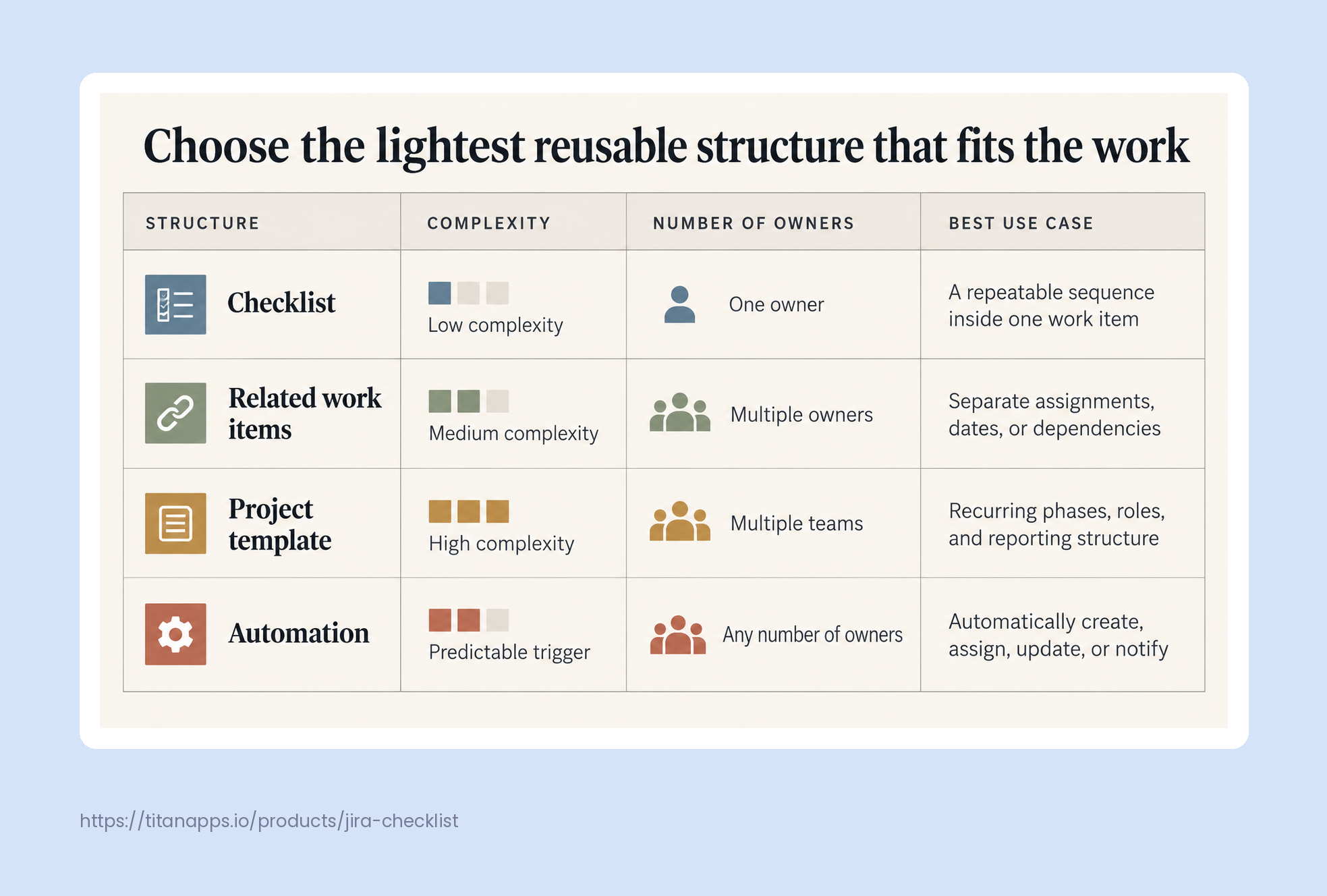
Choose the lightest reusable object that matches the work:
- Use a checklist when one owner completes a repeatable sequence inside a single work item.
- Use a set of related work items when different owners need separate assignments, dates, or dependencies.
- Use a full project template when the same phases, roles, and reporting structure repeat across initiatives.
- Use automation when a predictable event should create, assign, update, or notify without manual coordination.
Do not copy every historical task into a template. Keep steps that prevent known errors, support a handoff, or provide evidence for a decision. Remove fields and approvals that nobody uses.
4. Design handoffs as explicit contracts
Most cross-team delays happen at handoffs, not inside a team’s own work. One team marks an item complete, but the receiving team discovers missing context, unresolved risks, or an unavailable approver.
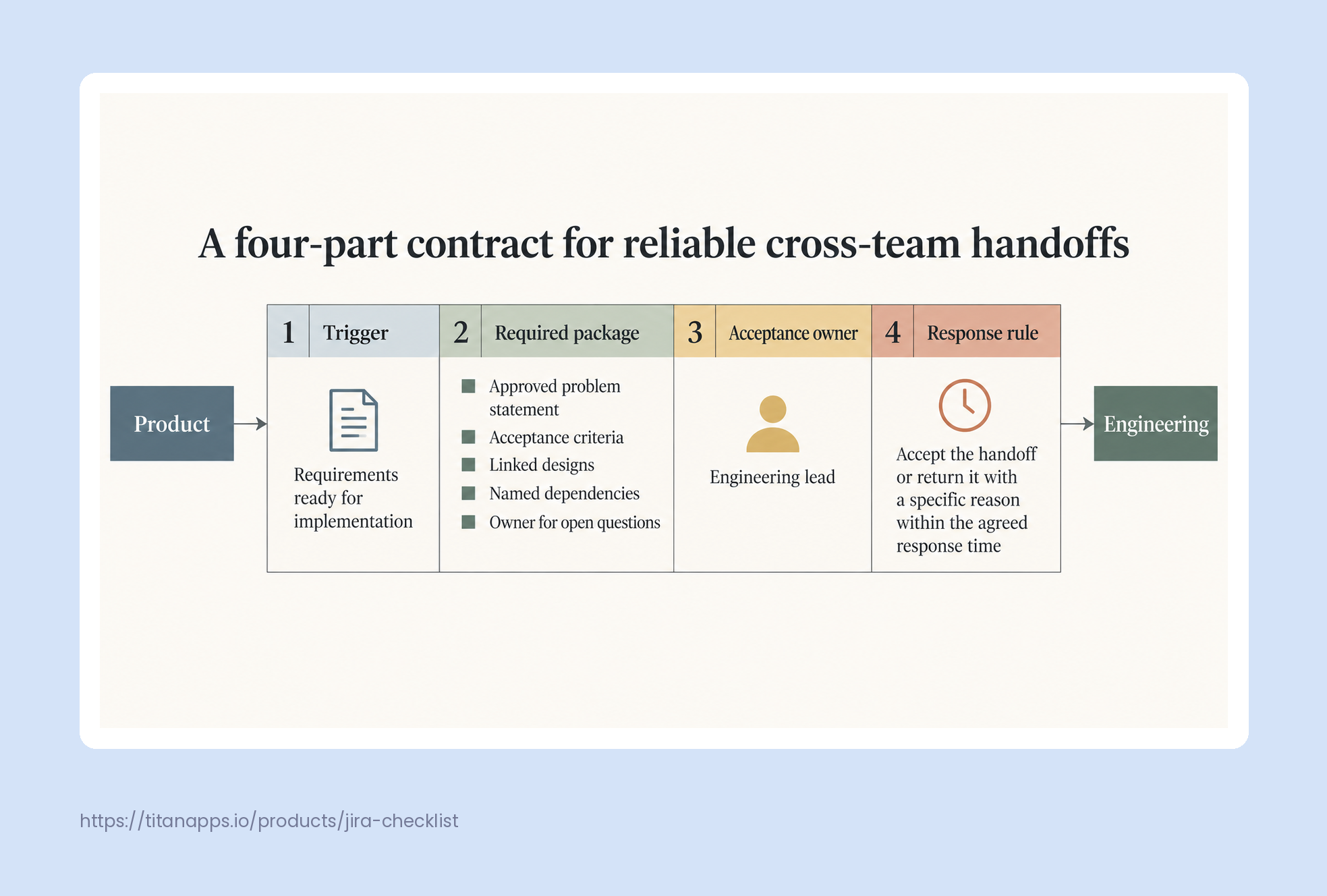
Treat each important handoff as a small contract with four parts:
- Trigger: the event that starts the handoff.
- Required package: the files, links, decisions, and evidence the receiving team needs.
- Acceptance owner: the person who confirms the handoff is usable.
- Response rule: the expected response time and what happens if the package is incomplete.
Consider a feature moving from product to engineering. “Requirements complete” is too vague. A usable handoff might require an approved problem statement, acceptance criteria, linked designs, named dependencies, and an owner for open questions. Engineering can then accept the work or return it with a specific reason.
For complex work, keep team responsibilities visible without creating unnecessary subtasks. TitanApps’ multiple checklists in Jira show one way to separate workstreams while keeping them connected to the same parent item.
5. Create an exception path before teams need it
A standard without exceptions becomes bureaucracy. An exception process without limits becomes inconsistency. Define both the decision boundary and the escalation path in advance.
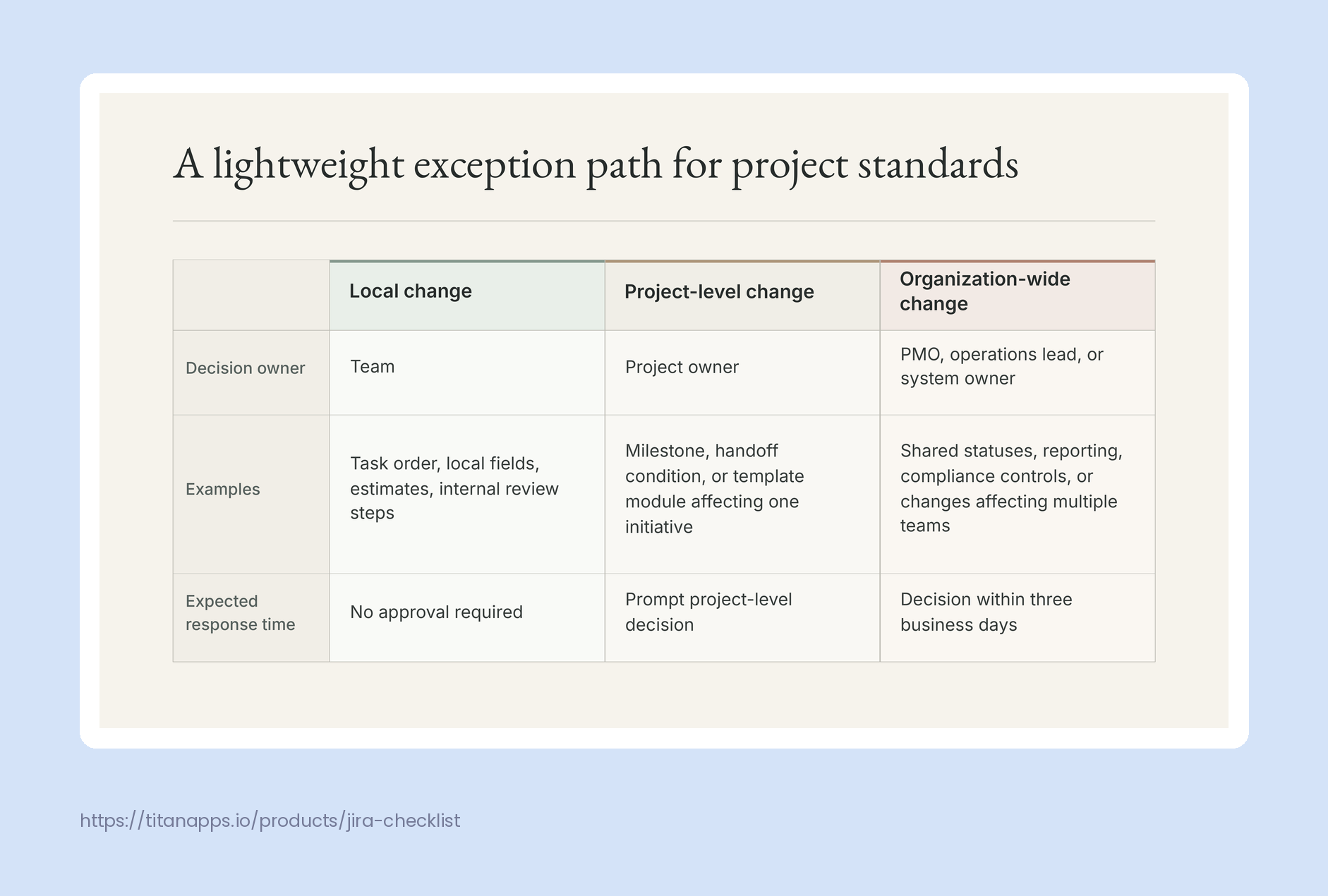
A practical model uses three levels:
- Team decision: teams may adjust task order, local fields, estimates, and internal review steps without approval.
- Owner approval: a project owner may change a milestone, handoff condition, or template module when the change affects one initiative.
- Governance review: a PMO, operations lead, or system owner reviews changes that affect shared statuses, reporting, compliance controls, or multiple teams.
Time-box governance decisions. If a shared-standard change requires review, give the reviewer a service-level expectation and a default outcome. For example, the reviewer has three business days to approve, reject with a reason, or request a short working session. Silence should not leave the team blocked indefinitely.
6. Standardize visibility, not constant status meetings
Shared reporting should come from the work system rather than separate slide decks. Agree on a small set of portfolio signals: milestone health, blocked dependencies, overdue decisions, unresolved risks, and forecast changes.
The underlying tools can differ. A team may use Jira, monday.com, Asana, or another project management system. The important requirement is that the shared signals can be reviewed consistently and traced back to the underlying work.
Avoid requiring every team to provide the same detailed metrics. A software team may track cycle time and defect escape rate, while an operations team tracks request age and completion volume. Standardize only the measures needed for cross-team decisions.
7. Review the standard as a product
Treat the operating model, templates, and automation rules as a product with users. Assign an owner, collect feedback, and release improvements in versions rather than changing the process through scattered messages.
Review these signals every month or quarter:
- Setup time: how long does it take to create a usable project?
- Exception volume: which rules create the most requests for approval?
- Handoff rework: how often does a receiving team return work because information is missing?
- Template drift: how many teams copy a template and immediately remove the same fields or steps?
- Decision latency: how long do blocked decisions remain unresolved?
If teams consistently bypass a rule, investigate before enforcing it more aggressively. The rule may not match the work, the template may be too detailed, or the required information may arrive later in the lifecycle.
A 30-day rollout plan
Week 1: Map the current work
Choose one recurring cross-team project, such as a product launch, customer onboarding, campaign, or procurement request. Map its major outcomes, owners, dependencies, handoffs, and completion evidence. Identify where teams wait or redo work.
Week 2: Build the minimum standard
Create the shared spine and no more than two team modules. Build the template, checklist, or work-item structure in the platform teams already use. Add only automation that removes a clear manual step.
Week 3: Run a live pilot
Use the standard on one active project. Do not judge success only by whether people followed the template. Record where they hesitated, requested exceptions, or moved work outside the system.
Week 4: Remove friction and publish version 1
Remove fields that did not support a decision. Clarify handoff criteria that caused rework. Set ownership for future changes, publish the exception path, and schedule the first review.
Final checklist
- The shared standard contains only information needed across teams.
- Each deliverable has one accountable owner.
- Core statuses mean the same thing in portfolio reporting.
- Team-specific steps remain configurable.
- Important handoffs have explicit acceptance criteria.
- Templates create the baseline automatically.
- Exceptions have named decision owners and response times.
- Metrics reveal friction instead of rewarding process compliance.
- The standard has an owner and a review cadence.
Conclusion
The fastest way to standardize project work across teams is not to add more control. It is to make the essential parts of delivery visible and reusable while leaving teams room to execute in ways that fit their work.
Start with a small shared spine, encode it in templates, define handoffs and exceptions, and review the standard using real delivery data. When consistency reduces repeated setup and unclear coordination, teams experience it as support rather than bureaucracy.