Tools for Jira
 Tools for monday.com





For most people, everything seems to begin with a project kick-off meeting. However, for those who are running the process, that meeting is never the true starting point. By that time, a lot of work has already been done, from shaping the project vision and building a roadmap to outlining the project schedule and responsibilities.
In practice, kick-offs often appear simpler than they really are. As a result, small but important steps are sometimes overlooked, the overall process lacks structure, and teams begin work without full alignment. A well-designed kick-off template helps bring order to this early phase and ensures a consistent approach across projects.
In this article, we share a free project kick-off template for Agile teams. You can use it to organize the work leading up to the kickoff, align everyone around the project’s purpose, and start execution with fewer open questions.
What Types of Project Kick-off Templates Can You Use in Jira?
There are different ways to structure a project kick-off template, depending on how detailed your setup needs to be:
Template in a checklist format
With this approach, the kick-off process is documented in a checklist that can be placed directly inside a single Jira work item. It guides the team through the preparation phase, step by step.
In agile project management, checklist templates often help teams organize work within a lightweight structure, without creating complex task hierarchies. Such templates can be used with automation and assigned to work items based on conditions. This allows you to save time and ensure standardization. To create a project kick-off template in checklist format, use Smart Checklist for Jira by TitanApps.
Template organized as a set of work items
You may need a template of this type if your process is too lengthy or complex for a checklist or if you want to assign different preparation tasks to different people. Natively, Jira doesn’t offer work item templates, but you can create them with Smart Templates for Jira. This allows you to save any set of work items as a template and share it across all the projects in your Jira instance.
For example, you can create a task named “Project kick-off” and add several subtasks, each representing a specific stage of the process. Once it’s saved as a template, the whole set of work items can be generated with one push of a button – or even automatically.
Both template types are useful for organizations that frequently launch projects for multiple clients or manage many internal projects in parallel. Reusing the same kick-off structure helps teams get started faster and maintain consistent project management across initiatives.
4 Key Stages to Include in Your Template
Regardless of the format you choose, a helpful template should cover the main preparation stages. The exact list can vary depending on your processes, but we recommend including these four:
- Scope planning. At the beginning, you define what the project will deliver and how success will be measured. This includes setting clear project objectives, listing concrete deliverables, and breaking the work into high-level milestones. As a result, you should have a viable project plan. You also identify key stakeholders, assign a project owner, and determine deadlines and dependencies.
- Documentation & Knowledge Sharing session preparation. Here, you collect and organize all the information the team needs to better understand the project background and start work. This includes preparing project documentation such as requirements, technical tasks, user research, competitor research, and specifications. You can also document key decisions and open questions in one place, so the team can review them together. Once this is done, share this information with the others.
- Jira setup. At this stage, you need to configure Jira and set up a new workspace for your team. Start by choosing the project type, creating the project, and defining the work item types you will use. Next, align workflows and statuses with your processes and configure the boards. Finally, create the first work items based on the agreed project scope and milestones. For more details, please see our Jira Setup Guide.
- Team collaboration tools & activities setup. Finally, you define how the team will collaborate during execution. Select and set up the communication channels, plan recurring standups, syncs, and retrospectives. Decide how progress updates should be shared with the stakeholders: for example, with regular status reports or a real-time dashboard.
Following this structure allows you to prepare for an effective kick-off and align your team on goals and processes.
Project Kick-off Template in the Checklist Format
Here’s a checklist prepared with the help of Smart Checklist for Jira. You can use it as a base and add other steps that reflect your specific process, if necessary.
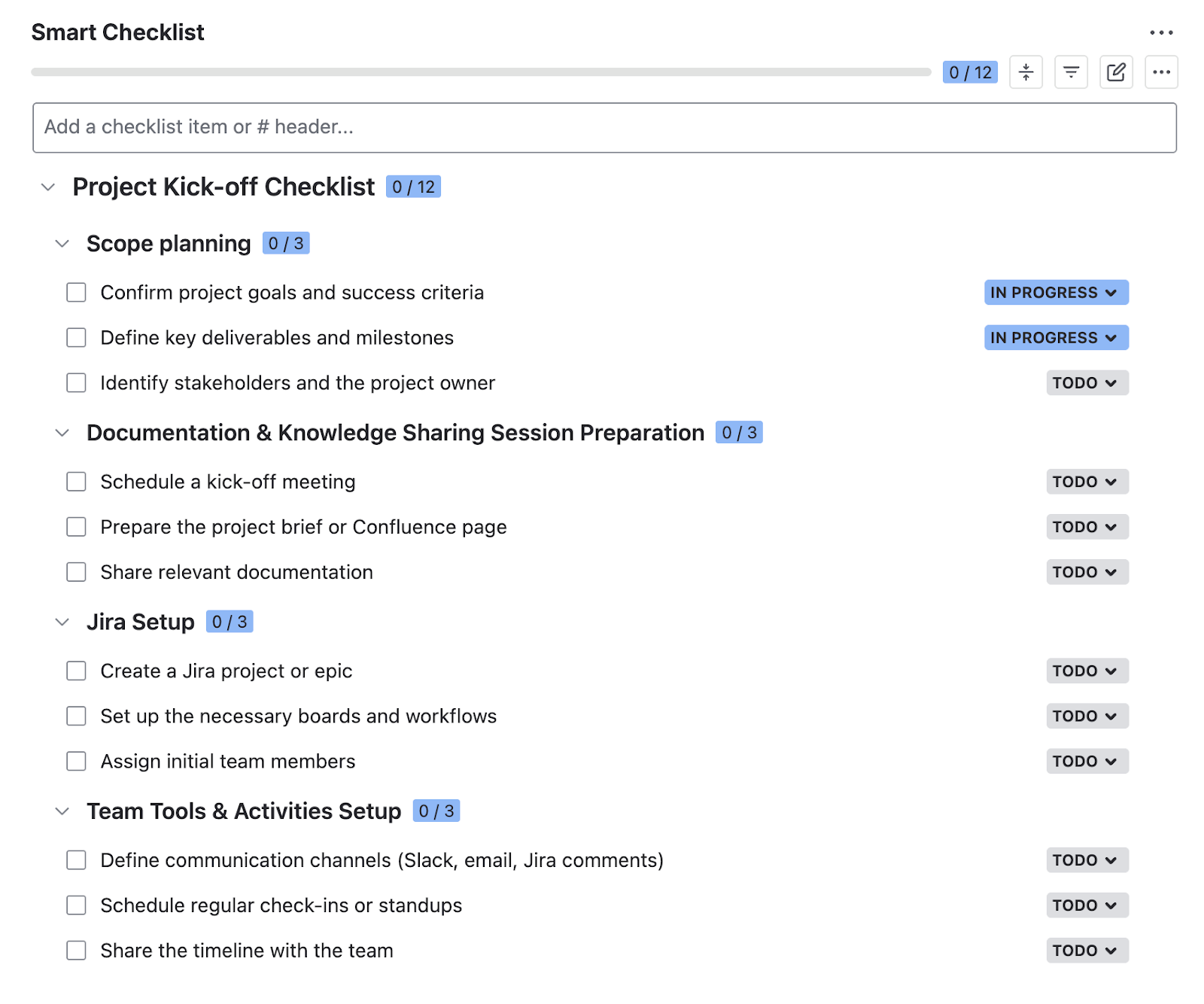
# Project Kickoff Template - Checklist
## Scope planning
- Confirm project goals and success criteria
- Define the key project deliverables and milestones
- Identify stakeholders and the project owner
## Documentation & Knowledge Sharing Session Preparation
- Schedule a kick-off meeting
- Prepare the project brief or Confluence page
- Share relevant documentation
## Jira Setup
- Create a Jira project or epic
- Set up the necessary boards and workflows
- Assign initial team members
- Add epics/work items for the key milestones
## Team Tools & Activities Setup
- Define communication channels (Slack, email, Jira comments)
- Schedule regular check-ins or standups
- Share the project timeline with the team
Smart Checklist allows you to use this project kick-off template in Jira for free.
Here’s how it can help you organize work with your team:
- Tag the responsible people or stakeholders
- Add dynamic deadlines/due dates
- Set custom statuses for checklist steps
- Use headers to structure work per stage
- Save your checklist as a reusable template
- Add checklists to work items automatically
- Mark crucial steps as mandatory
How to Add This Checklist to Your Jira Work Items
- Install Smart Checklist for Jira from the Atlassian Marketplace.
- Copy the project kick-off template we shared earlier. Then, paste it into the Smart Checklist section of your work item.
- Tag team members and add deadlines (optional). Make other edits if needed: add headers, include links to internal resources and dashboards, add details in the expandable sections for individual steps, and so on.
If your organization has many clients and often launches new projects, save the checklist as a template. Then you will be able to easily add it to new work items with just a few clicks, or even automatically. This saves time and helps you ensure standardization.
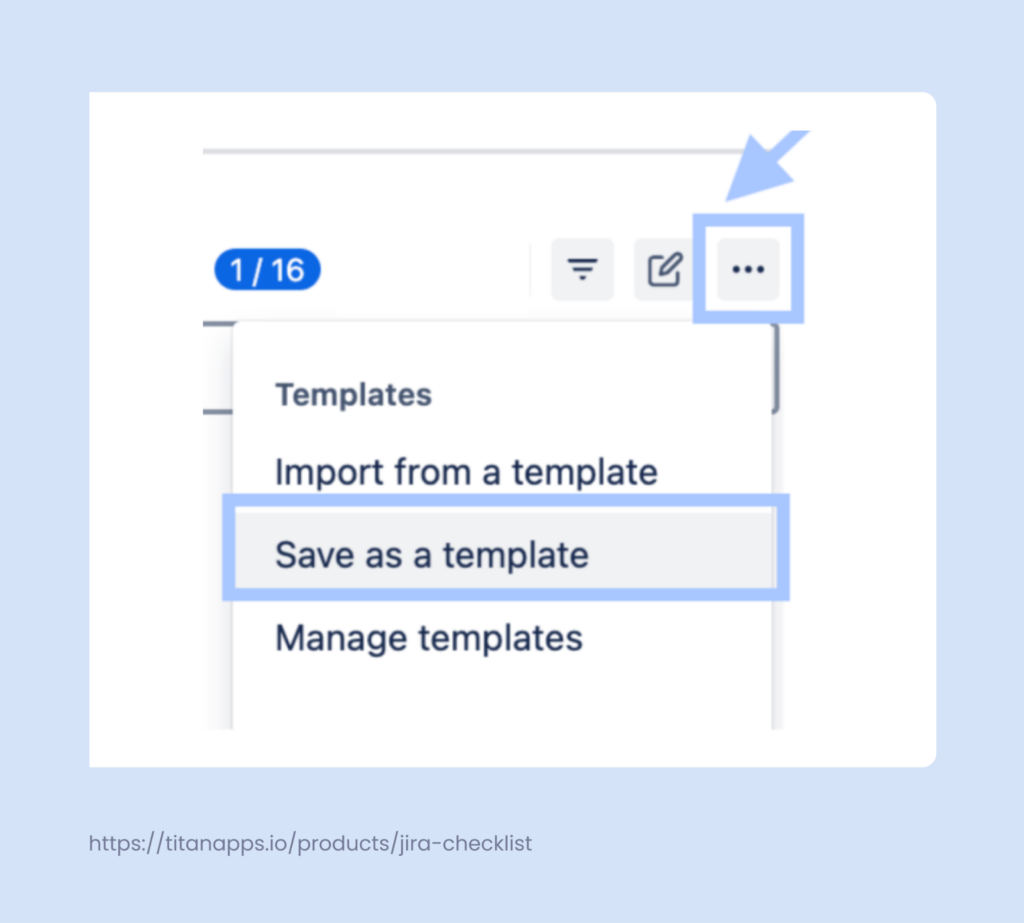
To save your project kick-off template, click the three dots in the Smart Checklist menu (as shown in the screenshot below) and select Save as a template.
Additionally, you can use Smart Checklist’s native automation features to automatically add this checklist to Jira issues (work items). For example, it can be assigned to tickets of a specific type, to tasks with a particular field, or based on other conditions. For advanced automation setups, you can also use Smart Checklist with Automation for Jira.
For more details, please refer to our Automation for Jira Guide on Confluence.
Value for Your Team: The Benefits of Using Smart Checklist for Jira
- Break processes into simple steps: Add a list of concrete actions directly inside a Jira work item
- Assign responsibility per step: Tag specific people in individual checklist items or sections
- Track progress at the item level: See which steps are done and which are still pending
- Keep the setup minimal: It’s a lightweight solution that works inside Jira without extra configuration
- Reuse checklist structures: Save your checklist as a template and apply it to similar work items later
- Automate checklist application: Add checklists automatically based on conditions
- Update checklists automatically: Apply changes to your checklist across multiple work items at once with the help of the Linked Templates feature
- Avoid unnecessary subtasks: Capture all action steps in a single checklist instead of creating multiple subtasks. This keeps Jira tickets clean while still showing progress and ownership clearly.
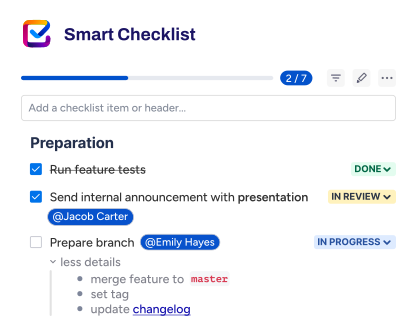
A Project Kick-off Template Organized as a Set of Jira Work Items
As I mentioned earlier, if your kick-off process is complex and involves many stages, it can be helpful to create a project kick-off template as a standard work item with subtasks.
Use Smart Templates for Jira by TitanApps to prepare such a template. Once done, you can generate your kick-off tasks from that template with just one click. All tasks, subtasks, checklists, due dates, assignees and reporters, task descriptions, and other fields and details will be preserved.
Here’s an example of what it might look like:
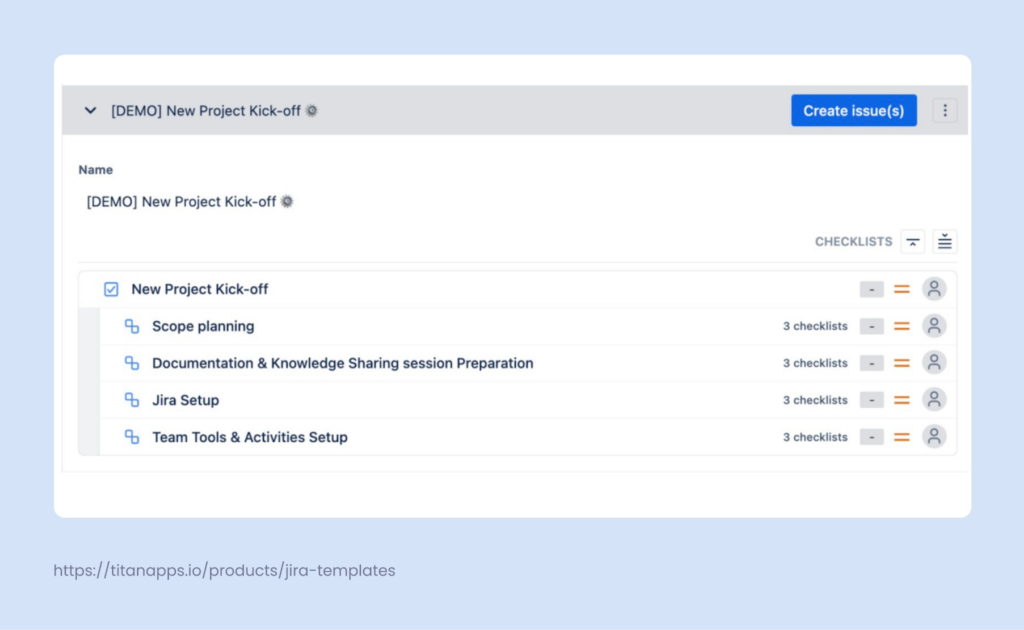
In this case, we have a separate task for the project kick-off. It includes a set of subtasks, with more granular steps listed as checklist items within the checklists.
This structure can be adjusted to your specific process. Smart Templates work with hierarchies of any complexity level, including those with custom hierarchy levels, such as Jira themes and initiatives.
How to Create A Project Kick-off Template of This Type
- Install Smart Templates for Jira from the Atlassian Marketplace.
- Prepare your project kick-off work item that you want to use as a template. Add child issues (work items), checklists, assignees, and fill out the necessary fields (optional).
- In the Smart Templates section of this work item, click Save the structure as a template. That’s it! Your project kick-off template is ready for your team to use.
Additionally, you can make this template Global. In this case, it will be shared across all projects in your Jira instance. When a new project (Jira space) is created, this template will already be there.
If you often launch new projects, it’s useful to automate this process even further. Here’s a rule that can automatically generate your set of kick-off work items from this template when a new Jira space (project) is created:
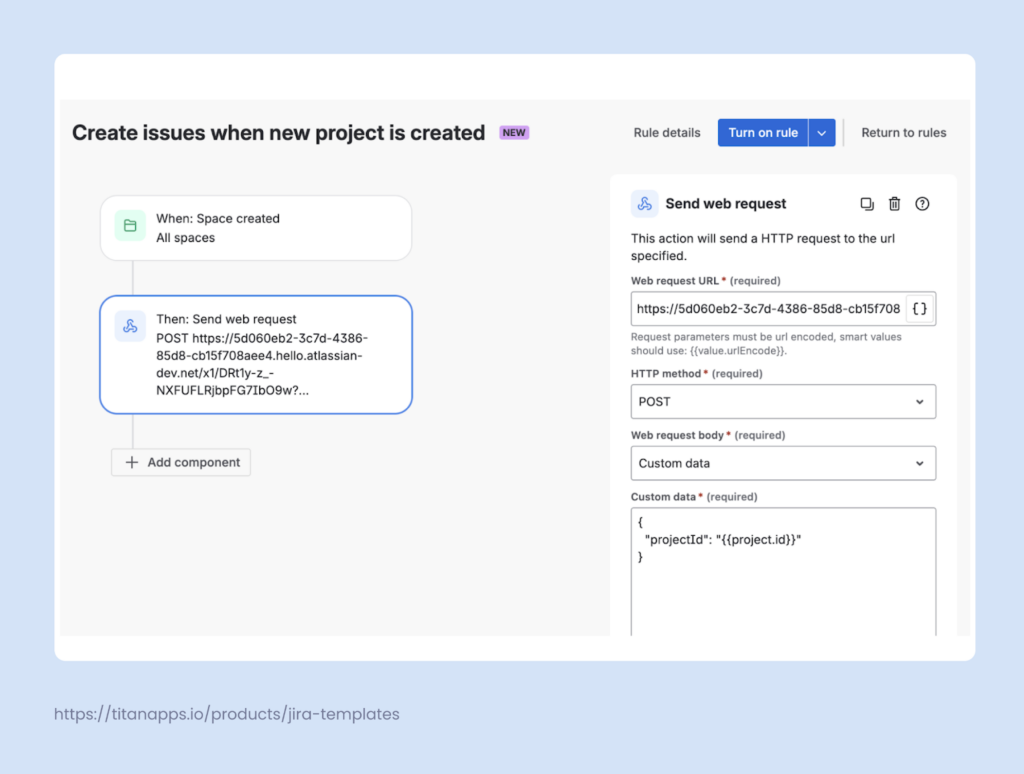
To set up this automation, you will need to generate a webhook link for your project kick-off template.
As a result, as soon as you create a new Jira space, it will already have ready kick-off tasks. This lets you get started faster and reuse the same approach across many projects.
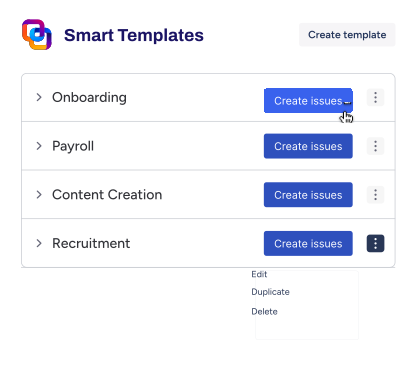
Why Use Smart Templates for Project Kick-off Setup
- Reduce manual setup work: Eliminate the need to recreate epics, tasks, and subtasks from scratch
- Ensure consistency: Apply one template for all your internal and/or client projects
- Adapt templates with variables: Reuse the same template while adjusting text content, such as project name, product, or client
- Pre-fill issue fields: Set default values for fields like assignees, priorities, components, or dynamic due dates
- Preserve work item hierarchy: Recreate full structures with parent–child relationships intact
- Schedule work item creation: Create kick-off tasks for recurring projects automatically
Best Practices for Managing the Project Kick-off Process
Address risks and assumptions openly
Use the kick-off meeting to bring concerns out in the open before they become real problems. Ask your team what could go wrong and what assumptions you’re making about resources, timelines, or dependencies. Open communication and working through concerns are crucial to project success.
Build relationships, not just work plans
Projects are run by people, so take time to help your team connect as humans, not just job titles. Let people share what they’re excited or worried about, and create space for informal conversation. If you’re meeting in person, consider starting with a quick icebreaker to get people talking and laughing together. These personal connections make it much easier to work through disagreements and stress later on.
Document and distribute key decisions immediately
Send out meeting notes and follow-up action items right after the kick-off. It’s best if the team receives them while everything is still fresh in everyone’s mind. Capture the next steps, who is doing what, and when things are due. This becomes your reference point and helps you prevent any ambiguity or misunderstanding.
Document everything in one place
Keep all your project materials in a single shared location that everyone can access. This means your charter, schedule, meeting notes, and key decisions should all reside together where the team can find them. No more hunting through email threads or wondering which version of the document is the real one.
Reuse the same kick-off structure across projects
Use our project kick-off template checklist or a standard set of work items. This allows you to cover all the important steps, promote a standardized approach, and make onboarding new team members easier.
Launch Projects Smoothly With Your Project Kick-off Template
A structured kick-off establishes a strong foundation for steady project progress right from the very first steps. By carefully planning the scope, documenting key context, setting up Jira correctly, and aligning on key processes, agile teams can move into execution with fewer assumptions and less rework. Utilizing a project kick-off template promotes consistent delivery and increases the chances of running a successful project from start to finish. Try the templates we shared in this article, adjust them to your needs, and see how they can improve the efficiency of your projects.