





 Tools for Jira
 Tools for monday.com




Finally, the day has come when you can receive a new task and reassign it to an AI agent directly in Jira. Or better yet, it can be assigned to an agent automatically. Although some organizations still meet this idea with skepticism, today it’s the reality for many software development teams. As they are now rethinking their approach to the SDLC, we decided to share our own experience and lessons learned on this journey.
The good news is that to benefit from AI automation, you don’t necessarily have to set up wild OpenClaw agents that put your security team on edge. Instead, you can power up your workflows directly in Jira.
In this article, we discuss how to approach building an AI-native SDLC in Jira. We give you an overview of Jira’s new AI capabilities and show you how it works in practice on the Smart Checklist team. Finally, we discuss how to measure productivity gains from AI adoption.
TL;DR: Key Takeaways About AI SDLC in Jira
- An AI-native SDLC puts AI agents to work at every stage of the software development lifecycle, while people set goals and review results
- Jira can serve as the hub for this process. Here, you can assign work items to AI coding agents, trigger agents on work item transitions, and monitor all agent sessions
- Here’s how to organize it step by step:
- Turn validated ideas into specs and work items with Jira Planner or Rovo
- Link designs from AI design tools to your work items
- Assign well-scoped work items to Rovo, Claude for Jira, or other coding agents.
- Let AI write tests and track testing with checklists
- Generate documentation and release notes with Rovo agents
- Add agentic steps to your Jira automation rules / flows to run automated agent loops
- Keep human review at every stage, and measure speed, quality, cost, and satisfaction together
- Use other teams’ experience to identify your high-value use cases. We share an end-to-end example of an automated AI-native workflow that our Smart Checklist team uses for sprint and release management
Just How Much AI Should You Use to Call It an AI-Native SDLC?
Most software teams have already adopted AI in some form. Developers ask chat assistants for help, and AI coding assistants like GitHub Copilot suggest code in the IDE. Still, this alone doesn’t make the process AI-native.
In practice, approaches range from individual developers using AI tools on their own to organization-scale agents handling entire stages while people steer and review. Most teams are somewhere in between. So let’s define what an AI-native process actually looks like.
What is an AI-native SDLC? Definition
 Definition
An AI-native SDLC is a software development lifecycle that was designed around AI agents from the start. Here, agents take on work at every stage, from planning and code generation to testing and release. At the same time, people define the intent, review the output, and stay accountable for decisions.
It’s important to distinguish between an AI-assisted and an AI-native approach. In an AI-assisted SDLC, the process stays roughly the same as for the regular software development lifecycle, and AI simply speeds up individual tasks. In contrast, in an AI-native SDLC, the team redesigns its workflow, roles, and metrics entirely around agentic AI.
The author of AWS’s paper on AI-Driven Development Lifecycle (AI-DLC) methodology, Raja SP, put it this way: “Simply retrofitting AI as an assistant not only constrains its capabilities but also reinforces outdated inefficiencies. To truly harness AI’s power and achieve the productivity North Star goals, we need to reimagine our entire approach to the software development lifecycle.”
In practice, this means an AI-native SDLC process should have the following components:
- Structured intent. Requirements and acceptance criteria should be clear enough for an agent to act on.
- Agents as assignees. AI coding agents receive work items the same way human teammates do.
- Review checkpoints. People check the output after each stage, not only at the very end
- Outcome metrics. Teams track cycle time, quality, and cost rather than lines of code or token consumption.
You can organize an AI-native SDLC process with the help of various tools, including dedicated AI coding solutions such as Claude Code, Codex, and others. For most people, setting up this process in Jira is probably not the first idea that comes to mind. However, Jira has received many new capabilities that make it a natural fit for this purpose. Let’s explore this in more detail.
Why is Jira the Right Place for an AI-Native SDLC? What You Need to Know
For many software development teams, Jira already holds most of the process, along with other Atlassian tools. Requirements live in Confluence, developers link pull requests to work items, and QA engineers test against the same work items. Many CI/CD and DevOps tools also connect to Jira, so it makes sense to bring AI agents where the work is already tracked.
Atlassian has also added many new features that let you run most SDLC stages in Jira itself, such as:
- Native agent integrations. You can assign work items to third-party AI coding agents or to Atlassian’s own Rovo Dev and Jira Coding Agent. There’s also a Jira agent for Slack that can turn your conversations into a ready set of Jira work items.
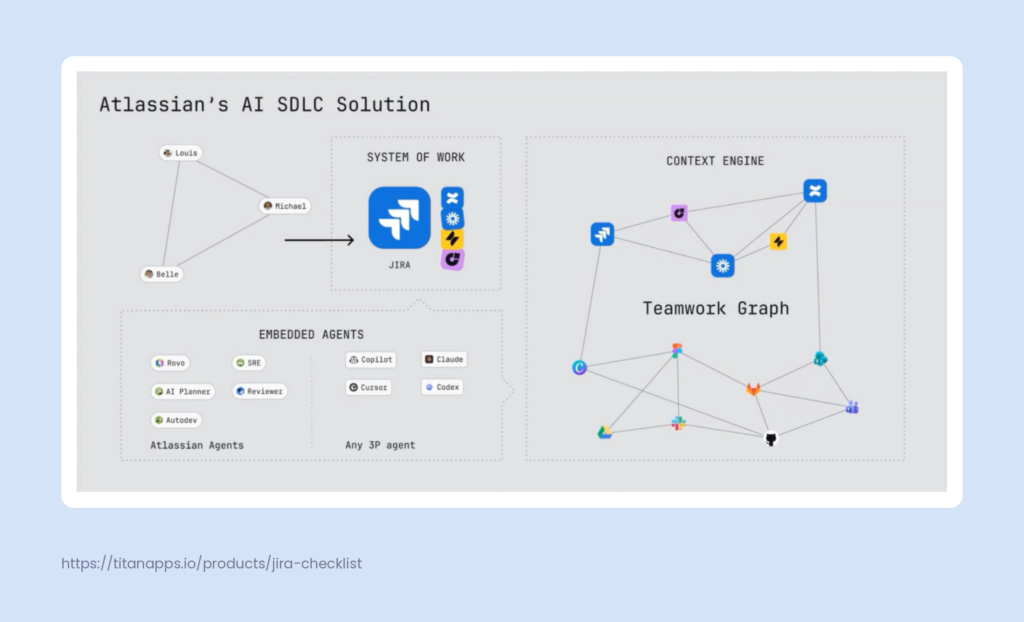
- Shared context. Agents can use the Teamwork Graph, Atlassian’s data layer that connects work items, Confluence pages, code, and data from linked third-party tools. In Atlassian’s internal benchmarking, agents with this context gave 44% more accurate results using 48% fewer tokens.
- Ready-made agentic setup. You don’t have to design an agent-ready space from scratch. The Agentic Engineering template creates a Jira space with preconfigured workflows, statuses, and agent steps.
Here is an infographic depicting Atlassian’s AI SDLC ecosystem across Jira, connected apps, embedded AI agents, and the Teamwork Graph providing the context layer:
The Key Ways to Use AI Agents in an AI SDLC in Jira
- Assign Jira work items to an AI agent directly. Agents configured in your instance become available in the Assignee field, just like your human teammates. For example, a coding agent can pick up a routine bug fix and open a draft pull request.
- Launch an AI agent from a work item view manually. The Agents menu in a work item lets you call an agent for a one-off task. This works well for summarizing a long discussion or drafting documentation.
- Trigger an AI agent on workflow status transition. Once an agent is mapped to a board column or workflow status, it starts working whenever you drag a work item into that column.
- Integrate an agentic step in a Jira automation rule / flow. Jira automation rules can call Rovo or other agents as action steps, enabling agentic loops. For instance, a rule can label an unclear work item “Needs Refinement” or pass a ready one to a coding agent.
To keep track of all agents running in Jira, use My agent sessions on the Jira For You page.
Integrating agents with traditional Jira automation is a powerful way to make your AI-native SDLC process more efficient.
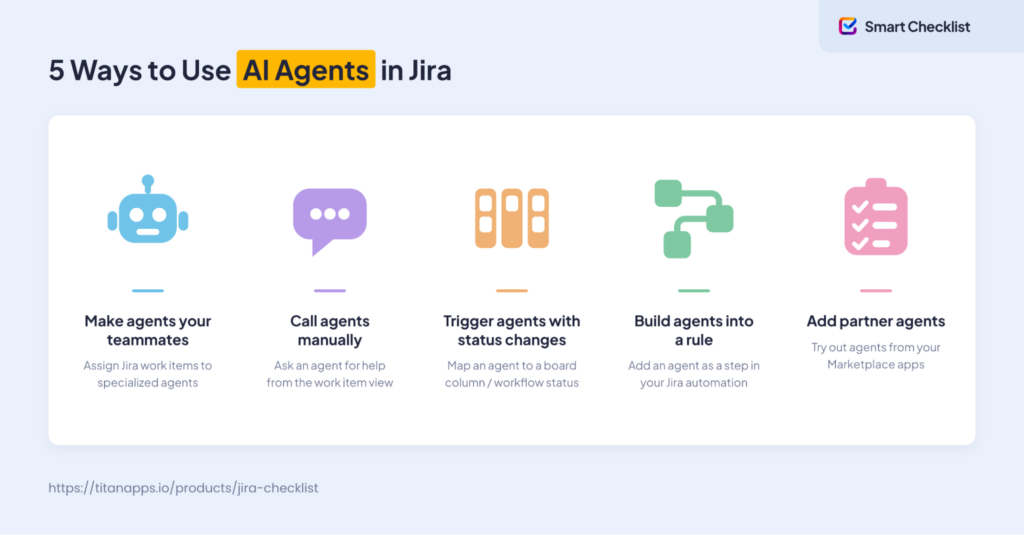
Atlassian partners and other vendors can also create their own AI agents that are available to you in Jira. These agents can further expand Jira’s AI-native features. For example, our team created a Rovo Agent for our solution, Smart Checklist for Jira. In Rovo chat, the agent can calculate checklist progress across an epic and generate new checklist templates from a short prompt. This gives you a quick overview of your team’s progress and lets you create a reusable process in seconds.

6 Key Stages of the Software Development Lifecycle and How to Make Them AI-Native
Different sources split the software development lifecycle into a different number of stages. Here, we group them the way our team at TitanApps approaches the process when working on Smart Checklist and other products. The 6 stages we cover are:
- Plan
- Design
- Build
- Test
- Document
- Deploy and maintain
In a traditional SDLC, each stage ends with a handoff between people. In an AI-native SDLC, each stage can run its own loop: agents do the work, and people review it.
Hands-on example
A simple setup of an AI-native SDLC workflow in Jira can look like this: You create an AI agent in Rovo Studio for each stage and map them all to your Jira board columns/workflow stages. Then, you can simply drag a ticket from one column to another, and the next agent will do its part. In between, you will need to review each agent’s output and leave a comment with updated input for the next agent.
This is just one of many possible ways to organize the process in Jira and across other apps you use. Below is our take on how each stage can work in an AI-native way.
Stage 1. Plan: Turn Requirements Into Specs and Work Items
AI-native planning with Jira Planner
AI agents build what you describe. When scope or constraints are missing, an agent will fill the gaps with guesses and move fast in the wrong direction. That’s why planning matters even more once agents join the team.
The best way to prevent this is to give an agent a detailed specification before it starts working. To address this need, Atlassian added a new Jira feature called Jira Planner. It can turn a rough feature idea into a structured, agent-ready plan.
Here’s what working with Jira Planner involves, at a high level:
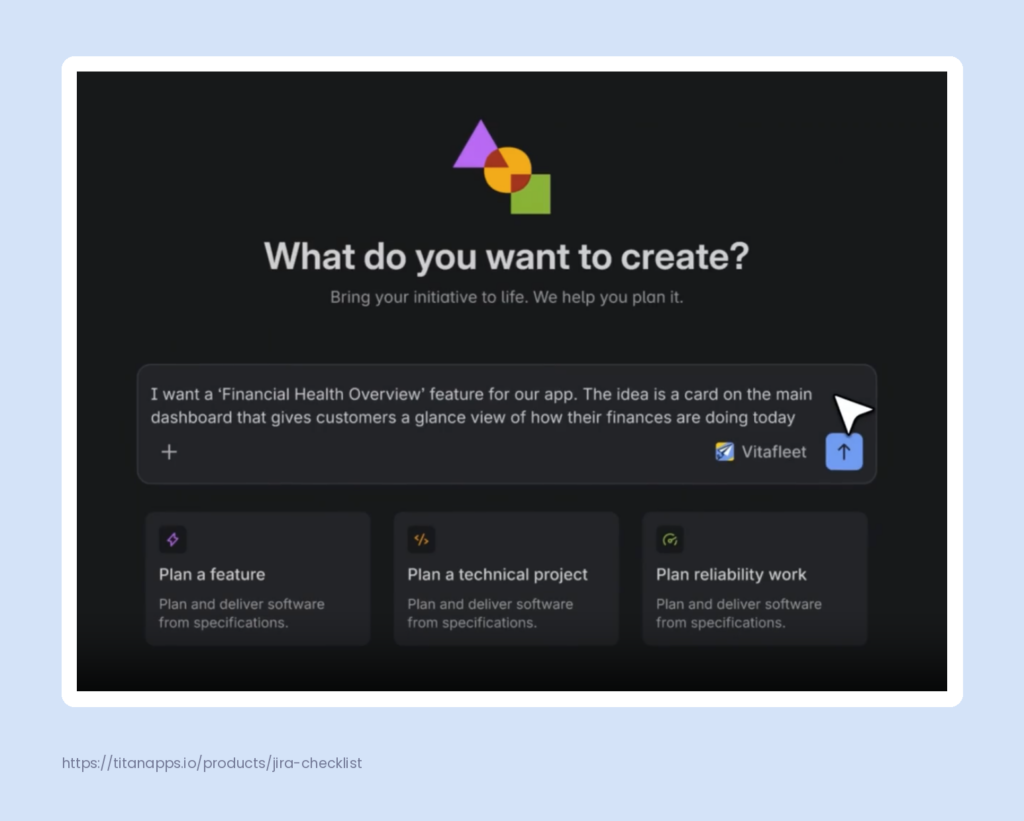
- Clarifying the idea. You give Jira Planner a short description of your feature, and then it asks follow-up questions about its scope, constraints, and expected outcome. In the Jira UI, it looks like a simple chat with an AI assistant:
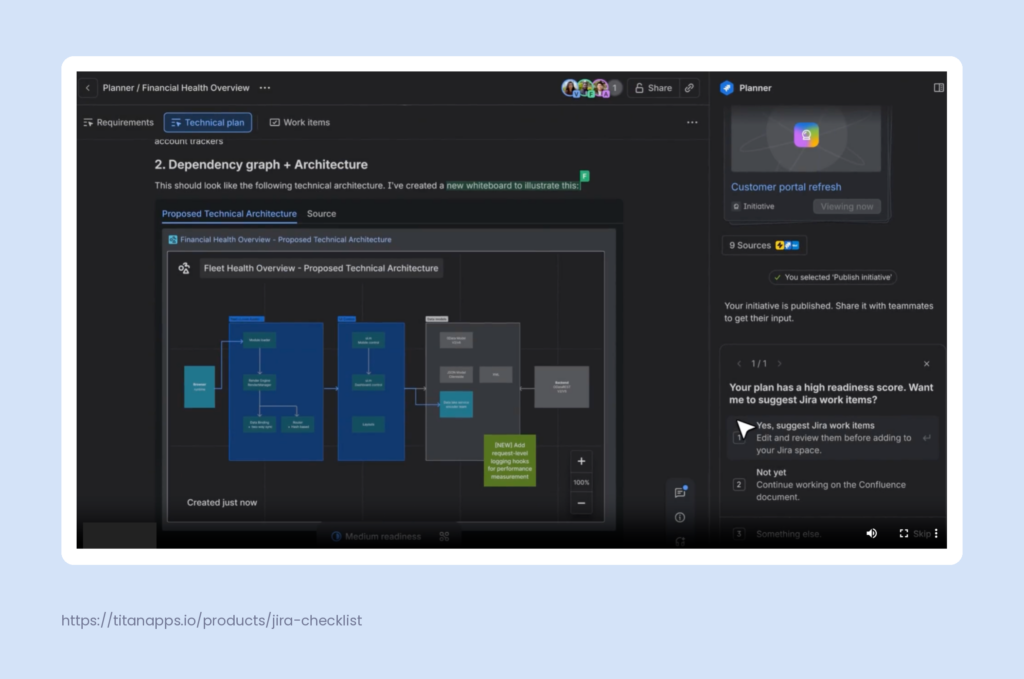
- Suggesting architecture and drafting the spec. Based on your answers and the context from your code and connected tools, Jira Planner prepares a complete technical plan. It includes a proposed technical architecture and a structured spec saved in Confluence. You can collaborate with your team on this plan before moving forward.
- Suggesting the work breakdown. Next, it proposes a set of work items needed to implement the plan, with dependencies and acceptance criteria.
- Creating work items. Once the breakdown looks right, Jira Planner adds these work items to Jira.
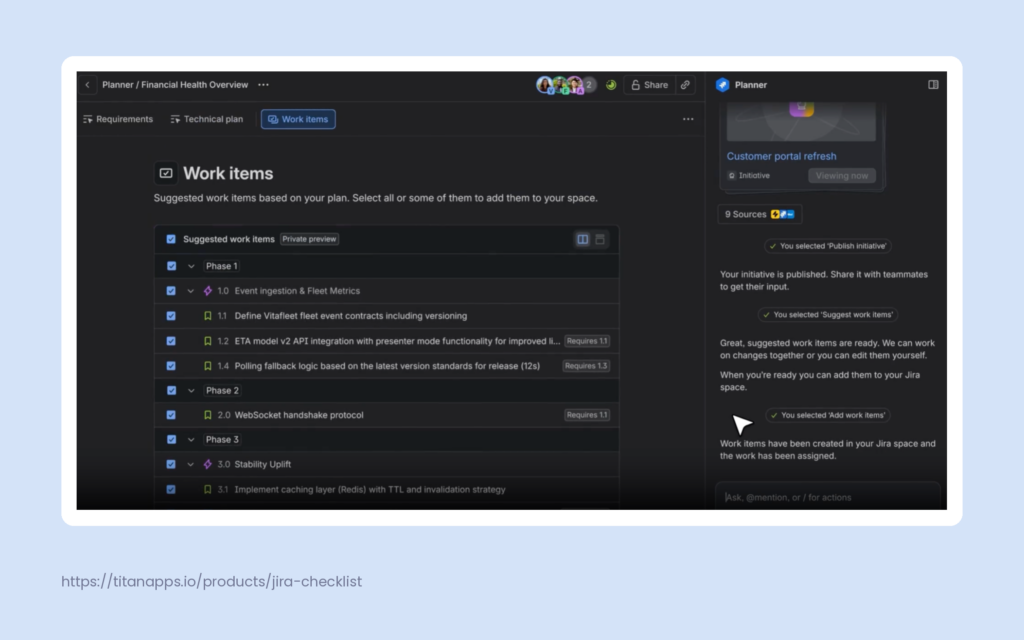
As a result, planning becomes much faster: you can go from a brief idea to a complete plan with work items already created in Jira.
More importantly, Jira Planner draws on your whole organization’s context through the Teamwork Graph. When you describe a feature, it can find relevant information about the client, the product, and related work items across your connected apps. This helps it understand the task better and build a plan tailored to your team.
Using Rovo Chat as a substitute for Jira Planner
If Jira Planner isn’t available to you yet (it’s been rolled out gradually), Rovo chat can do roughly the same thing for you. This AI assistant works across Atlassian apps and can take on most of the planning work. In this case, the process will involve a bit more back-and-forth, since each step needs a separate prompt.
Based on your prompts, Rovo chat can:
- write a specification from your notes or meeting outcomes
- save this specification as a Confluence page
- suggest a set of user stories for your epic
- create these work items in Jira
Here’s an example of such a conversation in Rovo chat in Jira. The AI assistant has already prepared specifications for a new feature, and now it’s asking for user approval to create work items for the team:
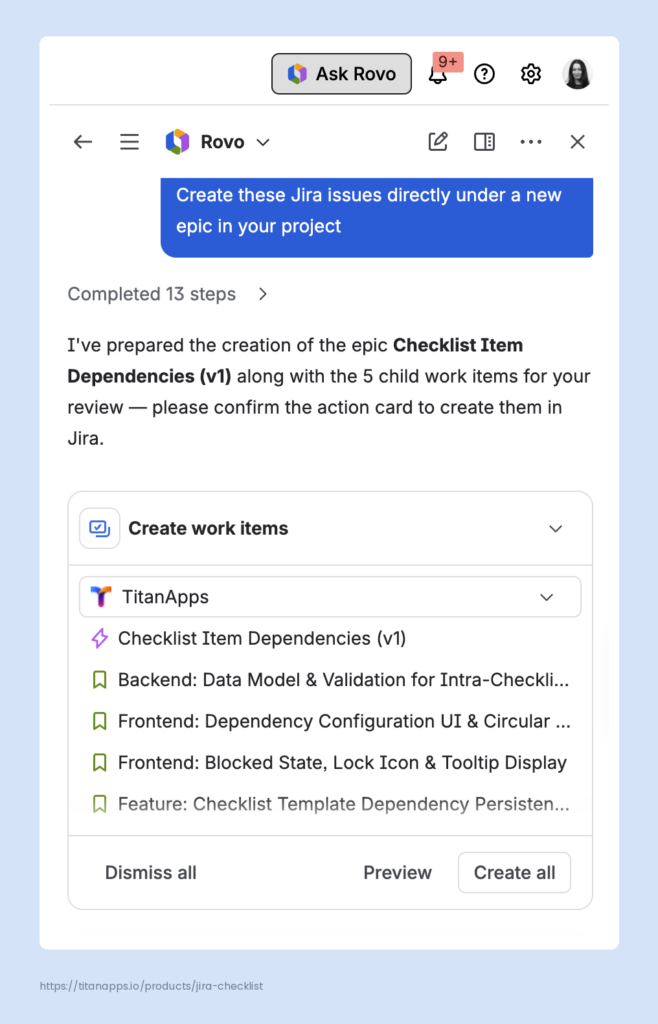
Planning with a Rovo agent
In addition to Rovo chat, you can also set up a Rovo agent for this process. Rovo agents are AI assistants that perform specific tasks based on the instructions and skills you give them. Such an agent can be configured in Rovo Studio.
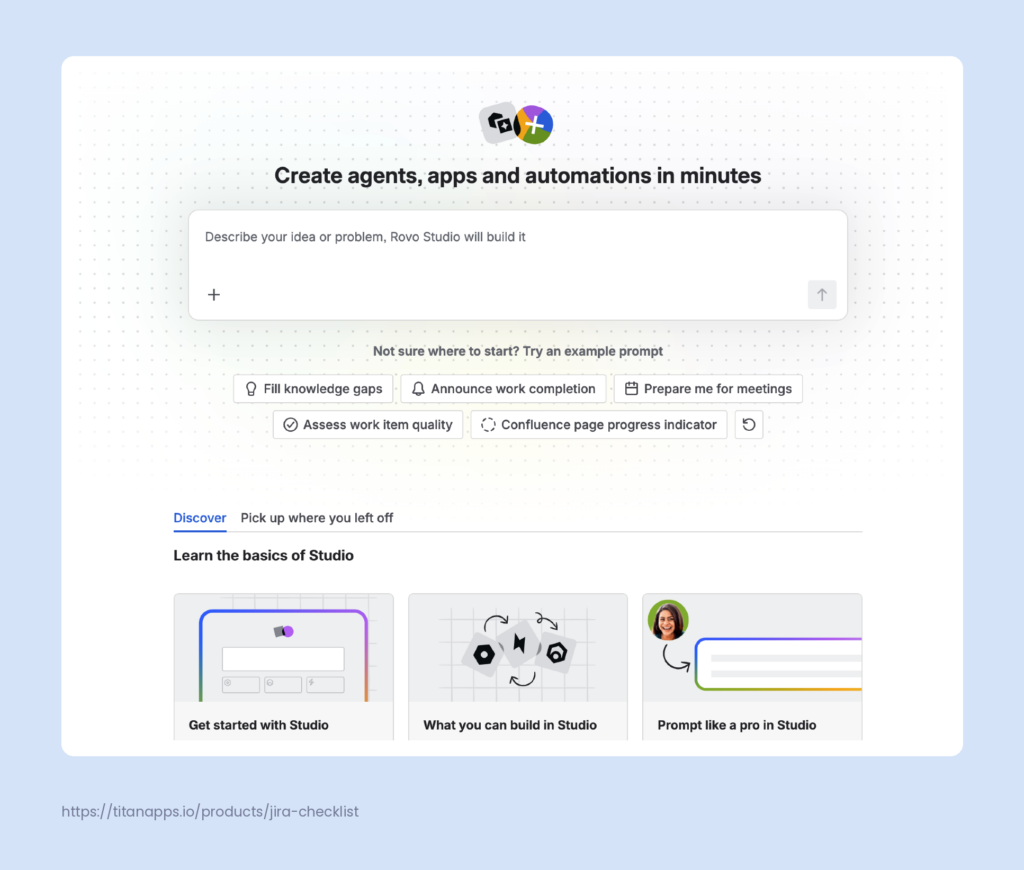
There, you will need to describe the whole planning flow once and provide additional instructions. After that, the agent will be able to go through all these steps automatically, without a separate prompt for each.
Pro Tip
AI-generated specs work best as a complement to real product discovery, not a substitute for it. Before a feature reaches planning, it’s worth validating the problem, the assumptions behind it, and its business value in a consistent, well-thought-out way. Our Product Discovery and Validation Template can help you structure this process step by step.
Stage 2. Design: Use Integrations With Design Platforms
AI has transformed design work to a great degree, with changes touching everything from generating prototypes to turning mockups into code. However, most of this progress is happening in dedicated design tools. Across all SDLC stages, Design has the fewest AI capabilities built into Jira itself. Still, Jira and Rovo can keep AI-generated/AI-assisted designs connected to the rest of your process.
Here’s what an AI-native design stage can include:
- AI prototyping. Designers and PMs can generate prototypes and UI concepts with tools like Figma Make, Claude Design, or Google AI Studio.
- Design-to-code workflows. With the Figma MCP server, developers can let coding agents read design frames and turn them into working code.
- Designs linked to Jira work items. The official Figma for Jira app lets you attach live designs to work items. In addition, the Rovo connector for Figma allows Rovo to use design context in search, chat, and agents.
This way, designs stay connected to the context and can be searched by Rovo for relevant tasks.
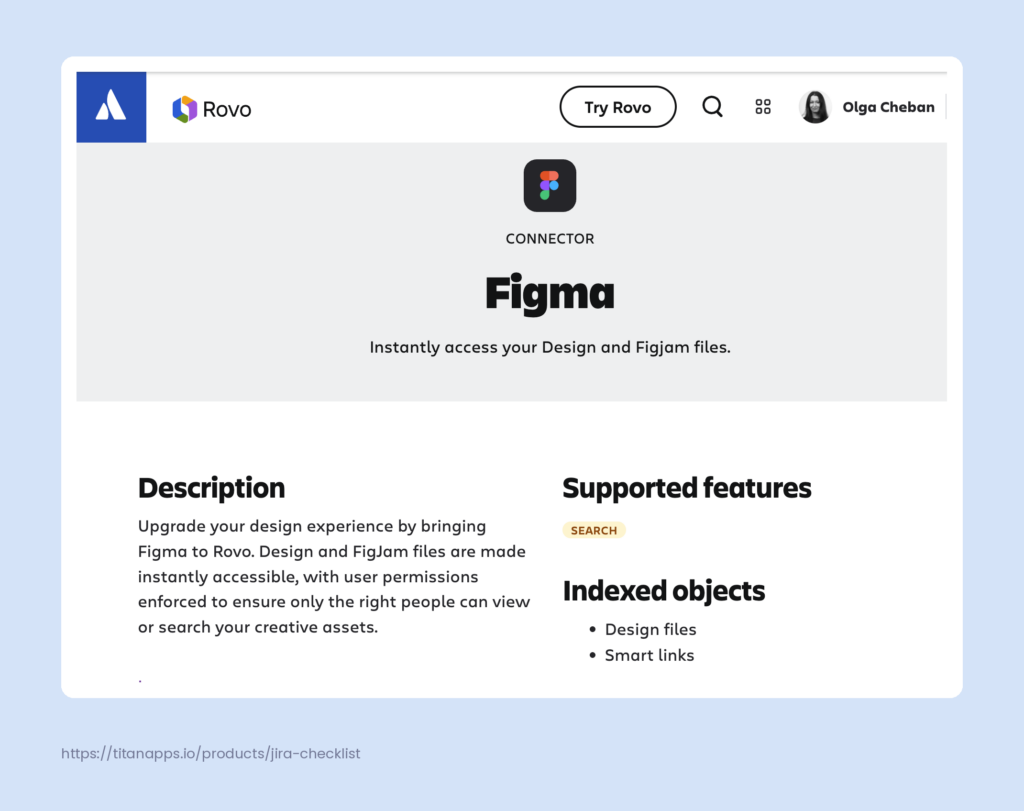
Stage 3. Build: Develop With AI Coding Agents in Jira and Rovo Dev
This is the core part of any AI-native SDLC process as this is where most of the heavy lifting is happening.
Native and third-party coding AI agents in Jira
Once work items are well scoped, it’s time to hand implementation over to AI coding agents. Jira supports several of them, so any work item can go to agents such as:
- Claude
- Cursor
- Codex
- GitHub Copilot
- native Jira Coding Agent
Most developers already know the first four tools, while the Jira Coding Agent is less familiar.
Definition
Jira Coding Agent is Atlassian’s own AI agent built into Jira for well-scoped, routine development tasks. When you assign a work item to it, the agent can make the required code changes and return a pull request ready for review. As a result, developers don’t have to switch to a local environment for routine fixes.
Other coding agents in Jira, such as Claude AI Agent, offer similar capabilities. Such agents are a good fit for routine work like bug fixes, vulnerability remediation, test generation, and documentation updates. However, your developers still make the final decision to merge the code, which is a crucial principle for AI SDLC.
At the beginning of the article, we mentioned different ways you can use AI agents for development. The example below shows how you can select the agent to work on your task directly from the work item view:
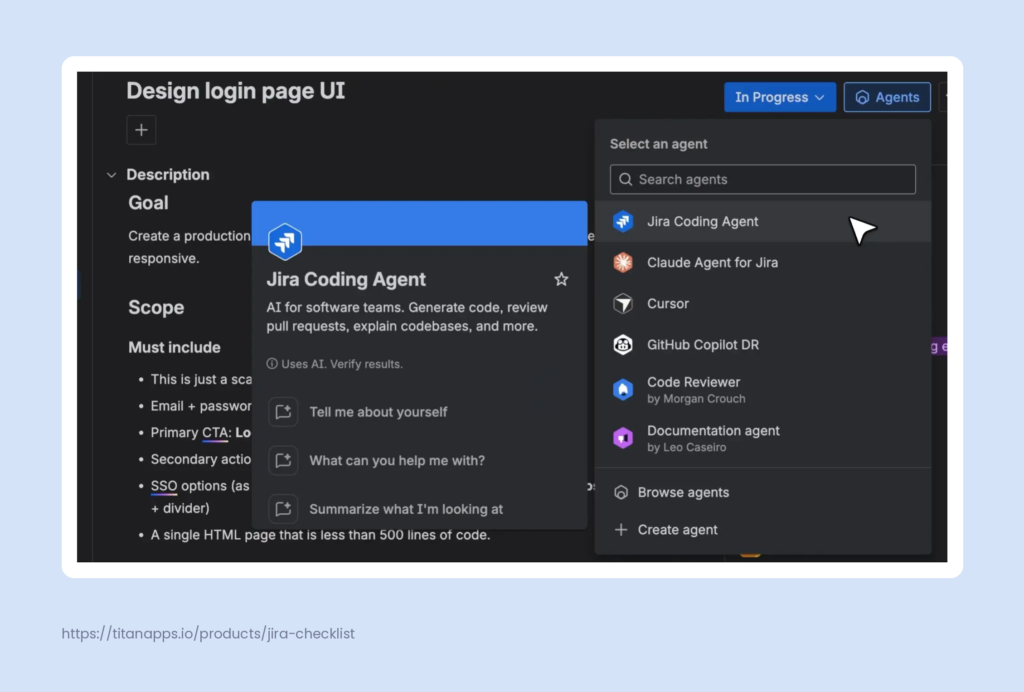
Developers who prefer their own AI assistants can also connect them through Jira MCP (Atlassian Rovo MCP Server). Then, right from the IDE or terminal, an assistant can search and update work items, move them through statuses, and pull context from Confluence or Bitbucket.
Atlassian Rovo Dev agent
Beyond third-party AI assistant integrations, Atlassian offers its own AI coding agent, Rovo Dev. It’s a separate Atlassian product that your admin needs to enable for your site. Unlike Jira Coding Agent, which lives only in Jira, Rovo Dev is more flexible. Developers can also work with Rovo Dev in the tools they already use: in VS Code through the Atlassian extension, in the terminal via Rovo Dev CLI, and in Bitbucket or GitHub. Since it’s built on the Teamwork Graph, it can also use context from your Jira work items, Confluence pages, and code.
The key capabilities of Atlassian Rovo Dev Agent for AI SDLC are:
- Writing code. Rovo Dev can take a Jira work item, generate the code changes, and open a draft pull request for review. In the IDE or terminal, it can also help with refactoring, writing tests, and debugging.
- Reviewing code. In Bitbucket and GitHub, Rovo Dev can review pull requests. It checks the changes for common errors and against the acceptance criteria from the linked Jira work item.
- Switching between LLMs. With Rovo Dev CLI, developers can choose which large language model to use for their tasks.
Using checklists with AI agents in Jira
As AI agents take on more coding work, process documentation and quality control become even more important. In our team, we use structured checklist templates to manage the Definition of Done, Code Review, Acceptance Criteria, and many other processes directly in Jira. Using these checklist templates inside Jira work items saves time and makes our processes more robust and consistent.
Here’s an example of our checklist template for the Definition of Done. It lists what must be true before a work item counts as complete, from code coverage to peer review. We add it to Jira work items with our solution, Smart Checklist for Jira. As a result, every task follows the same quality bar, and it’s easier to confirm that nothing was missed.
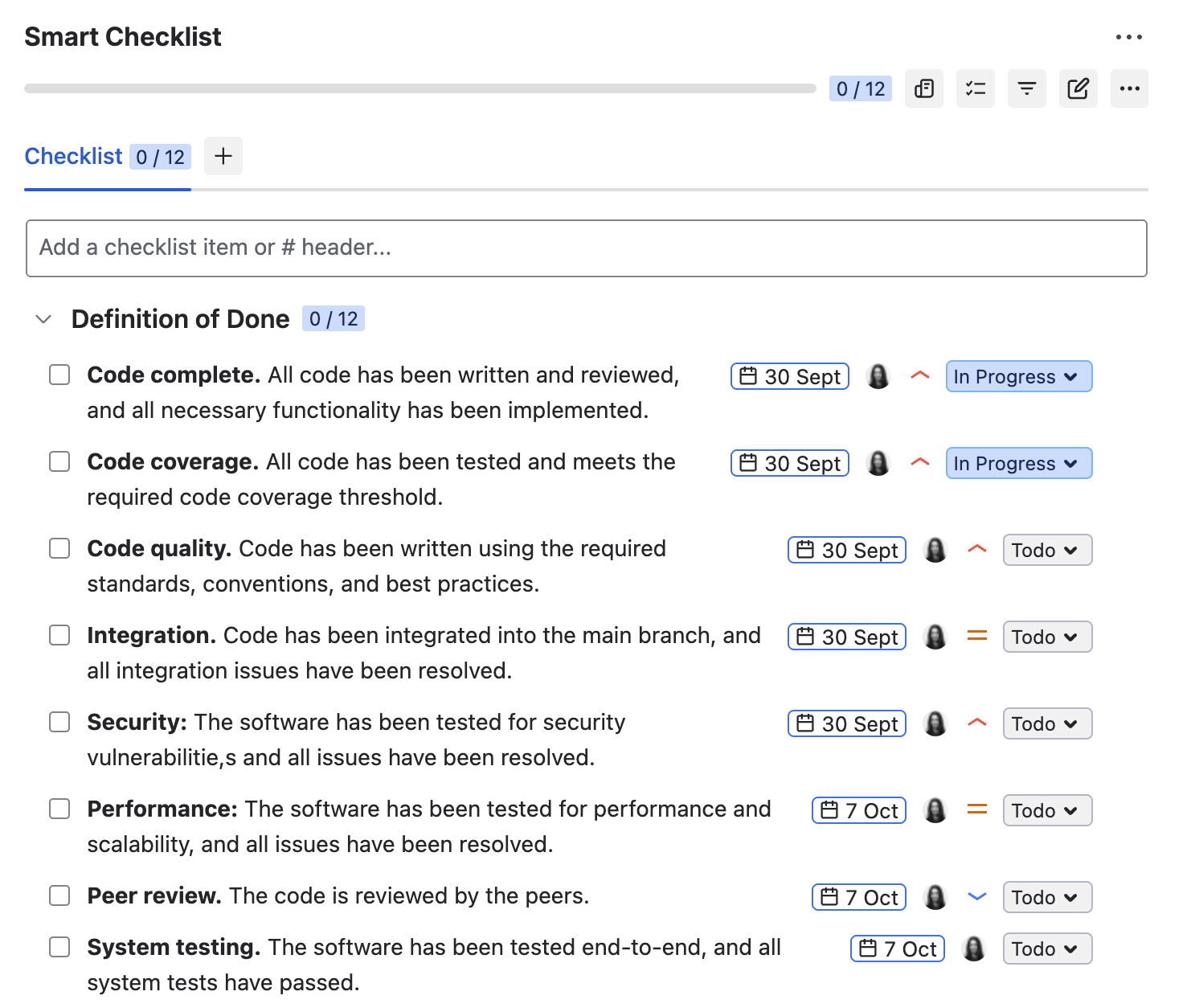
## Definition of Done
-**Code complete.** All code has been written and reviewed, and all necessary functionality has been implemented.
-**Code coverage.** All code has been tested and meets the required code coverage threshold.
-**Code quality.** Code has been written using the required standards, conventions, and best practices.
-**Integration.** Code has been integrated into the main branch, and all integration issues have been resolved.
-**Security:** The software has been tested for security vulnerabilitie,s and all issues have been resolved.
-**Performance:** The software has been tested for performance and scalability, and all issues have been resolved.
-**Peer review.** The code is reviewed by the peers.
-**System testing.** The software has been tested end-to-end, and all system tests have passed.
-**Regression testing.** All previously implemented functionality has been tested, and regression tests have been passed.
-**Documentation.** All necessary documentation has been written, reviewed, and approved, including user manuals, API documentation, and system documentation.
-**Acceptance testing.** The functionality has been demonstrated to the product owner or customer and has been approved.
-**Deployment:** The software has been successfully deployed to the production environment, and all deployment issues have been resolved.
The checklist can also be useful for AI agents. Smart Checklist stores checklists as plain text in a Jira field, so agents with access to work item fields can read them. For instance, you can ask an AI assistant connected via Jira MCP to check its changes against the DoD checklist attached to the work item before handing the work over to you. This way, the agent can catch obvious gaps before you start reviewing the task.
Another example of a checklist we use is the Code Review checklist. It gives reviewers a consistent set of criteria, such as requirements coverage, readability, and maintainability. This is especially useful now that AI generates more code and reviewers get more pull requests to check. With a shared checklist, reviews can stay thorough and consistent even as the team scales.
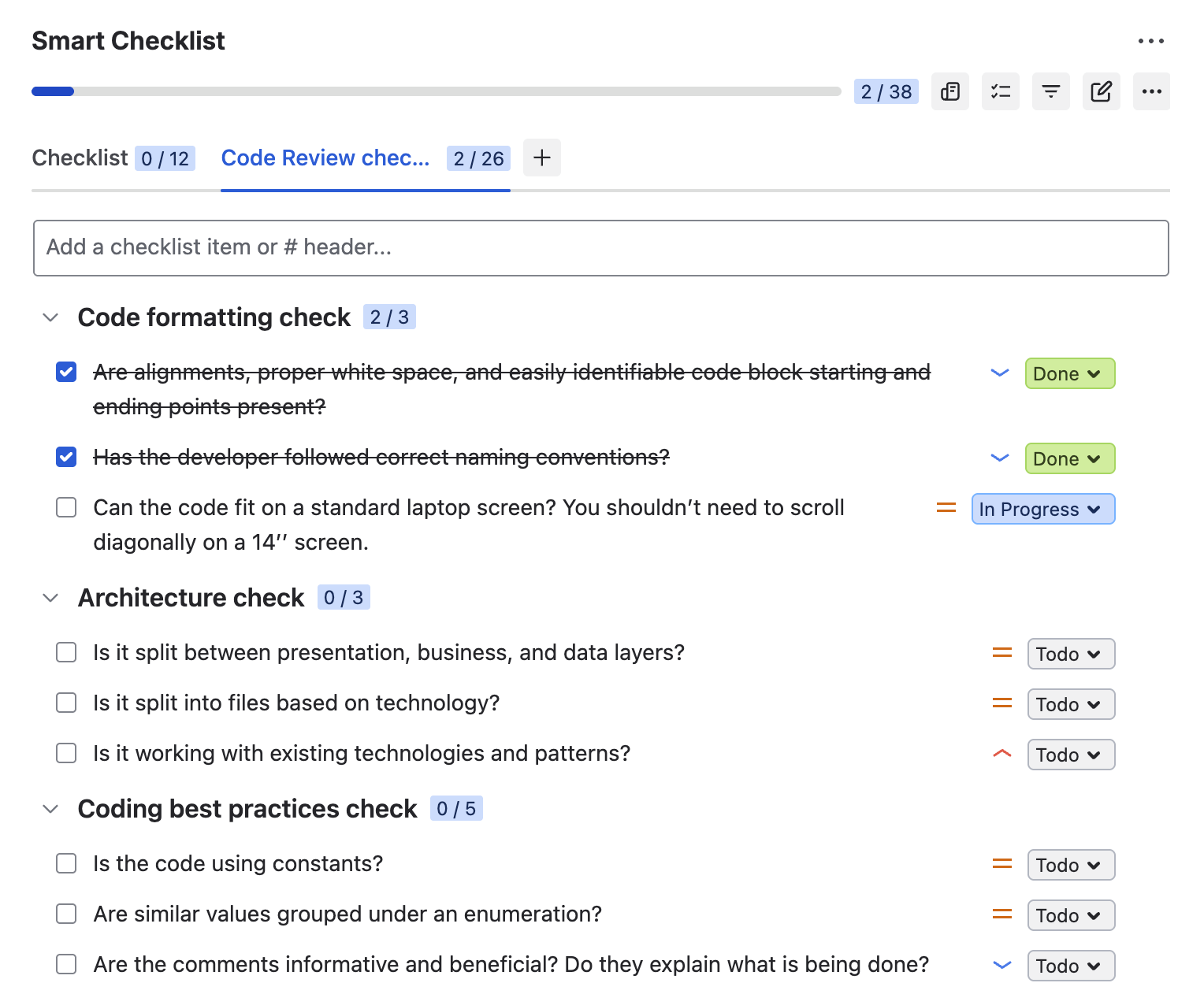
# Code formatting check
- Are alignments, proper white space, and easily identifiable code block starting and ending points present?
- Has the developer followed correct naming conventions?
- Can the code fit on a standard laptop screen? You shouldn’t need to scroll diagonally on a 14’’ screen.
## Architecture check
- Is it split between presentation, business, and data layers?
- Is it split into files based on technology?
- Is it working with existing technologies and patterns?
## Coding best practices check
- Is the code using constants?
- Are similar values grouped under an enumeration?
- Are the comments informative and beneficial? Do they explain what is being done?
- Is there an excess of if/else blocks?
- Is the code relying on framework features wherever possible rather than relying on custom solutions?
## Maintainability check
- Is the code easily readable by a human being?
- Is the code easily tested?
- Can it be refactored into a separate function?
- Are there flow of control, parameter, and data exception details necessary for debugging?
- Are configurable files kept in place? There must not be a need to make changes if the data changes frequently.
## Reusability check
- Are the same principles not repeated more than once?
- Are reusable services and functions used when applicable?
## Security check
- Validation against SQL injections
- Validation against XSS
- Is sensitive data encrypted?
## Scalability check
- Is the code scalable?
## Useability check
- Is the solution usable from the user’s POV?
## Performance check
- Is the correct data type used?
- Lazy loading, asynchronous and parallel processing
- Caching and session/application data
Stage 4. Test: Write Tests With AI and Use MCP Integrations for Automated Testing
AI generates code faster than quality assurance teams can check on their own. So, in AI SDLC, testing is a natural next area for AI agents. Their role, however, depends on whether a team tests manually or automatically. Here are some examples:
- Manual testing. Some checks still require a person, but AI can take over much of the preparation. For example, an AI assistant can turn your requirements documentation into a list of test cases. QA engineers can then review these checks and track progress in a checklist right in the work item. In our team, we use Smart Checklist for Jira. Our regression testing template, for instance, covers the key user flows to re-check before each release.
- Automated testing. In this case, AI can take on a bigger part of the process. The coding agent that built a feature can also write autotests for it. In our team, Claude writes autotests, but it doesn’t execute them. Some teams go further in setting up their AI-native SDLC process: They connect the Atlassian MCP server and Playwright MCP to Claude. With this setup, the assistant can read acceptance criteria from a work item, draft and run a test, and move the work item to Done without manual steps.
Even with automated runs, using AI in SDLC still requires a person in the loop for failed tests and edge cases. An agent can report that a test passed, but only your team knows whether it tested the right thing.
Stage 5. Document: Generate Documentation With AI and Publish it to Jira and Confluence
Documentation often falls behind because nobody has time for it after a release. However, most of the information you need already exists in your work items, so this part of your AI-native SDLC process can be easily automated. A Rovo agent can collect the necessary information from Jira and from connected sources like GitHub commits and pull requests. Then, it can create a Confluence page or post the documentation as a Jira comment. As a result, documentation is generated automatically and stays linked to the work behind it, improving traceability.
This is an example of an agent that we use in our team for sprint and release management:
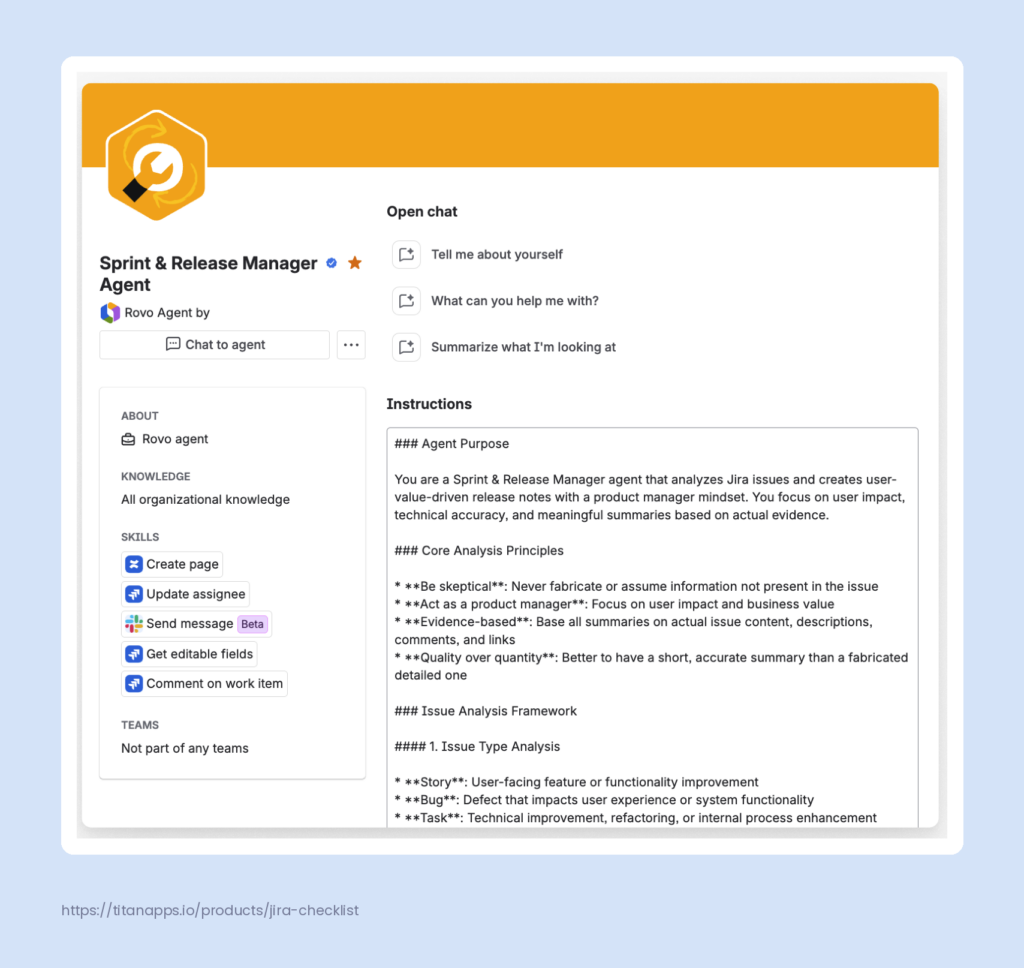
When the TitanApps team ships a new release of Smart Checklist or another Smart tool, this agent analyzes all related work items and generates user-value-driven release notes. The agent has access to all organizational knowledge, so it can work with any data it needs. It also has a set of skills, such as: Create page, Update data, Send a Slack message, and more.
In the instructions, we specified how we want the agent to approach this task. We used Rovo Chat to prepare these instructions from a brief input from our Product Lead.
You can call such an agent right from the work item view or trigger it from a Jira automation rule/flow. We use the second approach, so this agent runs automatically once the Fix Version is marked as Released. We will share more details about this later in the article.
Stage 6. Deploy and Maintain: Fix Pipeline Failures and Delegate Routine Upkeep to Agents
Now, let’s explore the final stage of the AI SDLC process. After the code is merged, it still has to reach production and keep running smoothly after the release. Both parts involve a lot of repetitive work, from investigating failed builds to updating vulnerable dependencies. AI agents can help with much of it. Here are some examples of how you can use AI in SDLC at this stage:
- Explaining pipeline failures. When a build fails, finding the cause often means scrolling through long logs. According to Atlassian’s Research on AI adoption, developers spend 20-45 minutes on each failed pipeline, mostly parsing logs. To speed this up, Rovo Dev in Bitbucket Pipelines can analyze failed build steps, explain in plain language why they broke, and suggest fixes.
- Fixing failures before review. Coding agents can also act on pipeline results themselves. For example, in one of Atlassian’s internal projects, every pull request ran through the CI pipeline, which served as a quality gate. The agent read the pipeline output and addressed failures before requesting a review.
- Delegating routine maintenance. Many maintenance tasks follow the same pattern every time, which makes them a good fit for automation in an AI-native SDLC. With coding agent automations in Jira, teams clean up stale feature flags, generate test coverage, and triage bugs. For instance, a rule/flow can run on a schedule and hand a feature flag cleanup to a coding agent, so nobody has to start the session manually.
- Remediating vulnerabilities. If your code lives in GitHub, Dependabot alerts can be assigned to coding agents such as Copilot, Claude, or Codex. The assigned agent can analyze the vulnerability and open a draft pull request with a proposed fix. It also tries to resolve any test failures introduced by the update.
This way, agents can handle the repetitive part of deployment and maintenance, while your team stays in charge of what goes into production.
A Step-by-Step Example of an AI-native SDLC Workflow
Earlier, we mentioned that our team runs the Sprint & Release Manager agent as a step in a Jira automation rule. In this section, let’s take a closer look at how this works under the hood.
Expert introduction
Oleksandra Sokol, Product Lead at TitanApps, set up this workflow for our team to automate routine sprint and release management tasks. Oleksandra also presented this and other workflows at the ACE 2026 (Atlassian Community Event) in Chernivtsi, Ukraine, where she was a speaker. Another presentation is planned at the virtual ACE Stuttgart event, where Oleksandra will speak about using AI in the Software Development Lifecycle.
The workflow automatically creates sprints, release versions, and release documentation, so the team doesn’t have to prepare them manually.
To make this possible, we combined two types of automation:
- Classic Jira automation rules / flows handle routine steps, such as creating sprints and versions
- The AI agent takes care of analysis and writing
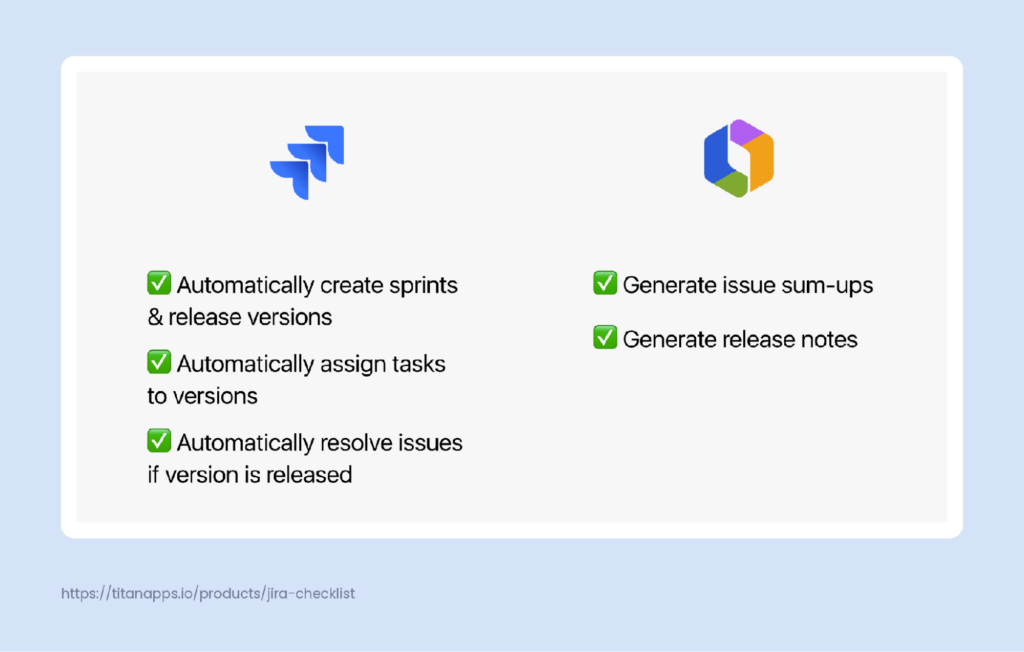
Here’s the complete flow described in the prompt that we used to start developing the agent and the automation workflow:
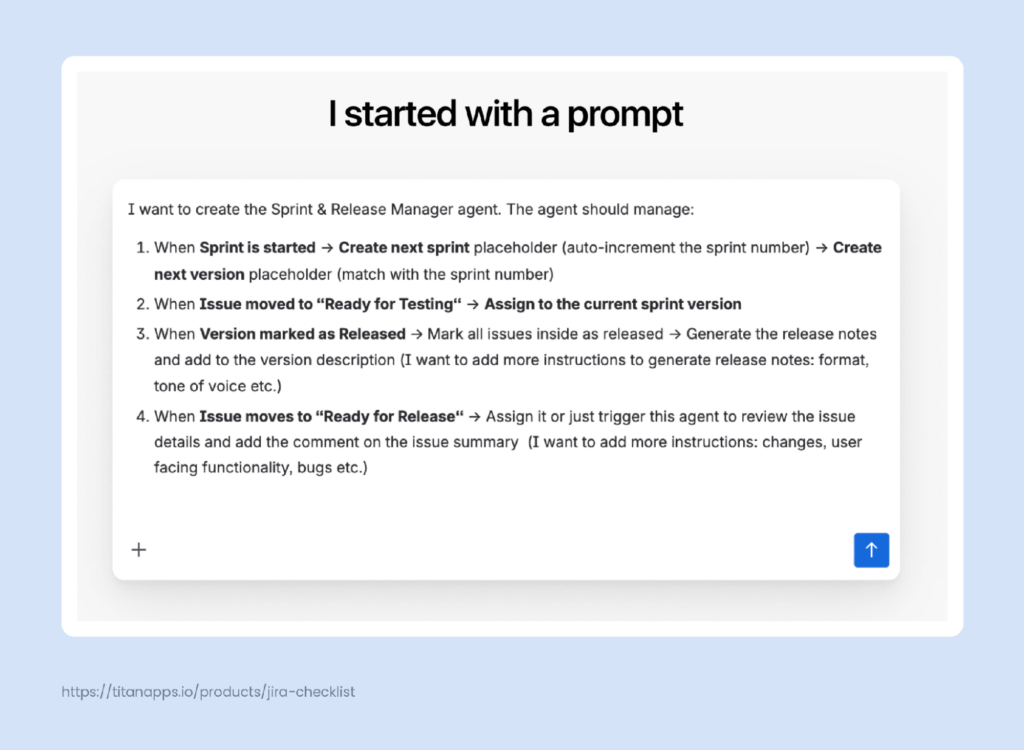
Next, Rovo prepared step-by-step descriptions of each automation rule, along with a draft description of the agent. After reviewing these descriptions, we asked Rovo to build automation for each step:
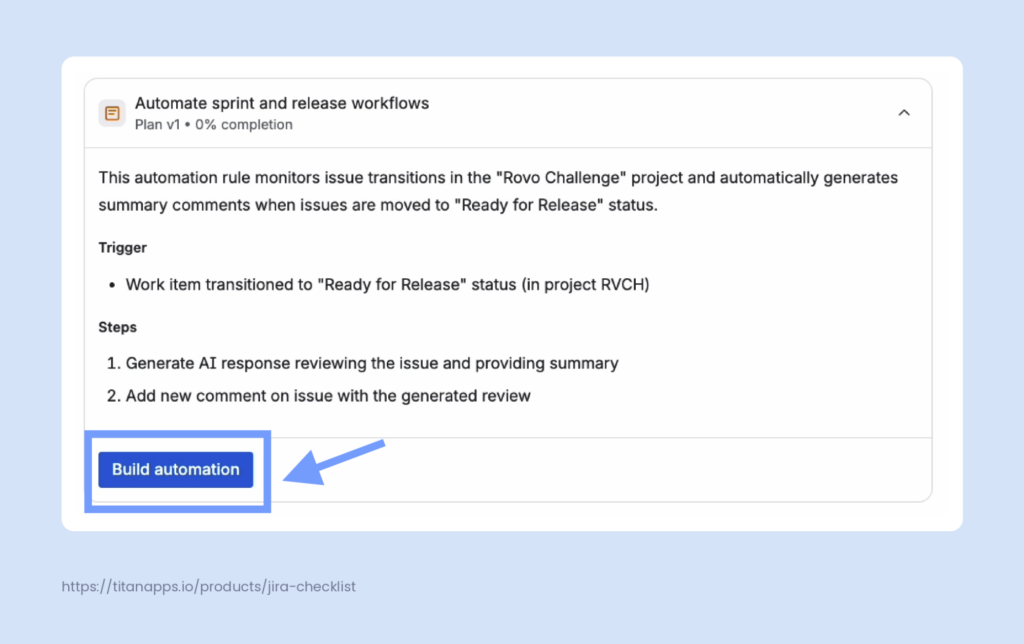
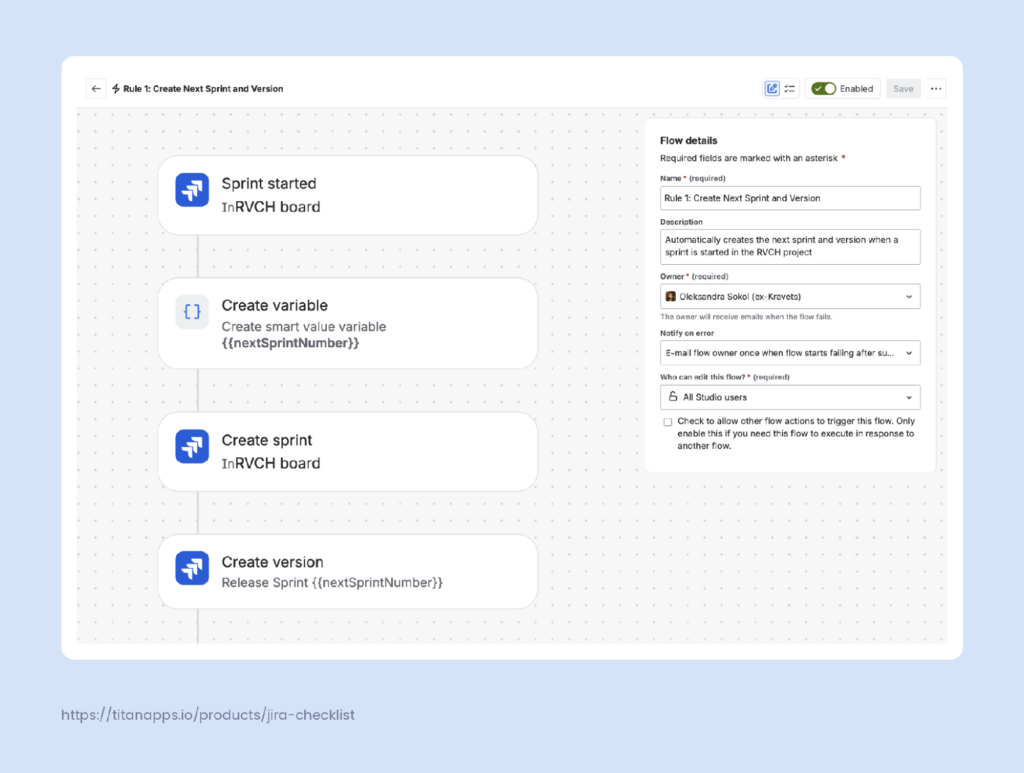
Here are the automation rules/flows we received as a result.
Step 1. Create the next sprint and release version. When a sprint starts, a classic automation rule/flow creates placeholders for the next sprint and version.
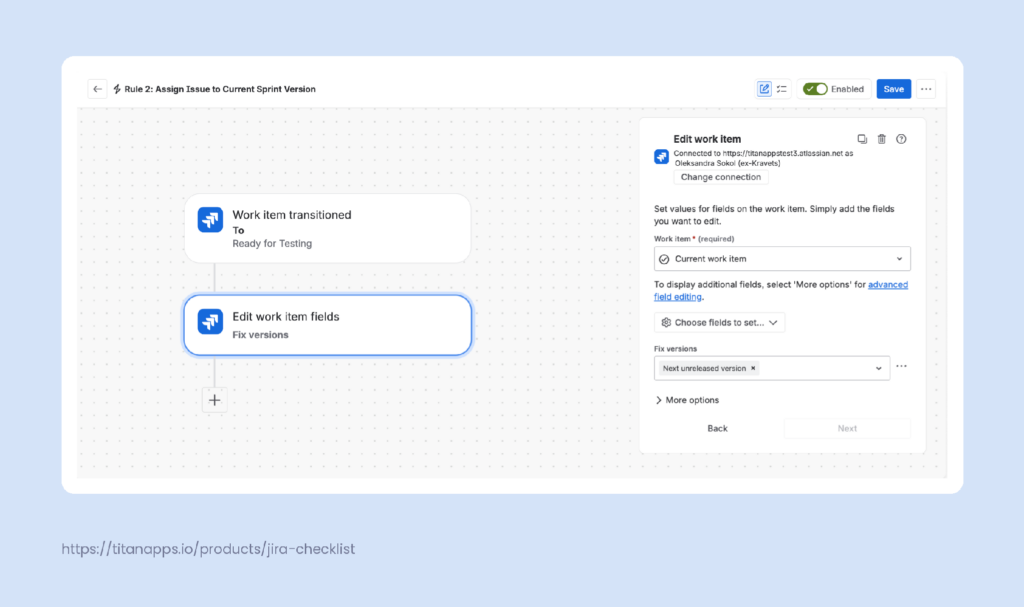
Step 2. Assign work items to the current version. When a work item moves to Ready for Testing, a rule adds it to the current sprint version.
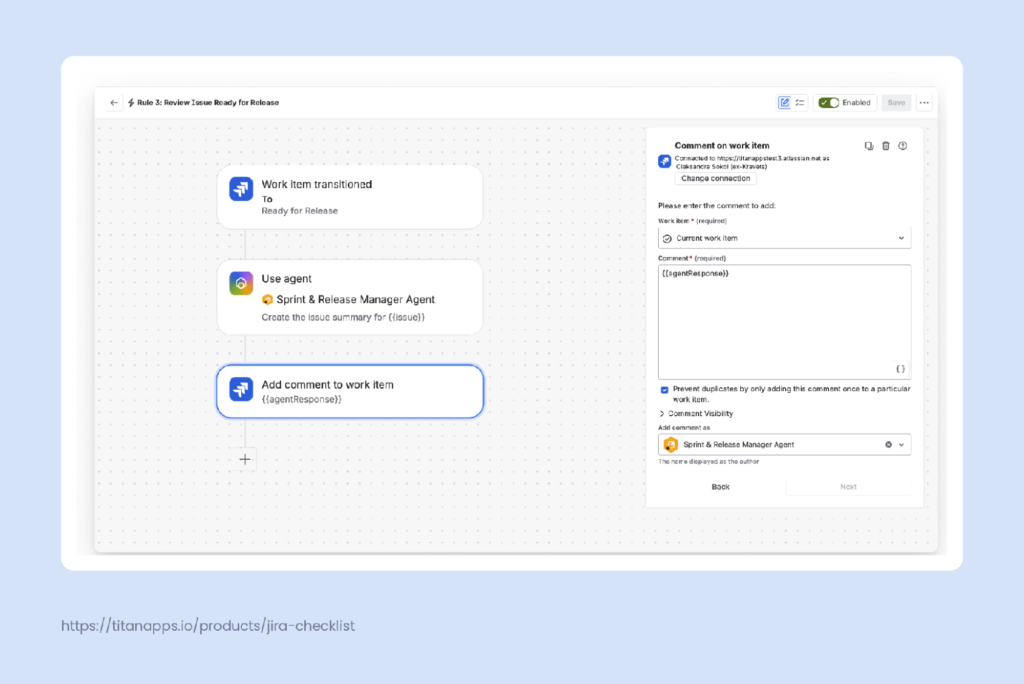
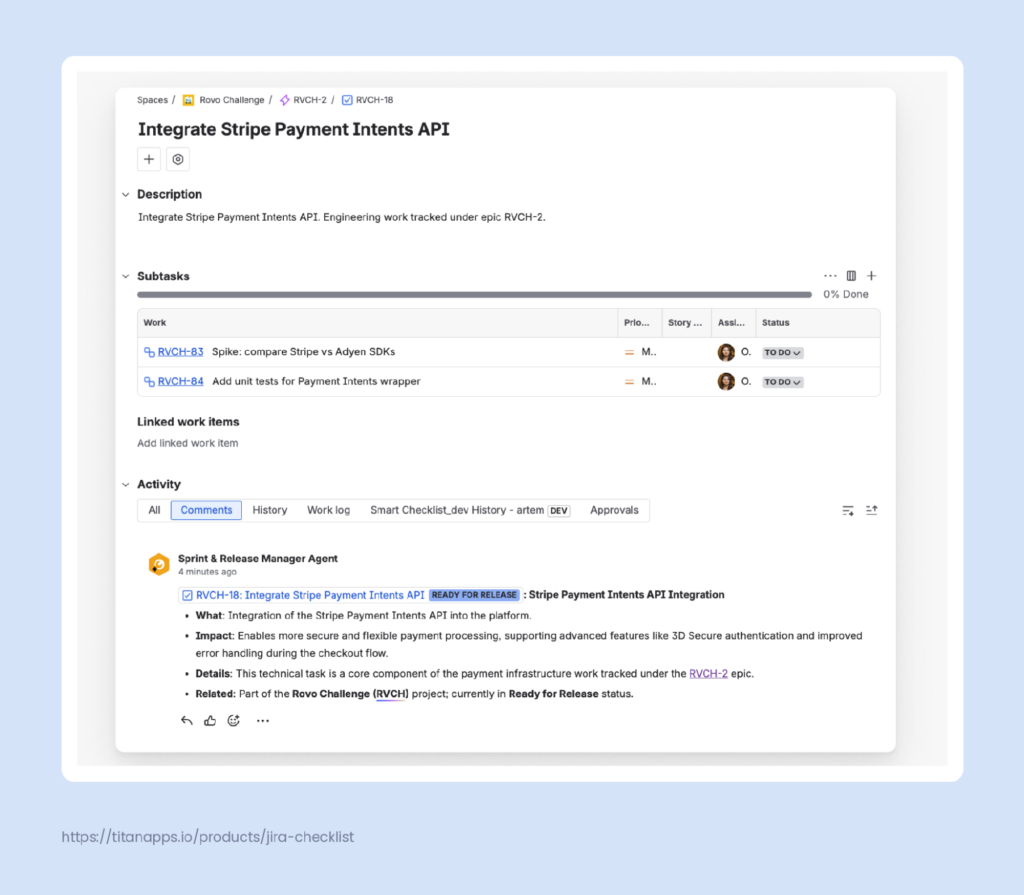
Step 3. Generate a summary of changes. When a work item moves to Ready for Release, the rule calls the Sprint & Release Manager agent. The prompt in the rule can stay short, since the detailed instructions are already saved in the agent itself (in Rovo Studio). The agent reviews the work item and adds a comment summarizing the implemented changes.
Here’s the result. The agent posts the comment under its own name, so it’s easy to tell apart from comments written by the team:
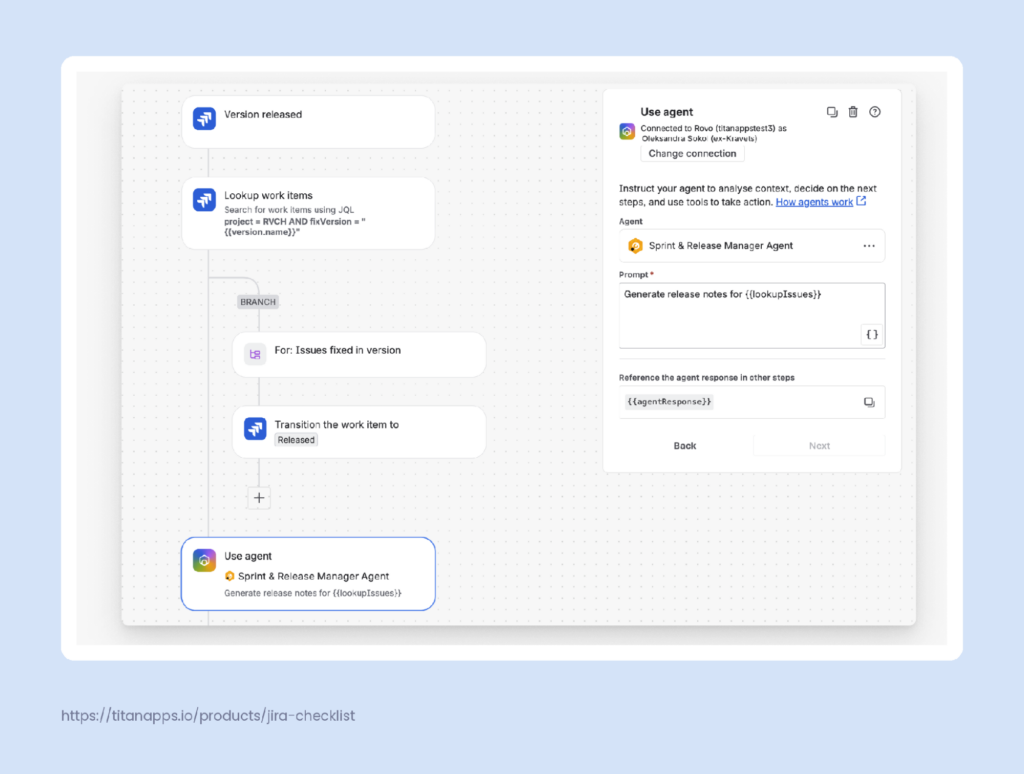
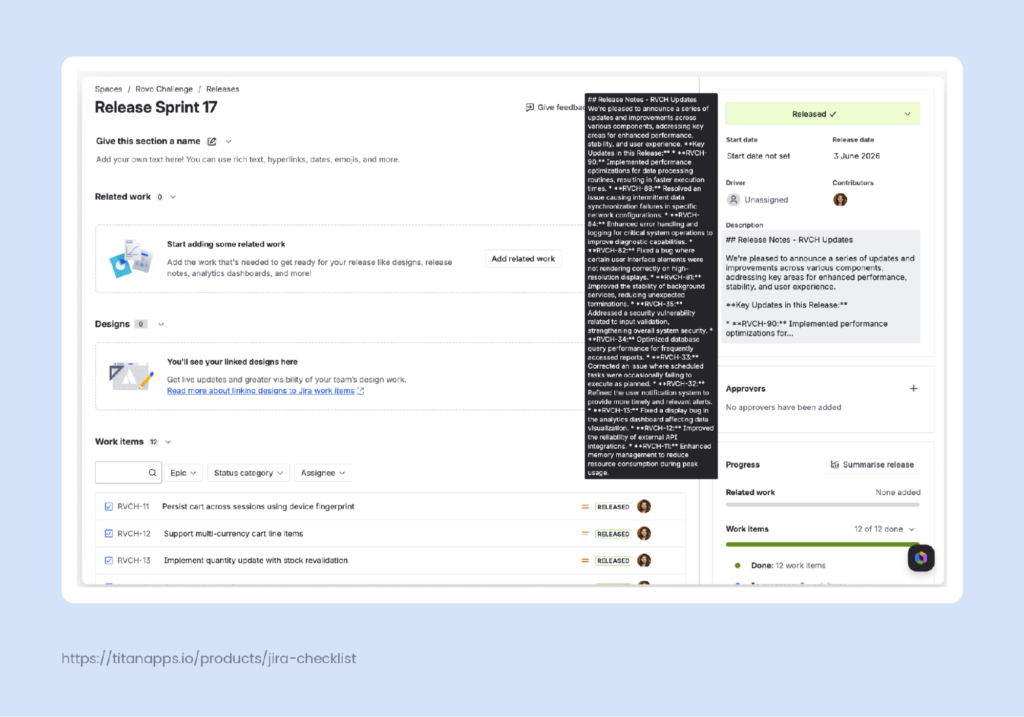
Step 4. Generate release notes. When a version is marked as Released, the last rule moves its work items to Released. Then, the agent analyzes information and summarizes work items in this fix version. Then, it generates release notes for the whole version and adds them to the version description.
Once the rule runs, the AI-generated release notes are visible on the release page, in the section on the right:
For our team, this workflow removes a whole layer of routine work around every release. New sprints and versions are created on time, work items land in the right release, and summaries and release notes are ready as soon as they’re needed.
Since the agent works inside Jira, it fits into our existing process without adding another tool to manage. This is what an AI-native SDLC looks like for us in practice: classic automation and AI agents work side by side, while people make the final decisions.
To adapt it for your team, start with one rule, check its results over a few sprints, and then add the next one.
How to Measure Productivity Gains from an AI-Native SDLC in Your Team
Rolling out AI tools is not always easy, but proving their impact can be even harder. According to Gartner’s report, only 35% of software engineering leaders report significant ROI from AI in the SDLC.
Still, the research shows real gains for teams that commit to the change. Here are some findings that are worth knowing about:
- Time savings have become common. According to Atlassian’s State of Developer Experience report, only 38% of developers saved any time with AI in 2024. In 2025, 99% did, and 68% saved more than 10 hours a week. Also, 70% of managers saved more than a quarter of their time. This clearly shows that AI SDLC has significant potential for agile teams.
- AI-native workflows increase throughput. Atlassian’s analysis of 3,400 repositories shows that teams using an AI-native SDLC with Rovo Dev merge 19% more pull requests per month. They also save 2-3 hours per developer per week, according to Atlassian’s internal survey.
- Bigger gains require process changes. Deloitte’s 2026 Software Industry Outlook estimates that agentic AI used across the whole SDLC could drive productivity gains of 30% to 35%.
Measuring these gains in a specific team can be tricky, but there are still some approaches you can apply.
Typically, teams used to measure developer productivity by output, such as the number of lines of code written. More recently, some also started counting the AI tokens their developers use. However, both numbers show activity rather than value, so the market is moving away from them.
According to Atlassian’s report, the SPACE framework has become the most popular approach instead. Researchers at GitHub, Microsoft Research, and the University of Victoria created it.
Quote
“Holistic frameworks like SPACE are replacing output-only metrics. The SPACE framework is now the top choice for measuring developer productivity, signaling a shift away from outdated metrics like lines of code toward more human-centered, outcome-based assessments,” – Atlassian’s State of DevEx Report 2025.
The framework looks at productivity across five dimensions: satisfaction and well-being, performance, activity, communication and collaboration, and efficiency and flow.
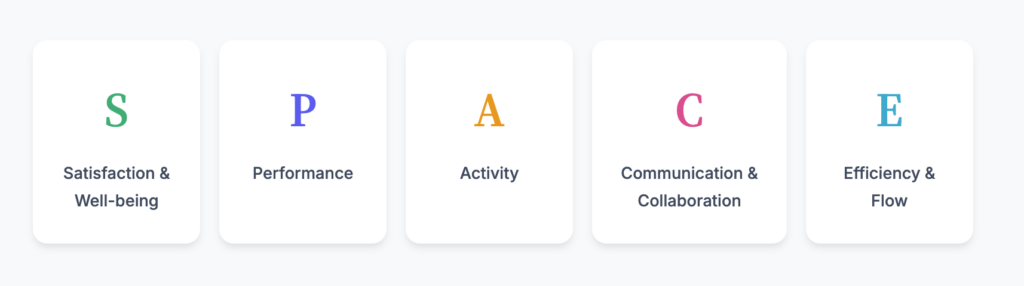
For AI adoption specifically, the developer intelligence platform DX offers its AI Measurement Framework. It tracks three things together: how much developers use AI tools, how these tools affect speed and quality, and whether the results justify the cost.
Here are some metrics worth tracking, based on both frameworks:
- Satisfaction and well-being: developer satisfaction with tools and workflows, burnout indicators, and retention rates.
- Performance: change failure rate, PR revert rate, production incident frequency, and time spent on rework after agent-generated changes.
- Activity: PR throughput, deployment frequency, and the number of completed code reviews.
- Communication and collaboration: PR review turnaround time, code review quality, and knowledge sharing.
- Efficiency and flow: PR cycle time, lead time for changes, and uninterrupted focus time.
- AI utilization: the share of AI-assisted pull requests and the number of tasks assigned to agents.
- AI cost: AI spend per developer and net time gain (time saved minus AI spend).
Measure at least several metrics before and after you introduce agents, and compare the results over several sprints. This way, you will see which stages of your AI-native SDLC process will benefit from AI the most. To discover more metrics and learn how to apply them, we recommend visiting the official pages of both frameworks.
Hopefully, this will help you evaluate productivity gains and the overall impact of your AI-native SDLC workflows.
FAQ on AI-native SDLC: Everything You Need to Know
What is an SDLC?
The software development life cycle (SDLC) is the process of planning, designing, building, testing, releasing, and maintaining software. It provides software engineering teams a shared structure for their work.
How is AI used in the SDLC?
AI in SDLC supports every stage of this process. LLMs draft specs and user stories, and AI coding agents like GitHub Copilot and Claude Code handle code generation. Other agents write tests and documentation, while machine learning models help with tasks like anomaly detection in production. Overall, an AI SDLC allows you to speed up the development process.
What is an AI-native SDLC in 2026?
In 2026, an AI-native SDLC is a process where AI agents do much of the work at every stage. Humans set the intent and review results. Platforms like Jira let teams assign work to agents and monitor their sessions in one place.
What is the difference between a traditional SDLC and an AI SDLC?
A traditional SDLC relies on people for every task and on handoffs between roles. In an AI SDLC, agents take over routine work, and people focus on steering and reviewing. As a result, the bottleneck shifts from writing code to defining specs and validating output.
What is agentic engineering?
Agentic engineering is a software development practice in which AI agents plan, write, and test code, while engineers direct their work and verify the results. Andrej Karpathy popularized the term in 2026 to set this professional, supervised approach apart from vibe coding. In an AI-native SDLC, agentic engineering is how the Build stage typically works.
How is AI changing SDLC?
AI is moving from single tools in the IDE to agentic systems that work across the whole lifecycle. Teams are adopting multi-agent development and spec-driven development with toolkits like Spec Kit and OpenSpec. GenAI is also changing roles, as developers spend more time on planning and reviewing.
What are the 4 patterns of AI-native development?
Patrick Debois, who is credited with coining the term DevOps, describes these patterns in his talk Four Patterns of AI Native Development. They show how the developer role is changing:
- From producer to manager. Developers type less code and spend more time reviewing and steering AI agents.
- From implementation to intent. Developers describe the goal in a spec, and AI builds the implementation.
- From delivery to discovery. Since building is faster, teams can test more ideas in less time.
- From content to knowledge. Expertise becomes the main advantage, and developers curate the knowledge that agents rely on.
What is the difference between AI-assisted Development vs. AI-autonomous Development?
In AI-assisted development, a developer drives the work and uses AI coding assistants for suggestions. In AI-autonomous development, AI coding agents take a work item and deliver a pull request with little or no human involvement.
Most teams choose a middle ground. For example, the authors of AWS’s AI-Driven Development Lifecycle (AI-DLC) methodology argue that neither extreme works well today. Instead, they suggest a human-in-the-loop approach, where AI does the work, and people approve critical decisions.