





 Tools for Jira
 Tools for monday.com





Developers and project managers spend a surprising amount of time switching between their AI tools and Jira. You ask an AI assistant for help with a task, then open the browser to find the right Jira issue, copy the details, then paste them into the conversation – and so it goes. The good news is that Jira MCP removes this friction entirely. With an MCP connection in place, your AI tool can talk to Jira directly.
This article explains what Jira MCP is, how it works, and what it enables.
TL;DR: Jira MCP in a Nutshell
- MCP is an open standard that gives AI tools a universal way to connect to data sources like Jira.
- Any AI assistant or IDE that supports MCP can use Jira MCP to search, create, and update Jira work items using natural language.
- The Atlassian Rovo MCP Server is the official, cloud-hosted MCP server for Jira, Confluence, and other Atlassian products.
- This official MCP server itself is free for all Atlassian Cloud customers. The AI tools you connect to have their own separate pricing.
- Unofficial community-built MCP servers also exist for teams on Jira Data Center.
Now, let’s zoom in and explore this topic in more detail.
Covering the Basics: What Is MCP (Model Context Protocol)?
 Definition
MCP (Model Context Protocol) is an open protocol that standardizes how AI applications connect to external data sources and tools. It gives AI tools a universal way to read data, execute actions, and work with context from different systems.
Before MCP was introduced by Anthropic in November 2024, every AI tool needed a custom integration for every data source. If you had 10 AI tools and 10 data sources, you needed up to 100 separate integrations. MCP collapses this into a universal standard. Each data source builds one MCP server, and every AI tool can connect to it.
The protocol is often described as “USB-C for AI” – a single standardized connector that replaces dozens of custom ones.
How Does MCP Work?
Here is how it functions at a high level. MCP uses a client-server architecture:
- The AI tool (Claude, ChatGPT, Cursor, VS Code) is an MCP host that connects to the MCP server via the MCP client
- The data source (Jira, Confluence, GitHub) runs an MCP server
The client sends requests to the server, and the server executes them against the underlying data source. MCP servers expose three types of capabilities to clients:
- Tools – executable functions the AI can invoke to perform actions, like creating a work item or transitioning a status
- Resources – data sources the AI can read for context, like file contents or database records
- Prompts – reusable templates for common interactions with the client
Now that we’ve covered what MCP is, we can explore how this applies to Jira.
What Is Jira MCP and What Does It Do?
Definition
Jira MCP is a term that people use to describe a solution for connecting AI tools to Jira through the Model Context Protocol, which is typically done through the Atlassian Rovo MCP Server (also called the Atlassian Remote MCP Server).
Strictly speaking, Atlassian doesn’t have a separate solution called “MCP for Jira”. What it offers is Rovo MCP Server, which covers multiple products, including Jira, Confluence, and Compass. However, for simplicity, we use “Jira MCP” throughout this article to refer to this type of connection.
There are also community-built open-source Jira MCP servers, mainly for Jira Data Center and Server deployments.
The sections below cover both the official MCP and community options, with a focus on the official server.
Official Jira MCP: Atlassian Rovo MCP Server
In May 2025, Atlassian launched the beta of its Rovo MCP Server to give external AI tools direct access to its products. This cloud-hosted, remote MCP server connects AI clients to Jira, Confluence, Compass, and other apps through a single secure endpoint at mcp.atlassian.com.
For Jira specifically, the Rovo MCP Server enables such operations:
- Read operations let your AI tool retrieve data from Jira. This includes getting a work item by ID or key, listing available projects, checking workflow transitions, viewing issue link types, and looking up user account IDs by name or email.
- Write operations let your AI tool make changes in Jira. It can create new work items, update fields on existing ones, add comments, log time, transition work items through workflow statuses, and create links between work items.
- Search is handled by a dedicated JQL tool and Rovo natural-language search. Your AI assistant can run any JQL query and get structured results back. This means you can ask it to find all high-priority bugs assigned to your team in the current sprint – and get an accurate, filterable response.
Beyond Jira, the server also supports Confluence tools for reading, creating, and searching pages. Jira Service Management tools give you access to ops alerts, on-call schedules, and team info. Bitbucket Cloud tools cover repositories, pull requests, pipelines, and deployments.
So, one of the benefits Rovo MCP Server gives you is the ability to work with your data across multiple Atlassian solutions.
The Data Layer Behind Rovo MCP – Teamwork Graph
The Rovo MCP Server’s search and cross-tool capabilities are powered by Teamwork Graph. This is Atlassian’s data intelligence layer that maps relationships between people, work items, and knowledge. This functionality covers Jira, Confluence, and other products in the Atlassian ecosystem. The network of connections extends to dozens of third-party tools, including GitHub, Slack, Google Drive, and Figma. In total, Teamwork Graph supports over 100 out-of-the-box connectors, while giving you an opportunity to build custom ones.
When an AI assistant queries Jira through MCP, it’s not just pulling a flat list of fields. Teamwork Graph provides connected context. It can link a Jira work item to the Confluence page that describes it, the developer who last worked on it, and the pull request that closes it.
Naturally, that depth of context requires careful access control and sensitive data protection.
How Authentication Works on Rovo MCP
The server uses OAuth 2.1 as the primary authentication method. When you connect an AI tool for the first time, a secure browser-based consent flow opens. All actions respect your existing Atlassian permissions. If you can’t view a project in Jira, you can’t access it through MCP either.
For machine-to-machine or non-interactive setups, API token authentication is also available. Your organization admin controls whether this option is enabled.
Enterprise Adoption of Rovo MCP
Since reaching general availability, the Rovo MCP Server has seen strong uptake. According to the press release from Atlassian, “Adoption from Atlassian’s largest customers shows that enterprises drive nearly 50% of all Rovo MCP Server usage, and customers on paid Atlassian editions drive 93% of usage.”
Atlassian also reported in an interview for SiliconANGLE that nearly one-third of all MCP operations generated by its customers are writes. This means teams are creating and updating records through AI tools – in other words, they are actively using Jira MCP for real work, not just browsing.
Unofficial Jira MCP: Community Alternatives
Atlassian’s official server is not the only option. The MCP ecosystem includes community-built open-source servers that connect AI tools to Jira through the same protocol. These are especially relevant for teams that run Jira Data Center or Server, since the official Rovo MCP Server only supports Atlassian Cloud.
The most widely adopted community project is MCP Atlassian – sooperset/mcp-atlassian. It has over 5,200 GitHub stars, 1,200+ forks, and active development with frequent releases. It supports both Cloud and Data Center/Server deployments and offers over 72 tools (executable actions) for Jira and Confluence, and can be deployed with Docker and Kubernetes. The project is open-source under the MIT license.
Another notable option is aashari/mcp-server-atlassian-jira. It takes a different approach by offering generic HTTP method tools that give full access to Jira’s REST API v3. It also uses a custom TOON output format (Token-Oriented Object Notation). It reduces AI token consumption by 30-60% compared to standard JSON responses.
The key tradeoff between official and community servers comes down to convenience versus control. The official server is managed, cloud-hosted, and requires no infrastructure on your side. Community servers give you the ability to self-host, customize tool behavior, and support Jira deployments that the official server doesn’t cover.
Comparison Table: Official vs. Community Jira MCP Servers
| Official (Atlassian Rovo MCP Server) | Community (e.g., sooperset/mcp-atlassian) | |
|---|---|---|
| Hosting | Remote, Atlassian Cloud | Local or self-hosted |
| Jira deployment | Cloud only | Cloud, Data Center, Server |
| Tools (executable actions) | 60+ supported tools (across Jira, Confluence, Compass, JSM, Rovo Search, and more) | Varies depending on the MCP server. 72+ tools for sooperset/mcp-atlassian (Jira + Confluence) |
| Authentication | OAuth 2.1 / API token | OAuth 2.0, API token, PAT |
| Customization | Managed by Atlassian | Fully open-source (MIT license) |
| Enterprise controls | Audit logs, domain allowlists, IP allowlisting | Varies by implementation |
| When to use | You're on Atlassian Cloud and want a managed, zero-maintenance setup with broad product coverage and enterprise security controls | You're on Data Center, need self-hosted deployment, want to customize tool behavior, or need to reduce token consumption |
The rest of this article focuses on the official Atlassian server. If your team runs Jira Data Center or Server, the community alternatives above are worth exploring as a starting point.
What Jira MCP Enables: From Simple Queries to Multi-Tool Automation
Now that we’ve covered what the Jira MCP server is and how it connects to your data, let’s look at what you can actually do with it. Here are the key capabilities offered by the official Jira MCP server (Atlassian Rovo MCP).
1. Search and retrieve information
The most basic use case: ask your AI tool a question about your Jira data and get an answer without switching tools.
You can query work items using natural language that translates to JQL behind the scenes. For example, “Show me all unassigned critical bugs opened this week in my main project.” Beyond individual work items, you can pull sprint statuses, project overviews, assignee details, and Jira Service Management alert history. Confluence is also searchable through the same connection.
Through Teamwork Graph, the search extends to connected third-party tools as well – linked GitHub PRs, GitLab pipelines, or CI/CD build statuses.
2. Create, update, and manage work items
MCP is not limited to reading data. You can take various actions in Jira directly from your AI tool – individually or in bulk.
This includes creating work items with pre-filled fields from a natural-language description, editing priorities, assignees, or custom fields in a single prompt. You can also add comments with status updates or technical notes. You can also transition work items through workflow statuses – for example, “Move PROJ-123 to In Review.”
For larger tasks, you can generate multiple work items from meeting notes or a spec document in one go – simply by asking your AI assistant to do this in natural language.
3. Work across the Atlassian ecosystem in one conversation
As we mentioned earlier, the Rovo MCP Server covers more than just Jira. This means you can chain actions across multiple products without switching tabs.
For example, you can create a Jira epic and generate a linked Confluence spec page at the same time. Or search Confluence documentation to find context for a work item and update its description based on what you find. You can also pull in context from other sources your AI tool has access to and use it to fill in Jira work items with relevant details. For instance, this can be additional information from meeting transcripts, emails, documents, or code repositories.
4. Build multi-tool workflows beyond Atlassian
An AI client can connect to multiple MCP servers at once. This means Jira actions can be part of a broader workflow that spans tools from entirely different ecosystems in a single conversation.
For instance, you can pull context from a Jira work item, find the related GitHub PR, and update both in the same prompt. A monitoring agent could detect an anomaly via Datadog, create a Jira work item with the diagnosis, and notify the on-call engineer through Slack. Or after a deployment completes in CI/CD, automatically generate a Jira work item summarizing the changes and link it to the release documentation.
As you can see, these capabilities range from simple lookups to complex cross-tool automation. The specific workflows you can build depend on which AI client you use and which MCP servers you connect to it.
Which AI Tools and Platforms Support Jira MCP?
In practice, any MCP-compatible client that supports OAuth 2.1 can connect to the Rovo MCP Server using the endpoint at mcp.atlassian.com.
Here’s an overview of the key apps and platforms that support the Rovo MCP Server, organized by category:
| Category | Tool | How it connects to Jira MCP |
|---|---|---|
| AI assistants | ChatGPT | Native MCP support in Chat, Deep Research, and Agent Mode |
| Claude | Supports Claude.ai and Claude Desktop | |
| Gemini | Connects via Gemini CLI or Google Cloud Marketplace | |
| Mistral AI | MCP-compatible client | |
| WRITER | MCP-compatible client | |
| Developer tools | VS Code | Connects via Atlassian extension or mcp-remote proxy |
| GitHub Copilot | MCP-compatible through GitHub's integration | |
| Cursor | Native MCP support via settings configuration | |
| Claude Code | Connects via native MCP support in the terminal | |
| Development platforms | Lovable | MCP-compatible; also available as a Rovo agent in Confluence |
| Replit | MCP-compatible; also available as a Rovo agent in Confluence | |
| Other apps | Amazon Quick Suite (AWS) | Native MCP integration |
| Docker | Available through Docker's MCP catalog | |
| Figma | MCP-compatible; also available as a Rovo agent | |
| Postman | MCP-compatible API platform |
Atlassian’s official documentation provides setup instructions for the listed clients, as well as a general guide for connecting other tools.
How Much Does the Jira MCP Server Cost?
According to Atlassian’s official documentation, there is no separate charge for using the MCP server. It’s available to all Atlassian Cloud customers, including Free plan users, within the set limits.
The available rate limits depend on your tier:
- Free – 500 calls per hour
- Standard – 1000 calls per hour
- Premium and Enterprise – 1000 calls per hour + 20 additional calls per user with up to 10,000 calls per hour
However, Jira MCP (Rovo MCP Server) might not stay entirely free forever. Atlassian has signaled that some MCP tools will become paid features over time. Specifically, the two Teamwork Graph tools (getTeamworkGraphContext and getTeamworkGraphObject) are currently in beta and free to use. When they move to general availability, Atlassian states they will be billed at a minimum of 1 Rovo credit per call. Atlassian has committed to providing at least 90 days’ notice before any charges take effect.
Keep in mind that the AI apps you connect to (Claude, ChatGPT, Cursor, etc.) have their own pricing. These costs are completely separate from the MCP server.
How does Jira MCP Work with Marketplace Apps?
Jira MCP operates through Atlassian’s APIs. This raises a practical question: how does it interact with Marketplace apps your team uses?
Marketplace apps can make their data visible to AI tools through MCP in two ways:
- Apps can contribute data to Teamwork Graph. From there, this information will be accessible for searching and querying. This is a relatively new capability, and not all apps support it yet.
- Apps can store their data directly in Jira as artifacts – in custom fields or issue/entity properties. These are not always shown in the Jira UI, but they are accessible through Jira’s API, which means the MCP server can read them.
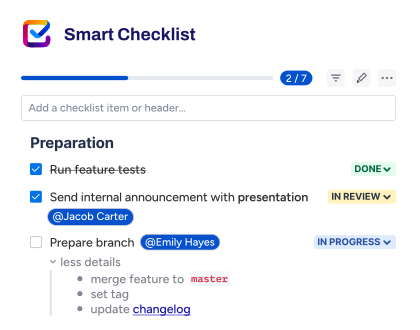
Smart Checklist for Jira is a good example of this second approach. The app stores checklist data in Jira issue properties and optionally duplicates it in a custom field called “Checklists” to enable JQL search, automation, and reporting. When you access information about a work item through MCP, the AI tool can read the checklist content. Smart Checklist also provides a “Smart Checklist Progress” custom field that shows completion status, such as “7/10” or “10/10 – Done.”
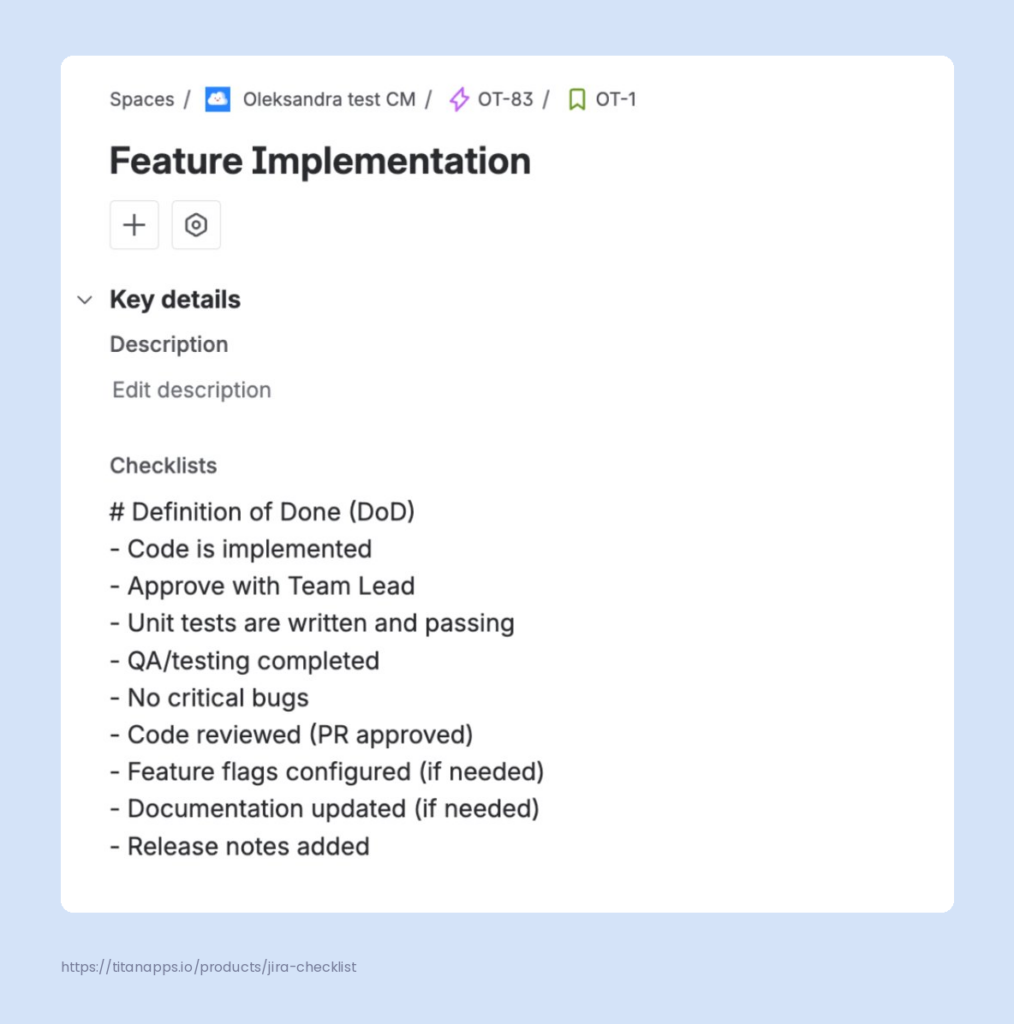
This means you can ask your AI assistant something like: “Give me a summary of what my team worked on last week, including checklists.” The AI tool will retrieve the work item data and the checklist content from the custom field, then summarize both.
Note
Smart Checklist is a process management solution that allows you to break down complex processes into actionable ToDos without subtask overhead. You can save checklists as templates to streamline recurring tasks and automatically add and update checklists to save your time
What Is the Difference Between Jira MCP and Rovo?
Despite the similarity in naming, the Rovo MCP Server is not the same thing as Rovo. This is a common point of confusion, so let’s clarify:
- The MCP server is an integration layer. It connects external AI apps to Atlassian data. It does not contain an AI model. It acts as a bridge between your chosen AI apps and Jira.
- Rovo, on the other hand, is Atlassian’s own AI product. It includes AI-powered search, chat, agents, and a studio for building custom agents. Rovo runs inside Atlassian products and via a browser extension. It routes to multiple AI models, and this process is managed by Atlassian.
The MCP server does use some of Rovo’s search and fetch capabilities. But the distinction is clear: the Rovo MCP Server gives your external AI assistant access to your Atlassian data. Rovo gives you a built-in AI experience within the Atlassian ecosystem.
Here’s a table summarizing these differences in a nutshell:
| Rovo MCP Server | Rovo | |
|---|---|---|
| What it is | Integration layer / connector | Atlassian's AI product |
| Where it runs | In external AI tools (Claude, ChatGPT, VS Code, etc.) | Inside Atlassian products + browser extension |
| AI model | Uses whatever model the connected client runs | Routes to multiple models; the routing is managed by Atlassian |
| Core function | Connects AI tools to Atlassian data (supported apps) | AI search, chat, agents, studio across Atlassian |
| Who controls the AI | You choose the AI client and model | Atlassian manages the AI experience |
| When to use | You already use an external AI tool and want it to read and write Jira data directly. You want full control over which AI model processes your data. | You want a built-in AI experience across Atlassian products without configuring external tools. You need Atlassian-managed AI agents that run inside Jira workflows. |
How Jira MCP Fits into the Future of AI-Assisted Project Management
Jira MCP is still a relatively new technology, but the direction is clear. MCP is an open standard governed by the Agentic AI Foundation, a directed fund under the Linux Foundation. This organization is backed by Anthropic, Block, OpenAI, Google, Microsoft, AWS, Bloomberg, and Cloudflare. MCP is already being used by all major AI companies. From its side, Atlassian is actively expanding the Rovo MCP Server’s functionality and its ecosystem of connectors. AI agents in Jira can already be assigned to Jira projects and execute tasks within workflows autonomously. As large language models and AI systems improve, the range of work that teams can delegate through MCP will only grow.
Frequently Asked Questions About Jira MCP
Can Jira MCP replace Jira Automation?
No – they serve different purposes. MCP is request-driven: an AI assistant sends a command, and the MCP server executes it. Jira Automation is event-driven: it triggers rules based on work item changes, schedules, or conditions.
MCP is best for ad-hoc and conversational tasks. Jira Automation is best for always-on background rules that run without human input. In practice, the two can complement each other. For example, you can use natural language to ask an AI tool to create new issues from a spec document, and Jira Automation can then handle the downstream workflow transitions automatically.
Is my Jira data sent to the AI model?
Yes. When you use MCP, the AI tool retrieves data from Jira through the MCP server and includes it in the conversation context. This means Jira ticket content, issue types, assignees, and other issue details are processed by the LLM you’re using. The MCP server itself respects your Jira permissions and access controls, but you should also review your AI provider’s data handling policies. Your Atlassian account credentials are never shared with the AI model – authentication is handled separately through OAuth or an API token.
Can multiple people on my team use the same MCP connection?
Each user authenticates individually with their own Atlassian account. The MCP server enforces per-user permissions, so each person only sees and modifies what their Jira access allows. There is no shared workspace or shared session. If a team member doesn’t have permission to view a Jira project, the AI tool connected through MCP won’t be able to access it on their behalf either.
Does Jira MCP work with Jira Data Center or only Jira Cloud?
The official Atlassian Rovo MCP Server supports Jira Cloud only. If your team runs Jira Data Center, you’ll need a community-built MCP server such as sooperset/mcp-atlassian. It supports both Cloud and Data Center deployments and can be installed locally or via Docker. These community servers connect to Jira through its REST API using an API token or personal access token for authentication.
What happens if the MCP server goes down?
If the Atlassian Rovo MCP Server experiences an outage, your AI tool won’t be able to reach Jira through MCP. However, Jira itself is not affected. All Jira issues, workflows, and automations continue to function normally. You can check the server status and report issues through the Atlassian Community forum.
How does Jira MCP handle dependencies and linked issues?
The MCP server can read and create issue links, so your AI tool can retrieve dependency information for any Jira issue. Through Teamwork Graph, the context extends further – the AI tool can surface linked pull requests, Confluence docs, and deployment status from connected third-party tools. This makes it possible to ask questions like “What’s blocking this issue?” and get a meaningful answer that spans multiple systems.
Do I need to set up environment variables or an env file to connect?
It depends on your setup. If you’re using a cloud-hosted AI tool like ChatGPT or Claude.ai, no local configuration is needed – you simply authenticate through your browser. If you’re connecting through a local MCP client or an IDE like VS Code or Cursor, you may need to add the server endpoint to a configuration file. Some community MCP servers require an env file with your Atlassian instance URL and API token.
Can I use Jira MCP with async workflows?
Yes. Since MCP supports both read and write operations, you can use it to manage async workflows end to end. For example, ask your AI assistant to summarize all open items in the current sprint, draft status updates, or create follow-up issues after a meeting. The AI tool can also retrieve JSON-formatted data from Jira’s API responses for more structured use cases, though most interactions happen through natural language.