





 Tools for Jira
 Tools for monday.com





Project requirements have a way of slipping through the cracks in Jira. They get scattered across work item descriptions, Confluence pages, and comments, so no one can see the full set in one place. Or they’re written down, then skipped as the work moves on, with nothing flagging that a requirement went unmet. To keep each detail visible, teams break the large requirement down into subtasks until the board becomes so cluttered that it gets overwhelming.
But Jira can handle requirements better than that. This guide walks through the full lifecycle: how to capture requirements, organize them, and verify they get done. It also covers when Jira is enough and when a dedicated tool earns its place.
Key Takeaways
- For most agile teams, Jira and Confluence cover requirements management end to end. A dedicated RM platform is only necessary when strict compliance requirements necessitate it.
- The requirements management in Jira covers five stages: define and document, group, review with the team, create issues (work items), and verify that requirements are met.
- Where you document a requirement depends on scope. Small requirements fit in the work item description; a large feature belongs on a Confluence page linked to work items.
- A checklist app like Smart Checklist for Jira gives each small requirement its own status without cluttering the board and can block a transition until mandatory items are checked. Thus, it adds per-item tracking and enforcement Jira lacks natively.
- Acceptance criteria and the definition of done are two common ways to confirm requirements are met, and both work well as checklists inside the work item.
What is Jira Requirements Management?
 Definition
Jira requirements management is the practice of defining, organizing, tracking, and verifying product requirements inside Jira. It uses work items with their links and parent-child relationships, custom fields, workflows, Confluence integration, and checklist apps to ensure the product aligns with user and business expectations.
The Requirements Lifecycle Inside Jira
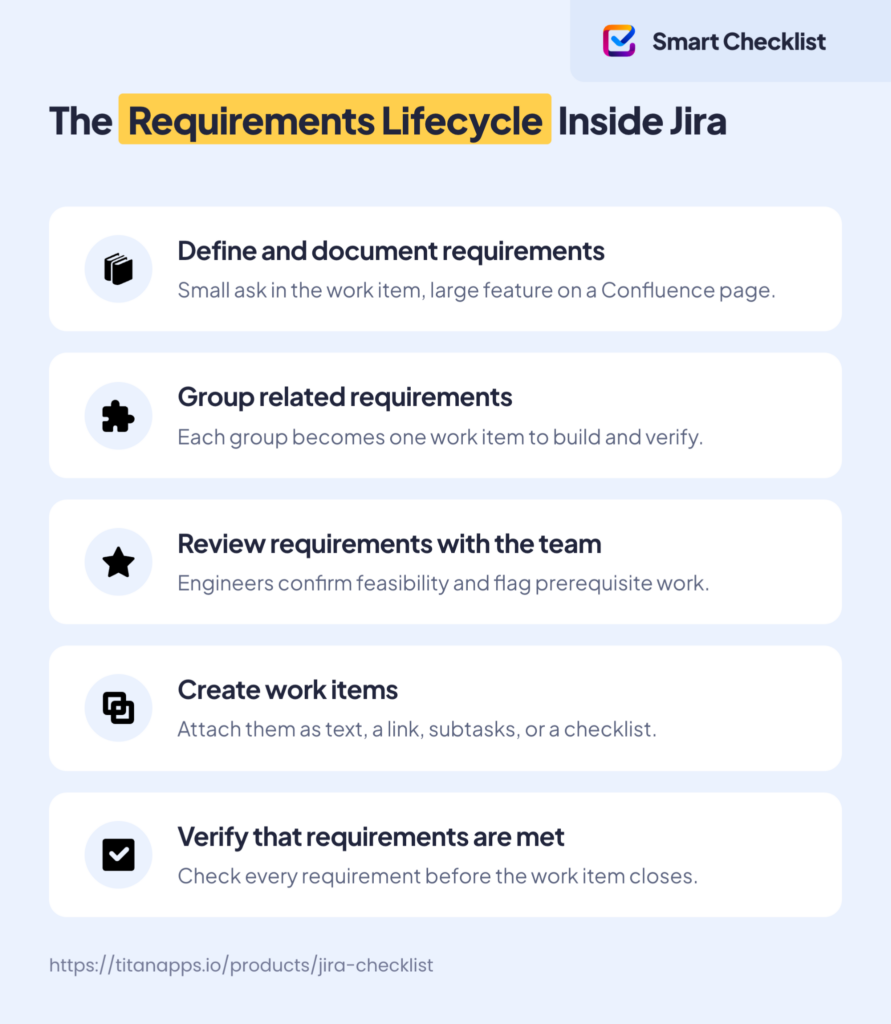
The requirements lifecycle in Atlassian Jira covers five stages: define and document requirements, group related requirements, review requirements with the team, create work items, and verify that requirements are met. Each stage maps to Jira work items, Confluence pages, or checklists, so requirements and delivery work stay in one system.
This lifecycle starts once you know roughly what you need to build. Getting to that point is discovery: collecting feedback, weighing ideas, and deciding what’s worth doing. You can do it in Jira or use a dedicated tool – Jira Product Discovery. This stage is often referred to as requirements gathering. However, customer feedback is not a requirement in itself – it is a prerequisite for creating one. This section covers what happens after.
Define and Document Requirements
Once you’ve collected feedback and mulled it over, you think about how to hand the work to engineers, so they build the right thing. For that, you need to define the requirements clearly and write them down.
Where you document the requirements depends on the scope of the work:
- A dedicated page works best for a large chunk of work that can be broken into several steps. Say you want to launch an MVP for a new capability. Rather than breaking everything down into tickets up front, you first draft all the requirements in a single document. Confluence suits this well – Atlassian even ships a Product Requirements Document (PRD) template for the purpose. From that page, you can create a Jira epic, then turn each requirement into a story that automatically links back to the epic (see more details in Use Jira and Confluence together). The benefit is that all requirements for the feature are in one place. You avoid clicking through ten work items later just to see the full picture.
- A Jira work item fits well for a small improvement when a dedicated page is overkill. For instance, the customer asks for a minor change and the requirements are light. In this case, you create the work item straight away and put the requirements inside it.
Group Related Requirements
A raw requirement list is not ready for delivery. Before you create work items, prioritize requirements and group together those that belong together. Each group can become a single work item for a developer to build and a tester to verify. A good group turns into a work item that isn’t blocked by missing pieces and delivers a clear result once it’s done.
Review Requirements with the Team
Even when defined, documented, and organized, the requirements are still your view of the work. The next step is requirements validation with the technical team who will actually bring them to life. The team may flag that a requirement isn’t feasible as written. Or they may point out work that needs to happen first, such as a database change, before a feature can be built.
Create Work Items
With the requirements grouped and validated by the team, you create Jira work items for different groups and add links between them to track dependencies. This is the point where requirements enter your delivery workflow.
You have different ways to attach the requirements to a work item:
- As text or a link to a Confluence page in the description. A simple text description is suitable for small changes or improvements. For complex undertakings, leave the requirements on the Confluence page and link the work item to it. On the upside, it is easy to manage, and all the requirements are in one place. On the downside, tracking progress and verifying no details were missed are challenging.
- As subtasks. To see progress clearly and ensure all requirements are met, you can break complex requirements into subtasks. This way, each component gets its own status, assignee, due date, and priority. However, it may turn your board into a wall of subtasks that is hard to manage. Besides, you don’t always need every requirement as a dedicated work item.
- As a checklist. Transform requirements into a checklist inside the work item. You get a per-item view without spawning a subtask for every line. Jira’s native description offers only basic checklist-style Action Items, so a fuller checklist needs an app. We come back to what that gives you when verifying the work.
For a small change, creating a work item manually won’t take long. For a large feature with many work items, AI can help. Atlassian’s Rovo can create work items and draft descriptions for you. You control the process, confirming actions and supplying required fields.
Verify That Requirements Are Met
Once the team starts working on the work items, you need to confirm each requirement was actually met. The way the requirements are integrated influences how you do it.
With the requirements in the work item description, you can’t see which parts are done. A linked Confluence page lives outside the work item. Completion status tracked there sits on the page, not on the work item itself, so the team doesn’t see it inline where they’re doing the work. In neither case is the requirement’s status tied to the workflow, so nothing prevents the work item from reaching Done while the requirement remains unmet. Decomposing requirements into subtasks, as we mentioned earlier, is a way out, but it adds management overhead.
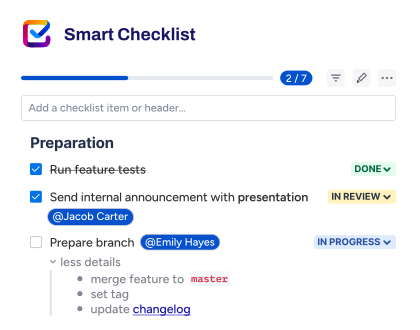
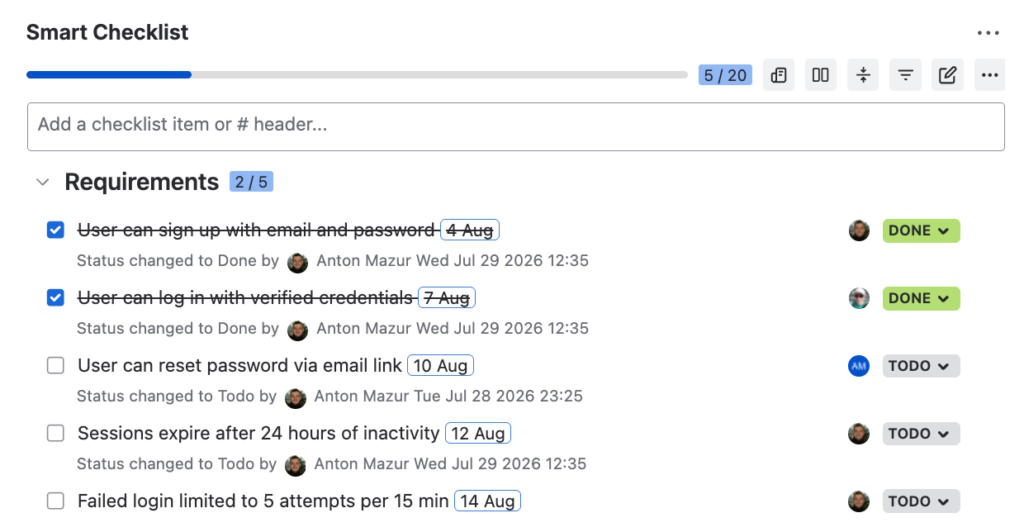
A checklist app closes the gaps without cluttering your Jira board. Smart Checklist for Jira gives each requirement its own status, so you see which are done and which are still open. You can also make items mandatory and add a workflow validator that blocks the transition to another status until they’re checked.
A checklist is a natural home for both common ways to confirm requirements are met:
- Acceptance criteria check whether a single user story does what it should for the user. They are per-story and testable, written so the product owner, developers, and QA agree on what “good” looks like. For how to write them in Given-When-Then or checklist form, and how to enforce them with custom dev and QA statuses, read our full guide on acceptance criteria in Jira.
- The definition of done checks whether a work item clears the team’s shared quality bar, the same for every item. It usually covers code review, tests, and documentation. For a reusable DoD checklist template and a step-by-step setup with Automation for Jira and workflow validators, see our guide on the definition of done in Jira.
When Jira is Enough, and When You Need a Full RM Platform
For most agile teams, Jira offers sufficient capabilities for requirements management. A dedicated RM platform earns its place only when regulation forces it. The table below shows the possible setups and what pushes a team from one to the next.
| Approach | Best for | Requirements traceability | Enforcement | When to move up |
|---|---|---|---|---|
| Jira + Confluence | Non-regulated agile teams | Delivery alignment: version history shows what changed and who changed it | None at the item level | You need to stop work items advancing until requirements are checked |
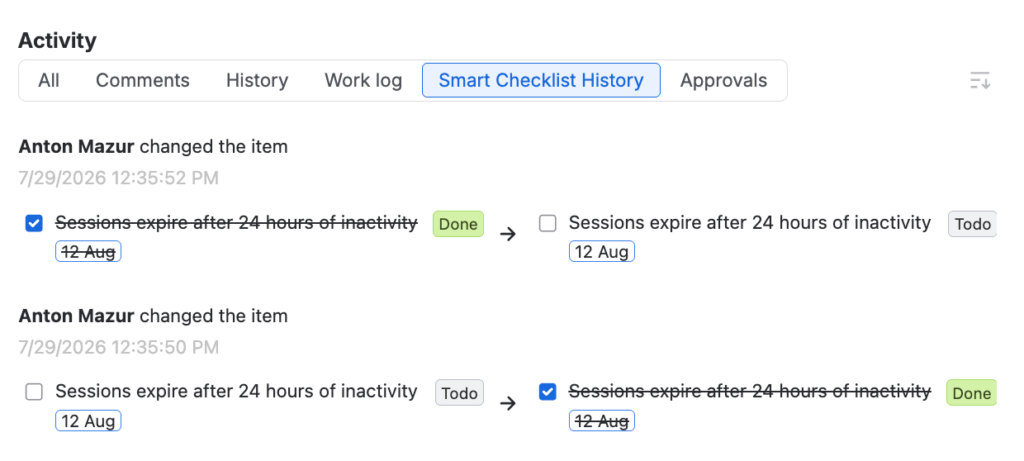
| Jira + Smart Checklist | Teams needing per-item tracking and an audit trail, but without a separate platform | Per-item history: who completed or changed each requirement, and when | Mandatory items block a transition until they're checked | You want requirements tracked as linked artifacts in Jira, with traceability matrices and coverage across tests |
| Jira + a requirements management app | Teams wanting RM structure inside Jira | Traceability matrices and coverage linking requirements to test cases and work items; requirements baselines on some apps | Requirement lifecycle states, including review and approval on some apps | You need formal baselines, electronic signatures, or standards certification |
| Dedicated RM platform | Regulated product development (medtech, automotive, aerospace) | End-to-end traceability with impact analysis across requirements, tests, and risks | Formal, gated approvals and locked baselines | — |
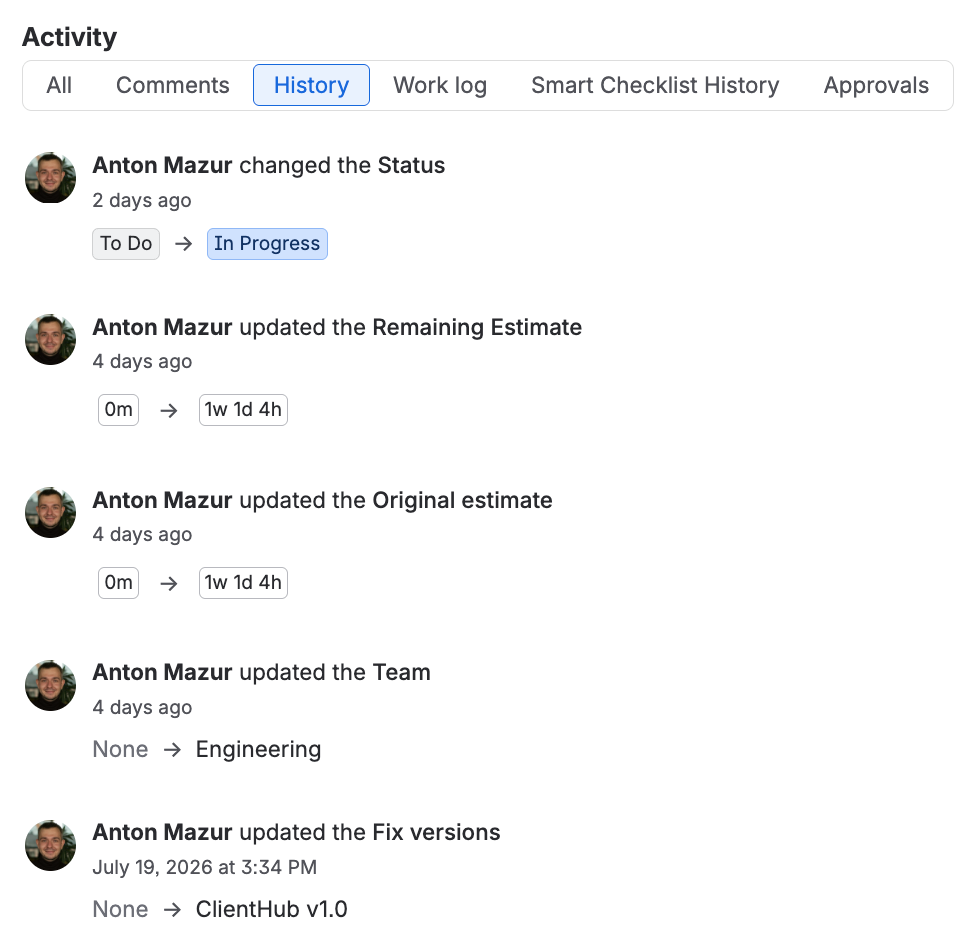
For a non-regulated agile team with delivery alignment in mind, Jira and Confluence cover the full lifecycle. Requirements live next to the work they generate. The team can see them, and version history in both tools shows what changed and who changed it.
Smart Checklist for Jira adds enforcement capabilities with mandatory items that gate work item transitions. Also, it boosts traceability by providing a per-item history of who completed what and when.
Some teams model requirements as a dedicated work type (Jira issue type) and layer a Marketplace RM app on top for traceability and coverage. Modeling requirements as their own work type lets each requirement link to the stories and tests that implement and verify it. It’s a heavier setup, and whether it’s worth it depends on how much formal coverage reporting you need.
However, even this hybrid approach doesn’t change the fact that Jira was not intended to be a dedicated requirements management tool. Regulated product development has to prove conformance against formal standards, with baselines, electronic signatures, and audit-ready traceability that updates as requirements change. If your work carries those obligations, a purpose-built platform is worth the management overhead and extra cost. For a comparison of the main options and where each fits, see our guide to the best requirements management tools for 2026.
Managing Requirements in Jira: Wrap-Up
In Agile project management, requirements management often comes down to Jira Cloud and Confluence. Requirements live within Jira work items, closely intertwined with delivery. Small requirements are usually captured and documented within the work item description, while larger features call for a Confluence document, checklists on the work items, or both. Checklists help boost requirement traceability and enforcement.
Requirements management apps extend Jira further, adding traditional RM capabilities such as traceability matrices and baselines. Organizations with strict compliance needs, though, are better off with a standalone RM platform. Such a tool lets them pass an audit against a specific standard, maintain traceability across many tools, manage requirements at scale, run formal change control, and trace requirements to risks for safety certification.
Frequently Asked Questions About Requirements Management in Jira
What types of requirements can I manage in Jira?
You can manage most kinds of requirements in Jira: business, functional, non-functional, and technical. The way you do it depends not on the type of requirement, but on scope and how much traceability you need. Short requirements can live as text in a work item description. A larger set can sit on a linked Confluence page. Individual requirements can become checklist items inside a work item, each with its own status. And requirements that need to be tracked as separate artifacts can be modeled as their own work type.
How to gather requirements in Jira?
Jira can support the whole path, from early feedback to documented requirements. You can collect feedback and discovery notes in Jira itself, though a dedicated tool like Jira Product Discovery is better equipped to describe and prioritize ideas and to support high-level roadmapping. In requirements management, Jira comes into play when you turn feedback into actual requirements. For a small change, create the work item and write the requirements into its description. For a larger feature, draft the full set on a Confluence page first, then link that page to the Jira work items. If you want each requirement tracked and verified individually, add them as checklist items within the work item.
How can I integrate Jira with other tools for effective requirements management?
For most teams, the key integration is between Jira and Confluence, and it is built in. You document requirements on a Confluence page, then link that page to Jira work items. Atlassian Marketplace can extend Jira’s capabilities. A checklist app like Smart Checklist for Jira adds per-item tracking and can enforce completion when paired with a workflow validator. Requirements management apps add capabilities usually associated with RM platforms, such as traceability matrices, baselines, and impact analysis. For more comprehensive needs, platforms like Jama Connect, Siemens Polarion, and IBM DOORS Next integrate with Jira via dedicated connectors, so requirements live on the platform while delivery stays in Jira.