





 Tools for Jira
 Tools for monday.com





Somewhere in your company, there’s a spreadsheet with feature ideas that nobody has opened since spring. Every product team has one, and every product team knows it’s not a system; it’s a graveyard. Atlassian’s answer to this problem is Jira Product Discovery, a tool made for the messy stage before the roadmap takes shape.
This guide is for PMs who are exploring Jira Product Discovery or getting their first project off the ground in it. By the end, you’ll know how to set up JPD, how its key features work, and whether it fits your team better than the alternatives.
TL;DR: Key Takeaways
- JPD is a purpose-built app for prioritization and roadmapping. It is available on Cloud only
- Ideas in JPD work as structured work items with various fields, custom prioritization formulas, and multiple view types
- The two-way Jira integration links JPD ideas to Jira epics and issues in real-time, connecting discovery to software development
- Pricing starts free for up to 3 creators with unlimited contributors (the latter have limited editing access). There are also several paid plans for larger teams, with prices starting from ~$10/creator/mo
- JPD projects are team-managed only, meaning each space is self-contained
- JPD does not walk you through the discovery process itself. You can use our free Product Discovery Checklist template to run this process consistently
First Things First: What Is Jira Product Discovery? Definition and Context
 Definition
Jira Product Discovery is a prioritization and roadmapping tool built for product teams in Jira Cloud. It helps product managers organize ideas, attach supporting insights, score them against custom criteria, and share roadmaps with stakeholders
Think of it this way. Jira Software is where committed work gets tracked and shipped. JPD is where uncommitted work lives before it earns a spot on the roadmap. That includes product opportunities, half-formed ideas, feature requests from customers, and internal suggestions from sales or support.
Here’s an example: let’s say your sales team hears the same feature request from three prospects in a week. In the past, someone might mention it in a Slack thread and forget about it. With Jira Product Discovery, that feedback becomes an insight attached to an idea. The idea gets scored against other opportunities using your prioritization framework. If it makes the cut, it moves to a roadmap and gets linked to a Jira epic for engineering to pick up.
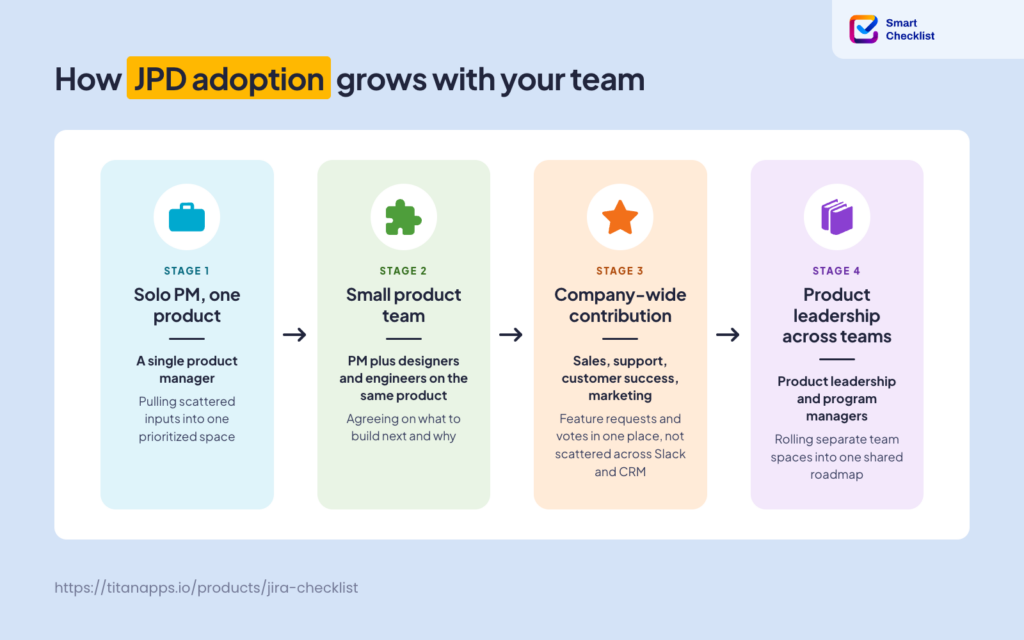
Jira Product Discovery can be used daily by people holding different roles:
- Product managers and product owners – they typically own the space, run prioritization, and build the roadmap
- Sales, support, marketing, and others – people from various teams can add customer insights, vote on ideas, and submit feature requests
- Engineering team – they can collaborate on ideas and estimate their feasibility before new ideas move to the roadmap
- Executives and other stakeholders – they often view shared roadmaps and collaborate on different views
Let’s explore in more detail why teams use this platform.
The 5 Top Use Cases For Working in Jira Product Discovery
According to Atlassian’s State of Product 2026 Report, 84% of product teams are concerned the products they’re currently working on won’t be successful in the market. And CB Insights’ Top 9 Reasons Startups Fail report, published in March 2026, found that poor product-market fit was among the primary reasons for failure in 43% of cases. Both point to the same gap. Teams often ship without enough evidence that the market wants what they’re building.
Jira Product Discovery helps teams tackle that problem. It provides a shared space to organize inputs from research, customers, sales, and support in one place. Product teams turn to JPD when spreadsheets, sticky notes, and scattered docs stop scaling. It helps you keep track of all valuable inputs and accumulate meaningful context, where everyone can access it and collaborate on it. That foundation is what helps you decide what’s worth building, and whether the market will actually want it.
Here are the most common use cases that Jira Product Discovery is used for:
- Shaping a new product vision from raw market signals. Product managers gather user interviews, competitor teardowns, sales call notes, and analytics into one JPD space. Over time, patterns start emerging. The vision takes shape as a working set of prioritized ideas with evidence attached, not as a static strategy doc.
- Running quarterly and annual roadmap planning. When a team plans the next quarter or year, Jira Product Discovery becomes the working canvas for that conversation. Product managers pull up the current pool of ideas, sort them by prioritization score, weigh trade-offs against capacity and goals, and decide which opportunities make the cut. The output is a set of commitments organized as Now, Next, and Later, ready to share with stakeholders and hand off to engineering.
- Managing a company-wide intake process for feature requests. Sales, support, and customer success surface feature requests every week. Without a shared intake process, that signal gets lost in Slack threads and CRM notes. Product teams use JPD to route everything into one structured backlog, where requests get logged, scored, and either promoted to the roadmap or archived.
- Building the business case for what to build and what to skip. Defending priorities to leadership takes up a large share of a PM’s time. JPD gives them a shared scoring model and an evidence trail. When someone asks “why are we not building X,” the PM can pull up the score and the customer feedback behind the call.
- Coordinating discovery across multiple product teams. Larger organizations run JPD Premium as a shared layer above multiple product teams. Program managers set up global fields so different teams score ideas on the same criteria. Cross-project roadmap views aggregate initiatives from each team’s space into a portfolio roadmap for leadership, while each team keeps its own space for detailed work.
The Key Jira Product Discovery Features That Can Be Useful To Your Team
Ideas as Structured Work Items
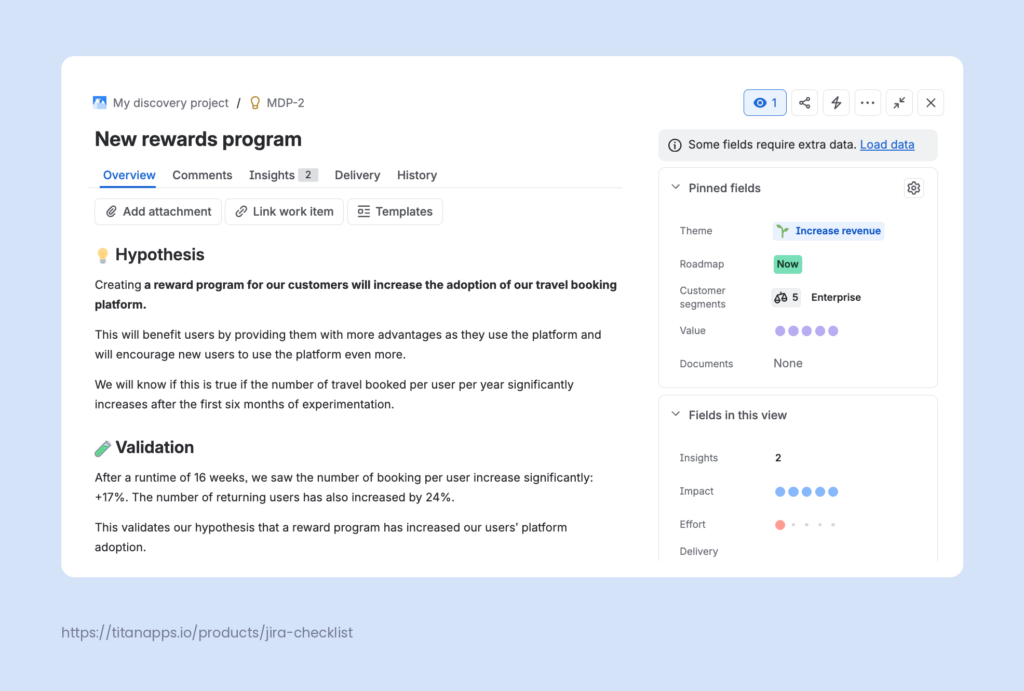
In JPD, every idea is a separate work item with its own dedicated space. Ideas hold a description, comments, insights, votes, delivery links, and any custom fields you define. This structure matters because it turns loose thoughts into something you can filter, sort, prioritize, and act on.
You can create ideas from several entry points:
- The Create button inside JPD
- Directly in any view (list, board, matrix, or timeline)
- From Slack messages via the Slack integration
- From Jira Service Management requests
- Through the JPD Chrome extension while browsing user feedback online
Ideas can be merged when they overlap, archived when they lose relevance, and restored later if the market shifts. They are the atomic unit of your discovery space.
Custom Fields and Prioritization Formulas
JPD gives you two categories of fields. There are built-in system fields like Assignee, Comments, and Delivery progress, and you can add custom fields you choose or create yourself. For example, Impact, Effort, Confidence, Goals, or Reach.
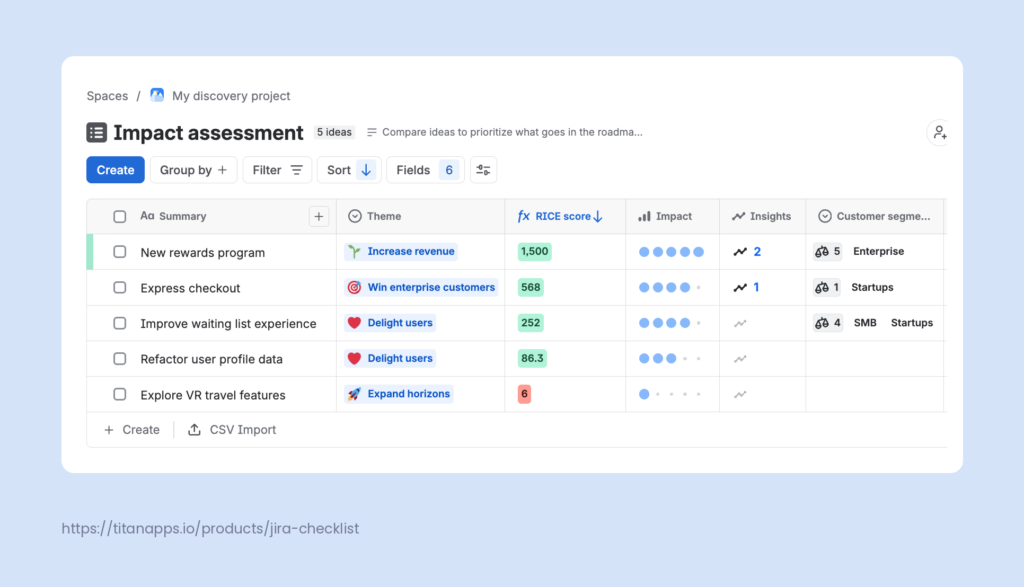
You can use custom prioritization formulas that let you calculate a score from other fields. There are three options:
- Weighted score – normalizes and weights inputs across all ideas in your project.
- Roll up – sums values from other fields, like the number of insights plus the number of votes on an idea.
- Write your own – uses a simple expression language for formulas like (Reach * Impact * Confidence) / Effort for RICE scoring.
This helps you prioritize ideas based on your custom criteria. According to Atlassian’s State of Product 2026 Report, “Nearly 40% of respondents listed prioritizing features as their most significant challenge.” Custom fields and formulas replace subjective debates with a shared scoring model everyone can see and challenge.
Custom Views for Different Audiences
Different stakeholders need different views of the same information. Executives want strategic context, while engineers need delivery detail, and product managers need to compare trade-offs. Jira Product Discovery allows you to create custom views for various audiences.
It supports four view types, and you can create as many of each as you need:
- List view organizes ideas as a spreadsheet-style list with sortable and filterable columns. Best for backlog grooming and detailed idea reviews
- Board view / roadmap view groups ideas by any field into columns. Best for Now/Next/Later product roadmaps and team-specific views
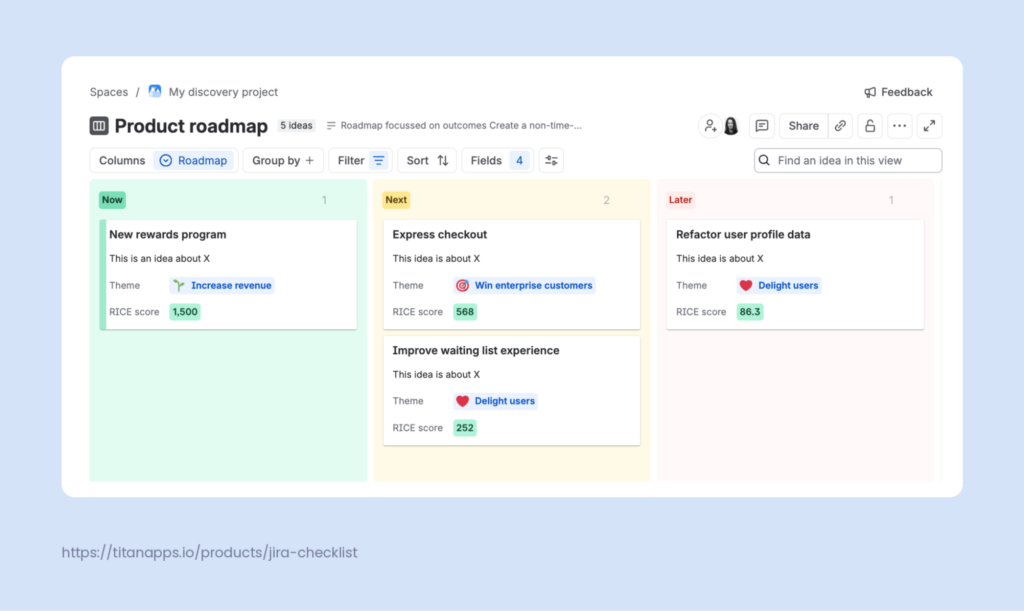
- Matrix view plots two fields on X and Y axes, such as Impact vs Effort. Best for prioritization workshops and identifying quick wins
- Timeline view shows ideas across weeks, months, or quarters. Best for sharing rough dates with leadership
You can publish views externally for stakeholders, share them internally with your team for collaboration, or export data to CSV, Excel, and Google Sheets.
Insights: Attaching Customer Feedback to Ideas
Your team can have many ideas, but it’s important to ground them in something. In Jira Product Discovery, each insight is a piece of data attached to an idea. This can be customer quotes from user interviews, support ticket links, Slack messages from sales, product analytics dashboards, or market research reports.
Insights can be added through the same channels as ideas, plus third-party tools like UserTesting and Salesforce. Each insight keeps its original source link and attribution, so anyone can trace a claim back to the customer, ticket, or conversation it came from.
Two things make insights especially useful during prioritization. First, one insight can be linked to multiple ideas, which matters when a single piece of feedback touches several opportunities. Second, JPD counts insights per idea automatically. That count works as a lightweight signal of demand. Sort your backlog by insight count and the loudest opportunities float to the top.
Two-Way Sync With Jira Software
Once an idea is prioritized, you can open its Delivery tab and either create a new Jira work item or link it to existing ones. Here’s how this works:
- All the context travels with the idea when you create a new work item from it. That includes the idea description, linked insights, and other information. As a result, engineers don’t just see what to build; they can also see the reasoning, customer evidence, and the goal behind it.
- The link between the idea and the work item stays live, and that matters because ideas don’t stop evolving once engineering starts. From JPD, product managers can see the delivery status of the connected epics and tasks. From Jira Software, engineers can jump back to the idea to check the latest state.
- Progress in Jira automatically syncs with Jira Product Discovery so that you can track it in the idea view, on the JPD board, and in other views. You can choose work item count or story points as the estimation basis.
- One idea can be linked to multiple Jira epics across multiple Jira projects, which helps when a single opportunity spans several teams. Idea fields also show up inside Jira Plans, so program managers can see discovery context alongside delivery data during cross-team planning.
How to Get Started With Jira Product Discovery
Getting up and running takes about an hour if you already have a Jira Cloud account. Here is the sequence.
Create Your First JPD Project
Sign up for JPD from atlassian.com or add it to your existing Jira Cloud site. In your Jira instance, go to Projects > Create Project (+) and select the Product Discovery template.
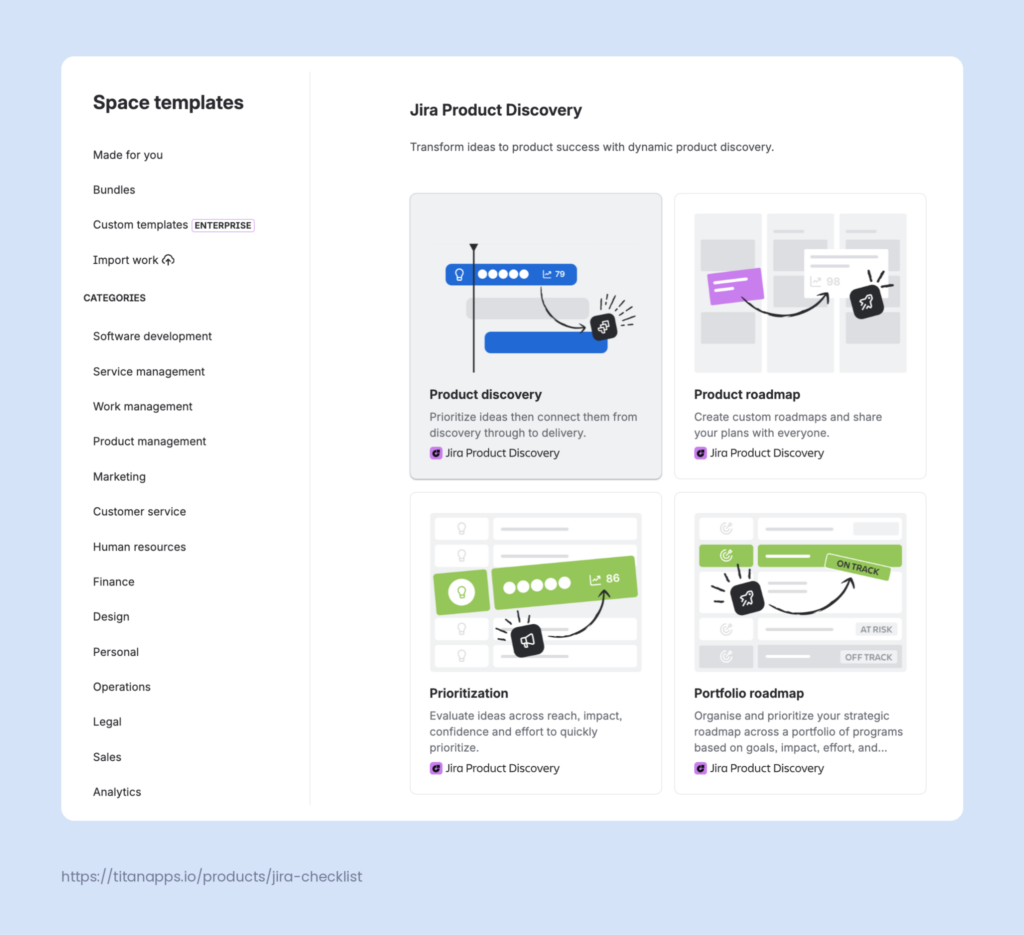
Please note that JPD projects are team-managed only. That means they are administered at the team level, and each space is self-contained. Configuration in one space does not affect others. This gives product teams autonomy, but it also requires some coordination when you set up JPD across multiple product lines.
Define Custom Fields and Prioritization Criteria
In addition to default fields, you will likely need your own custom ones to match how your team thinks about opportunities. It is recommended to start with 5 to 7 custom fields. If you have too many, this might overwhelm contributors and reduce adoption. Common custom fields include:
- Reach as a numeric field for how many customers an idea affects
- Business value as a rating for revenue or strategic weight
- Product area as a single-select for filtering by area of the product
- Customer segment as a multi-select for prioritizing by audience
Once your inputs are in place, you can create a custom formula field for your prioritization score. It can help you define the value of an idea based on multiple criteria.
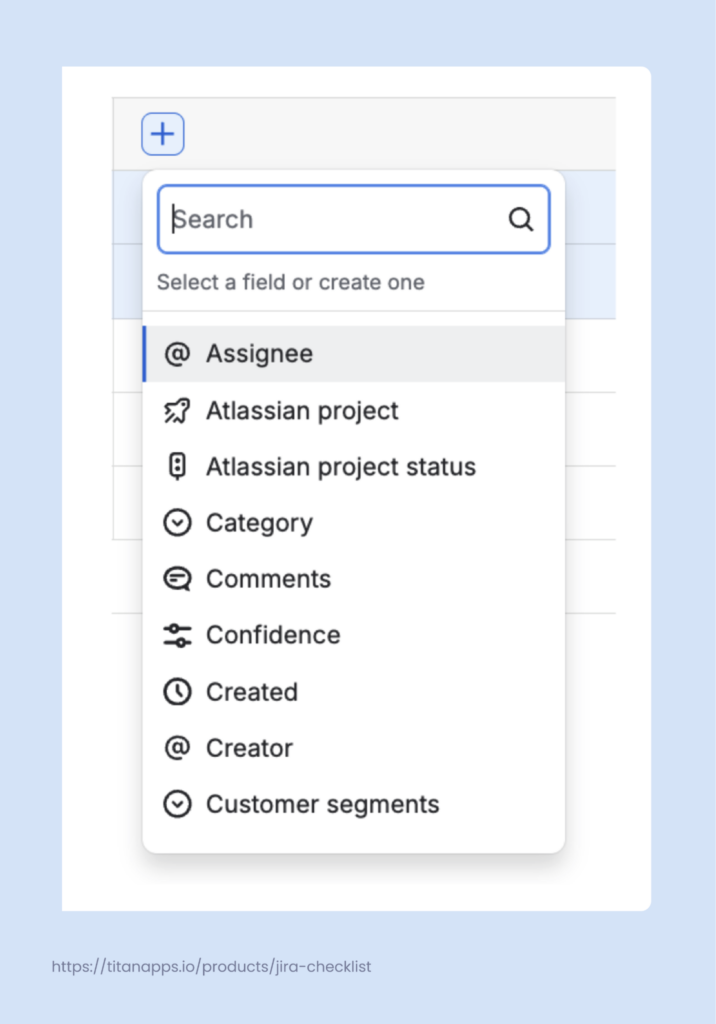
You can add new fields directly from the list view with your ideas. Just click the plus sign in the empty column and select the field you want to add. It’s also possible to create an entirely new field not listed in this drop-down menu. In this case, you will need to specify its type – for example, text, link, custom formula, and so on.
Add Ideas and Fill Them With Context
With your project structure and scoring criteria in place, the next step is populating the space with actual ideas.
Add ideas through whichever channel fits your team: the Create button inside JPD, directly in any view, from Slack, from Jira Service Management requests, or through the Chrome extension while browsing user feedback online. Larger teams often set up an intake form so anyone across the company can submit ideas without needing JPD access themselves.
Once an idea is created, fill it with context. Write a clear description of the problem or opportunity. Fill in the custom fields you defined earlier. Attach insights as evidence: customer quotes, support ticket links, sales notes, research findings, or analytics screenshots. The more evidence is collected for each idea, the more defensible your prioritization decisions become downstream.
Structured discovery work is what turns raw observations into that evidence. We share a free step-by-step checklist for it further down.
Here’s an example of an idea work item in Jira Product Discovery:
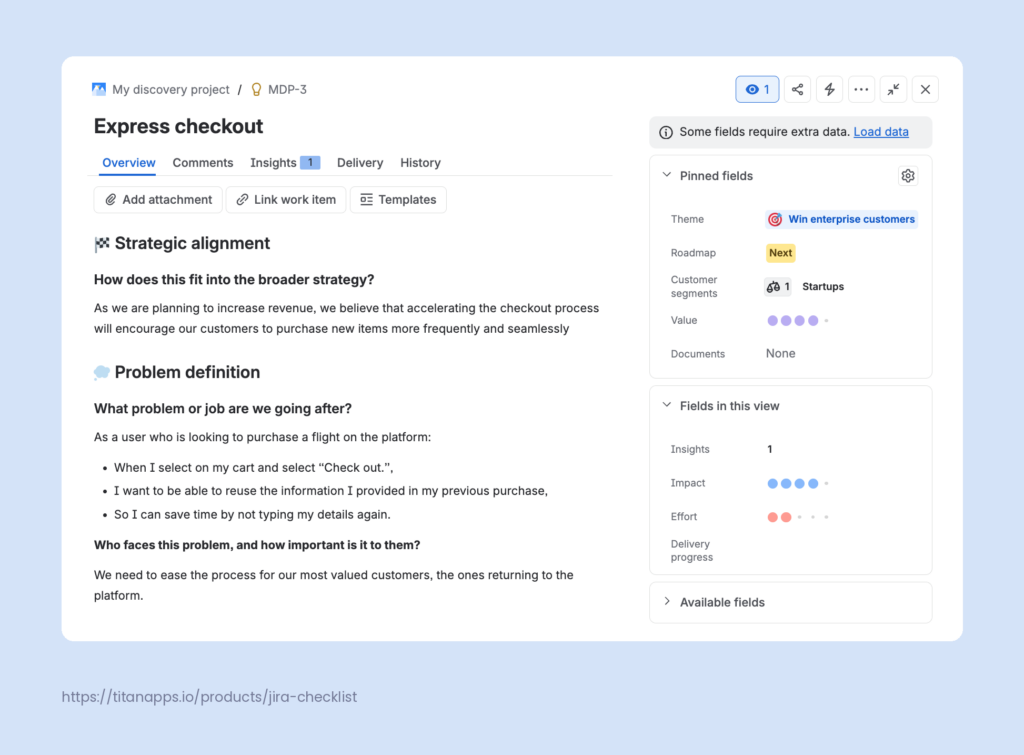
JPD offers various templates for idea work items. You can also create your own custom templates and reuse them for recurring idea types. The templates can be accessed directly from the Idea work item view.
Build Views for Product, Engineering, and Stakeholders
Prepare a set of views for the audiences you communicate with most:
- List view sorted by your prioritization score for internal backlog grooming
- Matrix view plotting Impact vs Effort for prioritization workshops
- Board view / roadmap view grouped by Now/Next/Later columns for engineering handoffs
- Timeline view for leadership updates
These views should be pre-configured out of the box. However, before presenting them to stakeholders, you will still need to work on them. Make sure that they contain the correct work items, filtered by the fields you need, and so on. All these views are live and will be updated in real time as your work items change.
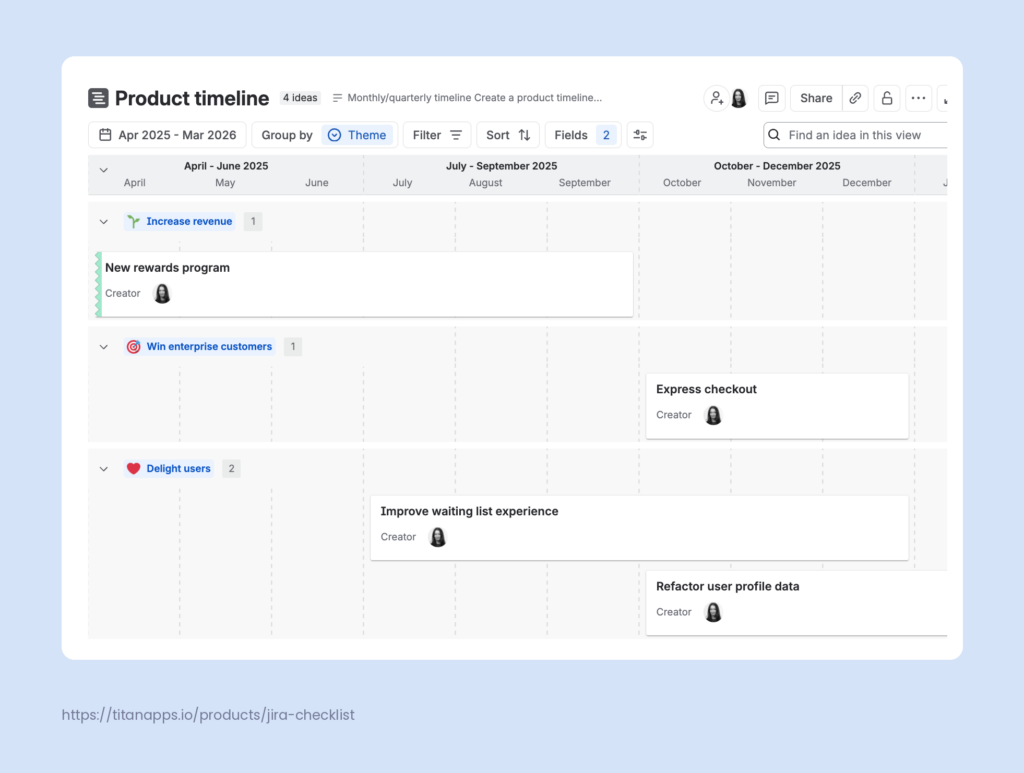
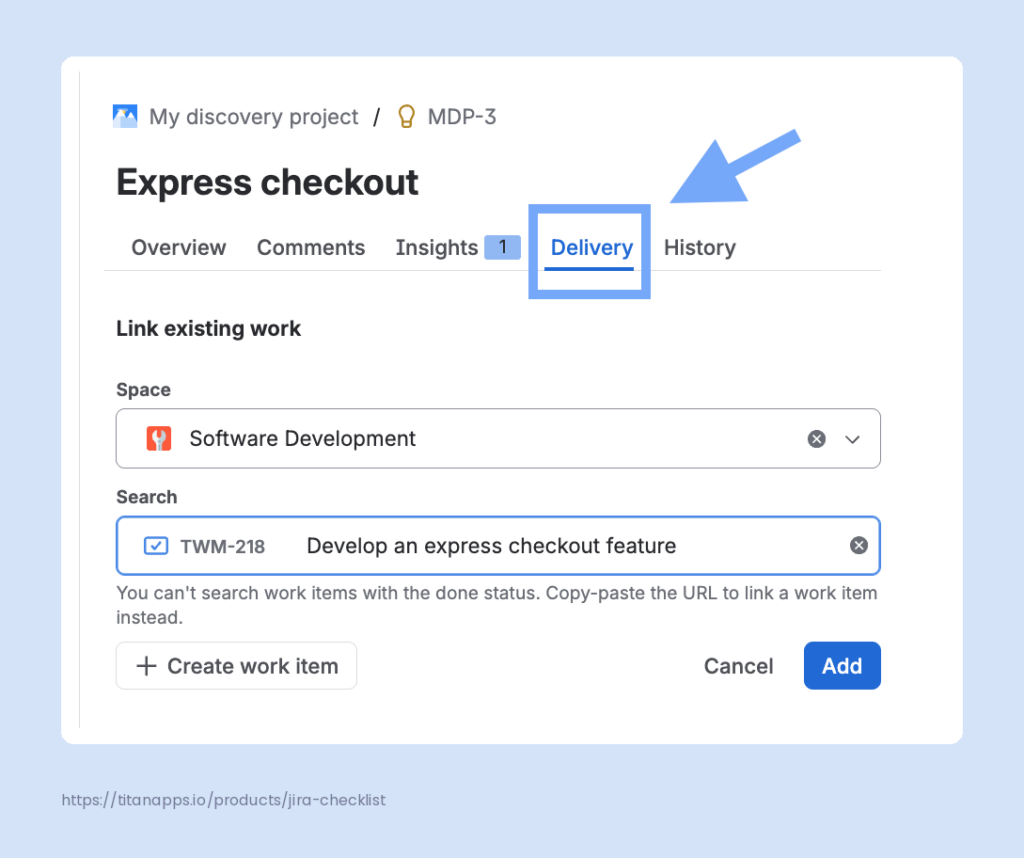
Connect JPD Ideas to Delivery Work in Jira Software
Once an idea is ready for engineering, open its Delivery tab. Select “Create work item” to spin up a new Jira epic or task. Or select “Link a Jira work item” to connect an existing one. Check the option to embed the idea description and fields into the new work item, so engineers get full context.
The delivery progress bar starts tracking as soon as the linked work moves through Jira Software. As a result, product teams then get real-time visibility from ideation to shipping. The information between your Jira project and Jira product discovery will be synchronized in real time.
A Free Product Discovery Template for Jira – Step-by-Step Checklist
Jira Product Discovery gives you a place to capture and score ideas. However, it does not walk you through the actual discovery work behind them. You still need to interview users, review data, test simple concepts, and turn observations into evidence. Without a clear and consistent process for that, discovery can become chaotic and not scalable.
The TitanApps team has prepared this step-by-step discovery checklist to help our product team run more structured discoveries. You can use it for free to document your process and work on it in Jira.
Note
This checklist template was created with the help of Smart Checklist for Jira, which allows you to add feature-rich checklists to any work items in Jira Software and Jira Service Management.
This product discovery checklist maps the process to five stages. These move from framing the problem through validating a solution with real users. Each stage groups a small set of concrete actions, so anyone opening the work item can see where they are and what to do next.
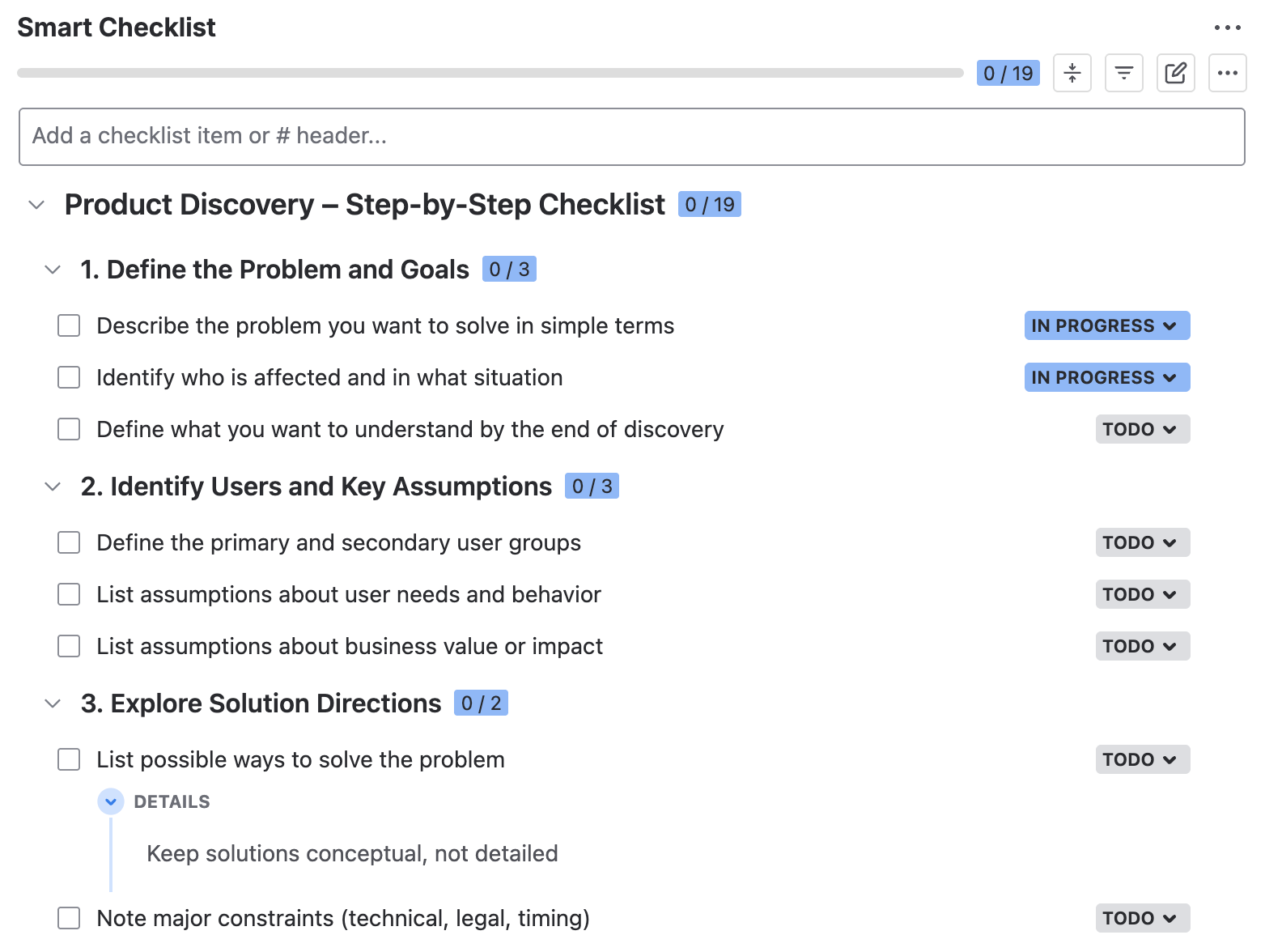
# Product Discovery – Step-by-Step Checklist
## 1. Define the Problem and Goals
- Describe the problem you want to solve in simple terms
- Identify who is affected and in what situation
- Define what you want to understand by the end of discovery
## 2. Identify Users and Key Assumptions
- Define the primary and secondary user groups
- List assumptions about user needs and behavior
- List assumptions about business value or impact
## 3. Explore Solution Directions
- List possible ways to solve the problem
> Keep solutions conceptual, not detailed
- Note major constraints (technical, legal, timing)
## 4. Run Discovery Activities and Gather Evidence
- Select discovery methods
> User interviews, desk research, data review, prototype feedback, etc.
- Prepare discussion guides, questions, or scenarios
- Run discovery sessions or research
- Analyze the results and adjust your solution based on your findings
- Define the next steps and owners
## 5. Validate your solution
- List the key risks and concerns
- Choose the validation method (prototype test, pilot, experiment)
- Create the simplest version of your product needed for testing
- Prepare realistic tasks users should complete
- Run validation sessions with the users and record results
- Analyze the outcomes and list required changes
# Product Discovery – Step-by-Step Checklist
## 1. Define the Problem and Goals
- Describe the problem you want to solve in simple terms
- Identify who is affected and in what situation
- Define what you want to understand by the end of discovery
## 2. Identify Users and Key Assumptions
- Define the primary and secondary user groups
- List assumptions about user needs and behavior
- List assumptions about business value or impact
## 3. Explore Solution Directions
- List possible ways to solve the problem
> Keep solutions conceptual, not detailed
- Note major constraints (technical, legal, timing)
## 4. Run Discovery Activities and Gather Evidence
- Select discovery methods
> User interviews, desk research, data review, prototype feedback, etc.
- Prepare discussion guides, questions, or scenarios
- Run discovery sessions or research
- Analyze the results and adjust your solution based on your findings
- Define the next steps and owners
## 5. Validate your solution
- List the key risks and concerns
- Choose the validation method (prototype test, pilot, experiment)
- Create the simplest version of your product needed for testing
- Prepare realistic tasks users should complete
- Run validation sessions with the users and record results
- Analyze the outcomes and list required changes
The template is designed to complement your work in Jira Product Discovery, not compete with it. JPD stays the home of the idea itself: the problem statement, the impact score, the customer signals, and the roadmap view. The checklist is where the discovery work behind that idea actually gets done. You can add the checklist to a companion research work item, linked to your idea in Jira Product Discovery.
To use this template, install Smart Checklist for Jira from the Atlassian Marketplace. Once installed, it becomes available on every work item across your Jira Software projects (spaces).
For more on this topic, please see our article about Jira Product Discovery Template.
How Smart Checklist Supports Product Discovery in Jira
Smart Checklist adds several practical features that help you organize your team’s work on the discovery process more efficiently and transparently:
- Assign checklist items – You can add assignees to separate checklist steps. This helps you organize the work of multiple people on the same process and creates visibility. Assignees can view all checklist items assigned to them on a dedicated tab.
- Set due dates and priorities – keep validation activities moving with granular per-item deadlines visible to everyone. This helps your teammates plan their work and ensure that they are not blocking anyone.
- Mark the key checklist items as mandatory and set up the validation step. Then, your teammates will not be able to move this work item to Done until all its mandatory steps are completed.
- Save the checklist as a reusable template – apply the same discovery process to every new idea worth investigating.
- Use built-in automation rules – you can apply the discovery checklist to new research work items automatically, based on work item type or other conditions. This can be done with Smart Checklist’s native functionality; no automation for Jira is needed.
- Add expandable info sections to items – you can include them into any checklist item. It can hold additional context, instructions, or links, and more.
- Use linked templates for enforced processes – a linked template stays connected to every work item using it. When you update the template, all connected work items receive the changes automatically. This keeps your discovery process consistent across teams.
An Overview of the Jira Product Discovery Pricing
Atlassian offers JPD on four plans: Free, Standard, Premium, and Enterprise. Using Jira Product Discovery does not require a Jira Software, Jira Service Management, or Jira Work Management subscription. It can run as a standalone product or alongside other Jira tools on the same Atlassian Cloud site.
Note
Billable users in JPD are called creators. They actively create and manage projects, ideas, fields, and views. Anyone else who contributes to a JPD project is a contributor. Contributors need a free Atlassian account but do not require a paid seat.
Community and Academic discounts are available, and billing runs on a monthly or annual cycle with a minimum term of one month.
Here’s how the four plans compare:
- Free Plan supports up to 3 creators, 2 GB of storage, and community support. It fits solo product managers or very small teams testing the tool. Contributors are still free to join and participate, although they will have limited editing rights. Contributors will need to have a free Atlassian account to collaborate in Jira Product Discovery.
- Standard Plan is intended for individual product teams that prioritize ideas and build roadmaps for a specific product or feature area. Monthly pricing starts at $10 per creator for teams of 1 to 25 creators, with per-creator rates decreasing at higher tiers. Annual pricing starts at $500 for up to 5 creators.
- Premium Plan targets product organizations operating at scale, with multiple product teams working across projects. It adds an aggregated view of roadmaps across projects and granular field-level and idea-level permissions. Premium comes with additional features for productivity, security, and reliability, along with SLA-backed support. Monthly pricing starts at $25 per creator for teams of 1 to 25 creators, while annual pricing starts at $1,250 for up to 5 creators.
- Enterprise Plan is designed for organizations with over 200 users. It adds support for multiple Jira Product Discovery sites, centralized access management with Atlassian Guard, and advanced analytics for custom reporting on discovery data. Pricing information is not public – it’s available on request from Atlassian Sales.
For more details, please see the official Jira Product Discovery pricing page.
Jira Product Discovery Alternatives
There are other platforms that cover roughly the same ground as JPD: idea capture, prioritization, and roadmap sharing. Some teams also assemble a similar workflow from tools they already have. The options below are worth considering if you are weighing JPD against the broader market or looking for a setup that fits your existing stack. Here are some of the top Jira Product Discovery alternatives worth taking a look at:
| Tool | Best fit | Prioritization | Customer feedback | Jira integration | Starting price |
|---|---|---|---|---|---|
| Jira Product Discovery | Product teams already on Jira Cloud who want ideation linked to delivery | Custom fields with weighted formulas | Insights: attach feedback from Chrome, Slack, email, and support tools to ideas | Native two-way sync between JPD ideas and Jira Software delivery tickets | Free for up to 3 creators; paid from ~$10/creator/mo |
| Productboard | Larger product orgs that need deep feedback aggregation across many channels | Custom scoring frameworks with weighted criteria | Deep aggregation from Zendesk, Intercom, Salesforce, Slack, and more; AI categorization | Two-way sync via connector | Free plan; paid from ~$19/maker/mo |
| Aha! | Enterprise product ops teams that want an end-to-end suite for strategy, roadmaps, and delivery | Custom scorecards across multiple frameworks | Public ideas portal where customers submit and vote on requests | Two-way sync via connector | From ~$59/user/mo |
| ProdPad | Teams that want product management best practices built into the interface | Impact and effort scoring, opinionated workflow | Feedback capture with automatic grouping around problems | Two-way sync via connector | Paid only; from $116 seat/month for the full access |
| Airfocus | Product teams that want flexible prioritization with feedback and roadmaps in one platform | Custom scoring frameworks; Priority Poker for group sessions | Pulls feedback from Intercom, Zendesk, Slack, and more. AI agent auto-links signals to opportunities | Two-way sync via connector | Paid only; pricing information on request only |
| Jira + Confluence | Teams that are already on Atlassian and don't have a budget for a dedicated product tool | Manual: custom fields, spreadsheets, or a dedicated Jira project | Manual capture in Confluence pages or Jira work items | Native integration | Free for up to 10 users on both; paid from ~$9.05/user/mo (Jira) + ~$5.70/user/mo (Confluence) |
Overall, Jira Product Discovery holds its ground on two fronts: cost and Atlassian integration. It has the most attractive pricing in this comparison, especially for teams that only need a few paid creators.
Now, let’s take a look at these alternatives in more detail.
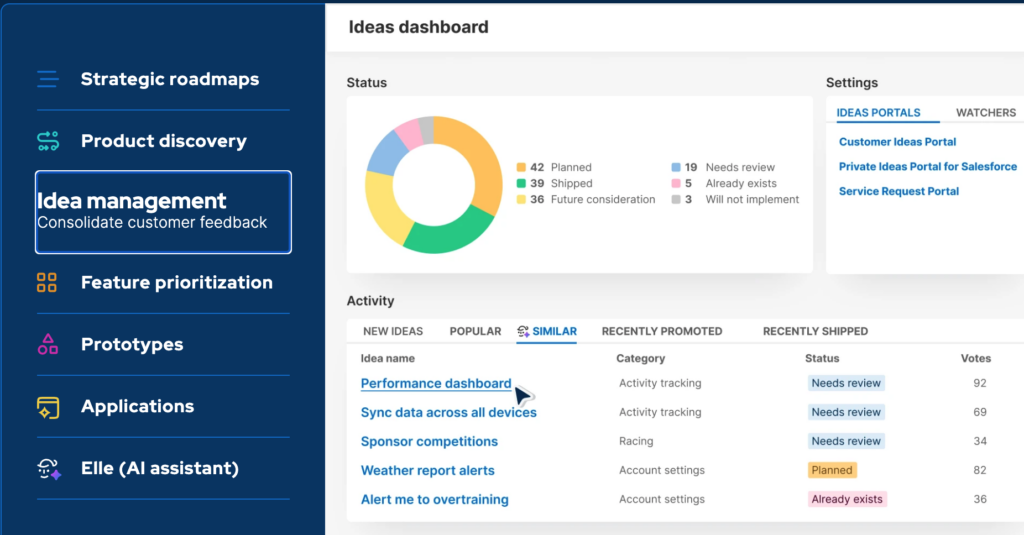
Aha!
Aha! offers a broader product management suite covering strategy, roadmapping, idea management, and engineering handoff. These live in separate but connected products: Aha! Roadmaps, Aha! Ideas, Aha! Develop, and others. Compared to JPD, it goes further in strategic planning features like goals, initiatives, and releases. It also includes a mature ideas portal that lets customers submit and vote on requests directly.
Aha! has a steeper learning curve and a much higher price point. Its scope can feel excessive for teams that only need lightweight idea capture and prioritization. It suits organizations with dedicated product ops teams that want an end-to-end suite rather than an ideation tool.
ProdPad
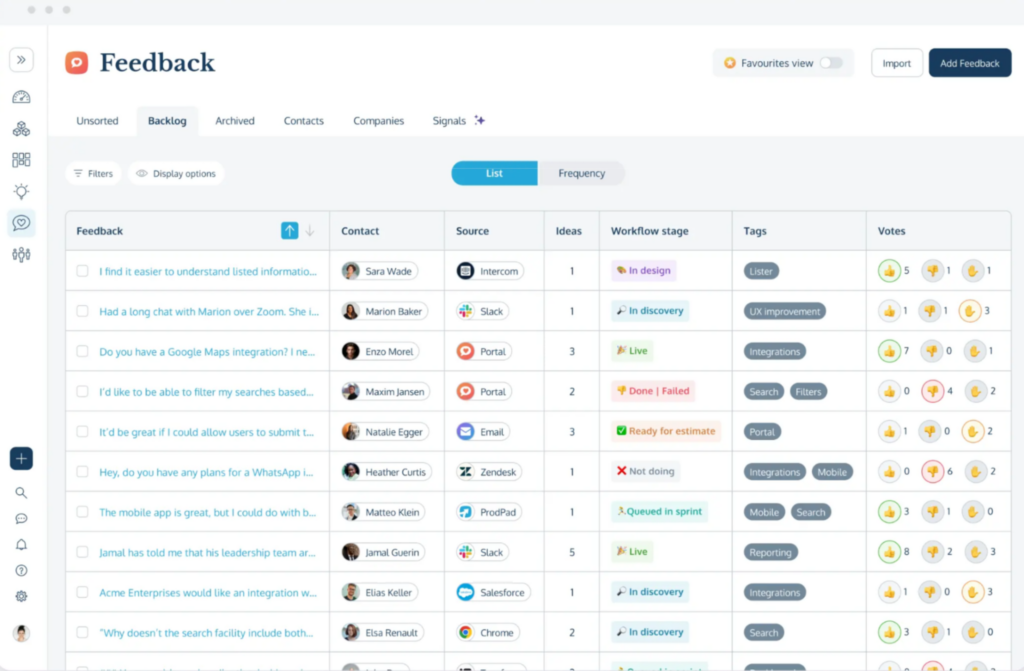
ProdPad is a standalone product management platform built around three connected areas: an idea backlog, a now-next-later roadmap, and a customer feedback inbox. (Please note that these three modules are priced separately). Ideas are captured with a problem statement, notes, and mockups, then scored on impact and effort to determine their position on the roadmap. Feedback from customers and internal teams can be attached to specific ideas, so the reasoning behind each priority stays visible.
Where Jira Product Discovery gives teams a blank canvas to define their own fields, views, and scoring formulas, ProdPad follows a more prescriptive structure. The workflow, roadmap format, and idea layout come predefined and are not as flexible to reconfigure. ProdPad integrates with Jira through a two-way sync, allowing you to connect ideas with delivery work.
Productboard
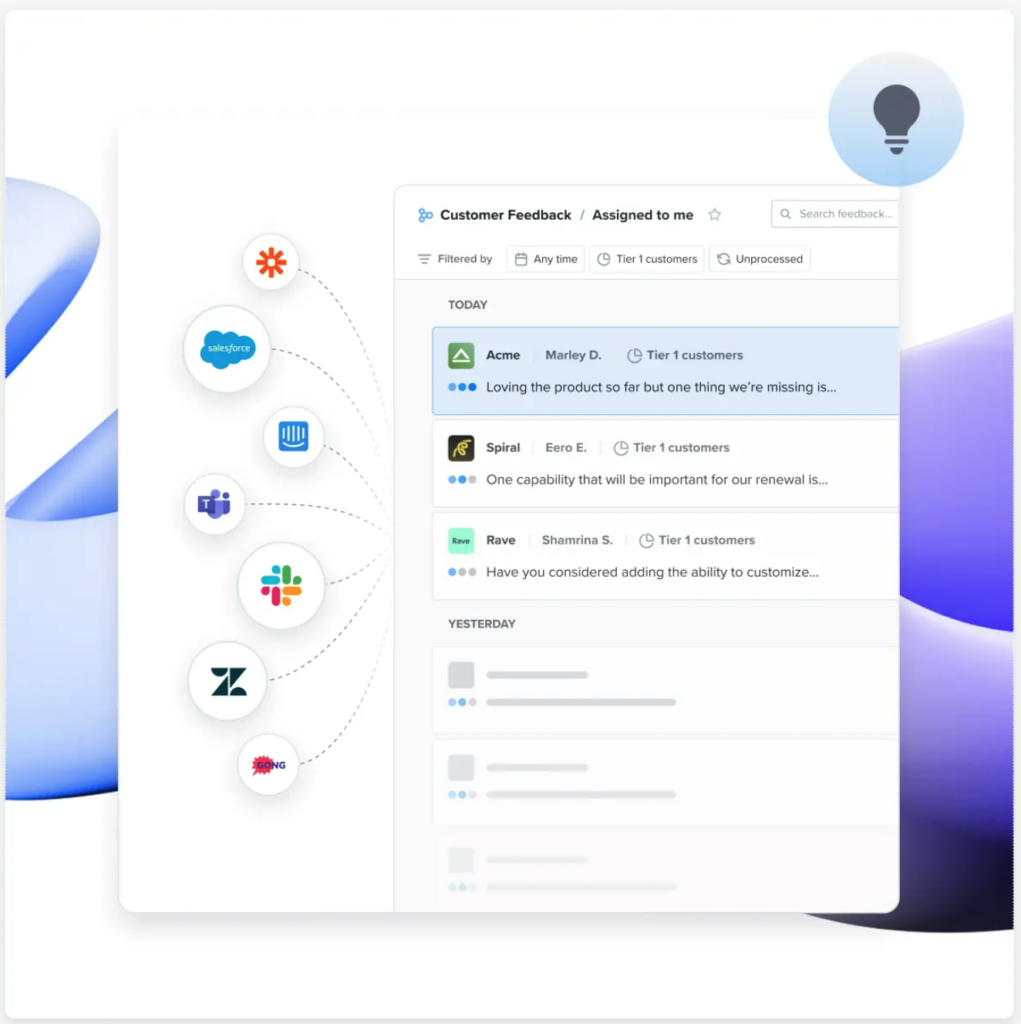
This product management platform has a set of core features that is similar to JPD’s. This includes idea capture, prioritization scoring, and roadmap views for different audiences.
The main difference is in the AI-powered feedback layer. Productboard’s AI agent, Spark, automatically links each piece of customer feedback to the relevant opportunity on your roadmap. Spark comes with every plan and can help you draft product briefs, summarize customer notes, and categorize insights. You can also create shared skills and add scheduled prompts for Spark to run automatically.
The platform offers a public-facing customer portal where users can submit requests, vote, and see the status of their feedback. Productboard’s pricing is higher than for Jira Product Discovery, but there is a generous free tier.
Airfocus
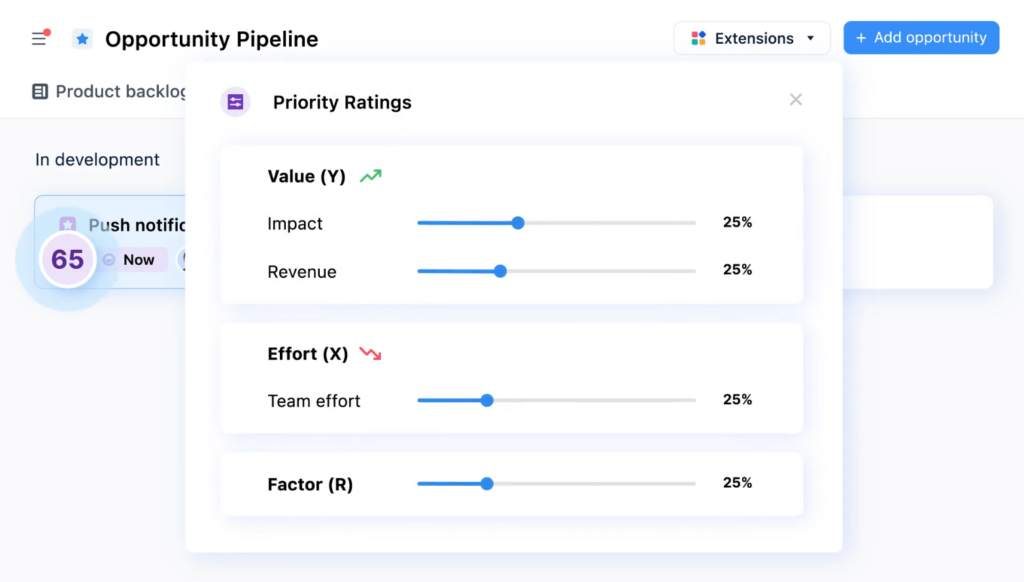
Airfocus is a product management platform, now part of Lucid, that combines prioritization, roadmaps, and customer feedback capture in one system. Ideas can be scored with RICE, weighted scoring, MoSCoW, or a custom framework the team defines. A feature called Priority Poker lets stakeholders score initiatives independently before discussing them as a group. Roadmaps come in multiple view types (timelines, Kanban boards, release plans, and now-next-later) and roll up into a portfolio view across teams.
That cross-team roadmap layer overlaps in part with Atlassian’s Jira Plans, which handles similar cross-project planning inside Jira Software. Where Airfocus goes further than both JPD and Jira Plans is on the AI side of feedback processing. Both JPD and Airfocus can pull signals from tools like Zendesk, Intercom, and Slack. But Airfocus uses AI to automatically link each piece of feedback to the relevant opportunity, while JPD leaves that linking to the user. It integrates with Jira for delivery handoff.
Jira Plus Confluence As an Alternative to Jira Product Discovery
Some product teams handle discovery and prioritization inside the Atlassian stack they already have, using Jira Software (or Jira Work Management) plus Confluence. The most common setup is a dedicated Jira project that acts as an idea backlog. It also has a custom work item type called “Idea” and custom fields for impact, effort, confidence, and a priority score.
In this setup, JQL filters and board configurations replace JPD’s built-in views. A Kanban board can show ideas by stage, and saved filters can produce sorted lists by score, theme, or source. Stakeholder roadmaps are handled inside the same Jira project, either as a Kanban board with Now, Next, and Later columns, or as the built-in Timeline view.
Confluence takes on the context layer. Teams use page templates for structured idea write-ups, Confluence Databases to maintain a shared idea register, and Confluence Whiteboards for visual prioritization exercises. When an idea is ready for development, its Jira work item is linked to a delivery epic in another project.
Compared to JPD, this setup takes more configuration and does not include weighted scoring formulas, matrix views, or customer feedback aggregation out of the box. The upside is that both tools are already in place and no new subscription is required.
Frequently Asked Questions About Jira Product Discovery
What Is the Difference Between Jira Product Discovery and Jira Software?
Jira Software tracks committed work like engineering tasks, bugs, and stories. Jira Product Discovery captures ideas and opportunities before they become committed work. JPD is for the “why” and “what to build next” phase. Jira Software is for the “how to build it” phase. Also, Jira Product Discovery projects are team-managed only, while Jira Software supports both team-managed and company-managed projects.
Can I Use Jira Product Discovery Without Jira Software?
Yes. JPD works as a standalone product for capturing and prioritizing ideas. You just lose the two-way sync between ideas and delivery work. Many teams start with JPD alone and add Jira Software later when discovery volume grows.
What Is Jira Product Discovery Used For?
Product teams use JPD to log and organize ideas, gather customer feedback as insights, prioritize opportunities using custom fields and formulas, build product roadmaps for different audiences, and hand off committed ideas to Jira Software for delivery.
Does Jira Product Discovery Support Roadmaps?
Yes. You can build roadmaps as a board or timeline view, publish them to external stakeholders, or share them internally for collaboration. Premium plans offer additional roadmap visibility across multiple product teams.
Is Jira Product Discovery Free?
Yes, it has a free tier for teams with up to 3 creators. The Free plan includes 2 GB of storage, unlimited contributors, and community support. Above 3 creators, you will need a paid plan.
How Much Does Jira Product Discovery Cost?
Standard plan costs start at $10 per creator per month, and Premium starts at $25 per creator per month. The exact price depends on how many users you have. Enterprise pricing is annual and requires contacting Atlassian. Annual subscriptions save up to 17%.
How Do You Use Jira Product Discovery?
The core workflow is: capture ideas, attach insights as evidence, score ideas using custom fields and formulas, prioritize using matrix or list views, link committed ideas to Jira epics, share roadmap views with stakeholders, and track delivery progress from within JPD.
What Are the Roles in Jira Product Discovery?
Two main roles. Creators are paid users who create and manage projects, ideas, fields, and views. Contributors are free users with an Atlassian account. They can add insights, vote, and comment, but they cannot modify project configuration.
How Is Jira Product Discovery Different From Productboard?
Productboard emphasizes customer-facing feedback portals and public voting. JPD focuses on internal prioritization and tight Jira integration for delivery. Productboard is usually stronger for public feedback collection. JPD is usually stronger for teams that function in the Atlassian ecosystem and need seamless idea-to-delivery links.
Where to Watch a Jira Product Discovery Demo?
Atlassian offers a pre-recorded on-demand JPD demo. You can also sign up for live demos with Q&A on the Atlassian website.