





 Tools for Jira
 Tools for monday.com




 Definition
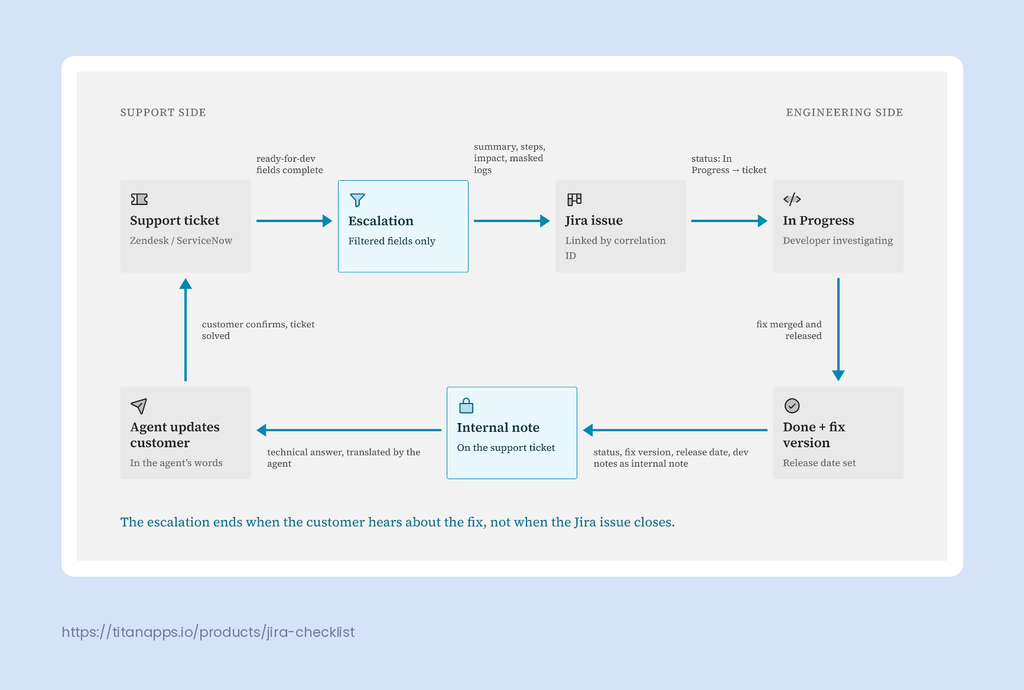
A support-to-engineering escalation is the handoff of a customer-reported problem from a service desk tool, such as Zendesk or ServiceNow, into a development tracker like Jira, so engineers can investigate and fix it. A well-designed escalation sends only the data developers need to act, keeps customer PII and internal-only notes behind, and automatically reports progress back to the support agent who owns the customer.
That last sentence is where most teams fall short. Support lives in one tool, engineering lives in another, and the escalation becomes a game of copy, paste and hope. Either Jira fills up with customer email addresses nobody asked for, or developers get a ticket that says “doesn’t work, customer angry” and nothing else.
This guide is a practical framework for fixing that. It covers which fields to sync, what to keep private, how to define a “ready for dev” standard, and how to close the loop so support hears about the fix before the customer does.
Key takeaways
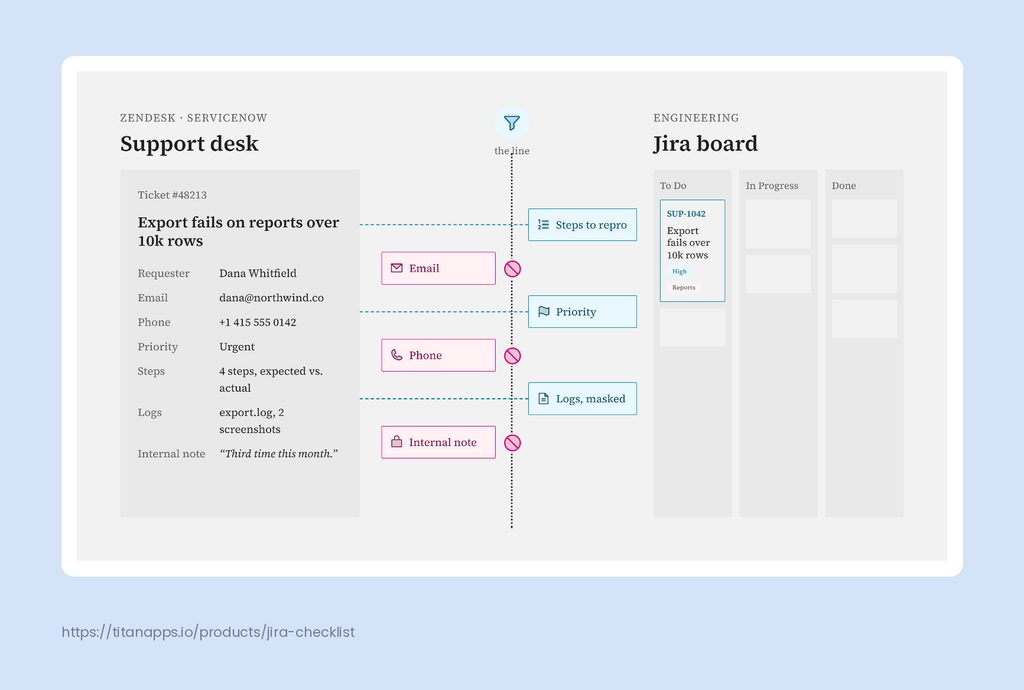
- Sync the problem, not the person: reproduction steps, impact, environment and evidence cross the line; names, emails and commercial details do not.
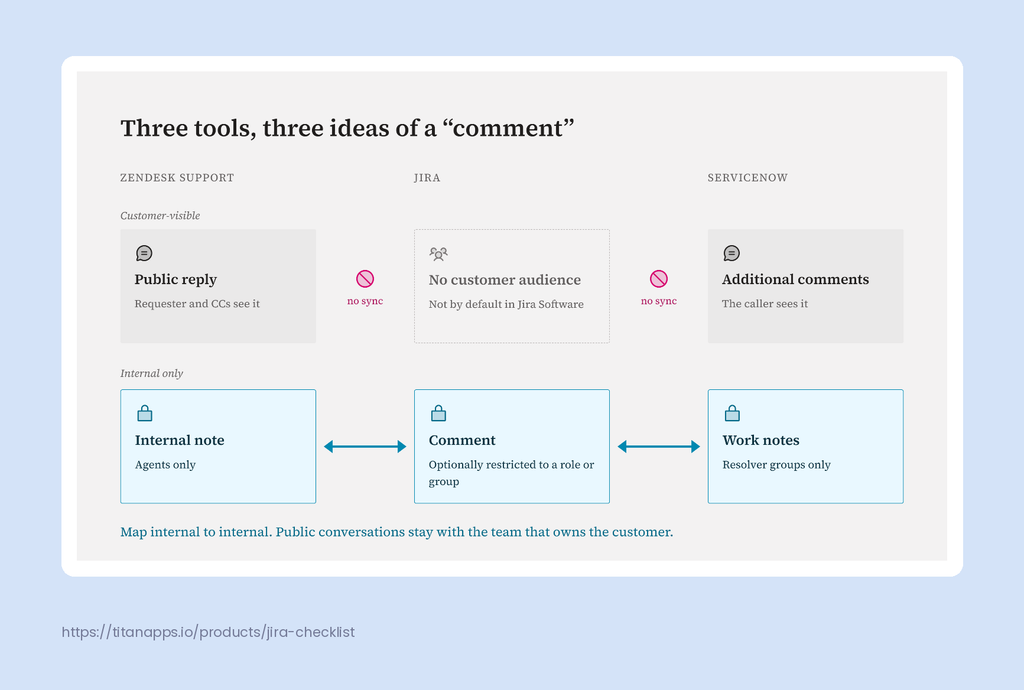
- Never sync comment streams wholesale. Zendesk, ServiceNow and Jira each model “internal” and “public” differently, so map them deliberately.
- Gate escalations with a “ready for dev” checklist, and treat the escalation as done only when support has been told the fix shipped.
- Developer comments should return to the service desk as internal notes or work notes, never as automatic customer replies.
Why support-to-engineering escalations break
Escalations rarely fail because people are careless. They fail because two tools with different data models, audiences and lifecycles are being bridged by hand. Three failure modes show up again and again.
1. Too little data crosses
The developer gets a vague summary, can’t reproduce the issue, and sends it back. Support re-asks the customer, waits two days, and forwards a screenshot. Every round trip adds days to time-to-resolution and erodes trust between the teams.
2. Too much data crosses
Someone copies the whole ticket thread into Jira, or a quick-and-dirty integration syncs every comment. Now customer names, email signatures, phone numbers and an agent’s candid internal note (“this account is about to churn”) are sitting in a tool that dozens of engineers, contractors and product managers can search.
That’s not just awkward. The IBM Cost of a Data Breach Report 2025 puts the global average cost of a breach at $4.44 million, and $10.22 million for US organizations. Every extra copy of personal data you create widens the blast radius if something goes wrong.
3. Nothing comes back
The bug is fixed, the Jira issue moves to Done, and the developer moves on. Support finds out three weeks later when the customer writes in to ask, or worse, to say they’ve already found out from the release notes. The fix shipped, but the escalation was never really closed.
ServiceNow vs Jira vs Zendesk: three tools, three ideas of a “comment”
Before deciding what to sync, it helps to see why a naive sync goes wrong. When people search “ServiceNow vs Jira”, they usually want a winner. For escalations, the more useful question is how each tool separates internal conversation from customer-facing conversation, because that is exactly where data leaks.
In Zendesk, for example, public comments and internal notes live in the same ticket thread but have very different audiences. ServiceNow splits the same idea into Additional comments and Work notes. Jira has no built-in customer audience at all.
| Primary unit of work | Ticket | Incident, case, problem or request | Issue (bug, task, story, epic) |
|---|---|---|---|
| Customer-visible conversation | Public replies | Additional comments | None by default in Jira Software; Jira Service Management uses "Reply to customer" |
| Internal-only conversation | Internal notes (private comments) | Work notes | Comments restricted to a project role or group; internal comments in Jira Service Management |
| Out-of-the-box lifecycle | New, Open, Pending, On-hold, Solved, Closed | New, In Progress, On Hold, Resolved, Closed, Canceled | Defined per project workflow (for example To Do, In Progress, Done) |
| Who typically reads it | Agents, requesters and anyone copied on the ticket | Service desk agents, resolver groups and callers | Engineers, product managers, QA, sometimes contractors |
| Who owns the customer relationship | Support agent | Service desk / incident owner | Usually nobody, and that is the point |
The takeaway: there is no one-to-one mapping between these models. A Zendesk internal note is not automatically a Jira comment, and a Jira comment should certainly never become a ServiceNow Additional comment without a human in between. Your escalation design has to make these choices explicitly.
What should cross the line: the fields worth syncing
Think of the escalation as a contract between support and engineering. Support promises to send everything needed to act on the problem. Engineering promises to keep support informed. The fields below are the minimum viable contract for most Jira integration with Zendesk or ServiceNow setups.
| Field | Direction | Why it matters to the other side |
|---|---|---|
| Problem summary (rewritten, not the customer's subject line) | Support ? Jira | Gives engineers a scannable, searchable title instead of "URGENT pls help!!!" |
| Steps to reproduce, expected vs. actual result | Support ? Jira | The single biggest factor in whether a bug gets picked up or bounced back |
| Priority and severity (mapped, not copied) | Support ? Jira | Zendesk uses Low to Urgent, ServiceNow uses priorities 1 to 5, Jira uses its own scale. Map values with conditions so "Urgent" means the same thing on both sides |
| Product area, component, environment and version | Support ? Jira | Routes the issue to the right team and board without a human triage step |
| Business impact (ticket count, account tier, SLA clock) | Support ? Jira | Tells engineering how many customers are affected without naming any of them |
| Sanitized attachments (logs, screenshots, HAR files) | Support ? Jira | Evidence speeds up diagnosis, as long as it has been scrubbed first (see the next section) |
| Correlation ID (ticket number ? Jira key) | Both ways | Links the two records permanently so updates always land on the right ticket |
| Status (mapped to the support lifecycle) | Jira ? Support | Lets agents answer "any news?" without opening Jira or pinging a developer |
| Fix version, release date and resolution | Jira ? Support | Triggers the customer update when the fix actually ships, not when the code merges |
| Developer notes intended for support | Jira ? internal note / work note | Gives agents the technical answer privately, so they can translate it before the customer sees anything |
Two design rules make this table work in practice:
- Choose a direction per field, not per record. Priority usually flows from support to Jira, while status and fix version flow back. Syncing every field both ways is how you get two systems overwriting each other.
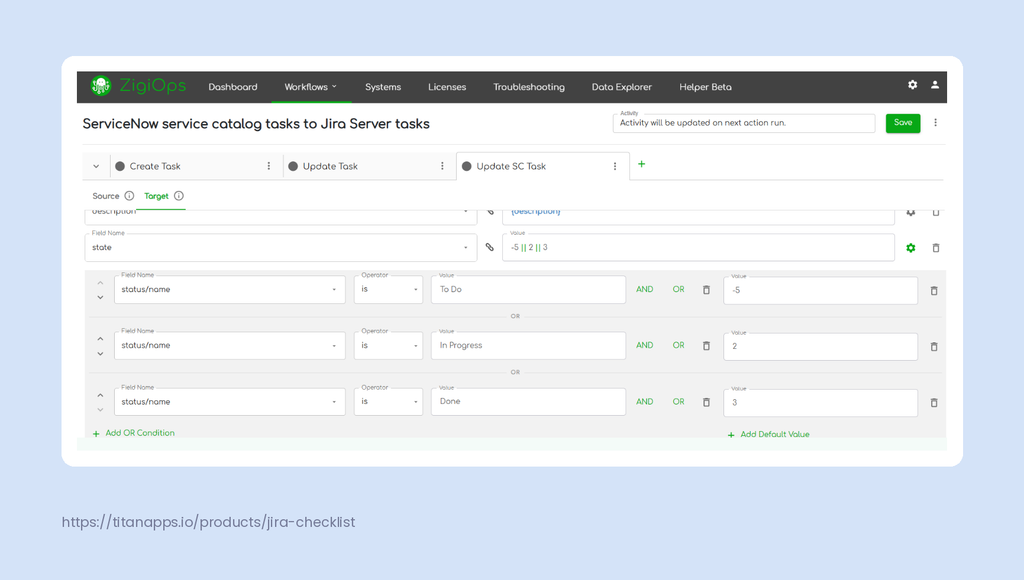
- Map values, don’t copy them. “Pending” in Zendesk and “On Hold” in ServiceNow don’t mean “Blocked” in Jira. Conditional mapping lets you translate states and priorities so each team sees values that fit its own workflow.
What shouldn’t cross the line (and how to enforce it)
Here’s the uncomfortable truth: the safest way to protect data during an escalation is to never send it. Data minimization is also a core principle of GDPR, which matters for any team handling European customers. Engineers need to understand the problem, not the person who reported it.
| Data type | Example | Risk if it crosses | Safer alternative |
|---|---|---|---|
| Customer PII | Requester name, email, phone, address, signature blocks | Personal data copied into a tool with a wider audience and different retention rules | Opaque account ID or organization tier |
| Internal support notes | Customer is threatening to churn", "Third time this month" | Commercial context leaks to people who don't need it, and tone travels badly | A structured escalation summary written for engineering |
| Raw public reply threads | Full email chains with quoted history and attachments | Pulls PII, CCs and unrelated issues into Jira in bulk | Only the comments explicitly flagged for dev |
| Secrets inside evidence | API keys, passwords, session tokens, internal IPs in logs | Credentials end up searchable in a dev tracker | Regex-based masking before the attachment or text is sent |
| Commercial data | Contract value, renewal date, discount terms | Biases prioritization and exposes sensitive deal data | Account tier or SLA level only |
| Automatic public replies from Jira | A developer comment posted straight to the customer | Half-finished theories and internal jargon reach the customer | Dev comments land as internal notes; the agent decides what to say |
Don’t sync comment streams wholesale
It’s tempting to sync “all internal notes” because they contain the agent’s troubleshooting. But internal notes also contain commercial context, frustration and gossip. Public replies are worse: they carry full email threads, signatures and CC lists.
A better pattern is to sync a structured escalation summary (a dedicated field or template) plus only the comments an agent explicitly flags for engineering, for example with a tag or a prefix like #dev.
Mask what can’t be removed
Logs and error messages are valuable evidence, but they often contain email addresses, IPs or tokens. Masking these at the integration layer, with regex-based find-and-replace rules, means the evidence reaches Jira without the secrets.
Keep the integration layer itself out of the data business
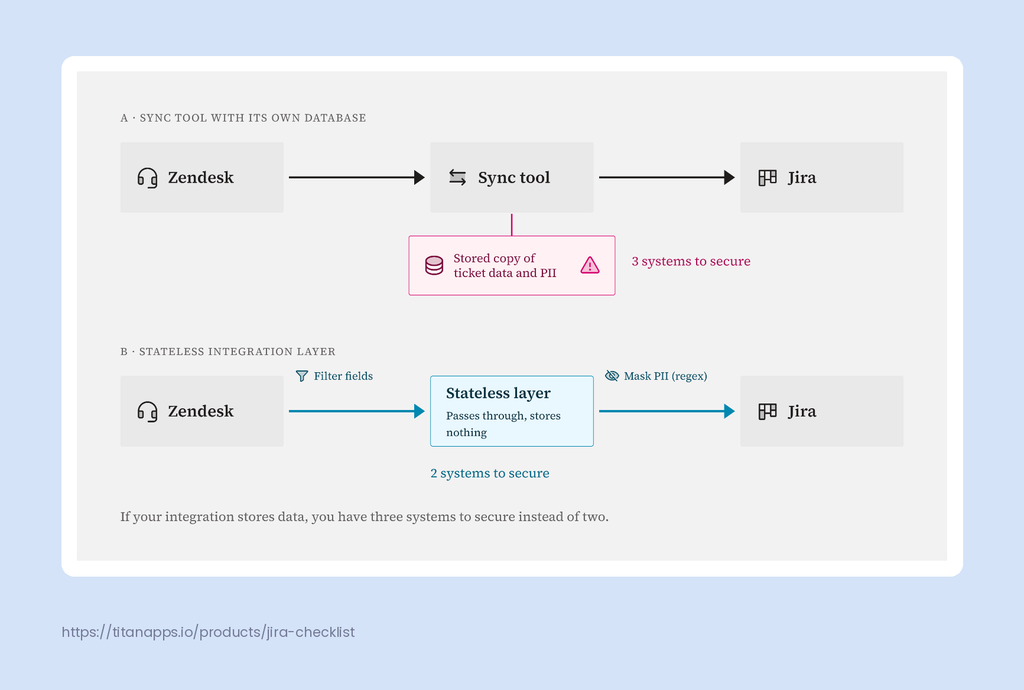
Here’s a question teams forget to ask: where does the data sit while it travels from Zendesk or ServiceNow to Jira? Many sync tools keep a copy in their own database or cloud, which quietly creates a third system holding your customer data.
A stateless integration avoids that problem entirely. ZigiOps, for example, does not store any of the data it transfers and is ISO 27001 certified, so the integration platform never becomes another copy of PII that needs securing, auditing and deleting.
Define “ready for dev”: a standard for escalated tickets
Agile teams already use a Definition of Ready to decide when a backlog item is clear enough to start. Escalations deserve the same treatment. An escalated ticket is “ready for dev” when it meets every point below:
- One-sentence problem statement written for an engineer, not copied from the customer’s subject line.
- Reproduction steps, or an explicit “could not reproduce” with what was tried.
- Expected vs. actual behavior, stated plainly.
- Environment details: product area, version, browser or client, instance or region.
- Impact: number of linked tickets, affected account tier and mapped severity.
- Evidence attached and sanitized: logs, screenshots or HAR files, with PII and secrets masked.
- Duplicate check done: the agent has searched for an existing Jira issue and linked to it if one exists.
- Workaround status: whether a workaround exists and whether the customer has been given one.
- Named support owner: the person engineering should go to with questions.
The trick is to make the standard enforceable rather than aspirational. Required fields on an “Escalate to engineering” form in Zendesk or ServiceNow are a good start. Better still, let the integration trigger only when those fields are populated, so an incomplete escalation simply never reaches Jira.
On the Jira side, mirror the standard as a checklist on the escalated issue type, so triage can confirm readiness at a glance. If your team already manages a Definition of Done in Jira with checklists, the same approach works for escalations: one tab for “ready for dev”, one for “done”.
Tip: define “done” for the escalation too. An escalation isn’t done when the Jira issue is closed. It’s done when the fix has shipped, support has been notified, and the customer has received an update. Add those three items to your escalated issue’s Definition of Done.
Running support in Jira Service Management? Put the checklist on the request
Not every escalation crosses tools. Many teams run support in Jira Service Management, on the same Atlassian site as engineering. The data rules above still apply. What changes is that the “ready for dev” standard can sit on the customer request itself.
Smart Checklist for Jira adds that standard as a checklist on each request. Jira Automation can import the right checklist template when a request is created. Rules can match on request type or other field values. Agents then work through the same items every time, from reproduction steps to the duplicate check.
Mandatory items turn the checklist into a real gate. A workflow validator blocks the escalation transition until every mandatory item is done. You can also split “Ready for dev” and “Done” into separate checklist tabs. A header/tab validator then checks only the tab that matters for each transition. Tabs and validators are Smart Checklist Pro features on Cloud, and validators work in company-managed projects only.
Customers benefit too. Smart Checklist can show checklist progress on the JSM customer portal, so requesters see that work is moving without asking for updates. For more on queues, SLAs, and automation, see this hands-on guide to Jira Service Management.
Close the loop: make sure support hears back when the fix ships
Closing the loop is where a Jira ServiceNow integration or Zendesk for Jira setup earns its keep. The return path should be as deliberate as the escalation itself.
- Map status changes back, but don’t auto-resolve. When the Jira issue moves to In Progress, update the support ticket so the agent can see work has started. When it reaches Done, set the ticket to a “fix available” state (for example Pending in Zendesk or a custom state in ServiceNow) rather than solving it automatically. The agent confirms with the customer, then resolves.
- Sync fix version and release date. “Done” in Jira often means merged, not deployed. The fix version tells support when the customer will actually see the change.
- Return developer comments as internal notes or work notes. The agent gets the technical explanation privately and rewrites it for the customer. No half-finished theories reach the requester.
- Prevent echo loops. If an update from support creates a Jira comment, that comment must not sync back as a “new” update. Filter out changes made by the integration user and only collect changes since the last successful run.
- Keep it near real time. A sync that runs once a night means support learns about fixes a day late. A polling interval of about a minute keeps both sides current without hammering either API.
How ZigiOps handles the escalation path
Everything above is tool-agnostic, and you can approximate parts of it with native apps, automation rules or custom scripts. The challenge is keeping it maintainable once you have dozens of field mappings, several Jira projects and more than one service desk.
ZigiOps is a 100% no-code, standalone integration platform (not a plugin) that connects Zendesk and ServiceNow with Jira Cloud and Jira Data Center. Here’s how it maps to the framework in this article:
- Trigger conditions as your “ready for dev” gate. Escalations are created only for tickets that match your conditions, such as a specific tag, group or populated readiness fields. Everything else stays in the service desk.
- Field-level mapping with conditions. Only mapped fields ever leave the source system. Conditional mapping translates priorities and statuses, for instance setting a ServiceNow incident to In Progress when its Jira task moves to In Progress.
- Correlation built in. ZigiOps stores the Jira key in a correlation field on the support record (such as correlation_id in ServiceNow), so every later update lands on the right ticket.
- Expressions for masking. Replace and regex-replace expressions redact emails, IPs or names in text and logs before the data reaches Jira.
- Comment routing and loop prevention. Jira comments can be mapped to ServiceNow work notes rather than customer-visible comments, and “last time” expressions combined with an author filter ensure only new changes from real users are synced.
- No data storage, no transaction caps. ZigiOps doesn’t store transferred data, is ISO 27001 certified, and doesn’t limit the number of transactions, so a spike in escalations doesn’t turn into a spike in your bill.
According to ZigiWave’s own customer data, teams using ZigiOps report 65 to 90% less manual cross-system work and 45 to 75% faster incident and change cycles. You can see the ready-made setups for the Zendesk Jira integration and the ServiceNow Jira integration, each built from customizable templates configured entirely in a guided UI.
Frequently asked questions
Can Zendesk tickets automatically create Jira issues?
Yes. With a Jira integration with Zendesk, a ticket that meets your conditions (for example a tag or a completed escalation form) automatically creates a Jira issue with mapped fields, and later updates sync to the same issue through a correlation ID.
Can I sync only some Zendesk comments to Jira?
Yes, and you should. Filter comments by type (public or internal) and by a flag such as a tag or prefix, so only notes written for engineering reach Jira. Syncing whole comment threads tends to copy customer PII into Jira.
Can Jira comments go back to ServiceNow as work notes instead of customer-visible comments?
Yes. In a Jira ServiceNow integration, map Jira comments to the ServiceNow work_notes field rather than Additional comments. The service desk sees the developer’s update privately and decides what to share with the caller.
What is the difference between ServiceNow and Jira for escalations?
ServiceNow is built around the requester, with separate customer-visible comments and internal work notes. Jira is built around engineering work and has no customer audience by default. For escalations, ServiceNow owns the customer conversation and Jira owns the fix.
Does an integration platform need to store my ticket data?
No. Some sync tools keep copies of transferred records, but stateless platforms don’t. ZigiOps transfers data directly between systems without storing it, which keeps the integration out of your data retention and breach scope.
How do I stop escalation updates from looping between tools?
Only collect changes made after the last successful sync, and exclude changes authored by the integration user. Together, these two conditions prevent the same comment or status change from bouncing back and forth.
Is ZigiOps a Jira plugin?
No. ZigiOps is a standalone integration platform that connects to Jira, Zendesk, ServiceNow, and other systems through their APIs. It’s available as a cloud or on-premises deployment and doesn’t run inside either tool.
Conclusion: escalate the problem, not the person
A healthy support-to-engineering escalation process comes down to three decisions: what crosses the line, what stays behind, and how the answer gets back. Sync problem data, impact and evidence. Keep PII, internal chatter and commercial details on the support side. Gate escalations with a “ready for dev” standard, and don’t call them done until support knows the fix has shipped.
Whether your team runs a Jira integration with Zendesk or a ServiceNow setup, the tools will keep changing. A clear contract between support and engineering is what keeps both teams sane.
See a clean escalation flow in action. Watch ZigiOps connect your service desk and Jira with filtered fields, masked data and automatic back-sync. No code, no data storage. Book a Demo.