Tools for Jira
 Tools for monday.com





Jira pricing can look affordable at first, especially if you only compare the Free, Standard, Premium, and Enterprise plans. But once you start estimating your team needs the real cost becomes much broader than the entry price.
The gap between list price and real cost comes down to four things: your billing model (monthly vs annual), how fast your user count grows, which Marketplace apps you need, and whether you require platform-level security or compliance tools on top of Jira itself.
This guide covers Jira Cloud pricing across all four plans, Jira Data Center licensing, and the cost impact of add-ons and hidden fees that most pricing guides skip. If you are budgeting for Jira or trying to figure out why your Atlassian bill is higher than expected, this is the breakdown you need.
Key takeaways
Jira Cloud pricing is progressive – the average per-user cost falls as your team size grows past key thresholds.
Marketplace apps for Jira are billed based on the maximum number of Jira users on the site, not just the app’s actual daily users.
Add-ons often increase total Jira cost faster than the base subscription, especially when user counts grow or when the same site includes Jira plus Jira Service Management.
Atlassian Guard, migration work, admin overhead, and overlapping app stacks can materially change total cost beyond what the pricing page shows.
Smart Checklist and Smart Templates from the Atlassian Marketplace can reduce app sprawl by handling recurring process needs inside Jira rather than adding more tools.
What does Jira actually cost in 2026?
Jira Cloud has four plans. Jira Data Center is a separate self-hosted option with its own licensing model. Here is the current pricing structure based on Atlassian’s official pricing page. Prices shown are monthly billing rates. Annual billing saves up to 17%.
| Plan | Monthly starting point: 100 users* | Annual example: 100 users* | Storage | Automation | Support / SLA | What changes the real cost |
|---|---|---|---|---|---|---|
| Free | $0 | $0 | 2 GB | 100/month | Community support | Good for evaluation, not a realistic benchmark for growing teams |
| Standard | $9.05/user/month | $9,050/year | 250 GB | 1,700/month | 9/5 regional support | User tier, billing mode, add-ons |
| Premium | $18.30/user/month | $18,300/year | Unlimited | 1,000/user/month | 24/7 critical support, 99.9% SLA | User tier, billing mode, add-ons, security extras |
| Enterprise | Custom | Custom | Unlimited | Unlimited | 24/7 support, 99.95% SLA | Multi-site design, governance, app stack |
*The Cloud price examples above reflect the current Jira pricing examples. Jira Cloud pricing is live and tier-based, so the exact amount should always be verified on Atlassian’s official Jira pricing page. The real Jira cost changes once your user tier grows, once you choose monthly versus annual billing, and once you begin adding Marketplace apps, Guard, or migration-related work. Later sections will break down those cost layers in more detail
Free is for small teams of up to 10 users who want to test Jira or run simple workflows. You get Scrum and Kanban boards, a backlog, basic roadmaps, and community support. Teams new to the platform can follow the Jira setup guide for beginners to get started.
Standard is where Jira becomes a serious project management tool. You get user roles, permissions, 250 GB of storage, 1,700 automation rule runs, data residency, and regional support during business hours. This is the right plan for most growing teams that need admin controls.
Premium is for teams that depend on Jira as a core operating platform. It adds Advanced Roadmaps for cross-team planning with dependency management, Atlassian Intelligence for AI-powered features, unlimited storage, a sandbox, project archiving, and 24/7 premium support with a 99.9% uptime SLA.
Enterprise is for large organizations with hundreds or thousands of users across multiple sites. Pricing is custom and requires contacting Atlassian sales. Enterprise adds unlimited automation rule runs, Atlassian Analytics with data lake access, advanced security including BYOK encryption, and a 99.95% uptime SLA.
Jira Data Center starts at $51,000 per year for 500 users. It is self-hosted, annual-only, and includes bundled capabilities like Plans and Automation for Jira. We cover Data Center pricing in detail later in this article.
How does Jira Cloud pricing work?
Jira Cloud pricing gets more nuanced once you look at how billing actually works. Atlassian uses progressive per-seat pricing for monthly cloud subscriptions, including Jira. That means the effective monthly rate changes as your team moves through higher seat tiers. Annual billing works differently: Atlassian sells annual subscriptions in distinct user tiers, and annual upgrades are handled as tier changes rather than the same month-by-month logic used for cloud monthly billing.
That is why “starts at” pricing is not the same as your real Jira cost. A small team, a 50-user team, and a 250-user team can all land on different effective rates even on the same Standard or Premium plan. Atlassian’s pricing calculator is the safest source of truth for exact annual and monthly totals at your current seat count.
For monthly subscriptions, Atlassian also uses Maximum Quantity Billing (MQB). Your bill is based on the highest number of seats assigned during the billing cycle. If you add seats mid-cycle, Atlassian charges a prorated amount for those added seats. If you remove seats later in the same cycle, your bill does not go down until the next billing cycle. That makes monthly billing more flexible than annual billing, but also less forgiving when headcount changes frequently
How much do Jira Marketplace add-ons really add to the bill?
This is where the real cost story gets interesting. For many teams, Marketplace apps end up costing as much as – or more than – the Jira license itself.
How are Marketplace apps for Jira billed?
Marketplace apps follow their own per-user pricing, billed separately from your Jira subscription. But the billing base is not what most people expect.
Atlassian’s billing rule: Marketplace apps are priced based on the maximum number of users across all Jira products on the site. Atlassian’s own example says that if a site has Jira with 100 users and Jira Service Management with 80 agents, the Marketplace apps installed across those Jira apps are billed at the 100-user level.
That means each new paid app you install creates a second pricing curve that scales with your total Jira seat count, not with the app’s actual usage. Billing cycles for apps must also match the parent Atlassian product, so annual Jira subscriptions mean annual app subscriptions.
Why do app costs rise faster than teams expect?
First, every app multiplies the impact of user growth. Adding 50 users to Jira does not just increase your Jira bill. It increases the bill for every paid app on the site.
Second, most apps use tiered pricing with steep jumps at certain user thresholds. Crossing from 100 to 101 users can trigger a significant cost increase across multiple apps simultaneously.
Third, mature Jira environments accumulate apps over time. A team that starts with one or two apps often ends up with five or six within a year. At $2-10 per user per month per app, a 100-user team running five apps is paying $1,000-$5,000 per month in app costs alone.
What changes with Enterprise multi-instance billing?
Enterprise changes the equation because Atlassian supports multi-instance billing for eligible Marketplace apps. Under that model, Atlassian says billing can be based on the number of unique users of the app across multiple instances, and a user who has access to more than one instance is counted only once for that app subscription.
That can reduce cost in some Enterprise setups, but it does not guarantee lower total app spend in every case. The result depends on whether the app qualifies for multi-instance billing and how the organization structures its sites.
Beyond the Jira license and Marketplace apps, four cost categories catch teams off guard.
Security and identity costs
If your organization needs SSO, enforced two-factor authentication, centralized user provisioning, or audit logs across all Atlassian Cloud products, you need Atlassian Guard.
Atlassian Guard is billed separately from Jira Cloud, and Atlassian positions it as an organization-level security layer. Cloud Enterprise includes Atlassian Guard Standard at no additional cost, but teams on lower Jira plans may need to budget for Guard separately depending on their security and identity requirements.
Note: Guard Standard costs approximately $4/user/month on annual billing. Guard Premium costs approximately $8/user/month.
Migration and change costs
Moving from Jira Server or Data Center to Jira Cloud is not just a subscription switch. Atlassian offers cloud transformation pricing and migration credits, but the real cost includes planning time, data migration, app compatibility audits, user training, and workflow reconfiguration. For organizations with complex configurations, migration projects can take 6-12 months and involve significant internal or consulting effort.
Admin and configuration overhead
Every app you add to Jira increases the surface area your Jira admin team manages: permissions, configuration, updates, renewal reviews, support requests, and compatibility testing after Jira upgrades. This is an operational cost, not a quoted number. But for teams running five or more apps, the admin time spent on app management is a real budget item.
Overlapping app stacks
Many teams buy multiple apps that partially solve the same problem. Two reporting apps. A templates app and a cloning app. A checklist app and a custom fields app that both try to standardize issue execution. The overlap is rarely intentional – it builds up as different team members solve different problems independently. Auditing your app stack once a year for redundancy is one of the simplest ways to reduce Jira cost.
Jira Cloud vs Data Center pricing: which one gets more expensive?
This is a pricing comparison, not a hosting debate.
Jira Cloud is more flexible for smaller teams. Monthly billing, progressive per-user pricing, and no infrastructure management. The cost is predictable. The tradeoff: you cannot tune performance limits, your automation runs are capped by plan, and you pay for the full Atlassian ecosystem (Guard, Confluence, JSM) as separate subscriptions.
Jira Data Center uses a separate annual subscription model and includes bundled capabilities such as Plans and Automation for Jira. But pricing alone is not the whole picture. Data Center also pushes more cost into infrastructure, maintenance, upgrades, backups, and internal admin capacity.
There is also a timeline issue buyers now need to factor in. Atlassian says impacted Data Center products reach end of life on March 28, 2029. New customers can no longer buy new Data Center subscriptions or new Marketplace Data Center apps after March 30, 2026, and existing customers can continue certain purchases through March 30, 2028. That means any Data Center pricing decision made today should be treated as a time-bounded investment, not a long-horizon default.
For teams comparing the operational differences between the two models, the TitanApps guide on the key differences between Jira Cloud and Data Center covers what changes beyond pricing, and the guide on automating Jira processes across Cloud and Data Center covers the operational side.
Real cost examples: what Jira might cost with add-ons
These scenarios use annual billing prices from Atlassian’s pricing calculator as of March 2026. Marketplace app costs are ranges based on typical pricing across the Atlassian Marketplace. Verify exact numbers for your team size before making a purchase decision.
Scenario 1: 10-user startup
A small team getting started with Jira.
| Line item | Cost |
|---|---|
| Jira Free (10 users) | $0 |
| 1 Marketplace app (free tier for up to 10 users) | $0 |
| Atlassian Guard | Not needed at this stage |
| Total | $0 |
The Free plan works here. No credit card required. The team gets boards, backlog, basic roadmaps, and 100 automation rule runs. The main constraints are 2 GB storage, no user roles or permissions, and community support only. Once the team grows past 10 users or needs admin controls, move to Standard.
Scenario 2: 50-user growing product team
A product team on Standard that needs documentation and a few essential apps.The Jira license ($4,550) is the starting price.
| Line item | Annual cost | Per user/month |
|---|---|---|
| Jira Standard (50 users, annual) | $4,550/year | ~$9.05 |
| Confluence Standard (50 users, estimated) | ~$3,250/year | ~$5.42 |
| 2 Marketplace apps at ~$2-3/user/month | ~$2,400-3,600/year | ~$4-6 |
| Atlassian Guard Standard (~$4/user/month) | ~$2,400/year | ~$4 |
| Total | ~$12,600-13,800/year | ~$23/user |
Confluence, Guard, and two apps nearly triple it. This is the pattern most teams discover after their first year: the ecosystem costs more than the entry product.
Scenario 3: 250-user mid-market team
A mid-market organization on Premium with compliance needs and a mature app stack.
| Line item | Annual cost | Per user/month |
|---|---|---|
| Jira Premium (250 users, annual) | $43,500/year | ~$15.54 |
| Confluence Premium (250 users, estimated) | ~$31,500/year | ~$10.50 |
| Jira Service Management (50 agents, estimated) | ~$15,000-25,000/year | ~$25-42/agent |
| 4-5 Marketplace apps at ~$2-5/user/month | ~$24,000-60,000/year | ~$8-20 |
| Atlassian Guard Standard (250 users) | ~$12,000/year | ~$4 |
| Total | ~$126,000-172,000/year | ~$57+/user |
At this scale, Marketplace apps and the Atlassian product stack dominate total cost. The Jira Premium license is roughly a quarter to a third of the total bill. This is the scenario where auditing your app stack for redundancy and evaluating whether some apps can be consolidated makes the biggest cost difference.
A note on these estimates. Jira Standard ($4,550 for 50 users) and Jira Premium ($43,500 for 250 users) are from Atlassian’s pricing calculator as of March 2026. Confluence, JSM, and Guard estimates are based on published per-user rates from atlassian.com and may vary by user tier. Marketplace app costs depend entirely on which apps you choose. Use Atlassian’s calculators for Jira, Confluence, and Guard to get exact numbers at your team size.
How to estimate Jira cost before you buy
Before you commit to a plan, walk through this checklist.
- Count your licensed users correctly. A Jira user is anyone who can log in. Inactive accounts still count toward your user total on monthly billing (Maximum Quantity Billing charges peak count). Audit your user list before buying.
- Decide Cloud vs Data Center first. The pricing models are completely different. Cloud is per-user, monthly or annual. Data Center is tier-based, annual-only, self-hosted. Do not compare plan features until you have decided on the deployment model.
- List the apps you already know you need. Check each app’s pricing on the Atlassian Marketplace at your actual user count. Remember: apps bill based on the maximum user count across all Jira products on the site.
- Model cost at today’s seats and your next growth tier. If you have 90 users today and expect 120 in six months, model costs at both numbers. Crossing a user tier threshold affects both Jira and every app on the site.
- Check Guard separately. If your organization needs SSO, enforced MFA, or centralized audit logs, Atlassian Guard is a separate subscription. Use Atlassian’s Guard pricing page to estimate.
- Check whether Enterprise instance design changes app billing. If you are evaluating Enterprise, ask whether splitting across multiple sites reduces your total Marketplace app cost. Model both single-instance and multi-instance scenarios before you decide.
- Budget for the ecosystem, not just the license. Add Jira, Confluence, JSM (if needed), Guard, and apps together. That total is your real Jira cost.
How can Jira teams reduce add-on cost without losing functionality?
Most teams do not overspend on Jira itself. They overspend on apps – either because they buy too many, or because they use apps to work around problems that could be solved with better process design inside Jira. Many teams buy multiple apps that partially solve the same problem. Two reporting apps. A templates app and a cloning app. A checklist app and a custom fields app that both try to standardize issue execution. Before adding another, it helps to review the top Jira add-ons for project management and check for overlap with what you already run.
Audit your app stack annually. Check which apps are actively used, which overlap, and which were installed for a specific project and never removed. Removing even one underused app at the 100-user level saves $1,200-$6,000 per year.
Standardize recurring work before adding more tools. Some teams add apps because their recurring processes – QA checks, release steps, onboarding tasks, approvals – are not standardized inside Jira. Every team member builds their own workaround. That creates demand for more apps.
Smart Checklist adds structured checklists with mandatory items, workflow validation, and progress tracking directly inside Jira issues. Smart Templates adds reusable issue hierarchies with pre-filled fields, variables, and scheduled creation. Both work across all Jira plans, including Free. They handle recurring process needs inside Jira rather than expanding the app stack further.
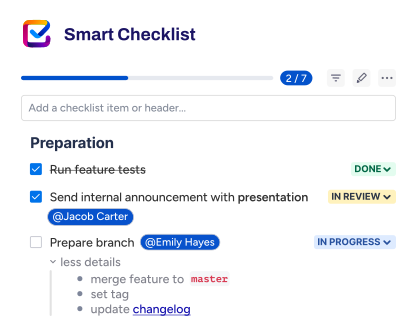
That is not a replacement for every app category. Test management, time tracking, and advanced reporting serve different needs. But for teams that keep adding tools to solve execution consistency problems, standardizing workflows with a process layer often reduces the number of apps needed.
For teams that want to see how automation and process standardization work together, the guide on automating Jira processes with Smart Checklists and Smart Templates covers real use cases. And for teams evaluating what Jira automation can do natively before adding apps, that is a good place to start.
Conclusion
Jira’s list price is competitive. The real cost depends on how many Atlassian products your team needs, which Marketplace apps become essential, and how your user count interacts with tiered billing across every product and app on the site.
The teams that overspend are usually the ones that add apps without auditing what they already have, or upgrade plans to get one feature when an app on a lower plan would have solved the problem. The teams that control cost are the ones that budget for the ecosystem from day one, model growth scenarios before committing, and consolidate their app stack before it consolidates their budget.
Frequently asked questions
Is Jira really cheap for small teams?
Yes, for the base Jira license. Jira’s Free plan supports up to 10 users at no cost with boards, backlog, basic roadmaps, and 100 automation rule runs per month. No credit card is required. Standard starts at $9.05/user/month, which is competitive with tools like Asana and monday.com. But “cheap” changes once you add Confluence, Guard, and Marketplace apps. A small team of 10 on Free pays nothing. A team of 25 on Standard with Confluence and two apps is already at $15-20/user/month. Budget for the stack, not just Jira.
How are Jira Marketplace apps billed?
Marketplace apps are billed per user per month (or per year for annual subscriptions), separate from your Jira license. The billing base is the maximum number of users across all Jira products on the site. If your site has 100 Jira users and 50 JSM agents, every app is billed at the 100-user level. App billing cycles must match the parent Atlassian product. That means if Jira is on annual billing, your apps are annual too.
Do Jira add-ons charge per active user or total site users?
For Marketplace apps for Jira Cloud, Atlassian’s billing rule is generally based on the maximum number of users of Jira apps on the site, not the number of people who actively use the app every day. That is why app pricing often feels disconnected from day-to-day usage. Buyers should still check the app’s own pricing page, but the Jira-site user count is usually the main billing driver.
Does Jira Service Management affect Marketplace app cost?
Yes. If your site includes both Jira Software and Jira Service Management, Marketplace apps are billed at the higher of the two user counts. Atlassian’s own example: a site with 100 Jira users and 80 JSM agents bills apps at 100 users. If JSM had 120 agents, apps would bill at 120. Adding JSM to a site can increase existing app costs even if the apps are only used in Jira Software.
Is Jira Data Center cheaper than Cloud at scale?
It depends on what you include. At very large user counts, Data Center’s fixed annual license can be lower than Cloud’s per-user subscription for the Jira product alone. But the Data Center does not include infrastructure, operations, security patching, or disaster recovery. When you add infrastructure and admin time to Data Center’s license fee, the total cost comparison is closer than the sticker prices suggest. The Data Center also reaches end of life in March 2029, so any new investment should factor in cloud migration costs.
Do I need the Atlassian Guard on top of Jira?
If your organization needs SSO, enforced two-factor authentication, centralized user provisioning, or organization-wide audit logs, yes. Atlassian Guard is billed separately at approximately $4/user/month (Standard) or $8/user/month (Premium) on annual billing. Enterprise plan users get Guard Standard included. For most mid-market and enterprise organizations, Guard is a practical requirement, not an optional upgrade.
Can multiple Jira instances reduce app cost?
Sometimes. Atlassian documents a multi-instance billing model for eligible Marketplace apps where billing can be based on the number of unique users across multiple instances. That can reduce cost in some Enterprise setups, but only when the app qualifies and the instance design actually improves the billing outcome. It is a modeling question, not an automatic savings rule.
What is the most cost-effective way to use Jira with add-ons?
Start with the lowest plan that covers your must-have features. Use Atlassian’s pricing calculator to model cost at your current and projected user count. Pick Marketplace apps carefully – each one adds a pricing curve that scales with your full site user count. Audit your app stack annually for overlap and unused installs. Standardize recurring workflows with tools like Smart Checklist and Smart Templates before adding more apps to solve process problems. And budget for the ecosystem – Jira plus Confluence plus Guard plus apps – not just the Jira line item.
Does Jira include Trello or Jira Work Management?
Yes. Jira Work Management is now included with every Jira Software Cloud license. If you have Jira Standard, Premium, or Enterprise, your team gets Jira Work Management at the equivalent plan level – with calendar, list, timeline, and summary views designed for non-technical teams. Trello is a separate Atlassian product with its own pricing plans. Trello has a free tier and paid plans starting at $5/user/month. Jira and Trello serve different use cases: Jira is built for structured project management with workflows and issue types, while Trello is built for lighter visual task tracking.
What are the user limits on each Jira pricing plan?
The Free plan has a user limit of 10. The Standard plan and Premium plan both support up to 100,000 users per site. Enterprise supports 50,000+ users across up to 150 sites. There is no user limit on Jira Data Center beyond what your infrastructure can handle. For most growing teams, the meaningful limit is not the user cap but the cost threshold – crossing from one annual billing tier to the next changes your total bill for Jira and every Marketplace app on the site.
How does Jira compare to other project management tools on pricing?
Jira’s Standard plan is competitively priced against paid plans from tools like Asana ($10.99/user/month), monday.com ($12/user/month), and ClickUp ($7/user/month). Jira’s Free plan for up to 10 users is also one of the more functional free tiers in the market. Where Jira gets more expensive is the ecosystem. Most teams that use Jira seriously also need Confluence, and many need Atlassian Guard. That total Atlassian stack cost can match or exceed all-in-one tools that bundle documentation, security, and project management into a single subscription. The right comparison is total cost of ownership, not just the Jira line item.
What functionality do you lose on the Free and Standard plans?
The Free plan lacks user roles, permissions, advanced analytics, and meaningful automation (100 rule runs per month). It also has no SLA, no premium support, and only community support through the Atlassian Community. The Standard plan adds permissions and admin controls but does not include Advanced Roadmaps, Atlassian Intelligence, a sandbox, project archiving, or the 99.9% uptime SLA. If you need enterprise-grade security features like IP allowlisting or BYOK encryption, those require Premium or Enterprise. Use Atlassian’s plan comparison on atlassian.com to see the full feature breakdown by tier.
How can teams optimize Jira costs as they grow?
Three ways to optimize. First, review your billing cycle. Annual subscriptions save up to 17% over monthly billing. Second, audit your Marketplace apps before each renewal. Removing one unused app across 100 users can save $1,200-$6,000 per year. Third, streamline your tooling. Some teams run overlapping apps that could be replaced by a single process layer. Tools like Smart Checklist and Smart Templates help standardize recurring workflows inside Jira, which can reduce the number of apps needed to keep work consistent. The goal is not to spend less on Jira – it is to spend accurately on the functionality your team actually uses.
Is enterprise pricing available for Jira Software Cloud?
Yes. Jira Software Cloud has an Enterprise plan with custom enterprise pricing, available only as an annual subscription. You need to contact Atlassian sales for a quote. Enterprise includes everything in Premium plus unlimited automation rule runs, Atlassian Analytics with advanced analytics and data lake, multiple sites (up to 150), enterprise-grade identity management through Atlassian Guard Standard (included), and a 99.95% uptime SLA. Enterprise is typically relevant for organizations with 800+ users, though Atlassian’s pricing page shows Enterprise pricing becomes available when you enter 801 or more users.