





 Tools for Jira
 Tools for monday.com





The more you can automate, the more time you will have for the “H” part of HR – humans. In addition to freeing up time, automation brings you many other benefits. It allows you to build clear and transparent processes, create a smooth employee experience, and improve retention rates.
In this blog post, we explain how to set up various types of automation in Jira for HR management purposes. To make this guide practical, I interviewed HR professionals from TitanApps and Railsware about the processes they run every day. From our product managers, I learned hands-on tips and approaches for setting these workflows up in Jira. I hope this information will be useful for you.
 Definition
HR automation in Jira means using Jira’s native rules, workflows, and Atlassian Marketplace apps to run recurring HR processes without manual work. Typical examples include onboarding, offboarding, recruitment, leave requests, and performance reviews. Automation reduces repetitive tasks, keeps processes consistent, and frees the HR team to focus on people rather than paperwork.
From Recruiting to Offboarding: What Can You Automate?
Using automation in Jira can help you streamline a wide range of HR processes and recurring work items. This includes tasks in areas such as talent acquisition, human resource management, and people operations. For example:
- Organizing recruitment activities
- Pre-onboarding and onboarding
- Running feedback sessions and performance reviews
- Implementing individual development programs
- Handling vacation requests from employees
- Collecting feedback on processes
- Offboarding
Although not everything can be completely automated, even partial automation will have a noticeable effect. It allows you to build better-structured processes, organize cross-team work more efficiently, and save time and effort.
As a result, you can ensure that every phase of an employee experience is orchestrated in the best way possible. This also helps you transition smoothly between the recruitment, onboarding, and individual talent development stages. This increases employee satisfaction while optimizing your HR team’s resources.
Note
Deloitte’s Modernizing HR research found that HR resources spend as much as 57% of their time on administrative tasks, leaving little room for the strategic, people-focused work HR teams are supposed to lead. Implementing automation for HR in Jira helps you improve this situation.
Automation in Jira For HR Purposes: What Are Your Options?
As automation is a broad concept, you can utilize various instruments to put recurring tasks on autopilot. They range from using Jira’s standard automation rules to installing third-party tools or building advanced integrations with Jira’s API.
Here are some examples of different solutions that are available:
- Smart Checklists for typical work items. This is helpful for tasks involving multiple action points. For example, onboarding includes a long list of steps a new employee should complete: sign documents, receive equipment, and attend intro calls. You can use Smart Checklist for Jira to document this process and automatically add your checklist to every task with “onboarding” in its title.
- Smart Templates for recurring processes. Some processes, such as recruitment, require the creation of identical Jira epics with the same set of tasks. Smart Templates for Jira allow you to save such an epic as a reusable template. For regular processes, typical epics and their child work items can be created automatically on a schedule.
- Automation for Jira to implement custom scenarios. Jira’s native automation functionality allows you to streamline a multitude of HR tasks and processes. It utilizes the trigger-action logic: once a specific event occurs, it triggers a pre-defined action or a sequence of steps. Jira offers you significant flexibility in choosing the conditions and shaping the rules to meet your needs. Some popular uses include setting up custom notifications and assigning tasks automatically.
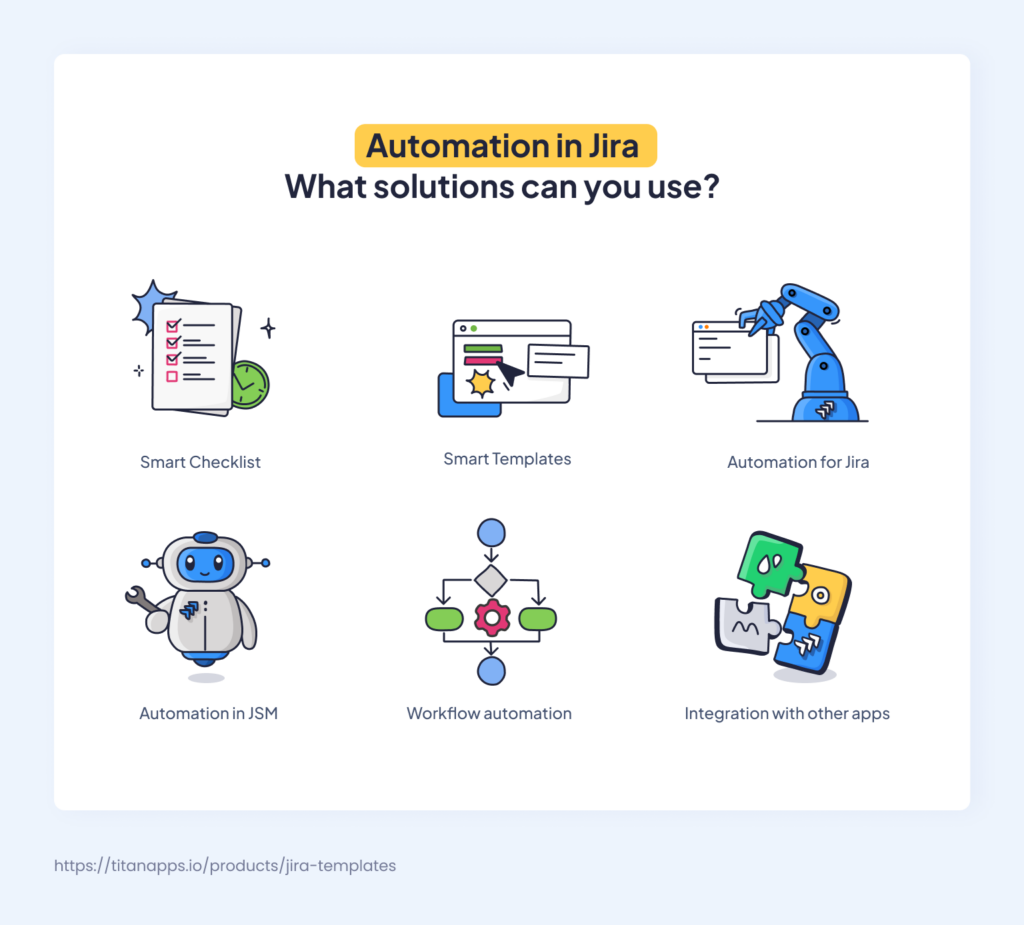
- Workflow automation for further optimization. A workflow in Jira describes a sequence of statuses a work item should go through, such as “To Do,” “In Progress,” or “Done”. You can use Jira’s Workflow Editor and other tools to incorporate automation into your workflows and make them more efficient. For example, you can block a vacation request from being moved to “Approved” unless it receives approval from the employee’s manager.
- Automation in Jira Service Management. Certain actions and processes in your JSM system can be streamlined as well. When employees submit purchase or refund requests, tickets can be automatically assigned to the responsible team members based on the request type. Another automation example is cloning a JSM ticket as a work item to a different space / project when a ticket requires the involvement of another department.
- Connecting Jira to external apps. Jira Automation allows you to set up connections to dozens of external tools, including Workday, Okta, Entra ID, DocuSign, Slack, and Microsoft Teams. Then, you can use this connection to add one of the available actions to any rule / automation flow. For example, Jira Automation can add a new user to an external HR system or pull an employee’s data from it. For HR apps without a native connection, platforms like Zapier or Workato can transfer data between them and Jira.
- Custom automation using the Jira API. With the help of a development team, HR processes can be automated further by integrating Jira with custom internal systems in your organization, as well as with various apps.
These solutions vary in complexity and require different levels of expertise to implement. For some cases, you will need to collaborate with a Jira administrator to set up the automation. However, you don’t have to start big to see a positive impact. Remember that even small changes can significantly enhance your work’s convenience and efficiency. Let’s explore some of the solutions in more detail to see how this can be achieved.
Set up Automated Checklists in Jira For Repetitive HR Tasks
HR specialists often manage processes that involve multiple steps or require the collaboration of different teams. It can be challenging to keep track of every detail and make sure everyone does their part on time.
Here’s how using checklists with automation can help with this:
For all repeated processes, we prepare a checklist describing the required steps from A to Z. Then, we save it as a template and use this templatized checklist together with Automation for Jira. So, anyone who works on a typical task has the same list of steps to follow. As a result, everyone has the same expectations and a clear understanding of what to do and in what order.

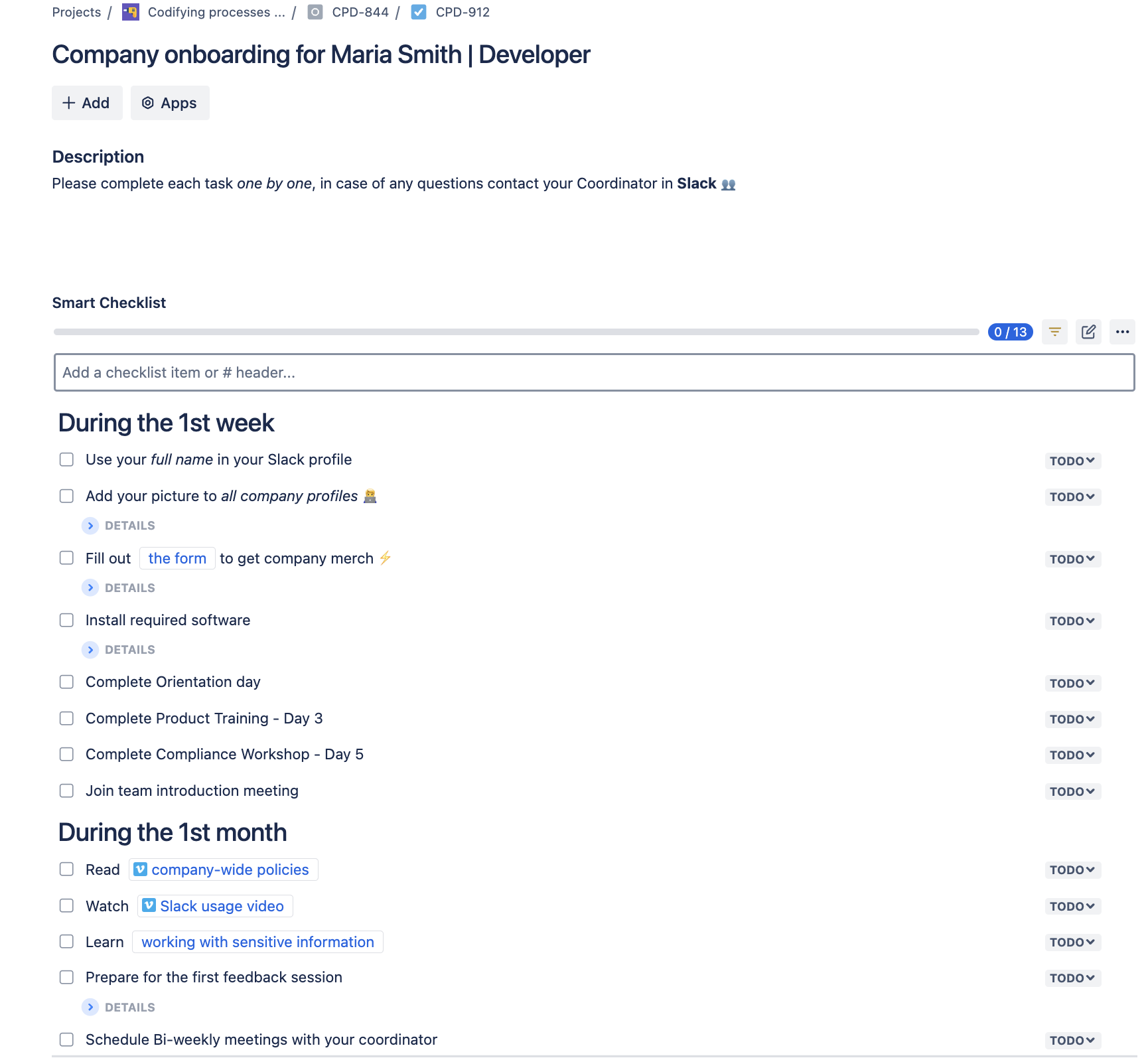
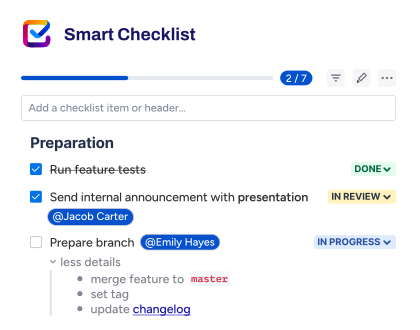
You can use Smart Checklist for Jira to automatically add structured checklists to your typical tasks. Here’s what it can look like:
Company onboarding for Maria Smith | Developer
# During the 1st week
- Use your *full name* in your Slack profile
- Add your picture to _all company profiles_
> List of company profiles: Slack, Google account, Jira/Confluence, etc.
- Fill out [the form](http://rw.rw/vimeo.com) to get company merch
> Please state your current address
- Install required software
>VPN setup
>Antivirus installation
- Complete Orientation day
- Complete Product Training – Day 3
- Complete Compliance Workshop – Day 5
- Join team introduction meeting
# During the 1st month
- Read [company-wide policies](https://vimeo.com)
- Watch [Slack usage video](https://vimeo.com)
- Learn [working with sensitive information](https://www.atlassian.com/software/confluence)
- Prepare for the first feedback session
>Purpose: Assess your training progress and role adaptation.
- Schedule Bi-weekly meetings with your coordinator
>Purpose: Review progress on tasks, ask questions
This example is a checklist prepared for a new hire. It guides them through the process step by step, provides links to the necessary materials, and uses headers to set priority for different action points.
You can create separate checklists for the People, Legal, IT, Procurement, Security, and other teams involved in the new employee onboarding process. These checklists will be automatically added to every new onboarding task. As a result, the documented process can be easily replicated, ensuring that everyone follows your company’s best practices.
In particular, Smart Checklist allows you to:
- Assign checklist items to different team members
- Include deadlines and priority for each step to better organize your work
- Save checklists as templates for reuse
- Use different statuses for each action item (“To Do,” “In progress,” etc.)
- Add multiple checklists to one Jira work item (Jira issue)
- Include headers to better structure your action plan
- Add links so that all necessary resources are always at hand
- Mark steps as mandatory and prevent moving to the next step until completed
- Use the markdown editor to adjust the formatting
- Add details for each step in an expandable section
Note
Gallup, a global analytics and advisory firm, finds that only 12% of employees strongly agree that their organization does a great job onboarding new employees. This points to a large opportunity for structured, documented HR processes that would improve employee satisfaction. Using a standardized Onboarding Checklist created with Smart Checklist for Jira is an effective way to achieve this.
Creating an Automated Smart Checklist Step-by-step
- Install Smart Checklist for Jira by TitanApps. Write down the key stages of the required process in your organization (for example, onboarding). Alternatively, you can copy the draft structure for the onboarding plan from the example we provided above.
- Open your Jira work item and insert the process description you prepared into the Smart Checklist section in your Jira task.
- If necessary, you can use the markdown editor to adjust the onboarding plan further: add missing steps, remove the ones you don’t need, and so on.
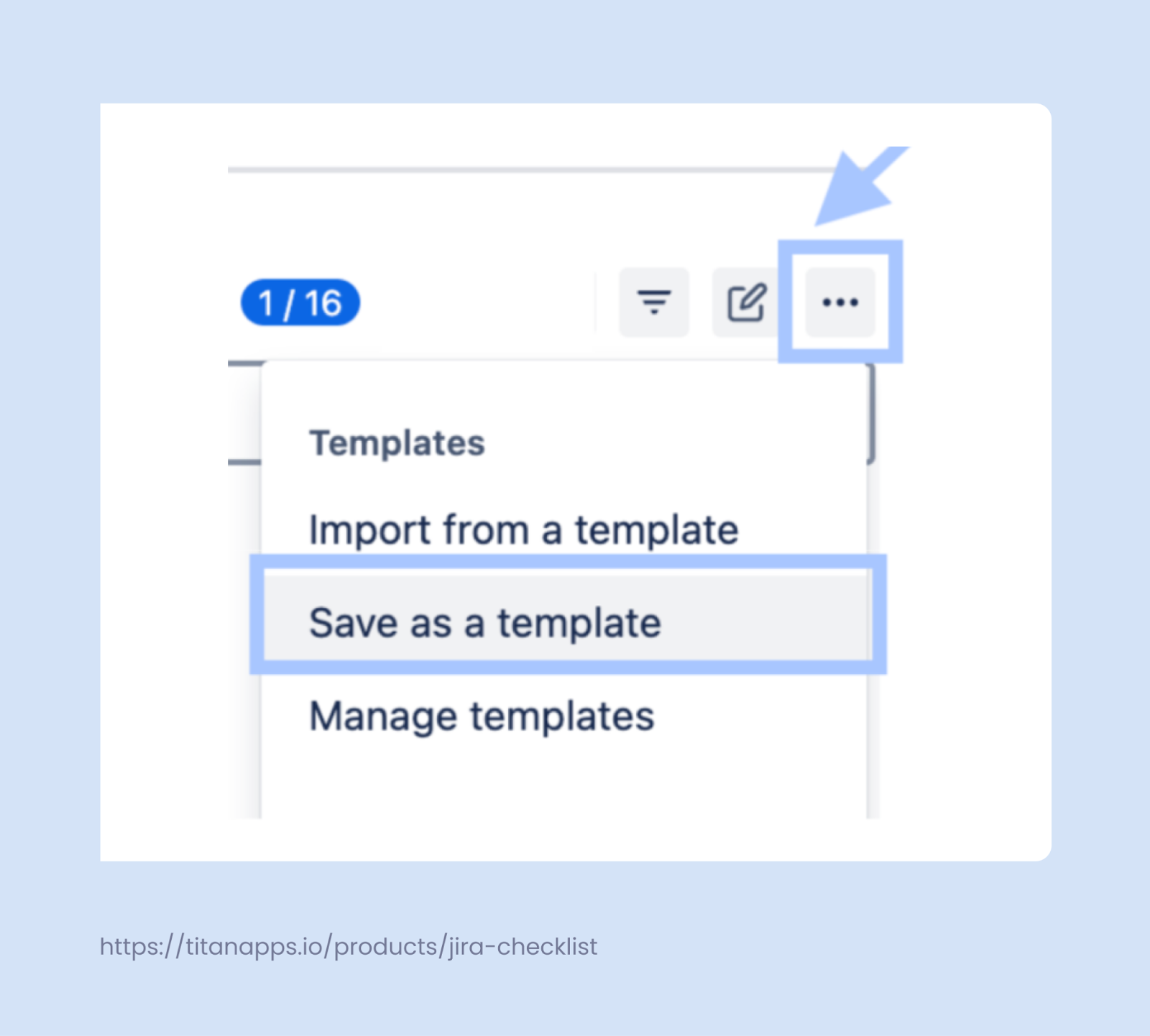
- Save the checklist as a template, as shown below.
- Assign your checklist to a specific issue type (work item type) using the Smart Checklist’s built-in functionality. Click the three dots as shown in the screenshot above, but, in this case, select Manage Templates. Click the template you need to expand its details. In the menu on the right, set your conditions for applying this template. In our example, the onboarding checklist template will be applied automatically to all new work items that have the word “onboarding” in their summary (title).
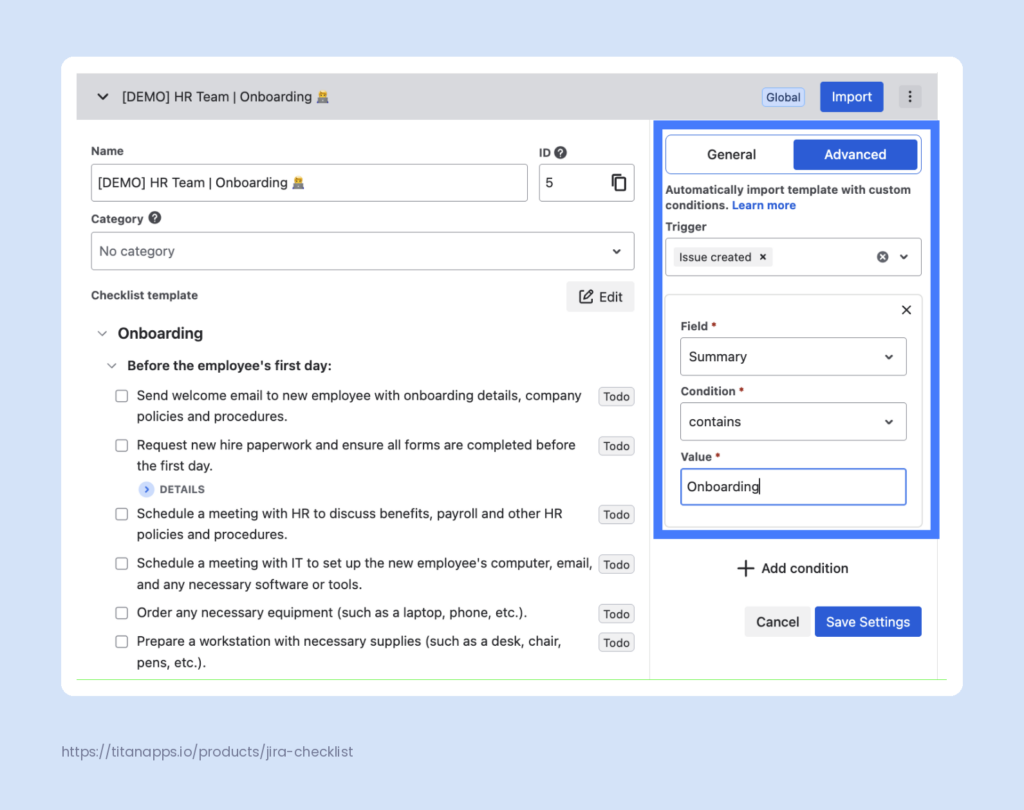
If you want to integrate Smart Checklist templates into more complex scenarios, use Automation for Jira. Follow this Smart Checklist Guide and Checklist Template Guide to select the type of automation you need and set it up.
Pro tip
For example, you can create a rule for adding a checklist template for each new subtask that meets your criteria. For instance, every “Install the required software” subtask in the “Onboarding” task can get a checklist with the tools an employee should install.
In general, using this tool with automation gives you a lot of flexibility. We will talk more about using Automation for Jira in one of the following sections.
Alternatively, if needed, you can add smart checklists manually from a saved template.
Use Automated Smart Templates For Recurring Processes
Many HR processes have a complex structure. They can be stretched in time and include multiple tasks with different assignees and checklists. Such processes can be organized with the help of Smart Templates. This tool lets you turn any task into a reusable template with a pre-defined structure.
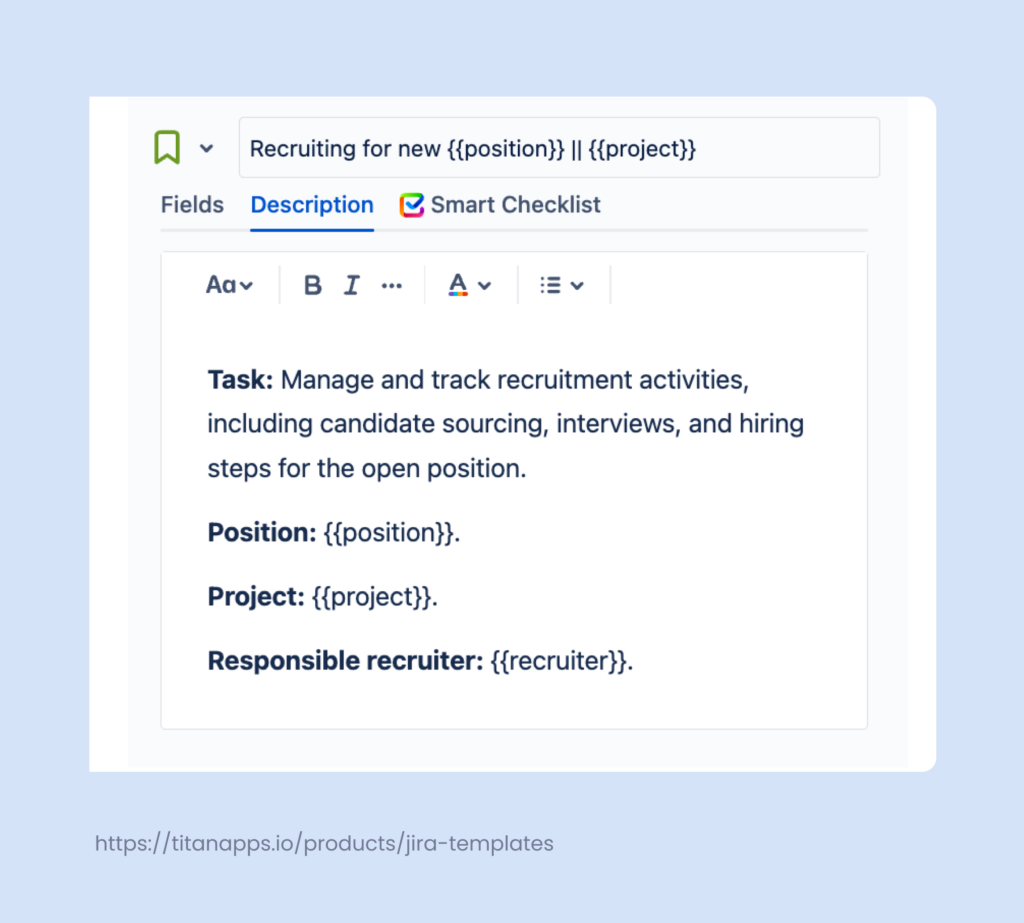
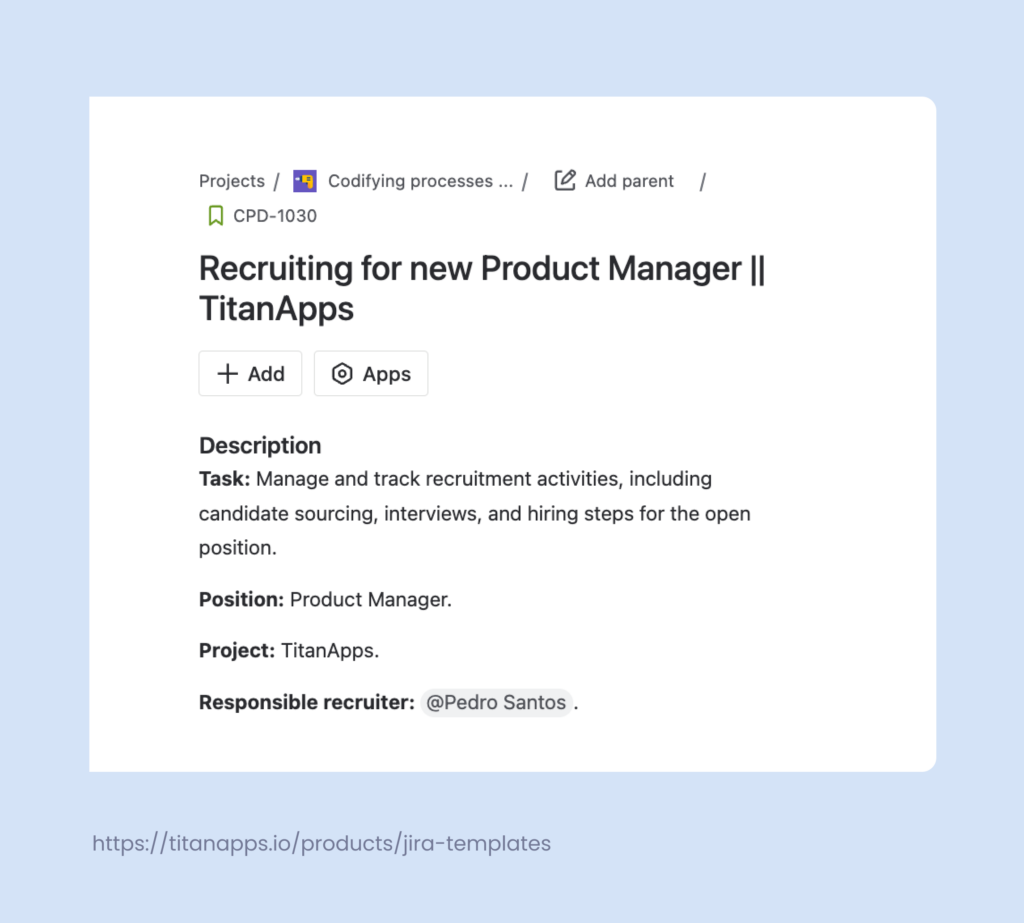
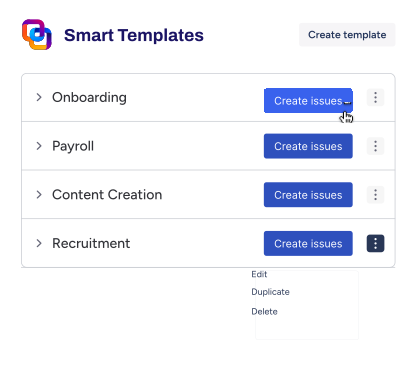
For example, below is a template for the recruitment process. When a new position opens, you can use this template to instantly create a new Jira epic with a standardized set of tasks, each including a checklist of To-Do items. As Smart Templates support variables, such as {{position}} and {{project}}, the same template can serve for multiple hiring campaigns.
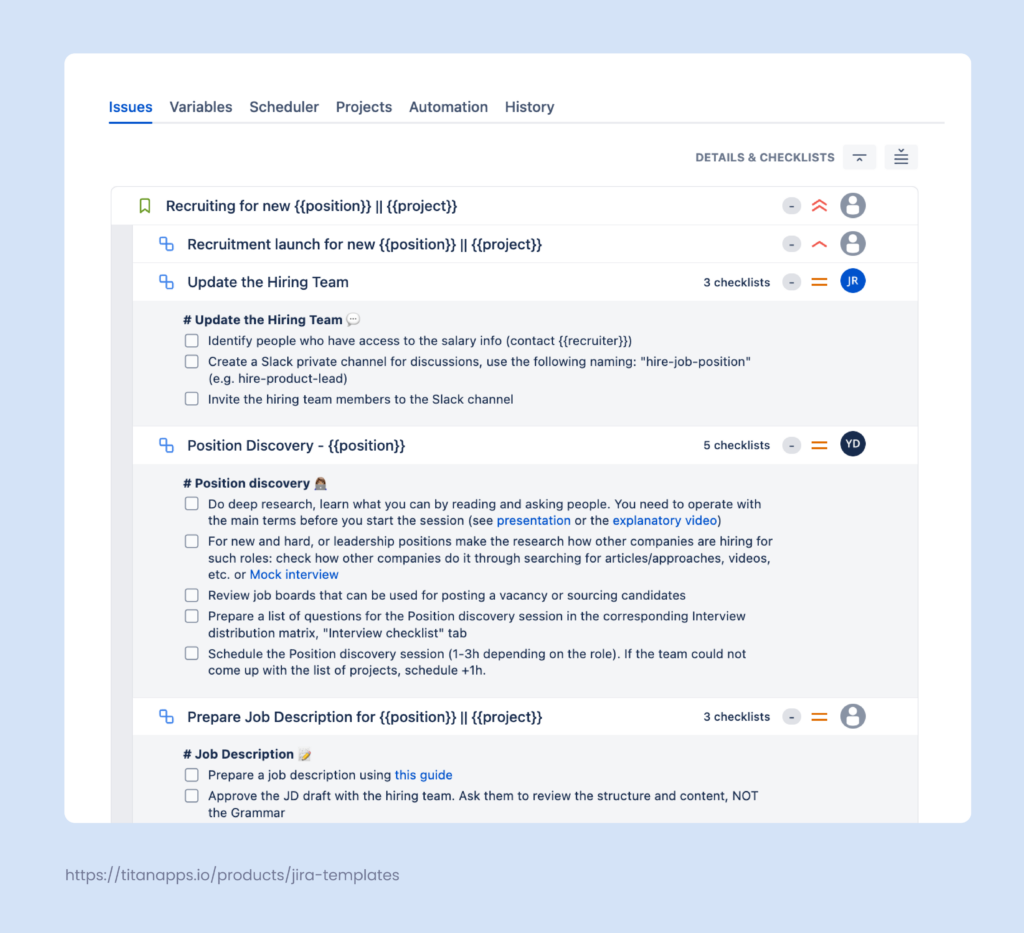
Apart from hierarchically organized issues, a smart template can have prefilled fields (Components, Priority, Labels, and Assignee). In addition, you can set up a reusable description structure.
The images below show a standardized task description in the template and its application in an actual task. The work item title and description variables were substituted with information specific to the task.
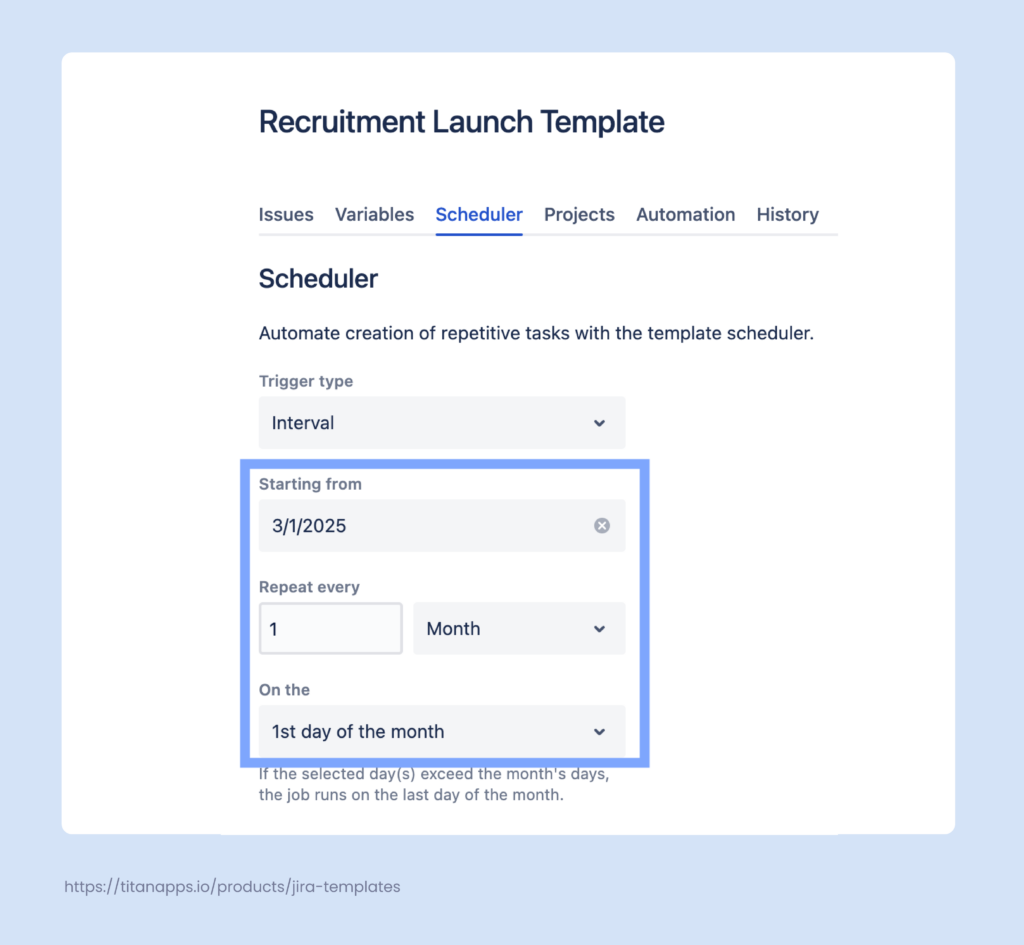
You can schedule automatic work item creation for recurring tasks according to your settings. This can be done with the help of the in-built Scheduler feature in Smart Templates:
To sum up, Smart Templates for Jira allow you to:
- Create templates from any existing work item or set of work items
- Structure complex processes as a hierarchy of tasks
- Automatically create work items from the template via Automation for Jira
- Schedule work item creation with the built-in Scheduler feature
- Automatically assign tasks and mention people
- Use variables for dynamic parameters
- Calculate due dates for work items automatically
- Prefill work item fields, including custom ones
- Set work item description structure and reuse it
All this allows you to instantly launch HR processes by automatically creating epics with multiple subtasks and pre-set assignees, due dates, and more.
Pro tip
Additionally, you can use Smart Templates together with native Automation for Jira. This enables you to automatically create new work items from your templates based on custom triggers. For example, when a new request of a specific type is created in JSM, an automation flow / rule can generate work items from your smart template. It can also fill in variables in that template using the data pulled from that request.
Step-by-Step Instructions For Creating a Smart Template With Automation
- Install Smart Templates for Jira.
- Open an existing work item that you want to turn into a template.
- In the Smart Templates section of your work item, click Save structure as template, name your template, and save it. Alternatively, you can create a template from scratch.
- Adjust the structure if needed before saving it as a template. Add and remove tasks or subtasks, specify assignees, use variables, include smart checklists, and so on. Once you’ve made the changes, save them.
- Use the built-in Scheduler feature to automatically create work items from your template.
- For more complex scenarios, follow this guide on How to integrate Smart Templates with Automation for Jira.
Benefits of Using Smart Tools in Jira For HR
Smart Checklist and Smart Templates can work separately, but you will gain more value if you use them together. They seamlessly integrate with each other and with Jira’s native automation functionality. Here are the benefits of utilizing these tools in Jira for HR tasks:
- Processes are well-structured, documented, and are run consistently.
- Everything in one place. For each everyday or recurring task, you get a single checklist featuring information that was previously scattered across multiple documents and policies.
- Complex processes are captured in the form of epics with multiple tasks and can be launched automatically on a schedule.
- More transparency – new recruiters and HR specialists can easily “plug” into the company processes without needing to spend months learning all the details. Smart Templates also allow you to see the list of all work items created from a specific template.
- Best practices take an applicable form and don’t just stay on paper.
- Better coordination between different departments, in particular for onboarding and other cross-team processes.
- Less repetitive manual work, more efficiency, and time optimization.
In general, Smart Tools for Jira by TitanApps are easy to use even if you don’t have any technical knowledge. This is something you can implement with little effort and quickly see the results. Over time, these improvements in process clarity and coordination have a measurable impact on your employee satisfaction rate.
Leverage Native Automation For Jira to Create Custom Rules And Scenarios
As mentioned earlier, you can use Automation for Jira with Smart Checklist and Smart Templates to integrate these tools into your processes. But, of course, this Jira functionality can be utilized in multiple other ways. It allows you to configure custom automation rules and shape your workflows in Jira according to your organization’s requirements.
Automation in Jira for HR is helpful for:
- Linking work items to automatically connect HR tasks that are related.
- Scheduling work item creation for tasks that repeat periodically, such as performance reviews.
- Adding checklists to work items when a specific type of HR work item is created, such as an offboarding task.
- Assigning work items automatically based on various conditions. For example, whether the task description contains “Employee satisfaction survey.”
- Triggering notifications and reminders. For example, sending automatic alerts for contract due dates, policy acknowledgments, or feedback sessions.
Here’s an example of a rule / flow for automatically assigning tasks. When a new issue is created, the rule is triggered and checks whether the summary contains the keyword and if the assignee is specified. If not, the issue containing the keyword is assigned automatically based on the parameters you chose. It can be assigned to the issue creator, a person responsible for this type of task, the epic assignee, and so on.
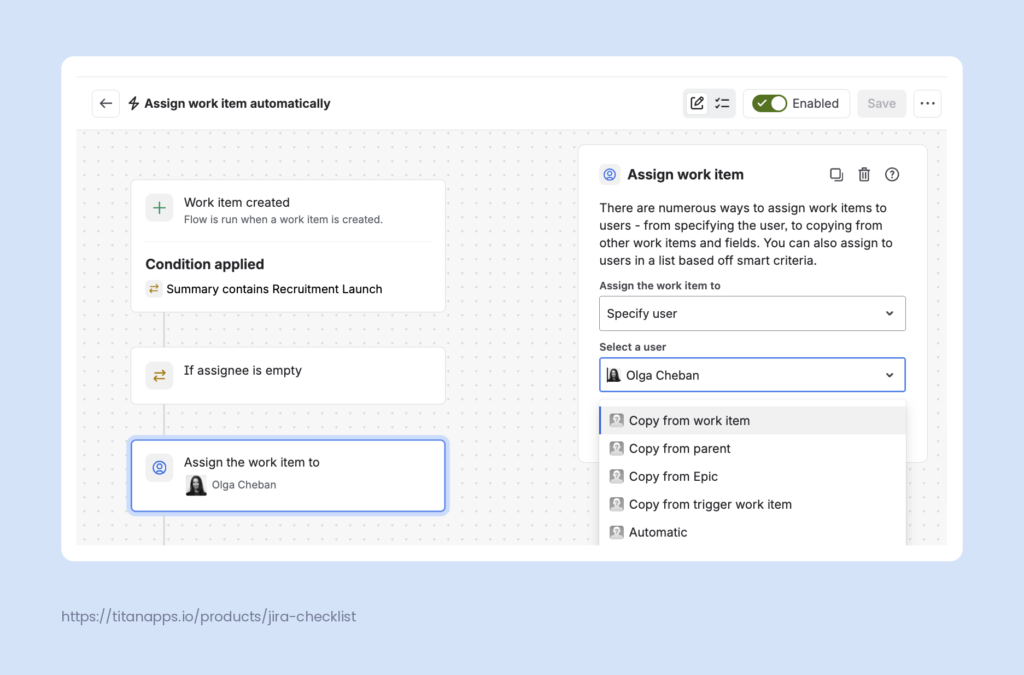
In this case, the rule checks for the phrase “recruitment launch” in the work item summary. If it’s there and the work item is without an assignee, it can be assigned automatically to the person responsible for recruitment.
Keep in mind that these flows may be broken if the assignee mentioned in the rule loses access to the project or has their account suspended.
How to Create an Automation Flow (Automation Rule) in Jira
Definition
A Jira automation flow is a set of instructions that tells Jira what to do when a specific event happens. Before April 2026, automation flows were referred to by a different term, “automation rules.” You will still see the previous name in many guides, but the feature works the same way. In this article, we use the two terms interchangeably.
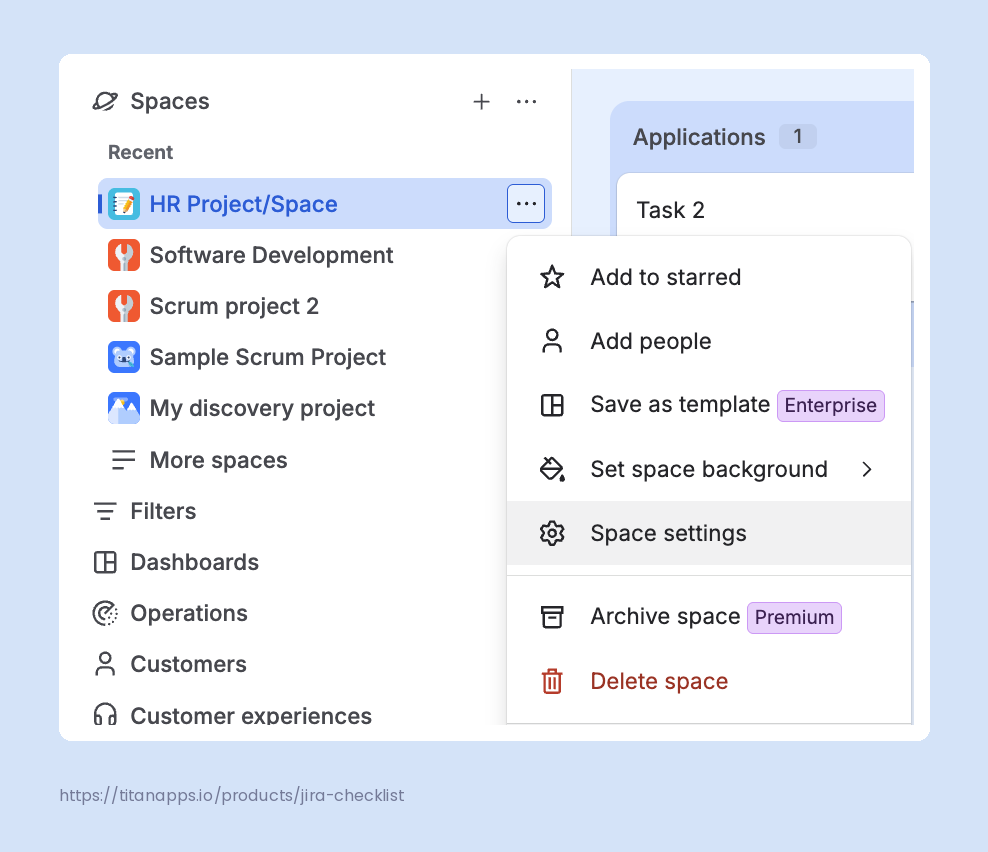
- Go to Space Settings -> Automation. Click Create Flow. To use this feature, you must have Administrator rights for your project / Jira space.
- Specify the trigger for the rule – the event after which the flow should run, such as Work item created or Work item updated.
- Add conditions to your flow. In the example above, we select Work item fields condition and specify the required parameters (the summary contains the required keyword and the assignee field is empty).
- Select the action that should be performed.
- Save and turn on your flow.
Use Automation With Your Jira Service Management Helpdesk
HR departments often use Jira Service Management (JSM) to set up a self-service portal or helpdesk software for employees. This is a great tool for processing requests, managing approvals, collecting employee feedback, and much more. Introducing automation can help you do this faster and with less effort, making HR service delivery more fast-paced.
The opportunities provided by Jira’s native automation functionality are nearly limitless. Here are some examples of what you can put on autopilot:
- HR request categorization. Once a ticket is created, the system can automatically detect the request type and assign the work item to the responsible person. For instance, a time off request is assigned to an HR manager.
- Facilitating approvals. Tickets that require approval or signing documents, such as job offers, can be automatically routed to the approvers once they are transferred to the Ready for Approval status.
- Automated notifications. People can receive notifications in Slack or other apps once certain activity occurs in the ticket (adding comments, uploading attachments, etc.). For instance, when an employee’s leave request is approved or denied, an automated notification is sent to the requester.
- Creating work items from Smart Templates. For example, when an employee’s contract end date is near, this can trigger an automated work item creation from a contract renewal task template. The HR team will be assigned a task to check whether the contract should be renewed or terminated.
- Adding Smart Checklists to user requests. For typical work items, you can automatically add step-by-step checklists and even make them visible to the person who submitted the ticket. They will be able to track progress on their request in the view-only mode. For example, an employee can submit a business travel request and then view the checklist of steps the HR team needs to complete to handle it. For more details, watch this short video about Codifying processes.
To set up automation for HR Service Management, go to Space Settings -> Automation. There, you can add a tailored automation rule/flow for your specific case. Let’s examine some examples.
Below is a rule for cloning a JSM work item into another space / project. It’s triggered once the initial work item is moved to In Progress. This rule is useful when a ticket requires the involvement of a team working in a different space. For instance, when an employee submits a reimbursement request and once it’s marked as In Progress, the ticket is cloned to the financial team’s space in Jira.
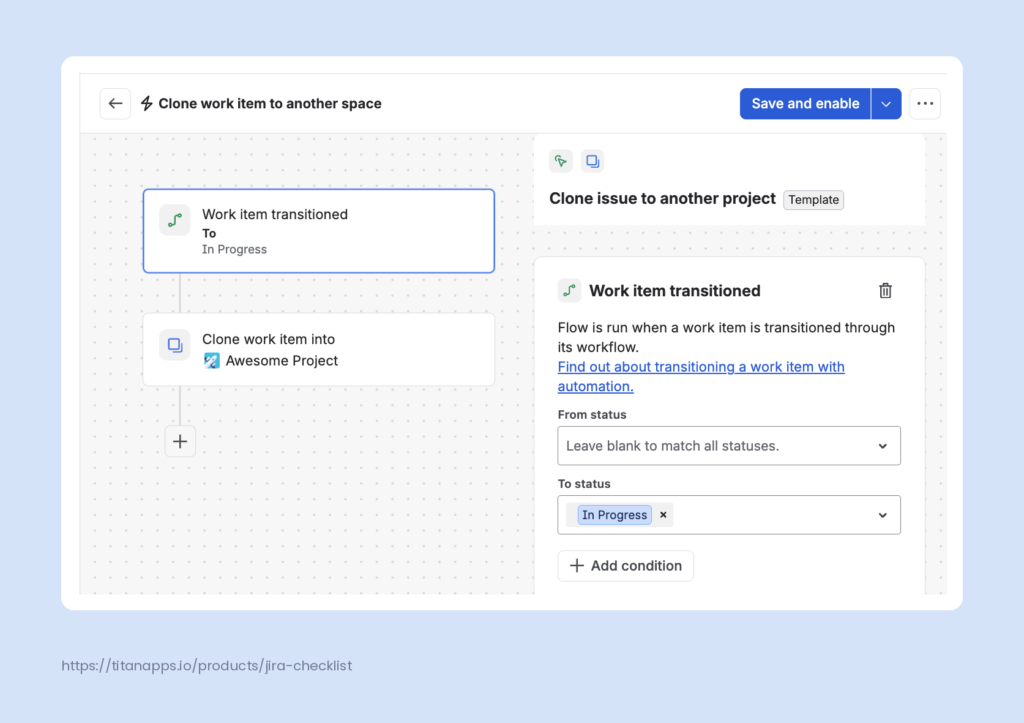
You can modify the rule to only apply to certain work item types if needed.
This automation works best if both spaces have identical work item layouts. This means you should take into consideration the differences between the two spaces and discuss this rule with your Jira Administrator before enabling it.
The next example is a rule that automatically adds a Smart Checklist to the selected type of JSM ticket. Let’s say an employee submits a ticket with the request type “Business Trip.” The rule below will add to this task a list of steps one should take while processing this request. As a result, the responsible person receives a ticket with a clear action plan.
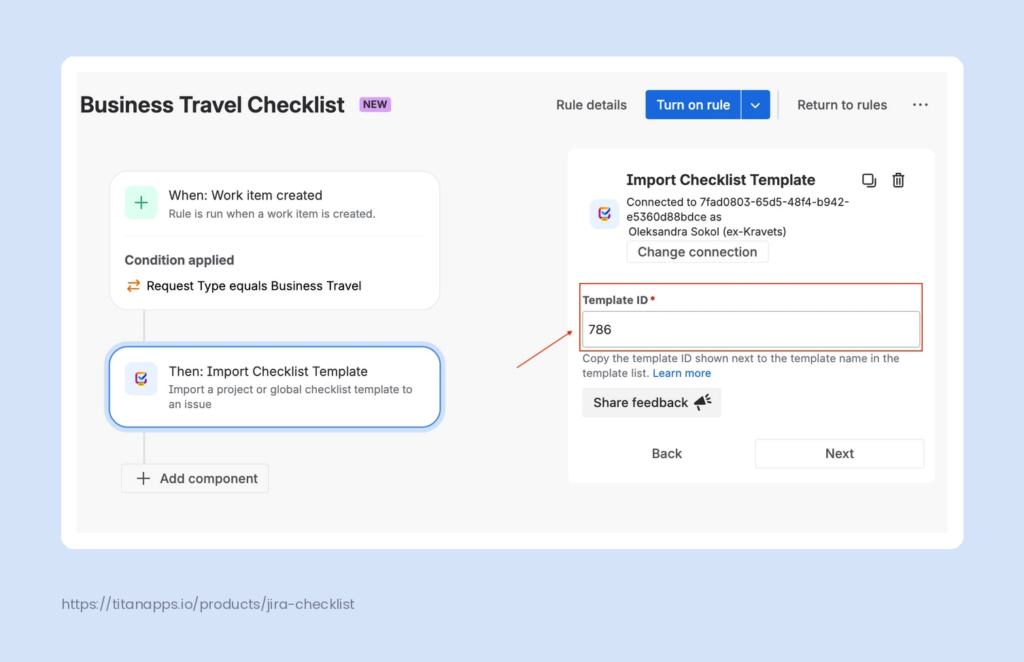
For more details on how to set up this automation, please see this Adding Checklist to JSM guide.
Using tailored automation rules and structured checklists will help you streamline HR service delivery and increase employee satisfaction rates.
Set Up Workflow Automation in Jira for HR Process Optimization
Workflows help you organize processes by clearly defining the key stages for typical or repetitive work items. For example, below you can see a simple recruitment workflow in Jira. It goes from Screening to Interviewing and further to Accepted while permitting the transition to Rejected from most of the other stages.
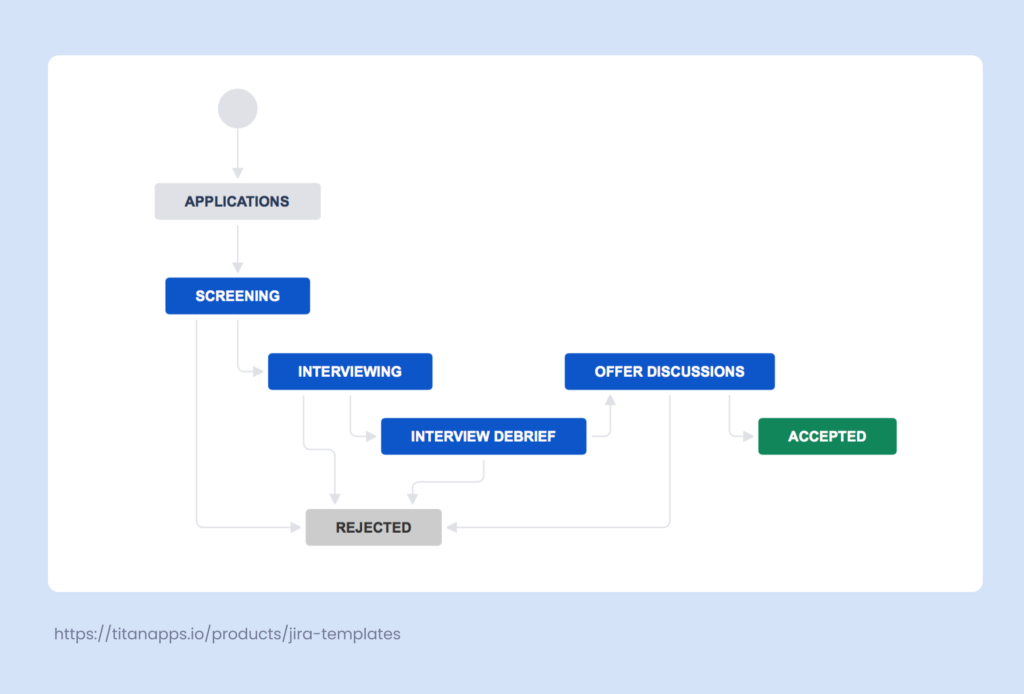
Jira allows you to integrate automation into your workflows. In particular, you can configure various actions that are triggered when a work item changes its status.
Here are some common examples of using workflow automation in Jira for HR processes:
- Strict rules for status changes. For example, moving a work item from Screening to Offer can be disabled if the Interviewing stage is skipped.
- Validating compliance. Add rules that will validate whether certain conditions are met. For instance, a rule can check whether an employee satisfaction survey form is attached before allowing you to proceed with the performance review.
- Auto-assigning reviewers. A workflow automation rule can change the assignee when a work item transitions to a specific stage. For example, when a business trip request is moved to “Approval Pending”, the work item can be auto-assigned to the employee’s manager.
To add automation to your workflow, use Jira’s Workflow Editor. There, you can adjust your statuses and transitions and add various rules. They fall into three main categories: rules that restrict transitions, validate details, or perform certain actions.
To access this menu, open the workflow you want to change in the Workflow Editor and click Rule in the menu bar on the top:
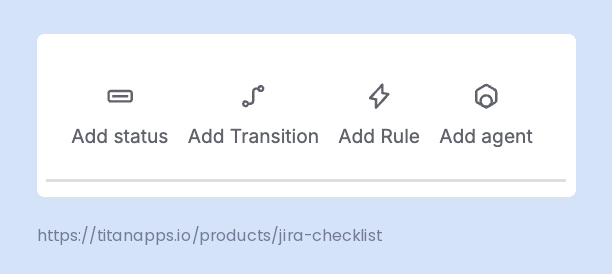
There, you can see all the options and select what fits best for your case.
As an example, let’s add automation to the recruitment workflow that we showed above. Let’s say only the people who were present in the interview can make a decision about sending an offer to the candidate. In this example case, these people are also specified in the Approvers field of the work item. We can set up workflow automation that prevents anyone else from transferring a work item to the Offer Discussion status after the Interview Debrief stage.
From the list of rules in the Workflow Editor, we select Restrict who can move a work item:
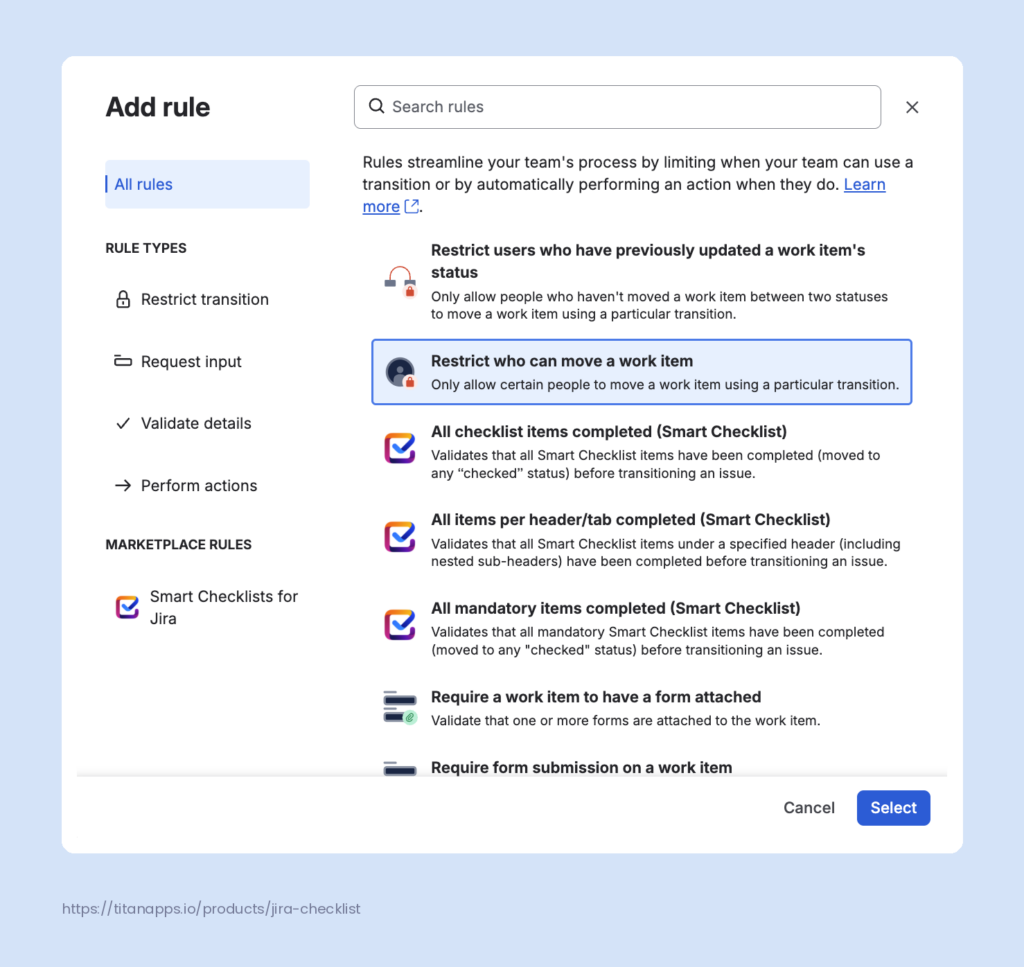
Next, we specify the transition to which the automation should be applied and select who can move the work item at this step: Restrict to -> Users in the custom field -> Approvers.
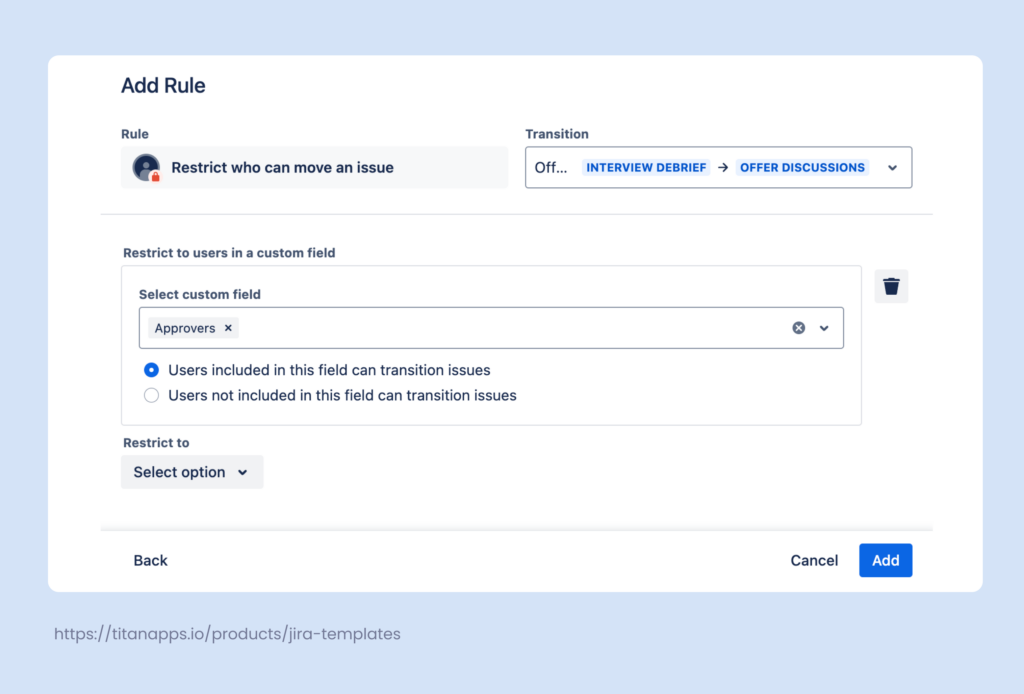
Once this is ready, we click Add. The automation is now active and will apply to all work items that follow this workflow.
Connect Jira to Third-Party Apps For Enhanced Automation
Most HR teams are not limited to Jira and also use many specialized HR management tools. These include apps such as BambooHR, Workday, Greenhouse, Rippling, HiBob, and many others. In addition, numerous business apps, such as Microsoft Teams, Miro, Google Sheets, and various ITSM solutions or project management tools are also used by HR teams. Connecting Jira to these third-party applications can help you automate HR tasks. That stack increasingly includes dedicated employee benefits platform that handles HSA, FSA, and lifestyle spending account administration separately from core payroll data, and the same Zapier/Workato connections described above can trigger a Jira onboarding checklist the moment a new hire is enrolled.
Here are some of the options to consider:
- Native connections in Jira automation. Jira connects directly to Workday, Okta, Entra ID, Docusign, Slack, Microsoft Teams, and more. You can set up the connection once and then use it for a trigger or an action in any rule / automation flow.
- Marketplace apps. In your Jira project, in the upper menu bar, click Apps -> Explore more apps to access the Atlassian marketplace. It features numerous third-party solutions with diverse functionality.
- Reporting and analytics automation apps. Platforms like Coupler.io can connect Jira to BI tools and help you build custom live dashboards, as well as integrate Jira with spreadsheets, data warehouses, and AI assistants.
- Data integration platforms. Tools like Zapier, Make, and Workato can transfer data between Jira and HR systems that have no native connection. For example, adding a new hire in BambooHR can create an onboarding work item in Jira. These platforms also let you build trigger-based workflows, where one event starts a chain of actions across several apps.
- MCP server for integration with AI tools. The Jira MCP Server (Atlassian Rovo MCP Server) lets you connect Jira and other Atlassian solutions to AI assistants such as Claude and ChatGPT. This allows you to perform actions in Jira directly from a conversation with an AI assistant. For example, you can ask Claude to create new tasks in Jira, check and analyze progress, and so on.
Here is a real-world example of connecting an HRIS system to Jira Service management. Atlassian’s HR team uses Workday, which they integrated with Jira via Workato. Here is how they describe this in their Jira Service Management for HR guide: “When we hire someone and add them to Workday, that action automatically creates a request in Jira Service Management. That request then initiates a catalog of requests from the onboarding checklist that our People Team follows, including laptop and account provisioning, accessory requests, and orientation scheduling”.
Another common example is setting up a Zapier integration for BambooHR and Jira Software. Here is how this can be done. Once you sign up for the tool and select the apps to connect, you will need to specify the trigger and action for the automation. In our screenshot below, the trigger is “New employee started” – an event that happens in BambooHR. The action is “Create work item,” which takes place in Jira.
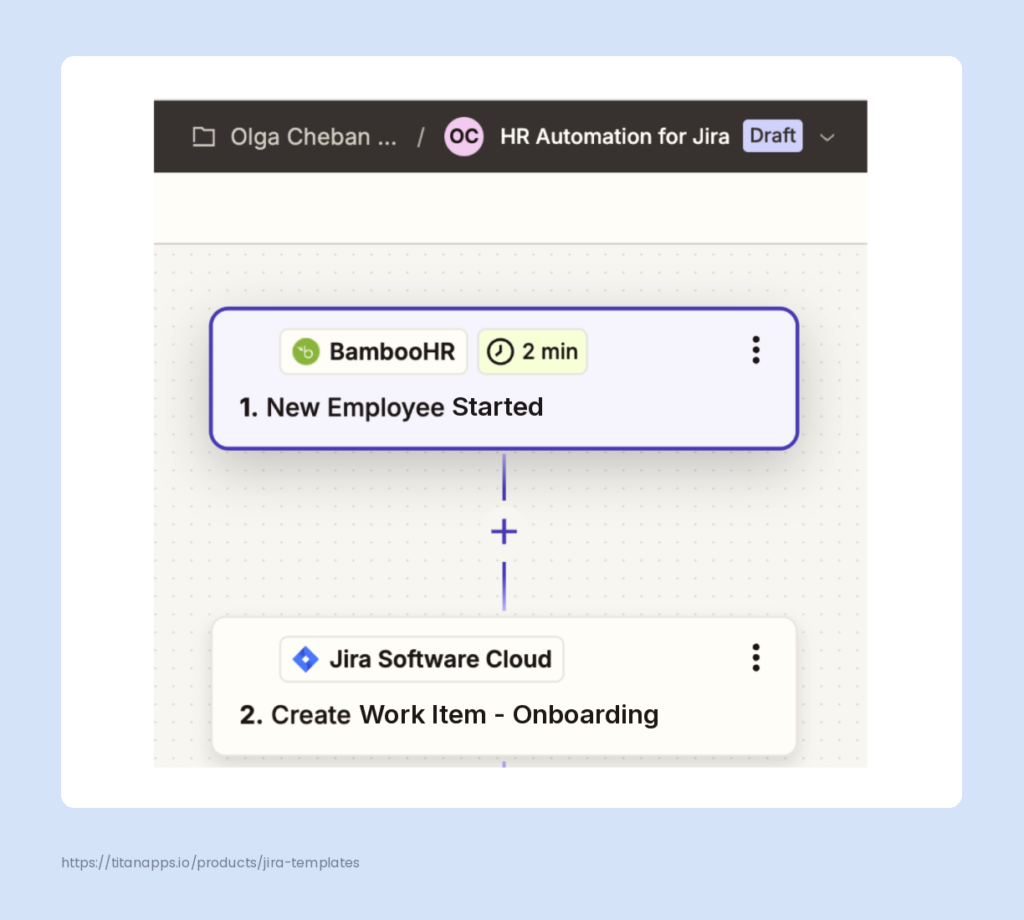
You will also need to connect your BambooHR and Jira accounts by providing your API credentials for these apps. After this, you will be able to fill in the necessary issue parameters, such as project, issue type, and any other required fields. Next, you will need to match fields from BambooHR to the corresponding fields in Jira so that the correct data is transferred between the apps, such as the employee’s name and position.
Once this is complete, you can test your integration and, if successful, turn it on. Zapier will check BambooHR for new data at specified intervals. If it registers a trigger event (e.g. a new employee added), it will run the automation and create a new onboarding work item in Jira according to the provided settings.
7 Ways to Use HR AI Agents in Jira Service Management for HR Automation
If your HR team already runs a service desk in Jira Service Management, you can hand a good share of the incoming traffic to AI. Employees can get answers to routine questions, submit properly filled requests, and see their tickets sorted before anyone opens them. Your team steps in only where a human is genuinely needed.
Jira Service Management uses the word “agent” in more than one sense, so it helps to sort out the term definitions first:
- Agent – In Jira Service Management, an agent is a person on your team who works on incoming requests. When Atlassian documentation mentions agents, it usually means human beings.
- Virtual service agent – This is the AI counterpart built into Jira Service Management. It talks to employees in your support channels and can answer their questions, collect details, and create work items. You shape its behavior by designing the conversation step by step, so it asks exactly what you decide, in the order you decide.
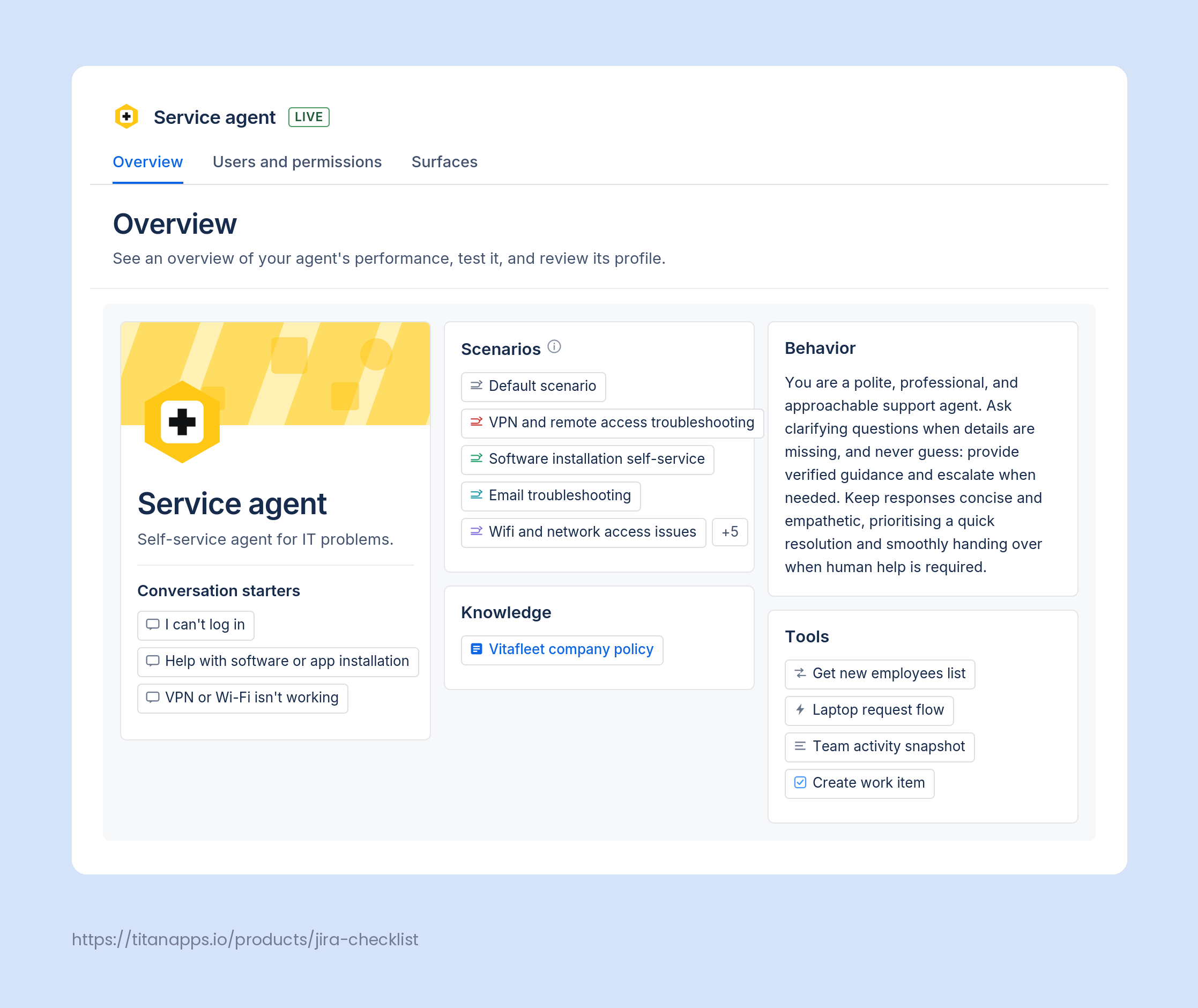
- Rovo agent – Rovo agents are Atlassian’s AI agents, and they work across Atlassian products rather than only in Jira Service Management. Several of them are built for service teams and can be used for HR purposes. You do not need to design a conversation plan for a Rovo agent. Instead, you write instructions, connect the knowledge base it should rely on, and let it work out the conversation itself. Some Rovo agents can talk to employees on your portal, while others run quietly inside automation rules.
Note
According to Atlassian’s State of AI in Service Management 2025 report, “In HR, using AI agents for employee inquiries and self-service is the most used function, at 43% (…). Intelligent HR knowledge base management and content discovery is the second most used, at 42%.” The numbers for the current year are not available yet, but the usage level has likely increased by now.
Here are seven ways HR teams can put these agents to work.
- AI answers. Employees ask the same policy questions over and over, and every answer already exists somewhere in your documentation. The virtual service agent can search your linked knowledge base, summarize the relevant policy in plain language, and list the articles it used. For example, someone asking how many vacation days carry over into next year will get the answer and a link to the full policy page, without opening a ticket.
- Intents and conversation flows. For requests that need more than an answer, you can set up intents. An intent is a specific situation you teach the virtual service agent to recognize, such as an employee wanting to request leave. You then design what happens next: what the agent says, what options it should offer, and which questions it needs to ask. Atlassian can also generate intent templates from the themes in your existing requests, which is a practical way to find out what your employees actually ask most often.
- Automatic work item creation and routing. When a conversation reaches the point where HR needs to get involved, the virtual service agent can create the work item on the employee’s behalf. A flow (automation rule) can also switch the request type partway through, so the request lands in the right queue with the right fields. For example, an employee who starts by asking about business trips can end up with a properly categorized Travel request, filled in with the dates they already mentioned.
- Background automation triggers. A conversation step can run a Jira automation flow that the employee never sees. This is useful when something has to happen outside the chat. For example, once a relocation request is submitted, the automation can notify the HR business partner for that team and create a follow-up task for the legal team.
- Rovo agents on your portal and help center. You can place a Rovo agent on your HR portal as a chat widget. Scenarios let you split one agent into separate pathways, so payroll, leave, and equipment questions each draw on their own set of knowledge. The agent can also collect the fields a request type needs and raise the request straight from the chat, which means employees never have to search for the right form themselves.
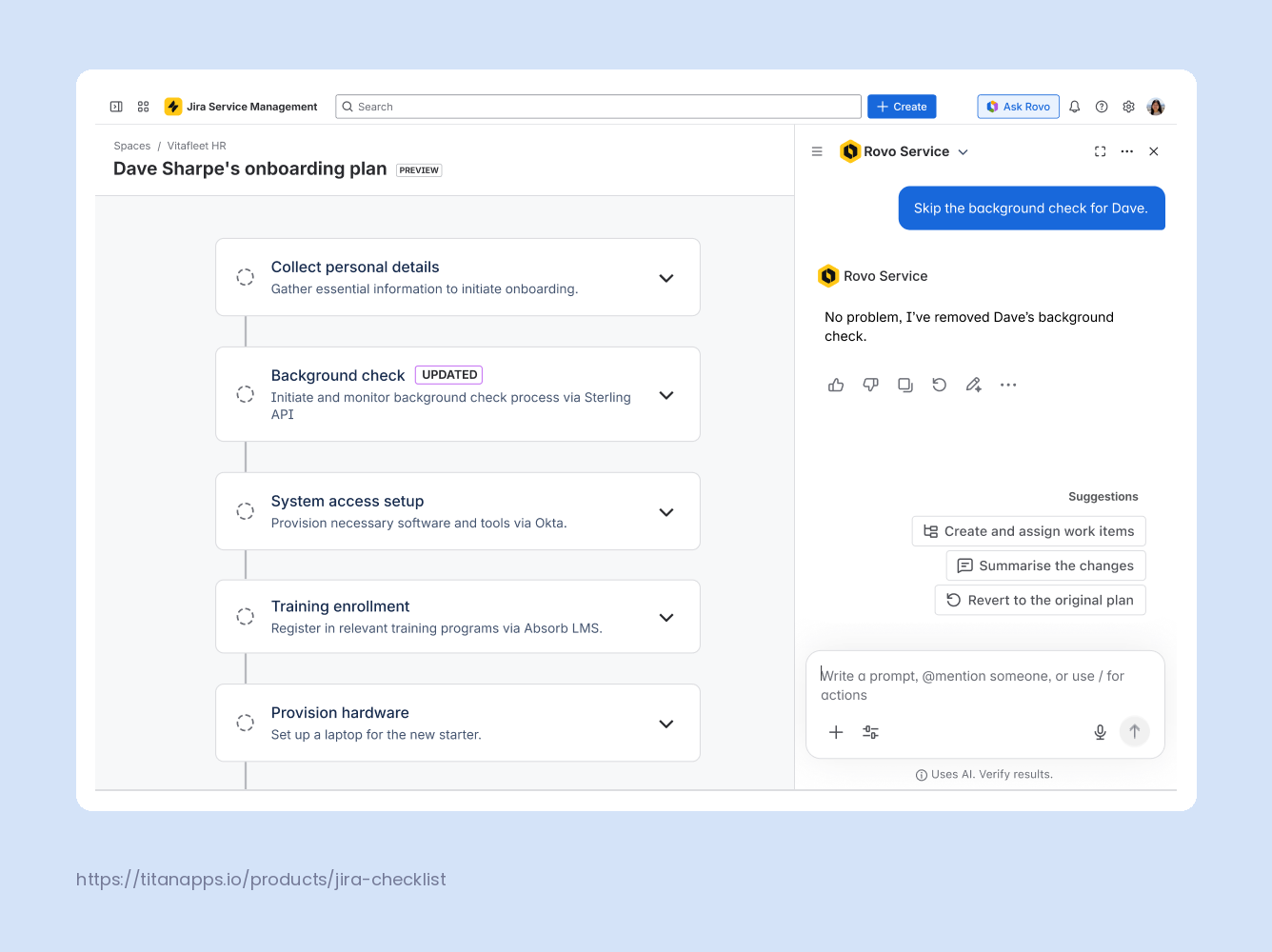
- Rovo Service for onboarding journeys. Most HR teams already have their onboarding process written down somewhere, usually as a checklist in a document. Rovo Service can turn that document into a structured journey of work items in Jira Service Management. You upload what you have, and it converts the content into a customizable individual plan. According to the State of AI in Service Management 2025 report, 30% of companies use automated AI-powered workflows for employee onboarding and offboarding. Rovo Service is one of the solutions they use for that purpose.
- Service Triage agent. An HR queue collects everything at once: payroll corrections, reference letter requests, policy questions, and the occasional urgent matter. This Rovo agent reads each incoming request and works out its type, urgency, and priority before anyone opens it. Add it to an automation rule and your queue sorts itself, so the sensitive cases surface first instead of waiting behind routine ones.
Taken together, these AI agents in HR reduce the volume of repeat questions reaching your HR inbox and make sure the requests that do arrive are complete and correctly categorized. Employees also get help outside your working hours, which matters if your company spans several time zones. The most common HR use cases are policy and benefits questions, leave and business trip requests, employee onboarding, payroll queries, and employment document requests.
Note
To have access to the virtual service agent feature, you need to have a Premium or Enterprise JSM Cloud subscription. Each of these plans includes 1000 AI-assisted conversations per month, with more usage for virtual service agents available for extra cost. You can find more details on the official Jira Service Collection pricing page.
Going Beyond Jira For HR Task Management
From task-level automation to complex rules streamlining HRSM processes, Jira provides a wealth of tools for work optimization. However, automation in Jira for HR purposes is just one of many things you can do to boost efficiency. To maximize your results, you may want to look beyond Jira and add other types of automation to your toolset.
For instance, when a new candidate applies, a Google Drive folder for this person can be created automatically on the company’s drive. There, you can keep their CV, portfolio, and position processing templates. Another example is setting up a Greenhouse data health monitor. It can give you weekly reports on whether any required data is missing from the applicants’ profiles. There can be countless other examples. I hope this tutorial has helped you discover new ideas for optimizing HR processes. Automation harbors immense power, and it’s worth remembering that even small changes can accumulate and lead to significant improvements.
For more on this topic, please see our other articles:
- Employee Onboarding Template for Jira
- Offboarding Template in Jira
- Employee Evaluation Template for HR
- Recruiting Plan Template for Jira
- A Free Jira Position Opening Template
- Jira Ticketing System: How JSM Handles Requests
Frequently Asked Questions About HR Automation in Jira
Do I need Jira Service Management to automate HR processes?
No. Automation for Jira and other automation features work in Jira Software as well. Jira Service Management adds a self-service portal for employees, dedicated request types for HR, and SLAs. It runs on the same IT service desk foundation your IT team may already use. That helps with high-volume request handling but is not mandatory.
How does automation support HR compliance and audit trails?
Automated checklists and templates make sure every process runs the same way each time. Mandatory checklist items can block work items from being closed until required steps are complete, which creates a consistent audit trail inside Jira. This is helpful for SOC 2 audit in Jira and ISO 27001 audit and certifications, as well as for internal HR policy checks.
Can Jira be used for HR?
Yes. HR teams use Jira Service Management to handle employee requests through a self-service portal. The Jira HR Service Management template ships with request types for employee onboarding, employee offboarding, confidential HR cases that restrict sensitive information to selected people, and requests that need approval. Jira also covers HR work that is not request based, such as recruitment and performance reviews. Add Smart Checklist and Smart Templates to document each process as reusable, actionable steps across the whole employee lifecycle.
Which is the best software for HR?
There is no single best option, because HR software splits into different categories. HRIS platforms like Workday, BambooHR, and Rippling store employee records and run payroll and benefits. Human resources service management tools like Jira Service Management handle requests, approvals, and cross-team processes such as onboarding. Most companies use both and connect them. Jira Service Management makes the most sense if your company already runs on Atlassian tools and wants HR, IT, and finance on one platform, an approach known as ESM.
What are the benefits of HR automation?
Automation returns the hours your HR team spends on repetitive admin work. It also makes processes consistent, so every new hire and every leaver goes through the same steps. The main benefits are:
- Faster HR service delivery, because requests route to the right person automatically
- Fewer errors, since steps are documented instead of remembered
- HR compliance automation, so mandatory steps cannot be skipped and every action is logged
- Better cross-team coordination between HR, IT, finance, and facilities
- Easier scaling, because growing headcount and service demand do not add proportional admin work
- Faster ramp-up for new HR specialists, who follow documented processes instead of learning them from colleagues
What platforms offer AI-powered HR automation?
Most major HR and service platforms now include AI features. Workday, Rippling, and BambooHR apply AI to records, payroll, and hiring. ServiceNow and Jira Service Management apply it to HR service delivery.
Jira Service Management offers several AI-powered options for HR teams. The virtual service agent is built into the product and answers FAQs from your linked knowledge base in Confluence. It can also create work items when HR needs to step in. Rovo agents are separate and work across Atlassian products, so you can place one on your HR portal or run it inside an automation flow.
You can also use Rovo Service to build an AI-powered onboarding journey from a document you already have. This is how Atlassian layers AI on top of existing HR processes. It’s worth noting that the quality of your documentation sets the quality of the answers your HR AI agent gives. Pair it with structured checklists so each step is well-documented and recorded.