Tools for Jira
 Tools for monday.com





Railsware is an engineer-led company with a vast portfolio of building projects for companies such as Calendly and brightbytes.net, as well as experience in launching our own products like Mailtrap or Coupler. So when talking about Jira best practices for developers, we speak from experience.
Jira is used by different teams in different ways. A Jira admin cares about permissions, Jira instances, and keeping workflows consistent across projects. A product owner cares about backlog health, roadmaps, and dependencies. A development team cares about DevOps integrations, automation, and keeping work-in-progress under control.
That’s why “Jira best practices” only make sense when you know the context. In this guide, we’ll cover practical best practices grouped by role: Jira admins, project and product management, developers, and business teams using Kanban boards. The goal is simple: help your team use Jira Software as a project management tool that supports your team’s process, not one that creates bottlenecks.
This structure also helps when you run multiple Jira projects. You can apply the right patterns to each workflow, issue type, and board setup without over-customizing everything out of the box.
Why teams still choose Jira?

Jira is not perfect. It can feel heavy. It’s a large Atlassian product, and that sometimes shows in performance, UI complexity, and how long it takes to ship improvements. In the wrong setup, Jira can also push teams toward “tracking for tracking’s sake,” where due dates matter more than delivery and value.
Still, Jira remains one of the most widely used project management tools for software development and cross-functional teams. Here’s why it sticks:
• Permissions and governance: You can control who can see and change Jira work across stakeholders, team members, and external collaborators. This matters when multiple teams share one Jira project or when sensitive work lives in the same Jira instance.
• Work breakdown from initiative to execution: Teams use epics to group Jira tickets by feature or initiative, then track delivery in smaller work items. This works across Scrum and Kanban workflows and supports clear ownership (assignee) and dependencies.
• Custom fields and workflows: Jira workflows, statuses, screens, and custom fields can match how your team works. The flexibility is the point, but it needs structure to avoid clutter.
• Powerful search (JQL): If you know JQL, Jira becomes a real system for finding work, spotting bottlenecks, and building dashboards from live Jira data.
• Automation out of the box: Jira automation helps reduce manual work. You can auto-assign issues, move work items when rules are met, post updates to Slack, and keep the process moving without constant admin intervention.
• Integrations and Marketplace apps: Jira connects well with Bitbucket and GitHub for dev workflows, with Confluence for documentation, and with Slack for notifications. The Atlassian Marketplace adds thousands of add-ons and plugins for specialized needs.
• Broad application beyond dev teams: Jira supports iterative delivery (Scrum boards, sprint workflows) and non-iterative work (Kanban boards, service workflows, business tracking). The key is choosing the right templates and simplifying the process for the audience.
Jira best practices

Best practice 0: Define your goals and users
Jira is flexible enough to support very different methodologies and team setups. That’s a benefit, but it also means your Jira workflow can drift fast if you don’t define what Jira is used for in your organization.
Start with two questions:
What outcomes do you need Jira to support?
Is Jira mainly your system for project management and delivery tracking? Is it used for product management decisions and roadmap planning? Is it a lightweight task tracker for business teams? Or a shared space for multiple stakeholders to follow progress across Jira projects?
Who are the primary users?
A Jira admin configures permissions, workflows, and Jira instances. A product owner manages backlog and priorities. A development team works inside Jira tickets, uses integrations (GitHub/Bitbucket), and relies on automation to reduce manual steps. Business teams often use Kanban boards and need simpler templates.
This matters because the “right” setup changes depending on the audience. If your main users are business teams, a heavy Scrum workflow can slow adoption. If your main users are software development teams, missing integrations and weak automation will create friction. Defining goals and users upfront helps you choose the right Jira project template, issue types, and level of customization.
Jira best practices for Jira admins
Jira admins influence whether Jira stays a reliable system or turns into a messy set of disconnected Jira projects. The best admin practices focus on governance: permissions, user management, and a setup approach that matches how teams work.
Start with user management and permissions
Access control is one of Jira’s strongest capabilities. It’s also the fastest way to break trust if it’s inconsistent.
A practical baseline:
• Define who can create and edit Jira issues, who can transition statuses, and who can manage workflows.
• Use roles for team members and stakeholders instead of managing permissions person-by-person.
• Keep sensitive work readable only by the right groups, especially in shared Jira instances.
This protects your team’s process and reduces “permission chaos” where people can’t move work items or see what they need to deliver.
Choose a setup strategy: standardized or decentralized
There are two healthy ways to manage Jira at scale. Problems start when you mix them without intention.
1) Standardized setup (recommended for most orgs)
You reuse the same building blocks across Jira company-managed projects:
• consistent workflows and statuses
• consistent custom fields and issue types
• consistent permission schemes
This approach makes reporting, dashboards, automation rules, and cross-project work more predictable. It also reduces admin overhead long-term because you don’t maintain a different configuration for every new project.
2) Decentralized setup (team autonomy)
Some orgs offload setup to teams using team-managed projects. Teams can create their own workflows and fields without affecting other projects. This can work well when teams are independent and don’t need shared reporting.
The trade-off is fragmentation: dashboards and metrics become harder to unify, and you may see duplicate custom fields, inconsistent workflows, and recurring “why is this different in this project?” questions.
Be intentional about apps, plugins, and automation
Admins are often the final decision point for Atlassian Marketplace add-ons. Product managers and stakeholders may request functionality, but admins decide how it fits into the Jira workflow and whether it’s secure and maintainable.
A good practice is to treat add-ons and automation as part of governance:
• prefer out-of-the-box functionality first
• add apps when they solve a repeated need across teams
• standardize automation rules so they don’t conflict between projects
This keeps Jira fast enough to use daily and stable enough to scale.
Jira best practices for project & product managers
Project and product managers keep Jira useful when they treat it as a delivery system, not a storage space for every idea. The best practices here are about keeping the backlog healthy, making progress visible on the Jira board, and reducing confusion for team members and stakeholders.
Keep the backlog healthy and ready for delivery
Every Jira project accumulates Jira tickets: ideas, bugs, requirements, tech debt, and “quick fixes.” If you don’t maintain the backlog, you end up with duplicated work, unclear priorities, and bottlenecks during sprint planning.
A few reliable habits:
• Add requirements when they become actionable. Keep drafts and early exploration in Confluence or docs, then move validated work into Jira issues.
• Keep delivery work in one backlog where possible. Splitting tracking across multiple tools makes prioritization and dependencies harder to see.
• Run backlog refinement on a cadence. The goal is not perfection. It’s to keep work items clear enough for estimation and execution.
Make the Jira board reflect reality
Your Jira workflow should match how the team delivers work. For Scrum teams, that’s usually a Scrum board with sprint planning. For teams running continuous delivery, it’s often Kanban boards with WIP control and clear swimlanes for priority.
What matters most:
• statuses should represent meaningful steps, not micro-movements
• “In progress” should mean work is actually being done, not “assigned and forgotten”
• limit work-in-progress so the team finishes work instead of starting more
This improves throughput and makes blockers visible earlier.
Use roadmaps for visibility, not for perfection
Jira is not a design tool for roadmaps, but a roadmap in Jira is useful because it connects plans to real Jira work. You can review scope anytime, track dependencies, and support decision-making when priorities change.
If your product team needs a stronger discovery layer, consider Jira Product Discovery for structuring ideas, opportunities, and prioritization before work becomes Jira tickets. It’s a good fit for product management workflows that need more than a flat backlog.
Standardize recurring work with templates (avoid re-inventing delivery)
Managers often run repeated projects or repeated workflows: launches, internal initiatives, client delivery patterns, or onboarding. Setting them up from scratch in every new project creates overhead and inconsistency.
This is where Smart templates help:
• reusable work structures (issue hierarchy, epics, repeated Jira tickets)
• repeatable checklists (Definition of Done, acceptance criteria, release readiness)
• predictable roles and responsibilities across the team
Templates reduce setup time and keep the process consistent without adding more subtasks and clutter.
Jira best practices for developers (integrations, DevOps signals, automation)
Developers don’t need Jira to be “more detailed.” They need it to be connected to how work actually ships. The best developer practices are about tying Jira issues to code, keeping work-in-progress honest, and reducing manual status updates.
Connect Jira issues to code and delivery
If you use GitHub, Bitbucket, or GitLab, link Jira tickets to branches, commits, and pull requests. This creates a clear trail from work item – code change – delivery. It also makes collaboration easier for reviewers and product owners because the Jira issue shows what’s happening without extra meetings.
A practical pattern is to treat Jira as the workflow backbone and your repo as the execution layer:
• Jira issue holds the intent, scope, and acceptance/DoD criteria
• the repo holds the implementation history
• integrations make the relationship visible for stakeholders
Use automation to reduce “status chores”
Manual status updates are one of the biggest hidden costs in Jira. Automation rules can reduce this friction and prevent tickets from getting stuck.
Common developer-friendly automations include:
• moving issues to work-in-progress when development starts (based on commits/branches or workflow transitions)
• auto-assigning issues when a developer picks up work
• posting notifications to Slack when items are ready for review or when releases go out
The goal is not to automate everything. It’s to remove repetitive actions that don’t add value.
Make Definition of Done visible in Jira issues
For developers, DoD is not a document. It’s a checklist that prevents production surprises. Keeping DoD inside Jira issues makes it easier to follow consistently, especially when multiple team members touch the same work item across QA, review, and release.
A checklist approach helps teams:
• standardize quality steps
• avoid missing edge-case validation
• keep the workflow consistent across issue types
(We cover this in detail in our Definition of Done guide, which includes examples teams use in real Jira workflows.)
Treat Jira as a communication surface, not a dumping ground
Use Jira tickets to clarify scope, constraints, and expected outcomes. Keep deep technical discussion where it belongs (PRs, code review, architecture docs in Confluence). This keeps Jira readable and reduces noise for the rest of the team.
Jira best practices for business teams (Kanban + recurring work)
Business teams often struggle with Jira when they copy software development workflows. You don’t need Scrum boards, sprint planning, or complex issue types to run marketing, operations, or internal projects well. The best practice is to keep the workflow simple and make recurring work predictable.
Use Kanban boards and keep the workflow lightweight
For most business teams, Kanban boards work better than Scrum. The goal is steady flow and clear ownership, not sprint ceremonies.
A good Kanban setup usually means:
• a small set of statuses that reflect how work actually moves
• visible work-in-progress so tasks don’t stall silently
• swimlanes for priority or work streams when stakeholders need visibility
This improves daily execution and makes bottlenecks obvious earlier.
Standardize recurring work with templates instead of recreating tasks
Business teams run repeatable processes all the time: onboarding steps, policy updates, campaign launches, monthly reporting, content publishing, operational check-ins. Recreating Jira tickets (or piles of subtasks) every time leads to inconsistency.
Templates solve that by giving you a baseline process you can reuse:
• same structure for each new project or cycle
• the same key steps, every time
• predictable ownership for team members
Use checklists to reduce subtask clutter
Subtasks work, but they add overhead: more navigation, more noise, more scattered progress. A checklist inside a Jira issue keeps steps visible in one place and works especially well for repeatable processes.
This is useful when:
• you want a clean Jira board without dozens of subtasks
• you need consistency (the same steps in every workflow)
• you need progress visible to stakeholders without extra reportingChecklists also work well as templates for recurring tasks like onboarding, Definition of Done, and acceptance criteria.
Use checklists in Jira tickets for repeatable work and clarity
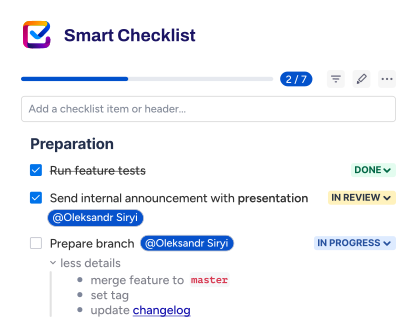
Smart Checklist is one of the simplest ways to make Jira work more consistently across teams. It helps you turn “we usually do X” into a visible set of steps inside Jira issues without creating a pile of subtasks.
A checklist helps when:
• the work item needs a plan (so the assignee doesn’t start from a blank page)
• multiple team members contribute and need a shared view of progress
• stakeholders need to see what’s done vs what’s blocked
• the same process repeats (Definition of Done, acceptance criteria, onboarding, service desk requests)
Smart Checklist for Jira supports this approach inside the issue view, so the steps stay close to the work. It’s especially useful when you want to standardize how the team executes recurring workflows without overcomplicating Jira workflows.
You can also connect checklists to automation. For example, teams often add a checklist template when a Jira issue matches a condition (issue type, label/component, or workflow status). That reduces manual setup and keeps execution consistent across your Jira project.
Less is more
Information helps, but in Jira tickets, too much information often creates confusion. The goal is clarity: the right context, in the right place, at the right time.
If a link to Confluence documentation, a design file, or a dependency is required to complete the Jira issue, include it. Use formatting so it’s readable. Keep the description focused on scope, expected outcomes, and constraints.
What doesn’t help is long personal reasoning, duplicated discussion across comments, or history that doesn’t affect delivery. When Jira tickets become a dumping ground, team members stop trusting them, and stakeholders stop using the Jira board to understand progress.
Treat Jira as the system of record for work and decisions about delivery. Keep deep background and long-form thinking in Confluence. This keeps Jira issues fast to read, easier to execute, and easier to maintain across a Jira project.
Roadmaps and templates: scale delivery without reinventing the process
When teams grow, the biggest Jira problem is rarely “missing features.” It’s inconsistency. One team tracks work one way, another team uses different issue types and statuses, and soon your roadmap, dashboards, and dependency tracking stop reflecting reality.
Two practices help keep Jira scalable: roadmaps for visibility and templates for repeatability.
Keep a roadmap in Jira to make dependencies visible
Jira is not a design tool for roadmapping, but a roadmap inside Jira is still useful because it connects plans to actual Jira work. It helps product owners and stakeholders see what’s planned, what’s in progress, and where dependencies can block delivery.
A roadmap becomes especially valuable when:
• multiple teams work in the same Jira instance
• epics depend on shared backend services or shared modules
• prioritization changes often and you need a clear view of impact
Use project patterns and templates for recurring delivery
Some teams run the same type of work repeatedly: consulting projects, similar client engagements, repeated internal initiatives, onboarding programs, compliance cycles, or repeated release processes. In these cases, creating everything from scratch for every new project is slow and inconsistent.
A better approach is to standardize your starting point:
• reuse a known Jira project structure (issue types, workflows, boards)
• reuse recurring work patterns (templates and checklists)
• keep execution consistent across team members
This doesn’t mean every Jira project must look the same. It means teams shouldn’t rebuild the basics every time they launch a new project.
Quality baseline: Definition of Done and Acceptance Criteria
A clean Jira workflow won’t save you if “done” means different things to different people. High-performing teams define a shared quality baseline and keep it close to the work.
Definition of Done (DoD)
Definition of Done is the team-wide checklist that determines whether a Jira issue is truly ready to ship. It usually includes quality steps like review, testing, documentation updates, and anything required for release readiness. The practical best practice is to keep DoD visible inside Jira issues, so it’s part of the delivery workflow.
Acceptance criteria
Acceptance criteria are story-level requirements: what the feature must do for the end user and how QA should validate it. Clear criteria prevent rework and reduce back-and-forth between product owners, developers, and testers. Teams often keep acceptance criteria in the Jira ticket description, but checklists work better when you want progress visible and validation explicit.
A checklist-based quality baseline helps teams avoid subtask overload while still keeping requirements testable. It also supports consistent delivery across issue types, especially when multiple team members work on the same feature.
After the sprint: use retros to remove bottlenecks
If you work in Scrum, finishing a sprint isn’t the end of the process. It’s your best opportunity to improve it. A simple retrospective habit helps teams refine workflows, reduce bottlenecks, and make future work more predictable.
At Railsware, we keep retros focused on two buckets:
• Goods: what worked well and why it worked
• Improves: what slowed delivery down and what to change next sprint
Jira makes this easier because it gives you shared facts. You can review what moved to Done, what stayed work-in-progress, where issues got stuck, and which dependencies caused delays. That makes the conversation less opinion-based and more actionable for the development team and product owners.
The key is consistency. A short retro after each sprint helps your team’s process evolve without adding heavy overhead.
Conclusion
Jira works best when best practices match the role. Jira admins keep Jira instances scalable through permissions, governance, and consistent project setup. Project and product teams keep delivery predictable through healthy backlogs, clear roadmaps, and repeatable templates. Developers get speed and clarity when Jira tickets connect to DevOps workflows and automation reduces manual chores. Business teams succeed when Kanban boards stay lightweight and recurring work is standardized.
If you treat Jira as a system for tracking real work—and keep workflows simple, searchable, and consistent—it becomes a reliable backbone for software development and cross-functional execution.
FAQ: Jira best practices
What are Jira best practices for teams of all sizes?
The best Jira best practices depend on role and team maturity. Start with clear workflows, consistent issue types, and permissions that match how team members and stakeholders collaborate. Then keep Jira work visible through a healthy backlog, a clean Jira board, and lightweight automation.
How do I choose between Scrum and Kanban boards in Jira?
Use a Scrum board when you plan work in sprints and need sprint planning, sprint goals, and retrospective cycles. Use Kanban boards when work is continuous and you want to manage work-in-progress and flow. Many business teams work best in Kanban, while software development teams often use Scrum.
How many statuses should a Jira workflow have?
Keep Jira workflows simple. Too many statuses create bottlenecks and slow execution. Start with a basic flow like To Do ? In progress ? Done and add only meaningful steps (for example, Review or QA) when they reflect real handoffs in your team’s process.
What should Jira admins focus on first?
Start with user management and permissions, then standardize core configurations across Jira projects: workflows, custom fields, issue types, and permission schemes. This keeps dashboards and metrics consistent across Jira instances and reduces long-term admin overhead.
How do you keep a backlog healthy in Jira?
Run backlog refinement regularly. Remove duplicates, clarify requirements, and keep Jira tickets actionable. Keep discovery and long-form context in Confluence, then move validated work into Jira issues when it’s ready for prioritization.
What is the best way to manage dependencies in Jira?
Use epics and linking to make dependencies visible, then review them through your roadmap and board. If dependencies frequently block work-in-progress, consider adding a lightweight “Blocked” state or a clear blocker label and reviewing it during planning.
What are Jira components, labels, and custom fields used for?
Use custom fields for structured data you want to report on. Use labels for flexible tagging. Use components to categorize issues within a Jira project when ownership and stable grouping matter. Choose the simplest option that supports your reporting and dashboards.
How can automation improve Jira workflows?
Jira automation can streamline repetitive work: auto-assign issues, set fields based on issue type, send notifications to Slack, and move issues through workflow steps when conditions are met. Automation works best when rules are standardized and tied to real workflow needs.
How do developers connect Jira to DevOps workflows?
Integrations with GitHub or Bitbucket help connect Jira tickets to branches, commits, and pull requests. This improves visibility for the development team and product owners and reduces manual updates. Automation can also support transitions when key development events happen.
How do you standardize recurring work without creating subtask clutter?
Use templates and checklists. A checklist keeps steps inside a Jira issue, so progress stays visible without dozens of subtasks. This works well for Definition of Done, acceptance criteria, onboarding, service processes, and recurring operational tasks. For repeatable issue structures across projects, Smart Templates lets you reuse the whole hierarchy in one click.
How do Jira dashboards help stakeholders?
Dashboards help stakeholders track progress across Jira projects and teams. Use them to visualize metrics like issue status distribution, cycle time signals, workload by assignee, and progress by epic. Dashboards work best when fields and workflows are consistent.
What tools should I use with Jira besides native features?
Start with Jira’s out-of-the-box functionality. Add plugins and add-ons from the Atlassian Marketplace when they solve repeated needs: reporting, templates, checklist workflows, dependency tracking, or specialized project management features.