Tools for Jira
 Tools for monday.com




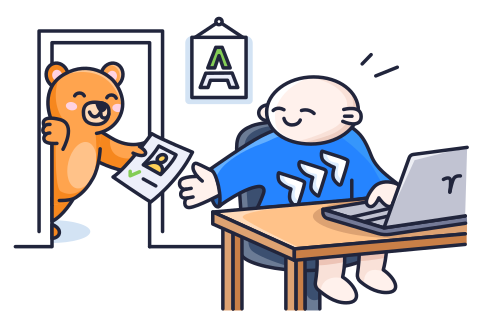
HR teams don’t struggle with effort; they struggle with playing detective to find employee information scattered across multiple systems.
An onboarding checklist can be in a spreadsheet, employee information in an HRMS, approvals in email threads, and reporting structures in an internal document.
When a manager asks, “Who owns this onboarding step?” or, “Can we see our department headcount?” HR teams often have to pull answers from multiple places.
The challenge isn’t the work itself. It’s the lack of structure around it.
HR needs structured workflows and an overview as companies grow. Many teams now use Jira beyond development to manage HR processes, track tasks, maintain employee records, and gain workforce insights.
In this blog post, we’ll talk about how real-life HR teams use Jira to make everyday HR tasks more organised, visible, and accountable.
The Role of Jira in Modern HR Operations
Jira is a project management and issue-tracking tool that helps you manage your work. It keeps track of tasks, assigns people ownership, handles approvals, and shows how things are going. Now imagine using that same structure for HR, where everything stays in order and works well.
You don’t have to deal with endless email chains, manual onboarding follow-ups, or confusion about who owns what. You get automated workflows that help you get things done. Jira helps HR teams stay cohesive by clarifying responsibilities, displaying real-time progress, and keeping structured records.
Let’s see how HR teams use Jira to simplify their daily tasks.
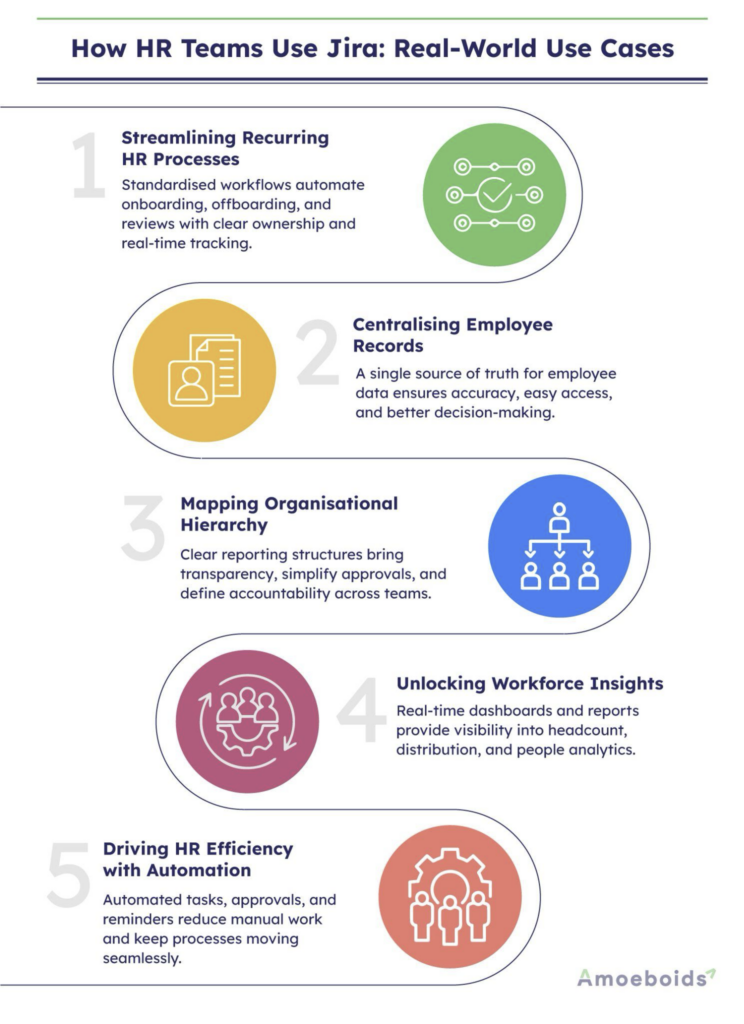
4 Real-World Use Cases For HR Teams Working in Jira
Use Case 1: Managing Recurring HR Processes
Every year, HR teams go through the same cycles. These repetitive tasks become inconsistent, hard to keep track of, and difficult to manage without structure.
Here’s how you can solve these challenges:
- Standardised workflows for onboarding, offboarding, probation reviews, and other recurring HR cycles
Standardised workflows ensure that HR tasks that repeat over and over again always follow the same steps. Set structures are helpful for things like onboardingand probation reviews because then you don’t have to rely on memory.
- Automated task assignments, approvals, and reminders to reduce manual coordination
Automation eliminates the need for constant follow-ups and reminder emails. The workflow automatically assigns tasks to the appropriate individuals based on the workflow stages. Automatic sending of approval requests and deadline reminders cuts down on the need for manual coordination and builds trust.
- Real-time visibility into process status, ownership, and timelines
Real-time dashboards allow HR teams to instantly see what’s pending, completed, or delayed. Ownership is clearly defined, so there’s no confusion about responsibility. Everyone who needs to see the timelines can do this, which makes things more open. This helps identify bottlenecks early and keeps processes on track.
- Centralised documentation with complete audit trails for compliance and reporting
All documents, approvals, and updates are stored in one central system. Every action gets a time stamp, which makes a complete record of what happened. This is especially helpful when doing internal audits or checks for compliance. Reporting is quicker, more accurate, and a lot less stressful.
How to apply this in practice? A hands-on example
Smart Templates for Jira by TitanApps let HR teams turn any repeating process into a ready-to-use template. This can be a single work item or an entire hierarchy of tasks with different assignees and deadlines. Define the steps, add subtasks, assign owners, and generate the whole set of work items from the template with one click. No cloning, no copy-pasting, no rebuilding from scratch.
The 5 key benefits of using Smart Templates for HR teams:
- Build a full task hierarchy from a single template. Structure multi-step processes like employee onboarding as a set of connected work items. For example, an onboarding epic can include separate tasks for IT setup, document signing, and team introductions – all generated at once.
- Adapt one template to different scenarios with variables. Instead of maintaining separate templates per department, use variables for dynamic values. For example, when applying an employee offboarding template, variables let you specify the assignee’s name and position during the work item creation.
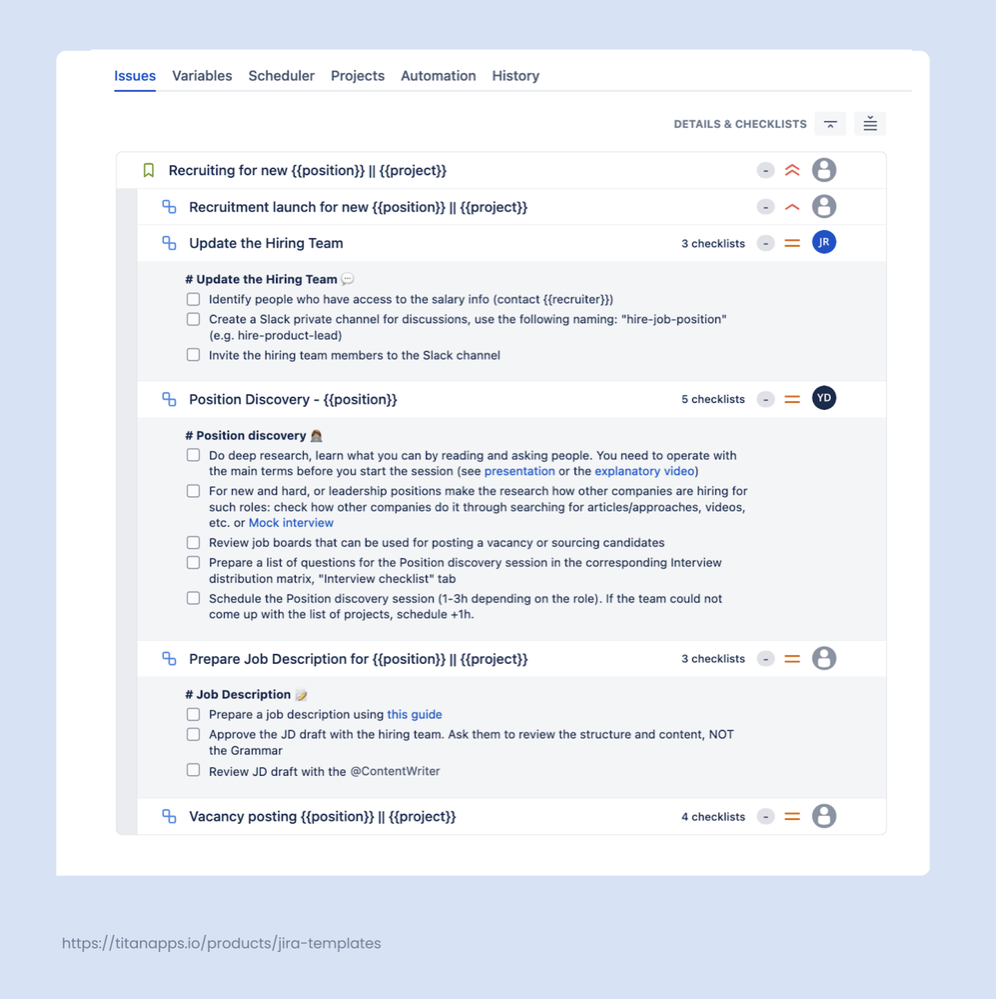
- Break down each task into actionable steps with Smart Checklists. Add detailed to-do lists inside every work item so nothing gets missed. For example, a recruitment template can include tasks like “Update the Hiring Team,” “Position Discovery,” and “Prepare Job Description” – each with its own checklist of steps, links to internal guides, and assigned owners.
- Put periodic tasks on autopilot with scheduled task creation. Set a template to generate work items on a recurring schedule. For example, payroll management tasks can be created automatically at the start of each month with all the necessary steps and assignees pre-filled. Pairing that automated setup with payroll software like Homebase keeps the calculation side accurate too, so the hours and deductions feeding each cycle match what actually reaches employee accounts.
- Keep processes up to date with a single edit. When a regulation or internal policy changes, update the template once, and every future instance will follow the new version. This helps teams stay aligned and keep processes consistent.
Learn more about automating HR processes in Jira with Smart Tools.
Use Case 2: Employee Records Management
Spreading information across spreadsheets, HRMS tools, and emails complicates the management of employee data. A structured system ensures precision, visibility, and improved decision-making. Here’s how you can organize this:
- Centralised employee profiles: A single employee profile keeps all of the important information in one place, such as the person’s name, their reporting manager, start date, and employment status. It makes it so you don’t have to check many tools.
- Department, designation, and location tracking: HR monitors each employee’s department, job title, and office location to ensure accurate team structures, support workforce planning, and guide internal movement decisions.
- Custom employee attributes: Custom attributes let HR keep track of things like skills, certifications, job type, or probation status. This makes it easier to sort, search, and look at employee data.
- Profile update management: Structured update workflows make sure that the right people check and approve changes to employee information. This cuts down on mistakes made manually and ensures that records are accurate, consistent, and simple to access.
- Single source of truth for employee data: Using one reliable system prevents duplicating information and keeps employee data consistent, allowing teams to access accurate records and trust HR reporting.
Use Case 3: Organisational Hierarchy
Clear reporting structures become more important as companies grow. It’s challenging to know who owns what and what roles people play without them, which makes it harder to make decisions.
- Reporting hierarchy mapping: Makes it clear who reports to whom in the whole organisation. This makes things less confusing and helps the approval and escalation processes go more smoothly.
- Team structure clarity: Clear team structures show how people in different departments work together. This helps HR make better plans for hiring, restructuring, and allocating resources.
- Manager-team relationships: They help you keep track of both direct and indirect reports. This allows HR to stay informed about who is in charge and makes it easier to write positive performance reviews.
- Department visibility across projects: Shows how different departments contribute to various projects. This helps leaders see how resources are being used and makes it easier for teams to work together and hold each other accountable.
- Organisational transparency: A clear organisational structure makes things more open and trustworthy. Employees know their responsibilities, who they report to, and who is in charge of what.
Use Case 4: Workforce Insights & Reporting
HR teams need clear data to make better decisions about their employees as companies grow. Structured reporting helps leaders see patterns in how people act, plan resources, and tell others about the company.
- Headcount visibility: HR teams can quickly see how many people work for the whole company. This helps leaders keep track of hiring and attrition trends and know how many people work for them.
- Department distribution insights: HR can look at how employees are spread out across teams and departments. This level of visibility helps find gaps in resources and makes it easier to balance the workforce.
- Employee metadata reporting: It’s simple to look at employee metadata like their role, location, type of employment, or skills. This makes reports more organised and helpful for HR when they need to make decisions.
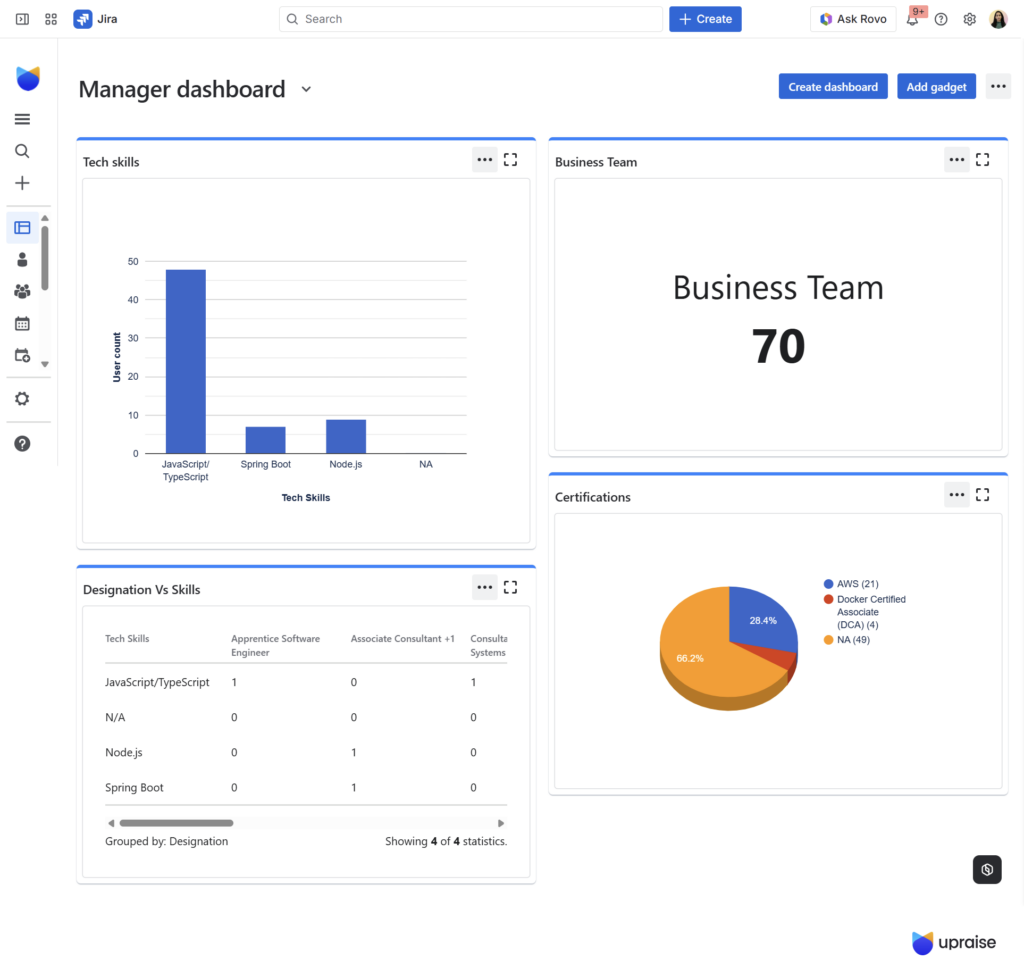
- People analytics dashboards: Dashboards show you real-time information about your workforce in a way that is easy to understand. HR and management can quickly see changes in the company, trends, and numbers.
- Workforce planning support: Data-driven insights help HR make better decisions about hiring, restructuring, and allocating talent. This ensures that the business is ready for future growth.
A practical example for HR teams
UpRaise People Automation helps HR teams manage employee information directly within Jira instead of relying on spreadsheets, emails, or multiple HR systems. It centralises employee profiles, allowing teams to easily track roles, departments, locations, job types, skills, and certifications in one place.
Key benefits:
- Employee profiles are collected so that HR teams can keep track of all workforce information in one place.
- Keeps track of employee information such as their roles, locations, types of employment, skills, and certifications.
- Supports OKRs for quarterly reviews, tracking performance, and helping employees grow.
- Allows you to give structured feedback through linked and repeated forms, like feedback during probation.
- Automates the processes of onboarding and offboarding.
- Allows access to leave data for HR planning and payroll purposes.
Advanced Tips for Using Jira Effectively in HR
HR teams must consider how to best use Jira, even with the right tools. A few smart ideas can make HR methods work better, be more visible, and work together more.
- Use established HR workflow templates to make sure that processes that happen over and over again follow the same structure.
- Set clear categories for HR requests, like onboarding, updating employees, or approving policies.
- Create automation rules to send out reminders, assign tasks, and receive approval notifications.
- Make dashboards to keep track of HR tasks like onboarding new employees, updating employee numbers, and waiting for approvals.
- Use custom fields to keep track of important information about employees, like their department, role, and job status.
- Keep structured documentation in issues so that approvals, updates, and records are easy to find.
HR teams can turn Jira into a streamlined and dependable hub for HR tasks by following these steps. This makes procedures easier to see and cuts down on manual work. It also helps teams from different parts of the company work together.
Final Thoughts
You don’t have to deal with many different spreadsheets, long email threads, and constant manual follow-ups for HR work. When set up right, Jira can turn everyday HR tasks into neat workflows that are easy to follow.
People can see how things are going, what needs to be done, and who is in charge of what. Everything is easier to keep track of and manage, from hiring new employees to planning the needs of the workforce.
If you want to make HR work easier in Jira, it can help you make workflows that are smarter and more efficient.