Tools for Jira
 Tools for monday.com





We know that Jira may look tough for marketers. For most marketing teams, working on a monthly marketing report template is not the favorite part of the job. You need to pull marketing data from Google Analytics, Google Search Console, ad platforms, email tools, and spreadsheets in Excel or Google Sheets. You have to align definitions, calculate key performance indicators (KPIs), and present them in a way that helps stakeholders make informed decisions.
But what if I tell you that Jira can be your solution to marketing report chaos.
A marketing report template in Jira gives the marketing team a repeatable way to summarize channel performance, track key metrics such as conversion rate, bounce rate, and number of impressions, and connect all of this back to the marketing strategy. When this template lives in Jira and uses Smart Checklist, it becomes a practical workflow, not just another static document.
In this article, we will walk through:
- What a marketing report template for Jira looks like
- A ready-made checklist you can use for your digital marketing report
- How to manage the process directly in Jira with Smart Checklist template
- Additional templates that help marketers report on feature releases, paid ads, and online events
What Is a Marketing Report Template for Jira?
A marketing report template is a structured outline that helps your team prepare a marketing performance report in a consistent way every month.
In other words, instead of rebuilding the report from zero, you follow the same steps every time:
- Define scope and goals
- Collect and organize marketing data
- Summarize overall performance and key metrics
- Break down channel performance (SEO, Google Ads, social media marketing, email marketing, etc.)
- Review budget, ad spend, and ROI
- Turn insights into next steps for the marketing team
In many companies, marketing report templates live in Excel or GoogleDocs. They work, but they also create extra friction: marketing analytics scattered between platforms, comments in Slack, tasks somewhere else in Jira, and no single source of truth.
In this article, the main focus is a marketing report template for agile teams working in Jira. In this context, the checklist template is:
- A checklist in a Jira issue that guides you through preparing a monthly report or campaign performance report
- A reusable set of Jira tasks you can trigger for each monthly report, quarter, or big marketing campaign
This is especially useful when:
- Reporting is split across multiple people (SEO specialist, Marketing manager, Content manager, Growth Performance Specialist, etc.)
- You need to show a clear story to stakeholders using the same key performance indicators and dynamics each month
- You want to automate parts of the workflow without losing control of the narrative
A Marketing Report Template Checklist for Jira
Below is a practical marketing report template you can use for a monthly report, a campaign performance review, or an ecommerce performance report.
You can paste this structure into a Smart Checklist inside a Jira issue and adapt it to your own marketing strategy and channels.
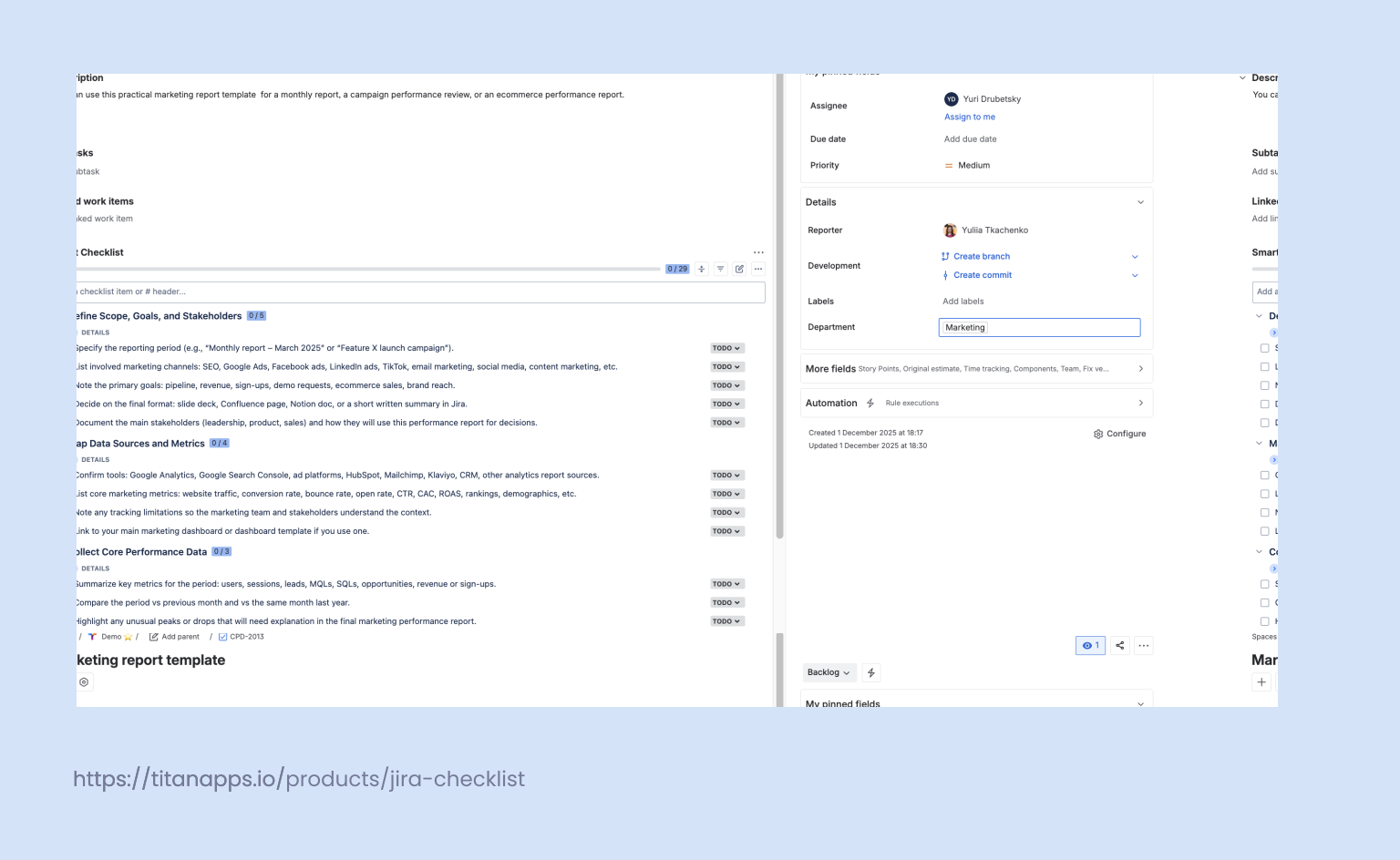
## Define Scope, Goals, and Stakeholders
> Start by clarifying what this marketing report covers and who it is for.
- Specify the reporting period (e.g., “Monthly report – March 2025” or “Feature X launch campaign”).
- List involved marketing channels: SEO, Google Ads, Facebook ads, LinkedIn ads, TikTok, email marketing, social media, content marketing, etc.
- Note the primary goals: pipeline, revenue, sign-ups, demo requests, ecommerce sales, brand reach.
- Decide on the final format: slide deck, Confluence page, Notion doc, or a short written summary in Jira.
- Document the main stakeholders (leadership, product, sales) and how they will use this performance report for decisions.
## Map Data Sources and Metrics
> Next, map all places where you pull marketing data from and align on key performance indicators.
- Confirm tools: Google Analytics, Google Search Console, ad platforms like Google Ads, LinkedIn Ads, HubSpot, Mailtrap, Klaviyo, CRM tools, other analytics report sources.
- List core marketing metrics: website traffic, conversion rate, bounce rate, open rate, CTR, CAC, ROAS, rankings, demographics, etc.
- Note any tracking limitations so the marketing team and stakeholders understand the context.
- Link to your main marketing dashboard or dashboard template if you use one.
## Collect Core Performance Data
> With the scope and metrics defined, collect the top-level numbers.This section answers the simple question: “Did our overall marketing efforts move in the right direction?”
- Summarize key metrics for the period: users, sessions, leads, MQLs, SQLs, opportunities, revenue or sign-ups.
- Compare the period vs previous month and vs the same month last year.
- Highlight any unusual peaks or drops that will need explanation in the final marketing performance report.
## Analyze Channel Performance
> Now break performance down by marketing channels and campaigns.
- For each relevant channel (SEO, Google Ads, paid social, organic social media, email campaign, etc.):
- Pull key metrics: impressions, clicks, cost, conversions, conversion rate, ad spend, revenue.
- Highlight best-performing campaigns, ad creatives, and keywords (for SEO and PPC report sections).
- Note underperforming areas, possible cause of underperformance, ways to optimize or change the strategy.
> For example:
> * SEO report: traffic and rankings from Google Search Console and Google Analytics, top landing pages, organic conversions.
> * Google Ads / PPC report: costs, conversions, CPA, top ad groups, ad performance per campaign.
> * Social media report: LinkedIn, Facebook, TikTok engagement, assisted conversions, number of new subscribers, CR.
> * Email marketing report: open rate, click rate, unsubscribes, delivery rate, click-to-open rate and flows (e.g., in Mailchimp, HubSpot).
## Review Funnel and Content Performance
> Connect acquisition to what happens later in the funnel.This is where you tie marketing analytics to real outcomes rather than just vanity metrics.
- Analyze how different channels and campaigns contribute to sign-ups, trials, or ecommerce revenue.
- Review performance of key content assets: landing pages, blog posts, webinars, lead magnets.
- Highlight where users drop off (high bounce rate pages, low-converting steps)
## Assess Budget, Ad Spend, and Efficiency
> Keep a dedicated section for money and efficiency.Even if you track these numbers in a spreadsheet or Google Sheets, this section in your Jira-based template ensures they are reviewed every time.
- Summarize spend for the period (Google Ads, social ads, sponsorships, tools) and compare it to the plan.
- Evaluate cost per acquisition, cost per opportunity, and cost per customer.
- Highlight channels or ad campaigns that deliver the best efficiency and those that should be reduced or paused.
## Capture Insights and Next Steps
> A strong marketing performance report doesn’t stop with numbers; it translates them into decisions.This section prepares the ground for the next reporting period and shapes your marketing strategy moving forward
- List 3–5 key insights based on the performance data.
- For each insight, add a recommended action (scale, stop, fix, test).
- Note dependencies (e.g., product changes, dev support, CRM updates) and assign owners.
## Prepare and Share Final Deliverables
- Finally, turn the checklist into a consumable digital marketing report.
- Paste in or link to the main charts and dashboards from analytics tools.
- Double-check consistency of numbers across all views (Jira, dashboards, Excel/Google Sheets).
- Share the report with stakeholders and collect feedback for the next iteration
Once you are comfortable with this structure, you can save it as a monthly marketing report template in Smart Checklist and reuse it every month
How to Use This Marketing Report Template in Jira
Once you have the structure, the next step is to turn it into a real workflow in Jira.
Here’s a simple way to do it with Smart Checklist:
- Create a “Monthly Marketing Report” issue
Use one issue type (e.g., Task or Story) for all reports, such as:
- “Monthly Marketing Report – March 2025”
- “Email + Social Media Performance Report – Q2”
This becomes the home for your marketing analytics, links to dashboards, and final summary.
- “Monthly Marketing Report – March 2025”
- Paste the checklist into Smart Checklist
In the issue, open the Smart Checklist panel and paste the template from the previous section.
Then:
- Assign owners for SEO, paid, social media marketing, and email marketing parts.
- Add the due date variable ({{now.Plus.3days}} for “collect data,” “budget & ad spend,” and “final review” items.
- Mark critical steps (like “Executive summary” or “Check key metrics vs targets”) as mandatory so they can’t be skipped.
- Assign owners for SEO, paid, social media marketing, and email marketing parts.
- Save it as a reusable marketing report template
When the structure feels right for your team:
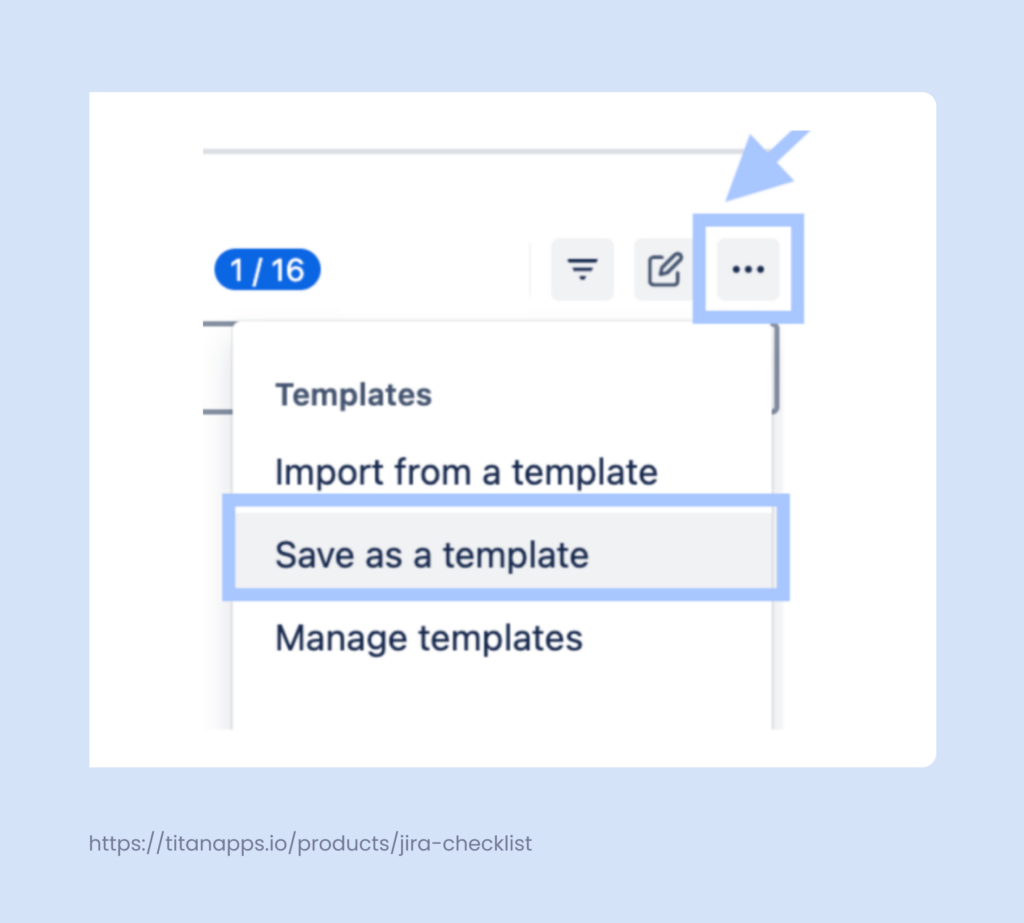
- Open the Smart Checklist menu and choose Save as template.
- Next month, create a new “Monthly Marketing Report” issue, import the template, and you’re ready to go in seconds.
- Open the Smart Checklist menu and choose Save as template.
This way, you keep one clear place for all marketing report templates, but still distribute work across the marketing team and keep everyone aligned in real-time.
Related Jira Templates Marketers Can Use Alongside Reporting
A marketing report template works best when it’s connected to how you plan and execute your marketing work. In TitanApps, we use several Jira-based templates that complement monthly and campaign reports and make it easier to tell a complete story with your numbers.
Here are three that are especially useful for marketers.
1. Launch Paid Ads Template
Paid campaigns can quickly become messy: multiple platforms, ad sets, audiences, creatives, and budgets to track. Our Launch Paid Ads template in Jira helps you structure this work before you ever look at a PPC report.
In practice, this template lets you:
- Capture goals, target demographics, KPIs, and expected ad spend before launch.
- Track creative production, audience setup, and campaign approvals across Google Ads, Facebook ads, LinkedIn ads, and TikTok.
- Document how each ad campaign connects to your landing pages, email campaigns, and follow-up flows in tools like Mailchimp, HubSpot, or Klaviyo.
When it’s time to prepare your marketing performance report, you already know:
- Which campaigns went live and when
- What each campaign was supposed to achieve
- Where to pull ad performance and channel performance data from
This makes your ads report and monthly performance report much easier to compile and interpret.
2. Marketing Feature Release Template
New product features often drive spikes in website traffic, sign-ups, and engagement. To make sense of these in your marketing performance report, you need a clear record of when and how you launched each feature.
The Marketing Feature Release template in Jira helps you:
- Plan messaging, content marketing assets, email marketing sequences, and social media posts for each release.
- Align timing across channels (blog, LinkedIn, social media, in-app messages, email campaigns).
- Track which audiences saw which messages and which channels drove the strongest response.
When you later look at metrics like conversion rate, open rate, or feature adoption in your monthly report, you can tie them back to specific feature launches instead of guessing what caused the change.
3. Jira Event Management Template (for Webinars and Online Events)
Online events and webinars still play a big role in B2B marketing, especially when combined with email marketing, social media, and follow-up campaigns.
The Jira Event Management template helps you:
- Organize all the work for a webinar or online event in one place: registration pages, promo content, LinkedIn posts, email invites, reminders, and post-event follow-ups.
- Coordinate between marketing, sales, and speakers without leaving Jira.
- Capture performance data after the event: registrations, attendance rate, engagement, and pipeline impact.
In your monthly marketing report, you can then include a compact performance report for each event: sign-ups, attendance, influenced opportunities, and follow-up email performance, all supported by a clear audit trail in Jira.
Together, these three templates create a consistent backbone for planning your marketing campaigns. The marketing report template you set up with Smart Checklist becomes the place where all of this performance data comes together for stakeholders.
Wrapping Up: From Data to Decisions
A good marketing report template does more than collect screenshots from Google Analytics or a quick SEO report. It gives your marketing team a repeatable way to:
- Track key performance indicators across all marketing channels
- Compare monthly reports over time and see real trends, not just noise
- Turn performance data into clear next steps for your marketing strategy
By moving the template into Jira with Smart Checklist, you keep:
- The checklist, ownership, and deadlines in one place
- Links to your marketing dashboard, analytics report, PPC report, and social media report close to the work
- A clear story you can present to stakeholders, supported by numbers from Google Analytics, Google Search Console, Mailchimp, HubSpot, and ad platforms
Over time, this makes your marketing performance report faster to build, easier to understand, and far more useful for informed decisions.
FAQ: Marketing Report Templates in Jira
1. What should a monthly marketing report include?
A solid monthly marketing report template usually covers:
- High-level marketing performance: website traffic, leads, sign-ups, revenue
- Channel performance: SEO, Google Ads, Facebook ads, LinkedIn ads, TikTok, email campaigns, social media marketing
- Core marketing metrics: conversion rate, bounce rate, open rate, CTR, rankings, demographics
- Budget and ad spend by channel
- 3–5 key insights and clear recommended actions
You can still use Excel or Google Sheets for calculations, but the structure and ownership can live in Jira via Smart Checklist.
2. Which tools should I use to build my marketing report: spreadsheets or Jira?
Most teams use a mix:
- Google Analytics, Google Search Console and ad platforms for raw performance data
- Spreadsheets (Excel or Google Sheets) to calculate KPIs and build quick tables
- Jira + Smart Checklist to manage the marketing report template, tasks, and sign-offs
Jira is not a replacement for analytics tools, but it is a good place to:
- Define the template
- Automate recurring steps
- Keep the whole marketing team aligned in real-time
3. How detailed should my channel performance section be?
Aim for a balance:
- For each channel (SEO, Google Ads, social media, email marketing, ecommerce), show a compact view of key metrics: traffic, conversions, conversion rate, cost, and revenue if possible.
- Add one or two comments per channel on what worked, what did not, and how you will optimize next month.
If stakeholders want more depth, you can always link to:
- A separate PPC report or ads report
- A dedicated social media report
- A detailed email marketing report from HubSpot, Mailchimp, or Klaviyo
Your main digital marketing report should stay readable enough to be used in a 30-minute review meeting.
4. How do I combine data from different tools (GA, ads, email, CRM) in one report?
You don’t need a perfect single marketing dashboard to start. A simple flow works:
- Pull core metrics from Google Analytics and Google Search Console for traffic and SEO.
- Add channel-level data from Google Ads, Facebook ads, LinkedIn ads, and other ad platforms for campaign performance.
- Include email metrics (open rate, click rate, unsubscribes, revenue) from Mailchimp, HubSpot, or Klaviyo.
- Bring high-level pipeline and revenue numbers from your CRM.
In Jira, your marketing report template acts as the checklist that tells you:
- Which metrics to pull
- Where to find them
- How they roll up into a single performance report for stakeholders
5. How can I keep stakeholders engaged instead of overwhelmed with numbers?
A few simple rules help:
- Start every marketing performance report with a short summary: 3–5 bullets on what happened and why.
- Use consistent KPIs month over month so people learn how to read the report.
- Keep most charts in linked dashboards or slides; in Jira, focus on the narrative and decisions.
- Always close with “next steps” and owners, so the report becomes part of the workflow, not just an archive.
This is where the Jira-based marketing report template shines: it makes it easy to connect metrics to actions and ensure the marketing team follows through.
6. Can I reuse the same template for email, social media, and content reports?
Yes, you can:
- Keep one core monthly marketing report template in Smart Checklist for the overall view.
- Create lighter variants for specific needs, such as:
- Email marketing report (focused on open rate, click rate, revenue per email)
- Social media report (engagement, reach, traffic, assisted conversions)
- Content marketing performance report (SEO rankings, page views, scroll depth, conversions)
- Email marketing report (focused on open rate, click rate, revenue per email)
All of them can share the same backbone: goals, metrics, insights, and next steps. Jira helps you reuse this structure across many report types without rebuilding it every time.