Tools for Jira
 Tools for monday.com





Most teams struggle not with the creative work, but with the workflow that delivers it. If your designers don’t know the specs until the day before launch, or if copywriters are guessing the tone, you don’t have a talent problem. You have a management problem. We need to fix that.
This guide looks at the operational backbone of marketing. We strip away the guesswork. We replace chaos with structure. Let’s get your marketing team aligned and your campaigns out the door on time.
What is Marketing Work Management?
Marketing management is the brain that directs the muscle. It is the end-to-end process of planning, executing, measuring, and optimizing every single channel your brand touches. You have to juggle simultaneously:
- Strategy;
- Operations;
- Resources;
- Analytics.
Key priorities define your success here:
- You need a marketing plan that aligns with business goals
- You need a roadmap that shows everyone where you are going over the next six months
- Campaign briefs must be clear to avoid rounds of useless revisions
- An editorial calendar is non-negotiable for consistency
- You need a KPI dashboard to see the key metrics
Effective management ensures the budget actually brings in leads. It also ensures that the team knows the due date before the panic sets in.
Marketing Workflow Management: The Operational Side
Workflow is the skeleton of your operation. It is the set of repeatable steps that moves a raw idea all the way to delivery and final measurement. Without a defined workflow, you get bottlenecks:
- Work sits in someone’s inbox for three days
- Approvals get skipped
- Mistakes go live
- No process is ever documented
A solid workflow strips away the “what do I do next?” panic. You need specific, unbreakable components:
- Intake: How does work enter the system? Is it an email? A form?
- Prioritization: What gets done first? Not everything is a fire drill.
- Assignment: Who owns the task?
- Production: The actual work happens here.
- QA: Check against the brief. Check the links.
- Approval: Sign off.
- Launch: Push it live.
- Analysis: Did it work?
If you skip a step, things break. Maybe the graphic looks bad on mobile because QA was skipped. Maybe the budget blew up because the approval stage wasn’t documented. A tight workflow prevents those disasters. It turns a chaotic creative process into a predictable assembly line where quality is guaranteed, not accidental.
What Are the Types of Marketing Workflows?
Most teams juggle six main types. Each requires a different rhythm and set of checks.
Email Marketing Workflow
Precision is king here. You can edit a blog post after it is live, but you can’t unsend an email. Segmentation comes first. Who is getting this email? Then copy, design, and code.
Never skip testing. You need to check dark mode, mobile responsiveness, and link validity. Scheduling follows. The workflow needs rigid QA steps. Another important step is to validate audience data and ensure deliverability before sending. Be sure to check if email is valid before scheduling or sending to avoid bounces and deliverability issues.
Email communication is one of those marketing management workflows that may seem simple. Despite this, it requires a well-documented process. Using tools such as Salesforce’s automated email marketing solution can also help streamline recurring tasks such as audience segmentation, campaign scheduling, and personalized email delivery while keeping the workflow consistent.
You can also use checklists to capture the standard steps directly where your team works – let’s say, in Jira or Monday.
Here’s what it can look like:
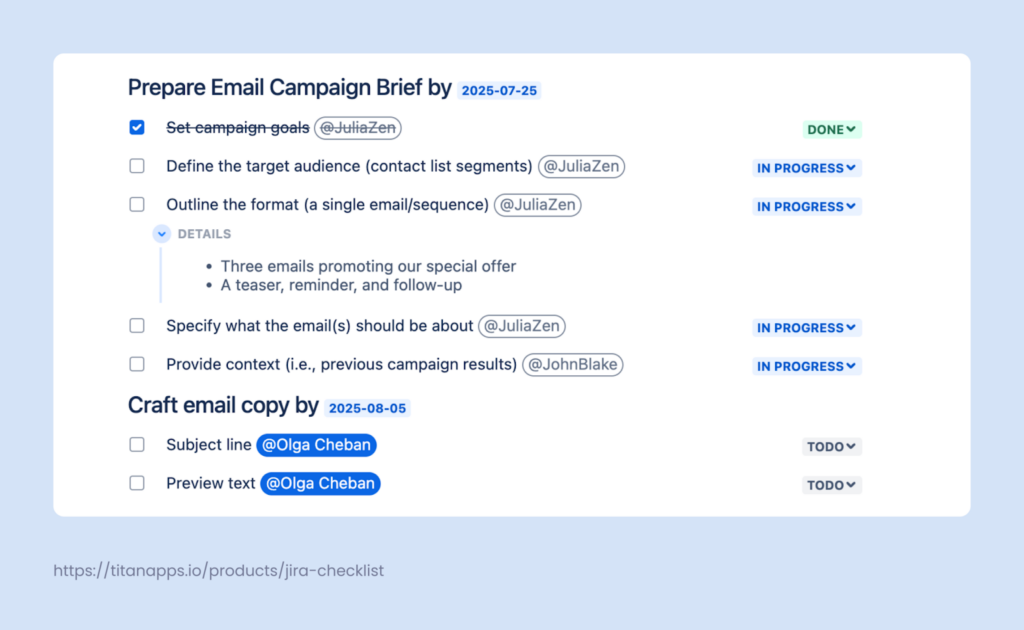
With a reusable checklist template, it’s easy for a team to consistently follow the same steps every time. As a result, you can ensure that nothing will be skipped or forgotten. All your email marketing campaigns will go through the same pre-defined preparation process.
This checklist was created with the help of Smart Checklist for Jira by TitanApps.
To learn more, see our article Email Campaign Template.
SEO Marketing Workflow
This one is tricky. It is a clear sequence of steps that helps teams plan, execute, and optimize SEO tasks efficiently while staying aligned with business goals and results. SEO involves multiple interconnected activities:
- Technical audits
- Backlink building
- On-page optimization
- All-around SEO Audits
Consequently, consolidating plans, data, and insights in one place is critical. It gets fragmented easily.
Centralized dashboards based on SEO tool data from SE Ranking help teams track key metrics such as website performance, technical health, and content quality. This makes it easier to monitor progress.
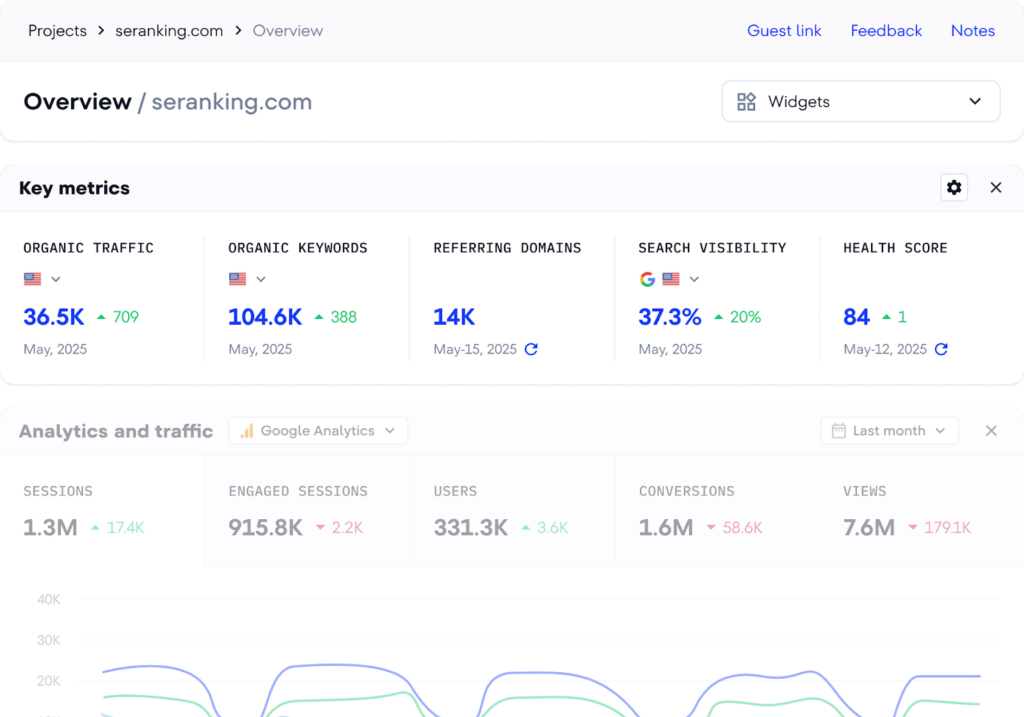
You identify issues faster. You prioritize optimization efforts based on data, not feelings. It keeps the technical developers and the content writers looking at the same scoreboard.
Content Marketing Workflow
This is the heavy lifter. The content marketing process usually involves drafting, editing, designing, and publishing. You can’t just write and hit publish:
- You need subject matter expert interviews
- You need legal checks if you are in a regulated industry
- You need an SEO review to ensure you aren’t writing into the void
- You need a copy editor to check plagiarism, grammar issues, and inconsistencies before publishing
The workflow must account for feedback loops. If the editor hates the draft, where does it go? Back to the writer or to the trash? Define it.
Social Media Workflow
Social media work runs continuously and requires steady coordination. It should support the broader marketing strategy without slowing down daily publishing.
The workflow usually begins with defining the target audience and setting goals, then moves into topic planning and content calendar preparation. From there, social media posts go through creation, review, scheduling, and publishing, often supported by tools like a social media post generator to streamline content production. Engagement monitoring and reporting happen simultaneously. Performance metrics help you assess progress and make adjustments on the go. These insights can also help teams identify opportunities to improve social media follower growth, whether through more targeted content, audience engagement, or dedicated growth tools.
Having a clear workflow structure helps you make your social media management process consistent and easily scalable. You can also use a LinkedIn post scheduler like Supergrow to plan posts in advance, maintain a consistent publishing schedule, and maximize your content’s reach. Your team can work more efficiently and focus on content creation and analytics, not on chasing “tribal knowledge”.
Paid Ads Workflow
Money is on the line. Budgeting is step one. If the budget isn’t approved, nothing moves. Then go:
- Creative production
- Targeting setup
- Bidding
- Constant monitoring
You iterate fast here. Paid ads workflow needs to allow for A/B testing and rapid creative swaps based on performance data.
Use best practices to set up a well-oiled marketing management workflow for PPC advertising, whether campaigns are handled in-house or with support from a saas ppc agency.
For example, see our guide on How to Launch Paid Ads. It contains a detailed overview of the process and a handy step-by-step checklist.
Event Management Workflow
This is where planning meets immovable deadlines. Whether it’s a webinar, workshop, online conference, or team event, all events go through clear phases. This includes defining the event goal, preparing logistics, coordinating promotion, running the event, and closing it out with follow-ups.
Each phase depends on the previous one being done right. Miss a speaker confirmation or a budget approval, and the whole timeline slips. Having a structured workflow helps teams coordinate all this in one place.
When everything is tracked in Jira, it’s easier to adjust plans, handle last-minute changes, and still deliver a smooth event experience without chaos. Tasks stay visible, owners are clear, and nothing critical lives only in someone’s inbox.
Here’s an example of an Online event planning template prepared with Smart Templates for Jira:
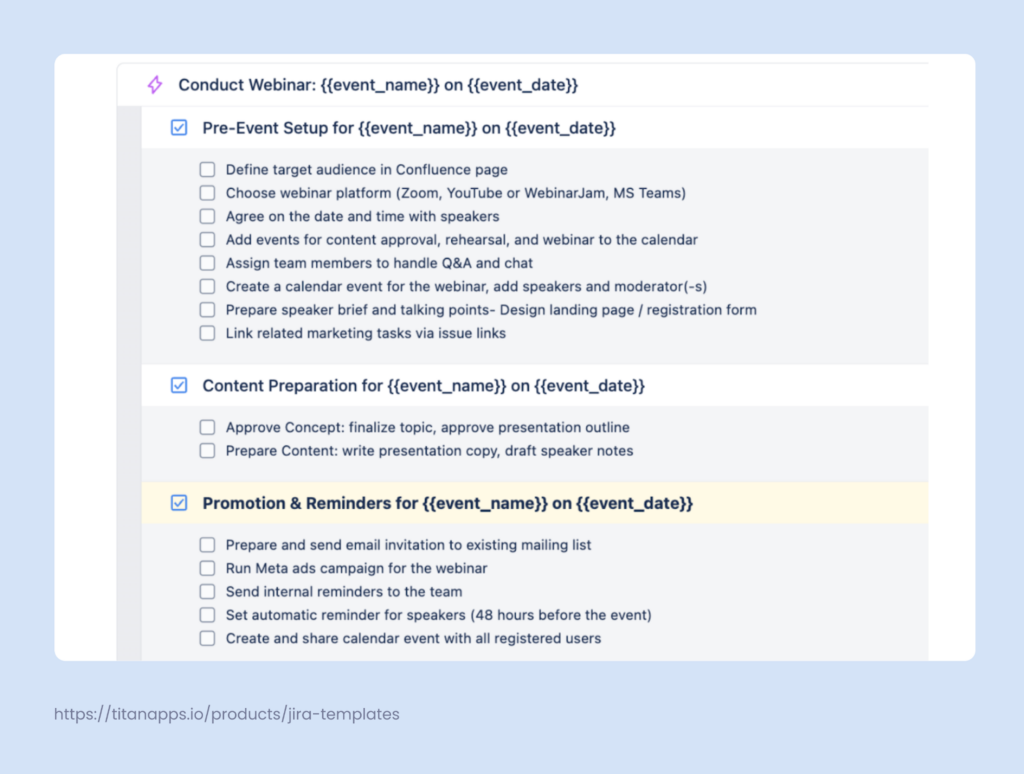
This solution allows you to save any set of Jira work items as a reusable template. Then, you can generate the complete set of tasks with one push of a button. This helps you save time when managing repetitive tasks and recurring processes.
Moreover, you get a well-documented, actionable plan, which can be applied to multiple events.
How to Bring All Marketing Team Workflows Together for Better Management?
Define Clear Goals
Be specific. “Get more leads” is unhelpful. “Get 500 MQLs by Q3 via LinkedIn organic traffic” is a goal. Everyone needs to know the target.
You need targets that scare you a little but are actually possible. It is awesome if you use the SMART framework (Specific, Measurable, Achievable, Relevant, Time-bound). If the goal is vague, the work will be sloppy. The designer needs to know why they are designing the ad. The writer needs to know the call to action.
If you set a goal to “make it pop”, you get a poor quality result. If you say, “drive 200 clicks to the pricing page by Tuesday with a CTR of 2%”, you get results.
Connect all your marketing efforts and initiatives to revenue or brand equity. If you can’t explain how a tweet makes money or builds trust, avoid it. Vague goals are the silent killers of productivity because they breed confusion.
Identify, Prioritize & Assign Tasks
Break the big rocks. A campaign isn’t a task; it’s a project. Who does what? Marketing project management must break it down. Don’t let tasks sit in the “To Do” pile forever.
Once you have a backlog of tasks, prioritize them. Do the high-impact, low-effort stuff first. Then assign it. And we mean assign it. Put a name on it. Not a department. “Design Team” is not a person. “Sarah” is a person. When everyone is responsible, no one is.
This approach helps prevent the bystander effect. Tasks that lack a clearly assigned owner are unlikely to be completed on time. It is therefore essential to ensure that every item on the board has a designated individual responsible for it.
Develop a Timeline with Realistic Deadlines
Start from the finish line and walk backward. If launch is on the 30th, you can’t start writing on the 29th. That’s a recipe for burnout and typos.
You need buffers. Factor in that:
- Things go wrong
- Files corrupt
- People get sick
Create a workback schedule that accounts for dependencies. You can’t code the email until the design is approved. You can’t design until the copy is written. Visualizing these dependencies saves you from the “hurry up and wait” nightmare.
Be honest about capacity. If your team is drowning, don’t pile on more. Capacity planning matters everywhere, in marketing and also in sales when adopting any new software or AI sales tools for team-wide use. An unrealistic deadline is a lie that destroys morale.
Select the Appropriate Marketing Project Management Software
Stop using spreadsheets for everything. They don’t scale. To streamline your processes, integrate your tools with a robust project management platform, such as Jira. This platform offers a centralized workspace, where your team can:
- Manage tasks and projects
- Structure work hierarchically with Epics, Tasks, Subtasks, etc.
- Update and track progress
- Monitor work scope and set priorities on a visual board
- Share documents
- Collaborate across teams
All this improves transparency and reduces communication gaps in marketing workflows.
Jira enables you to set up workflow automation, as well as other types of automation with flexible logic. For example, when a designer finishes work on marketing assets, the responsible copywriter can get an automated notification. Or better yet, Jira can reassign the task once the designs are attached. Using Jira automation allows you to reduce inefficiencies and run successful marketing campaigns.
Additionally, you can use Jira service management to handle incoming requests from the sales team or product development team, so nothing gets lost in email.
Apart from Jira, there are other project management tools that can support your marketing activities. One of them is Monday Work Management. Please see our article Jira vs. Monday: Which One to Choose for more information.
Monitor, Test & Scale
The launch isn’t the end. Look at the data:
- If the workflow process is slow, fix it
- If the approval process takes days, talk to the stakeholders
- If the conversion rate is tanking, pivot immediately
- If campaign performance is stellar, scale the approach
Don’t wait for the post-mortem meeting. Marketing workflow management is iterative. You fix the machine as it runs.
Also, talk to your team. Run retrospectives as they are very important. Use a Marketing Report Template to help you bring everything together.
Boosting Your Marketing Workflow Management Efficiency Using Jira
Jira enables marketing teams to manage campaigns by organizing tasks, assigning roles, and tracking progress. It is often seen as a developer tool, but that’s a mistake. It’s a workflow management engine. Custom workflows and templates streamline processes such as content approvals, while centralized updates keep the team aligned and collaboration smooth.
Customizable Workflows
Jira allows marketing teams to adapt workflows to how work actually moves, not the other way around. You can define stages that reflect your processes and map them out in Jira using custom statuses and transitions.
For example, a content piece can move through internal review, legal approval, SEO check, and a final sign-off. Additionally, you can configure the columns of your Jira board to match the process stages. All this makes progress visible and predictable.
To take this a step further, you can set up workflow automation. For example, when a task moves from the “In Progress” status to “In Review”, Jira can automatically assign it to the reviewer. In addition, Smart Checklist can automatically include a review checklist, so the reviewer will have clear steps to follow.
Here’s another example of workflow automation. Smart Checklist for Jira allows you to mark selected checklist items as mandatory. They will have a red asterisk next to the checkbox. Then, you can set up a rule that a task cannot be moved to “Done” until all mandatory items are completed. This allows you to manage marketing tasks on a more granular level.
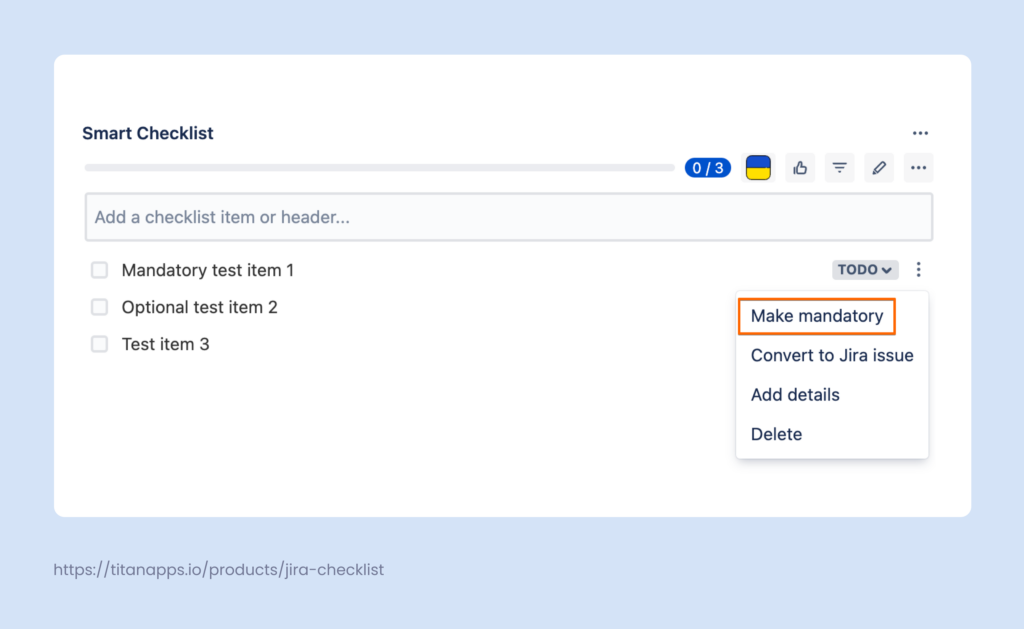
For more details on setting up marketing management workflows, please see our article How to Manage Workflows in Jira.
Clear Ownership
Marketing work often involves many contributors, which makes responsibility easy to blur. Jira helps prevent this by making ownership explicit at every stage of the process. Each task has a clear owner, and responsibilities can change as work moves through different workflow stages.
For example, a content task may start with a writer, shift to an editor during review, and move to a marketing lead for final approval. In Jira, assignees, watchers, and due dates keep accountability visible without extra coordination. If you use Smart Checklist, you can additionally tag the responsible people in individual checklist steps.
This clarity reduces handoff friction and makes it obvious who is responsible for moving work forward at any given moment.
Checklists and Automation
Checklists turn complex marketing tasks into clear, step-by-step action plans. What’s important, they live directly inside Jira issues (work items), exactly where work happens.
With Smart Checklist for Jira, checklists can be added automatically based on work item type, workflow status, or other conditions. For example, here we have a Launch Paid Ads template, and we set up an automation rule. It will add this checklist to every new work item that has the words “Launch Paid Ads” in its summary:
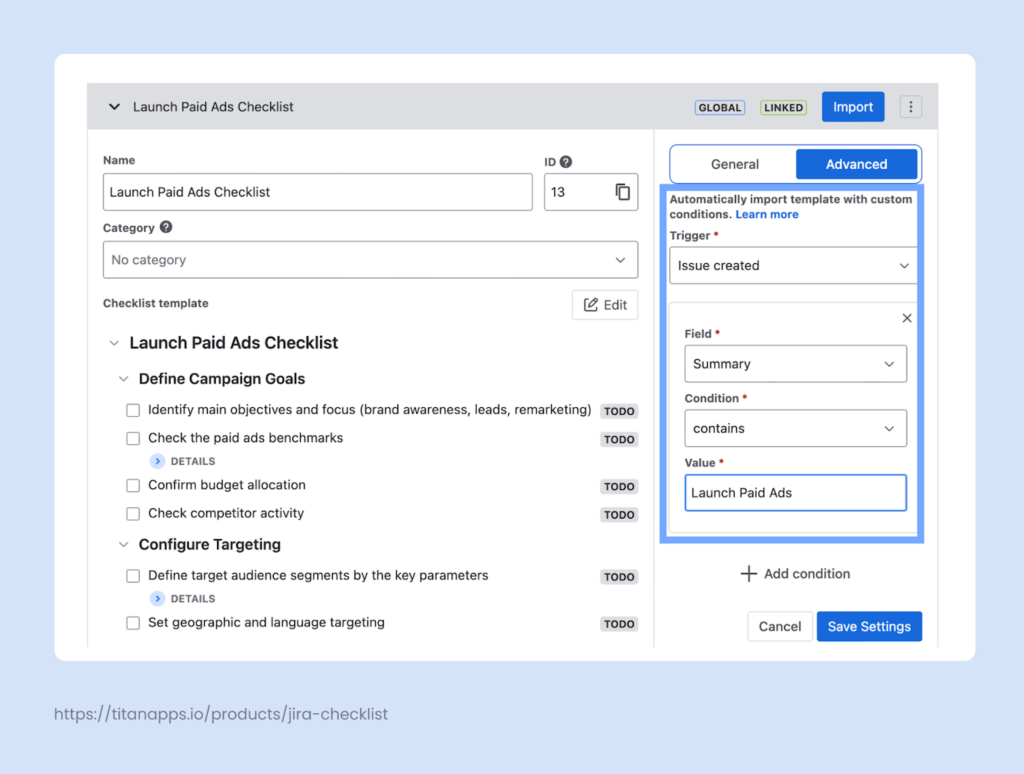
This automation is created with Smart Checklist’s native functionality. It’s rather intuitive and easy to use. If needed, you can also use smart checklists with Automation for Jira.
With the help of checklist automation, marketing teams reduce coordination overhead and keep execution consistent and predictable.
Bringing Structure to Marketing Management Workflows
Strong marketing results rarely come from isolated efforts. They come from repeatable workflows that help teams plan, execute, and improve without micromanagement.
When marketing work is structured in Jira, teams gain clarity and consistency. Ownership is visible, progress is easy to track, and work is clearly structured. With crisp workflows and the right tools supporting execution, marketing management workflows become easier to scale and improve over time.