





 Tools for Jira
 Tools for monday.com




Team: IT Infrastructure and Technical Support
Company: NDA
Industry: Financial Services
Employees: 500+
Problem
The company is a US financial services firm with three types of work running in Jira. The IT team uses Jira Service Management (JSM) for its service desk, support, and change management. Software development runs on Scrum and Kanban boards. Business teams use Jira for their own projects and service requests.
Employee onboarding and offboarding sit with the technical support team. Each request covers many steps across custodians, programs, and security groups. The steps were documented in a standard operating procedure (SOP) in Confluence. However, the SOP lived in one place, and the work happened in another.
This gap created several problems:
- Skipped steps: Nothing in the ticket confirmed that each SOP step was done. Steps were sometimes skipped or missed by accident.
- Comment chasing: To check progress, specialists read through Jira comments. Bold or colored text served as an informal status marker.
- Copy-paste tickets: Specialists copied older tickets as a starting point. Then they went back to check for errors.
- Weak audit trail: No record showed that each step had been confirmed as complete.
- Subtask overhead: The team tried subtasks, but they added overhead and made tickets harder to scan.
“Previously, we had to chase down comments in Jira to see if something was taken care of. Some things would be in bold, some would be colored. It became a real chasing of the tail.”
Solution
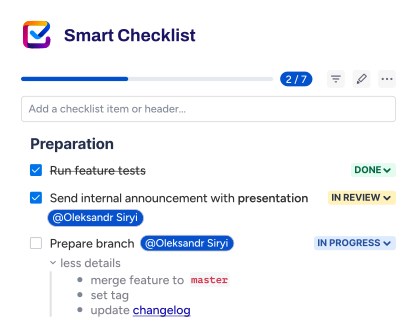
The technical support team brought the SOP into Jira with Smart Checklist. They turned the onboarding and offboarding processes into checklist templates. Then they made those templates global, so any project can use them. When a new request arrives, a specialist imports the matching template into the ticket.
Each checklist item stands for one step. When a step needs more context, the team adds details directly under the item. Specialists read the instructions right next to the step they are working on.
Templates also ended the copy-paste routine. Every request starts from the current process. When programs or security groups change, the team adjusts the checklist on the fly.
The biggest change was ownership. Each specialist works through the checklist and confirms every step inside the ticket.
“We have so many steps between custodians, programs, and security groups. Smart Checklist has become a great way for our team to take ownership of the tickets and make sure each step is done correctly.
Checked-off items also made audits simpler. Before, the only reference was the SOP itself. Now each completed step carries an explicit confirmation from the person who did the work.
“It provides a good audit control mechanism. Before, we followed an SOP on Confluence that said to do steps A, B, C, and D. Now we know the user checked it off and flagged it as complete.”
Head of IT Infrastructure and Data
Smart Checklist also replaced the subtask experiment. Checklist items live inside a single ticket, so the team gets a step-by-step view without extra issues to manage. Many teams weigh this same trade-off when choosing between Jira subtasks and checklists.
“Subtasks became a little overwhelming. Smart Checklist sits in that middle zone. We don’t over-complicate the ticket, but we still have the steps that need to get completed.”
Head of IT Infrastructure and Data
Results
“We had an SOP with everything we needed to do, but things were getting skipped or missed inadvertently. Using Smart Checklist has really helped our quality in making sure things get done.”
Head of IT Infrastructure and Data
With Smart Checklist team achieved
- Stronger quality control. The team reported that Smart Checklist helped them make sure work was getting done, addressing the gap between having a documented procedure and following it through to completion.
- Clearer ownership and easier audit checks. Completed checklist items gave reviewers a more direct way to check whether the expected steps had taken place, rather than reconstructing progress from comments.
- Less subtask overhead. The team could break down the process while keeping a concise view of the service ticket.
- Reusable, adaptable workflows. Shared templates removed the need to recreate the checklist for each request, while allowing changes as the underlying process evolved.
What’s next
The team plans to keep improving its IT service management (ITSM) processes, with onboarding and offboarding as the starting point. The next goal is to keep the documentation and the steps together in each ticket, so specialists have everything in one place.
For this IT team, Smart Checklist turned a Confluence SOP into steps that specialists confirm in every ticket. Onboarding and offboarding now follow one process, and every completed step leaves a record the team can rely on during audits. Teams building a similar flow can start with an employee onboarding template for Jira and an offboarding template in Jira.