Tools for Jira
 Tools for monday.com





Evaluations are often viewed as a mere formality, but they can also serve as a valuable tool. When conducted correctly, they help teams grow and support long-term development. In this article, we share a practical employee evaluation template, along with best practices and useful tips to make your evaluation process more meaningful and efficient.
When Do You Need to Conduct an Employee Evaluation?
To answer this question, let’s start with the definition.

Employee evaluation is a structured process designed to assess a person’s professional skills, productivity level, and the value of their individual contribution to the team’s success. To ensure objectivity, this process should be based on consistent, documented criteria applicable to all employees.
You may need to conduct employee evaluations at different stages of an employee’s journey. Ideally, this should follow a consistent framework applied during:
- Hiring
- Onboarding
- Peer reviews
- Regular manager feedback
- Development and growth planning
- Performance reviews
Using the same framework for employee evaluation at all these stages creates a unified system for growth assessment. This approach allows you to clearly see changes and understand how to support a person’s professional development.
Individual results can be compared to the general expectations for the role or department median. What’s also important is that the outcome of the evaluation process be incorporated into the development plan and help the employee grow their expertise.
Here are some benefits of conducting regular employee evaluations:
- Better alignment between the employee skills and company goals
- Providing a basis for data-driven decision-making about promotions and compensation reviews
- Identifying skill gaps and areas for targeted growth
- Supporting development planning and guiding employee progress
- Enforcing company culture by fostering shared values
- Improving organizational transparency by promoting fairness in how performance is assessed at all levels and how decisions are made
Using a template helps you navigate this process more effectively and ensure consistency.
What is an Employee Evaluation Template and How Can it Help You?
An employee evaluation template is a structured plan that documents the assessment process. Using a template helps you apply the same standardized approach to everyone and make the evaluation more objective.
Technically speaking, such a template can exist in different formats, from an Excel spreadsheet to a slide deck. In this article, we focus on employee evaluation for agile teams, so the template we prepared is a reusable checklist for Jira.
It can be added directly to Jira work items and used with automation, which helps you save time and effort. Everyone involved in the evaluation process can collaborate on a single Jira ticket, following the predefined flow. The template can also be used with Monday or, alternatively, as a stand-alone checklist.
A Free Employee Evaluation Template Checklist by Titan Apps
This template includes several categories listing more granular parameters. When working with the template, each of these parameters should be evaluated according to the rating model used in your organization. The most common industry practice is the Behavior-Based rating scale, where you assign a score from 1 to 5 to each criterion:
1 – Needs improvement
2 – Developing
3 – Meets expectations
4 – Exceeds expectations
5 – Outstanding / Role model
It’s also important to submit written open-form feedback for each section. This helps capture more specific details and opinions.
This employee evaluation template lists the key assessment categories and parameters relevant to most roles. You can use this checklist as a basis and add role-specific information depending on your needs.
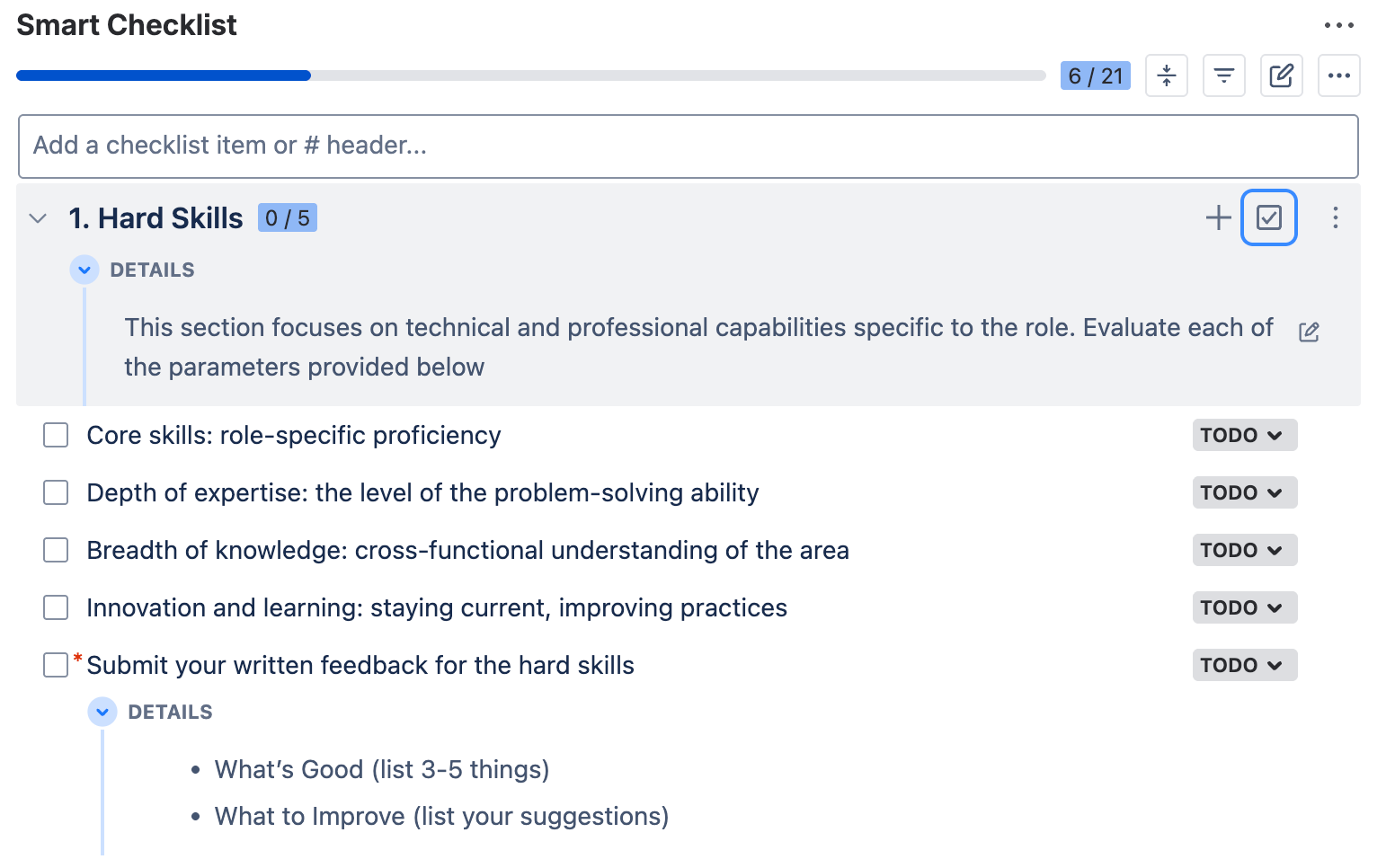
## 1. Hard Skills
> This section focuses on technical and professional capabilities specific to the role. Evaluate each of the parameters provided below.
- Core skills: role-specific proficiency
- Depth of expertise: the level of problem-solving ability
- Breadth of knowledge: cross-functional understanding of the area
- Innovation and learning: staying current, improving practices
- Submit your written feedback for the hard skills
>* What’s Good (list 3-5 things)
>* What to Improve (list your suggestions)
## 2. Productivity & Results
> Here, we assess the achieved results and the employee’s ability to deliver consistent, high-quality outcomes. Evaluate each of the parameters provided below.
- Stability of output: consistency and reliability of results
- Speed of delivery: pace of completing tasks and projects
- Results quality: accuracy and completeness of delivered work
- Attention to detail: precision and ability to catch issues early
- Accountability and ownership of results
- Prioritization and time management
- Submit your written feedback for the productivity evaluation
>* What’s Good (list 3-5 things)
>* What to Improve (list your suggestions)
## 3. Soft Skills & Competencies
> In this section, we evaluate interpersonal skills and behaviours that support teamwork and the company culture. Evaluate each of the parameters listed below.
- Communication and collaboration
- Teamwork and contribution to collective goals
- Problem-solving and critical thinking
- Adaptability and openness to feedback
- Leadership and ownership (where applicable)
- Emotional intelligence and empathy
- Proactivity and initiative
- Possessing the required skills corresponding to the seniority level
> Assess depending on whether it’s a Junior, Middle, Senior, or Lead position
- Submit your written feedback for the soft skills
>* What’s Good (list 3-5 things)
>* What to Improve (list your suggestions)
Basically, this template serves as an employee evaluation form. Once the HR team prepares the work item with this checklist and other necessary materials, they can tag the reviewers and let them know they can submit their feedback.
Note
This employee evaluation template was created with the help of Smart Checklist for Jira by TitanApps. This solution allows you to manage processes and automate workflows with feature-rich checklists in Jira.
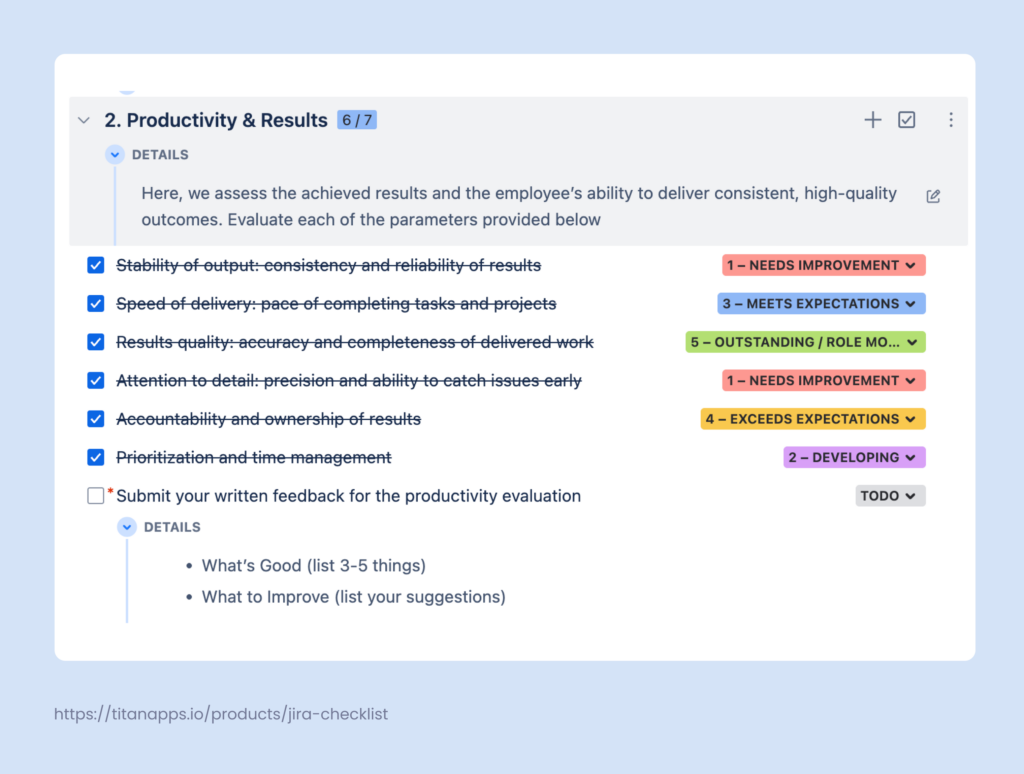
If you need input from multiple reviewers, you can add several checklists to the same work item. Then, the contributors can evaluate each parameter using custom statuses available for each checklist item – another useful feature of Smart Checklist. In our example, these statuses represent the numerical scale we discussed earlier, but you can change them according to your needs.
Clarifications and instructions can be included in the collapsible Details section. The reviewers can also use this section to provide their written feedback directly within the checklist. Since this input is crucial, we recommend marking this checklist item as mandatory.
Here’s an example of a completed employee evaluation checklist with pending written feedback:
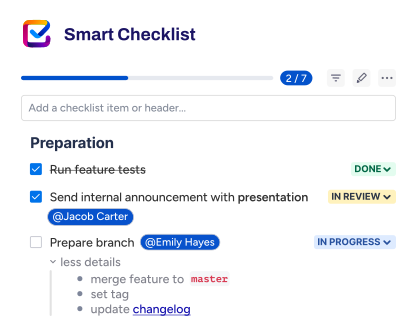
Additionally, Smart Checklist allows you to tag people, add deadlines, insert links, use headers of different levels, and more.
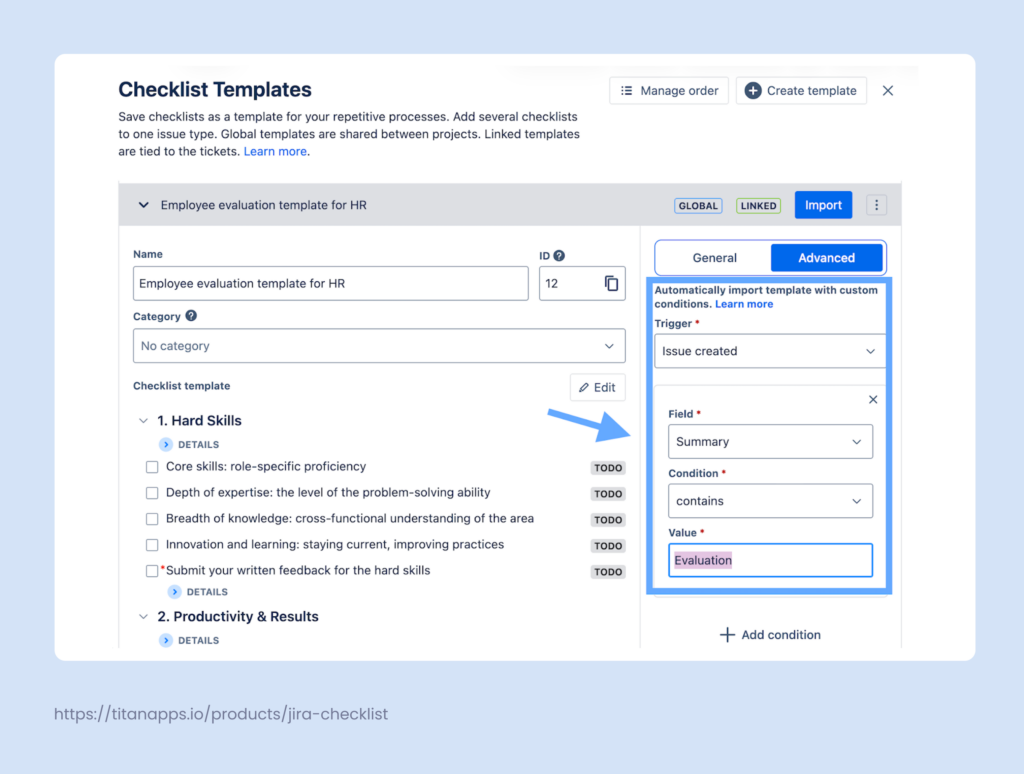
What’s also important is that it lets you save this checklist as a reusable template that can be used with automation. For example, it can be auto-added to all Jira work items that have “Evaluation” in their name / summary.
This helps you streamline the evaluation process and make it more efficient.
Employee Evaluation Template Checklist Split by the Assessed Category
For your convenience, here’s the same checklist split into separate sections. Update them with specific details for the evaluated role and then use Smart Checklist to add it to your Jira work item.
## 1. Hard Skills
> This section focuses on technical and professional capabilities specific to the role. Evaluate each of the parameters provided below.
- Core skills: role-specific proficiency
- Depth of expertise: the level of problem-solving ability
- Breadth of knowledge: cross-functional understanding of the area
- Innovation and learning: staying current, improving practices
- Submit your written feedback for the hard skills
>* What’s Good (list 3-5 things)
>* What to Improve (list your suggestions)
## 2. Productivity & Results
> Here, we assess the achieved results and the employee’s ability to deliver consistent, high-quality outcomes. Evaluate each of the parameters provided below.
- Stability of output: consistency and reliability of results
- Speed of delivery: pace of completing tasks and projects
- Results quality: accuracy and completeness of delivered work
- Attention to detail: precision and ability to catch issues early
- Accountability and ownership of results
- Prioritization and time management
- Submit your written feedback for the productivity evaluation
>* What’s Good (list 3-5 things)
>* What to Improve (list your suggestions)
## 3. Soft Skills & Competencies
> In this section, we evaluate interpersonal skills and behaviours that support teamwork and the company culture. Evaluate each of the parameters listed below.
- Communication and collaboration
- Teamwork and contribution to collective goals
- Problem-solving and critical thinking
- Adaptability and openness to feedback
- Leadership and ownership (where applicable)
- Emotional intelligence and empathy
- Proactivity and initiative
- Possessing the required skills corresponding to the seniority level
> Assess depending on whether it’s a Junior, Middle, Senior, or Lead position
- Submit your written feedback for the soft skills
>* What’s Good (list 3-5 things)
>* What to Improve (list your suggestions)
How to Add an Employee Evaluation Template (Checklist) to Jira?
This can be done in just a few simple steps:
- Install Smart Checklist for Jira from the Atlassian Marketplace.
- Copy the employee evaluation template we shared earlier. Then, paste it into the Smart Checklist section of your work item.
- Tag collaborators and add deadlines (optional). Make other edits, if needed.
It’s also useful to save the added checklist as a reusable template. To do so, navigate to the Smart Checklist menu, click the three dots (as shown in the screenshot below), and select Save as a template.
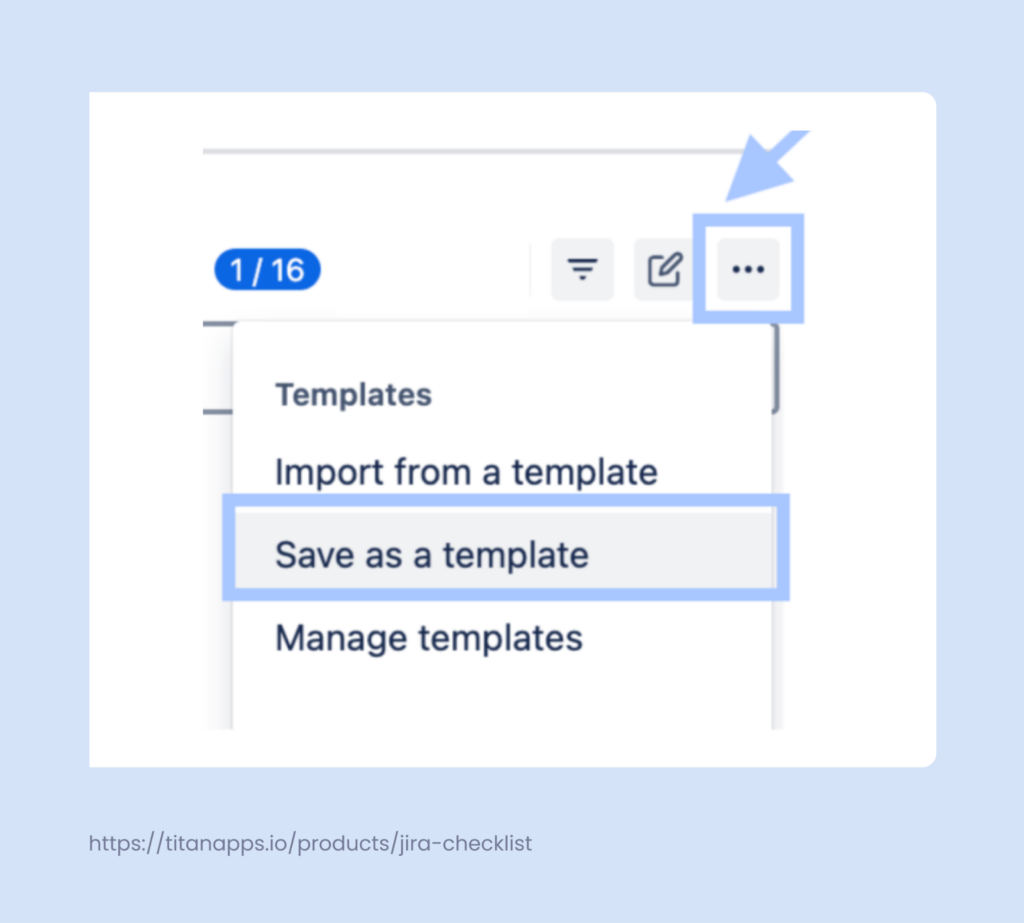
Once done, you can easily import the checklist you saved from the template whenever you need to. Saved templates can also be used with automation.
How to Automatically Assign This Checklist to Work Items
- In a work item with a smart checklist, click the three-dot menu in the upper-right corner and select Manage Templates.
- Find your employee evaluation template in the list and expand it. In the panel on the right, select Advanced.
- Set your trigger – in this example, it’s Issue created. Then, select Field -> Summary, Condition -> Contains, and Value -> Evaluation.
As a result, your employee evaluation template checklist will be automatically added to all work items that contain “Evaluation” in their summary. You can set different conditions or combine several, if needed.
How to Auto-Generate Employee Evaluation Tickets on a Schedule?
Creating evaluation tickets manually can be unfeasible, especially if you have hundreds of employees. For regular reviews, such as quarterly and yearly reviews, it makes sense to automatically generate Jira work items.
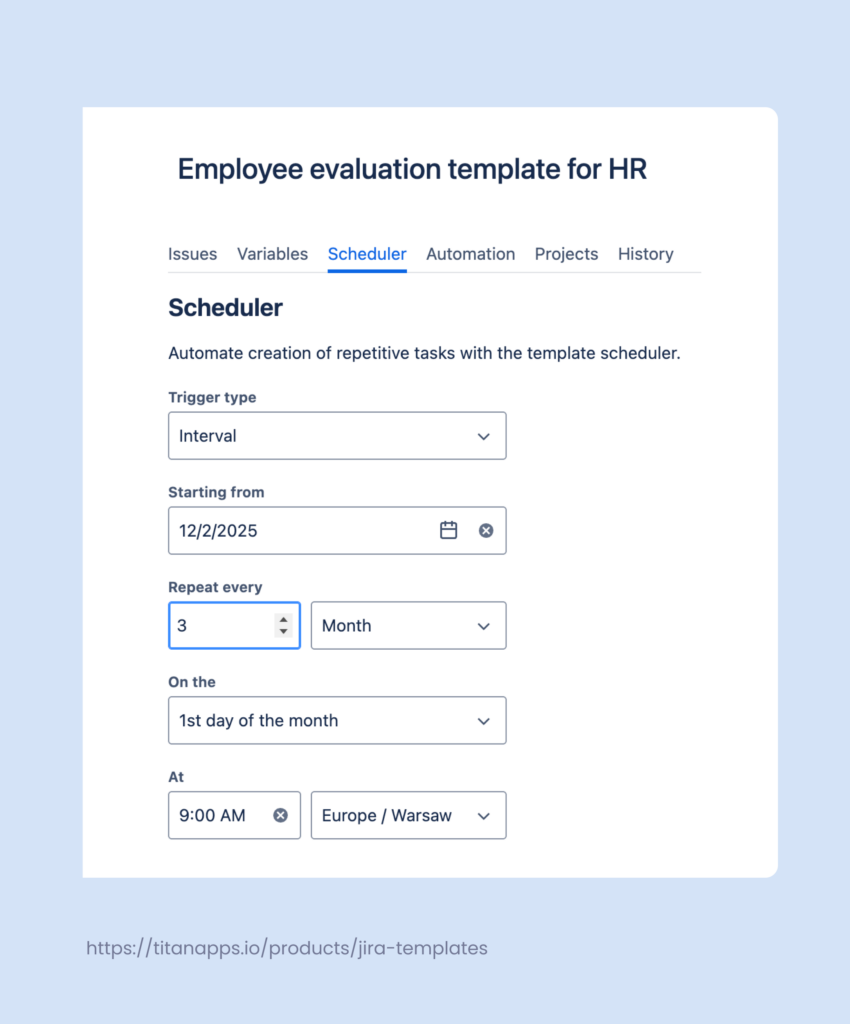
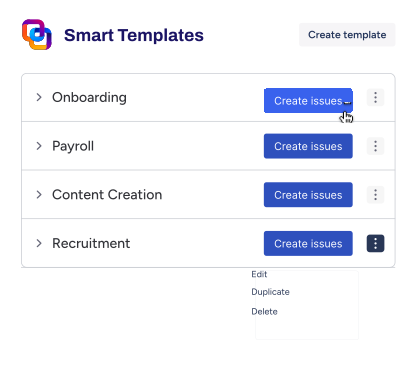
This can be achieved using Smart Templates for Jira. This solution allows you to save any work item or set of work items as a reusable template. Then, you can generate work items from that template automatically on a schedule.
For example, you can create a Jira ticket with the employee evaluation template checklist and add assignees, dynamic deadlines, and other information. This ticket can then be turned into a template.
After this, you can use Smart Template’s native Scheduler feature to auto-generate this work item every quarter. The schedule is customizable and can be adjusted to fit virtually any review period.
Alternatively, you can apply the same approach to an entire set of Jira tasks. For example, a performance review.
As a result, you will have Jira tickets ready with all the necessary information exactly when you need them. These tickets will be created automatically and pre-assigned to the responsible individuals.
Additionally, Smart Templates support variables. This is useful for managing dynamic values, such as {{Employee_name}} or {{Job_title}}. Upon work item creation, you will be able to provide specific information instead of these placeholders. This feature allows one template to be applicable to multiple employees, helping you optimize your time.
Benefits of Managing the Employee Evaluation Template With Smart Tools
- Consistent structure. The evaluation process is mapped into a clear checklist format with fixed steps. This promotes standardization and helps you conduct consistent and unbiased evaluations.
- All feedback in one place. Everything lives inside the Jira ticket – form links, evaluation checklists, and written feedback. No more jumping between docs or chasing files.
- Async, reviewer-friendly format. Smart Checklist lets team members submit structured feedback without needing to attend live meetings.
- Transparency and progress tracking. HR can track who completed which sections and see the status of each evaluation step at a glance.
- Scalable and repeatable process. Once set up, the whole cycle can be triggered and tracked via Smart Templates on a recurring schedule. This is ideal for quarterly or annual reviews as it saves you valuable time. The tickets can be pre-assigned to the responsible people and already include dynamic deadlines. As a result, auto-created tasks will go directly to the evaluators.
This approach simplifies the employee evaluation process for HRs and team leads. It reduces manual overhead, increases clarity, and ensures that reviews are consistent and actionable.
Best Practices for Conducting an Employee Evaluation That Matters
Thoughtful evaluations go beyond ratings – they help people grow and develop their skills. These best practices will allow you to make your evaluation process more impactful.
1. Use a single framework across all stages
Maintain consistency by using the same evaluation structure across hiring, onboarding, peer feedback, and employee performance reviews. Specific steps and criteria may adapt, but the core categories should stay aligned. This helps you apply a unified approach and clearly see how an employee grows over time.
2. Align your criteria with the company values
The employee evaluation system should reflect what your company values most. Connect the employee skills that should be developed to your company’s principles and goals. This helps you see how people contribute to the bigger picture and helps your organization achieve its goals.
For example, if your company values flat hierarchy and self-organized teams, ownership and initiative should be the core skills. Developing them will help employees to support and reinforce the company culture.
3. Gather input from multiple sources
Relying on a single person’s feedback can distort the picture. The human resources team needs to gather input from managers, peers, and cross-functional collaborators to better understand the current situation.
4. Review data, not just opinions
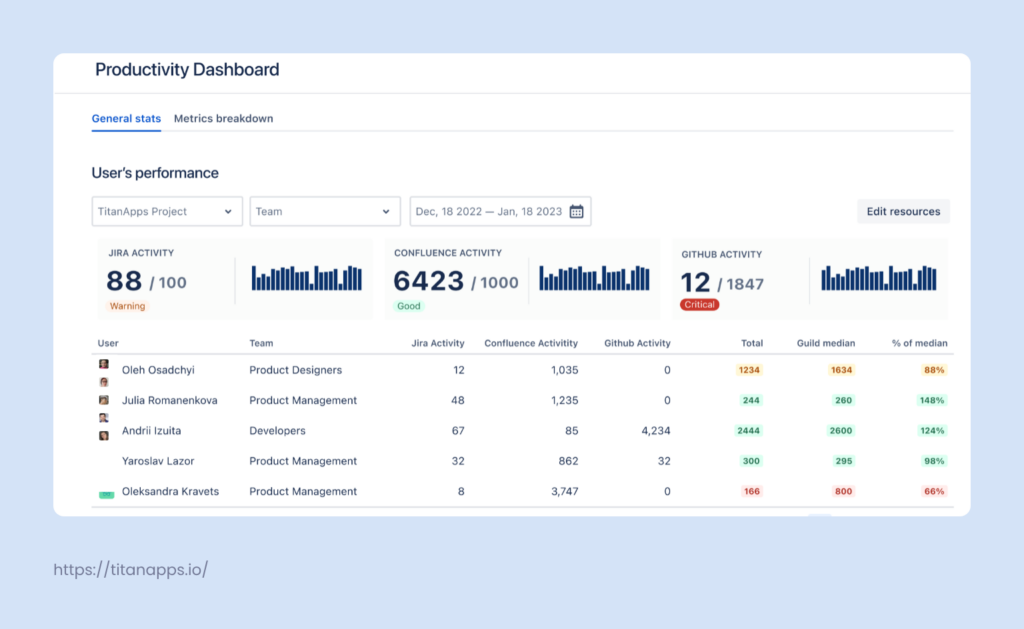
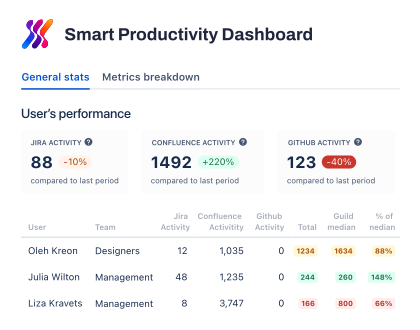
Even balanced feedback still remains subjective. It’s also useful to analyze objective data and specific KPIs before finalizing your conclusions. For example, you can review the employee’s work results on the Smart Productivity & Team Activity Dashboard. It automatically combines data from Jira, GitHub, and Confluence to provide detailed information on employee activity.
It allows you to track key productivity metrics: The number of work items created and closed by assignees, the number of commits and PR data, and the productivity median by team.
Team leads can set role-based benchmarks and then analyze individual contributions in comparison to the median for the person’s role. A performance of less than 100% means it’s below the guild median, and vice versa. This makes it easier to see performance improvements or, conversely, spot a decline in employee engagement.
All this enables you to assess performance more fairly and look at it in the context of the whole team.
5. Connect evaluation to development
Evaluation should support growth, not just measure performance. Identify skill gaps, explain the feedback, and link it to future development opportunities. For example, this can be learning a new skill, mentoring, or taking on more responsibility.
Such clarity helps a person to better understand their career options in your organization. This, in turn, can improve their well-being, job satisfaction, and motivation. When properly linked to development, employee evaluation can increase retention and help you build mature teams. To complement this process, employee engagement surveys can help you measure how employees feel between evaluation cycles and spot early signs of disengagement.
6. Act on the evaluation results
A review is only valuable if it leads somewhere. Share the outcomes, document key takeaways, and turn them into next steps. Making it actionable helps the employee grow and enhance the quality of work.
Additionally, it’s also important to encourage continuous feedback. Employees should feel comfortable requesting updates outside scheduled evaluation checkpoints. This makes feedback more meaningful and better connected to ongoing tasks.
Use the Employee Evaluation Template With Other HR Templates in Jira
For maximum process optimization, consider combining our employee evaluation template with other handy HR templates. For example, it can be added to the Performance Review Template and Onboarding Template in Jira. Let’s take a closer look at them.
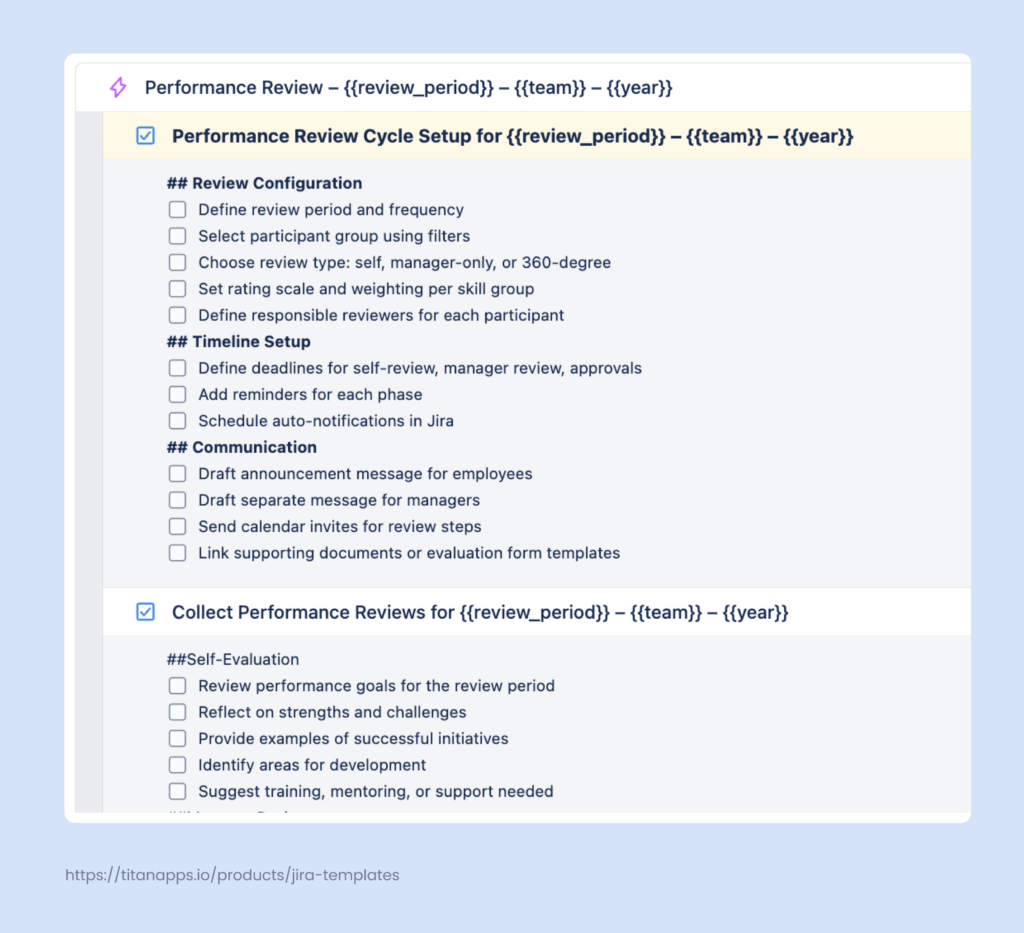
Performance Review Template
This is a set of standard Jira work items for performance review, saved as a template with the help of Smart Templates for Jira. It consists of an epic and several tasks with checklists. The template helps the HR team to organize the performance review process, documenting it in an actionable step-by-step format.
You can add the employee evaluation checklist as an additional section of the Performance Review Template. Alternatively, it can be included as a separate work item in this set (a task + checklist).
Onboarding Template in Jira
This template is designed to guide new employees through their first days in the organization. It lists all the steps they need to complete, provides links to helpful resources, and sets priorities.
Here, our assessment checklist can be added for employee self-evaluation. It can also be used to document the initial feedback for new hires. At this stage, it’s too early to assess overall performance, but you can evaluate observable hard and soft skills and highlight employees’ strengths.
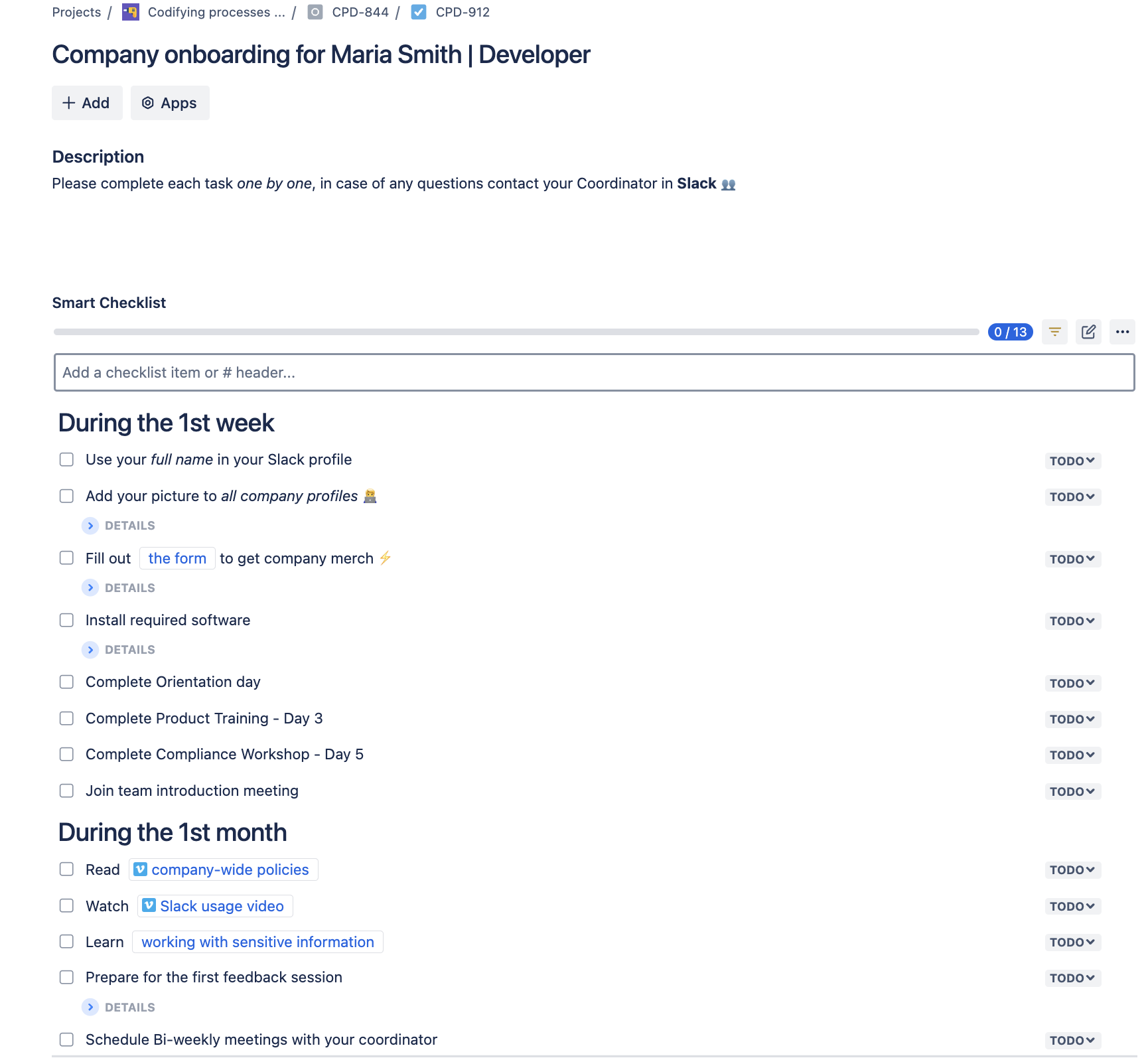
Company onboarding for Maria Smith | Developer
# During the 1st week
- Use your *full name* in your Slack profile
- Add your picture to _all company profiles_
> List of company profiles: Slack, Google account, Jira/Confluence, etc.
- Fill out [the form](http://rw.rw/vimeo.com) to get company merch
> Please state your current address
- Install required software
>VPN setup
>Antivirus installation
- Complete Orientation day
- Complete Product Training - Day 3
- Complete Compliance Workshop - Day 5
- Join team introduction meeting
# During the 1st month
- Read [company-wide policies](https://vimeo.com)
- Watch [Slack usage video](https://vimeo.com)
- Learn [working with sensitive information](https://www.atlassian.com/software/confluence)
- Prepare for the first feedback session
>Purpose: Assess your training progress and role adaptation.
- Schedule Bi-weekly meetings with your coordinator
>Purpose: Review progress on tasks, ask questions
For more on this topic, please see our article Onboarding Template in Jira.
Adopt Checklist Templates For Other HR Tasks And Processes
Checklists and templates can be indispensable for optimizing standard, repetitive tasks. Instead of starting from scratch, you can simply reuse materials you already have – especially if they are created according to the best practices and have proven to work well.
Checklist templates help you document processes in an easy-to-follow format. When they are adopted at scale and with automation, time savings can be enormous.
Have a look at our other templates created for HR professionals:
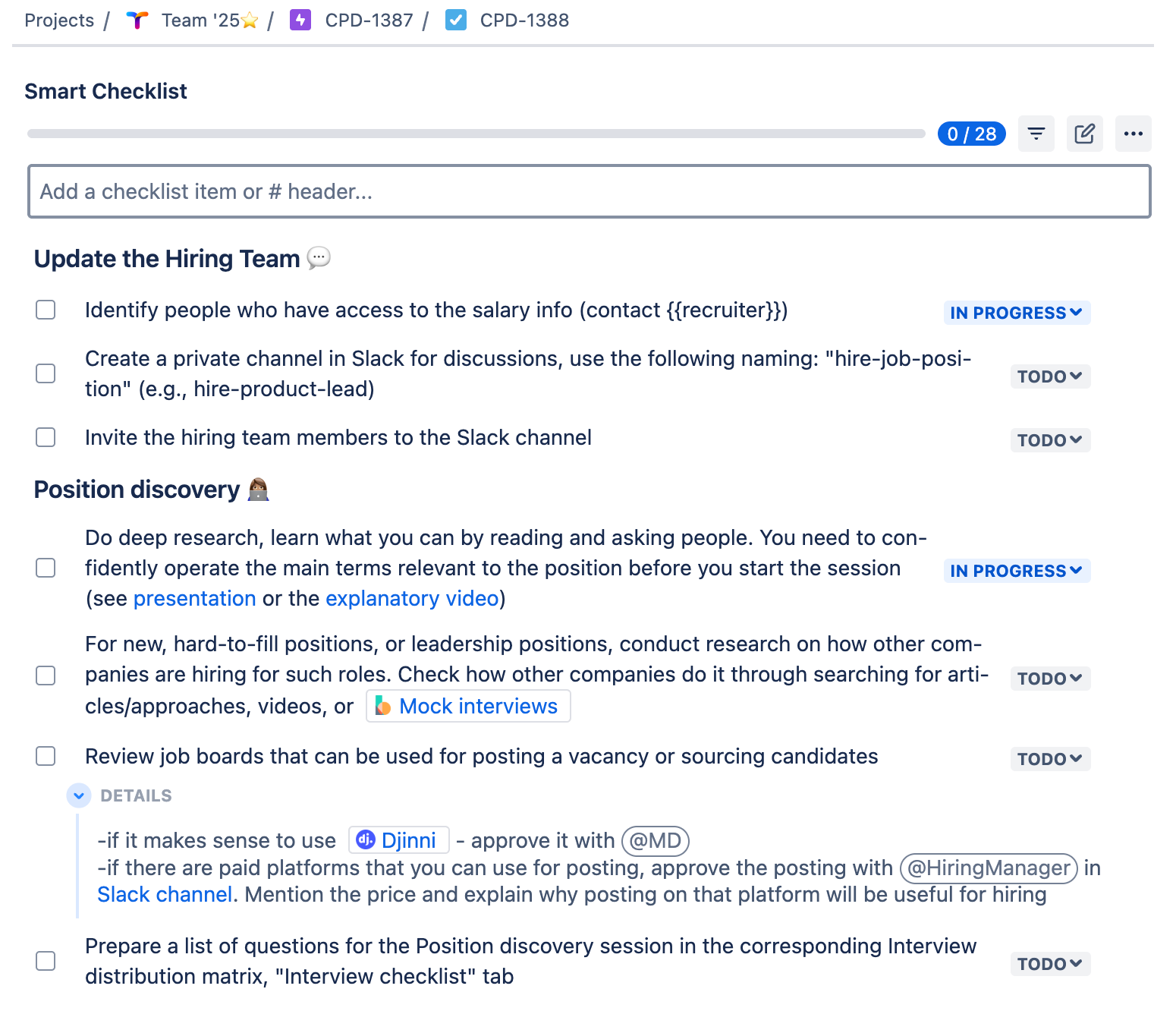
### Update the Hiring Team
- Identify people who have access to the salary info (contact {{recruiter}})
- Create a private channel in Slack for discussions, use the following naming: “hire-job-position” (e.g., hire-product-lead)
- Invite the hiring team members to the Slack channel
### Position discovery
- Do deep research, learn what you can by reading and asking people. You need to confidently operate the main terms relevant to the position before you start the session (see [presentation] or the [explanatory video])
- For new, hard-to-fill positions, or leadership positions, conduct research on how other companies are hiring for such roles. Check how other companies do it through searching for articles/approaches, videos, or [Mock interviews](https://www.thebalancemoney.com/how-to-use-mock-interviews-to-practice-interviewing-2061626)
- Review job boards that can be used for posting a vacancy or sourcing candidates
> -if it makes sense to use [Djinni](https://djinni.co/developers/) - approve it with @MD
> -if there are paid platforms that you can use for posting, approve the posting with @HiringManager in [Slack channel]. Mention the price and explain why posting on that platform will be useful for hiring
- Prepare a list of questions for the Position discovery session in the corresponding Interview distribution matrix, “Interview checklist” tab
- Schedule the Position discovery session (1-3h, depending on the role). If the team cannot come up with the list of projects, schedule +1h.
### Job Description
- Prepare a job description using [this guide](insert your link)
- Define job title, responsibilities, and requirements
- Outline key qualifications, skills, and experience needed
- Include salary range and benefits (if applicable)
- Approve the JD draft with the hiring team. Ask them to review the structure and content, NOT the grammar
- Review the JD draft with the @ContentWriter
### Vacancy posting
- Post on the company website
- Post on job boards (LinkedIn, Indeed, etc.)
- Post on social media channels
- Post internal referrals and employee networks
- Add vacancy to the applicant tracking system (ATS)
### Tracking & Follow-up
- Monitor application responses
- Ensure compliance with equal opportunity policies
- Review applications against job requirements
- Filter out unqualified candidates
- Prioritize top candidates for further evaluation
### Candidate Screening & Shortlisting
- Consult hiring managers for input on top candidates
- Prepare a structured shortlist (e.g., top 5–10 candidates)
- Notify shortlisted candidates and schedule interviews
- Send rejection emails to unqualified candidates
We hope this article helped you organize the employee performance evaluation and make this process more efficient.
For more details on how Smart Tools can benefit your organization through various templates, please see our case study How to Streamline Hiring Processes With Smart Templates.