Tools for Jira
 Tools for monday.com





If you’re already SOC 2 certified, you know the hardest part is not getting the report once. The major challenge is to stay audit-ready every fiscal year.
You’re constantly juggling:
- Ongoing internal controls
- Evidence collection across teams
- Regulator and customer questions about your security posture
A structured audit preparation checklist in Jira turns this into a repeatable workflow. You get one place to track evidence, owners, deadlines, and audit findings in real time, and you can reuse it every fiscal year.
In this article, we’ll walk through a SOC 2 Security (CC) audit checklist template you can run inside Jira. We’ll also share tips from our security team and show how to implement the template with Smart Checklist and Smart Templates for Jira.
What is a SOC 2 Audit Checklist Template?
A SOC 2 audit checklist template is a reusable, step-by-step structure that helps you prepare for your annual (or semi-annual) SOC 2 Type II audit.
Unlike a generic “security checklist”, It’s built for recurring audits:
- Maps directly to the SOC 2 Security Trust Services Criteria
- Organizes internal controls, risk assessment, and evidence by control family
- Supports both internal audit and external auditors during fieldwork
- Works well with automation, dashboards, and real-time status tracking
Think of it as your “master issue tree” for audit readiness. Instead of recreating the process for each fiscal year or each external audit, you clone the template, personalize variables, and start execution.
The goal is simple: when your external audit firm starts fieldwork, your audit team can pull up a Jira issue and see: which controls are in scope for this fiscal year, who owns each control, where the latest supporting documents live (policies, logs, screenshots, exports) and which corrective actions from prior year findings are closed or still open
This gives your internal auditors, security, and engineering teams a shared, real-time view of audit readiness instead of hidden spreadsheets and email threads.
How SOC 2 Security Criteria Shape the Checklist
The SOC 2 Security Trust Services Criteria are organized into common criteria (CC1–CC9). Your audit report is built on evidence that these controls are designed and operating effectively over the period.
For recurring audits, most companies stick with Security as the baseline, then optionally expand to Availability, Confidentiality, etc. The template below focuses on Security and follows the same structure your external auditors use:
- CC1 – Control Environment
- CC2 – Communication & Information
- CC3 – Risk Assessment
- CC4 – Monitoring Activities
- CC5 – Control Activities
- CC6 – Logical Access
- CC7 – Change Management
- CC8 – System Operations & Incident Response
- CC9 – Vendor & Third-Party Management
Instead of listing every point of focus, we bundle them into a comprehensive checklist that your audit team can manage in Jira.
SOC 2 Audit Checklist Template – Structure in Jira
We recommend one main Epic per year and one Jira issue per control family. Inside each issue, use Smart Checklist to manage the detailed tasks and evidence for that area.
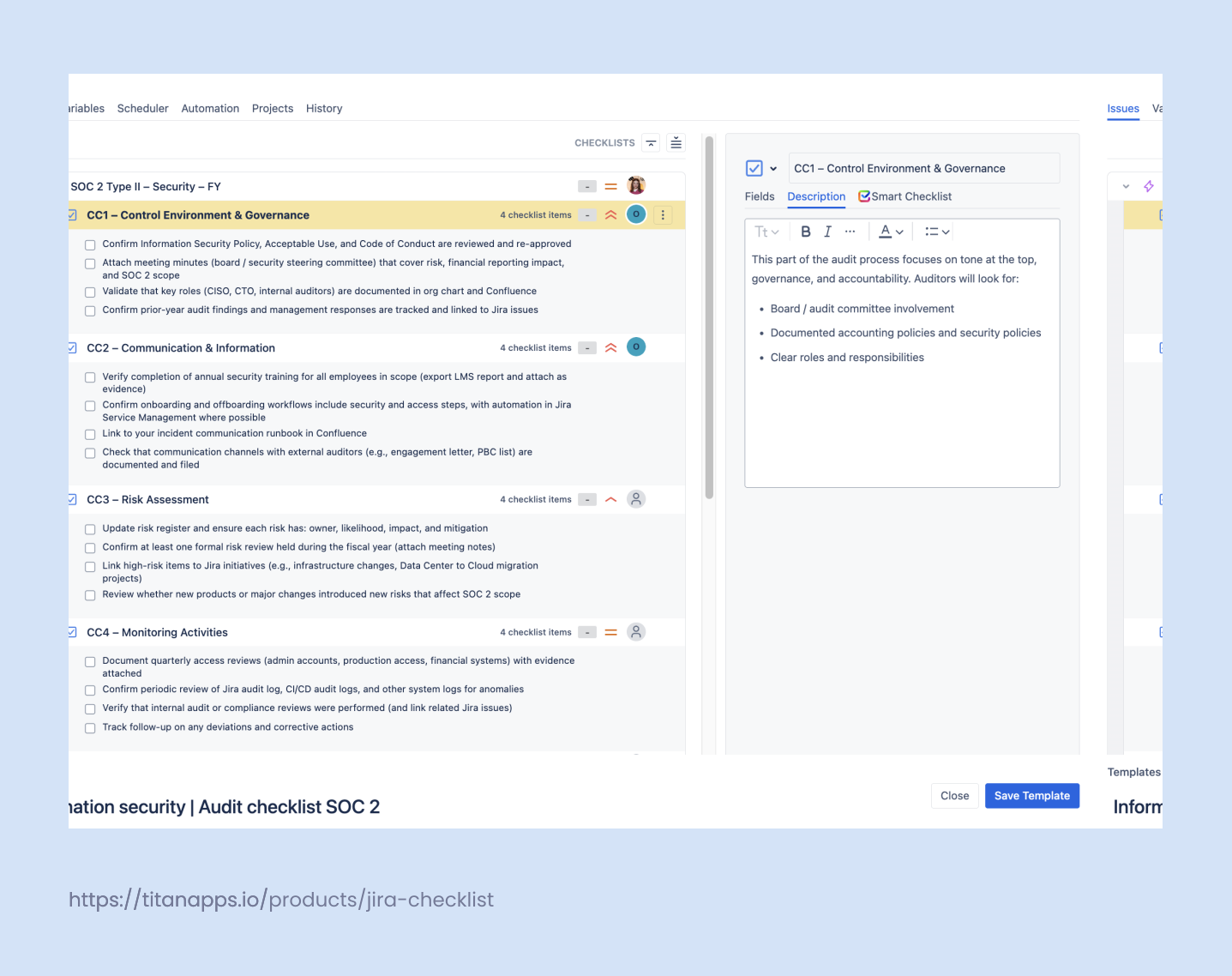
Epic: SOC 2 Type II – Security – FY{{year}}
Example variables you can reuse each year:
- {{year}} and/or {{month}} – audit period can be each 3, 6 month or once a year
- {{audit_firm}} – CPA firm / external auditors
- {{audit_owner}} – primary internal audit lead
- {{period_start}}, {{period_end}} – audit period dates
Below is how we suggest structuring the checklists.
1. CC1 – Control Environment & Governance
This part of the audit process focuses on tone at the top, governance, and accountability. Auditors will look for:
- Board / audit committee involvement
- Documented accounting policies and security policies
- Clear roles and responsibilities
Example checklist items:
- Confirm Information Security Policy, Acceptable Use, and Code of Conduct are reviewed and re-approved
- Attach meeting minutes (board / security steering committee) that cover risk, financial reporting impact, and SOC 2 scope
- Validate that key roles (CISO, CTO, internal auditors) are documented in org chart and Confluence
- Confirm prior-year audit findings and management responses are tracked and linked to Jira issues
2. CC2 – Communication & Information
Here auditors check how you communicate policies, procedures, and changes to relevant stakeholders.
Example checklist items:
- Verify completion of annual security training for all employees in scope (export LMS report and attach as evidence)
- Confirm onboarding and offboarding workflows include security and access steps, with automation in Jira Service Management where possible
- Link to your incident communication runbook in Confluence
- Check that communication channels with external auditors (e.g., engagement letter, PBC list) are documented and filed
3. CC3 – Risk Assessment
SOC 2 expects a documented, repeatable risk assessment process that feeds into your compliance program.
Example checklist items:
- Update risk register and ensure each risk has: owner, likelihood, impact, and mitigation
- Confirm at least one formal risk review held during the fiscal year (attach meeting notes)
- Link high-risk items to Jira initiatives (e.g., infrastructure changes, Data Center to Cloud migration projects)
- Review whether new products or major changes introduced new risks that affect SOC 2 scope
If you’re running large changes like Cloud migrations, map them to your SOC 2 risks and controls. Our Data Center migration to Jira Cloud step-by-step guide shows how to keep compliance and security in mind during big initiatives.
4. CC4 – Monitoring Activities
Monitoring is about ongoing checks that your internal controls work as intended.
Example checklist items:
- Document quarterly access reviews (admin accounts, production access, financial systems) with evidence attached
- Confirm periodic review of Jira audit log, CI/CD audit logs, and other system logs for anomalies
- Verify that internal audit or compliance reviews were performed (and link related Jira issues)
- Track follow-up on any deviations and corrective actions
5. CC5 – Control Activities
Control activities are the specific policies, procedures, and workflows that enforce your standards.
Example checklist items:
- Confirm change approval workflows in Jira or your DevOps tools are consistently used and documented
- Check segregation of duties between developers, reviewers, and deployers (link Bitbucket/GitHub/GitLab configuration screenshots)
- Validate that critical production changes require peer review and automated tests
- Ensure exception handling and deviations (e.g., emergency changes) are logged and approved
This is where post-incident reviews often show up. If you’re not already doing it, set up a reusable incident postmortem process in Jira and Confluence.
6. CC6 – Logical Access Controls
Logical access is a core part of SOC 2 and often a big chunk of fieldwork.
Example checklist items:
- Inventory all in-scope systems (AWS, Azure, GCP, Jira Cloud, Confluence, Slack, internal apps)
- Confirm SSO / authentication and MFA are enforced on all production and key business systems
- Validate onboarding and offboarding processes remove access within defined SLAs (e.g., 24 hours)
- Review admin and privileged account access at least quarterly and document the review in Jira
Your audit preparation checklist should tie to both HR workflows and IT workflows so user management is clear and auditable.
7. CC7 – Change Management
Here auditors care about how you manage changes to code, infrastructure, and configuration.
Example checklist items:
- Confirm all production changes go through a standard pipeline (e.g., from Jira to Bitbucket/GitHub then to CI/CD and to deployment)
- Link example pull requests, build logs, and deployment logs for sampled changes
- Ensure rollback and back-out procedures are documented and tested
- Attach sample evidence for configuration changes (e.g., firewall rules, IAM policies)
8. CC8 – System Operations & Incident Response
This section focuses on daily operations, monitoring, trial balance of system stability, and how you respond to incidents.
Example checklist items:
- Confirm monitoring and alerting are configured for key services (availability, performance, security)
- Attach sample alerts and response tickets from Jira Service Management or your incident tool
- Document incident response process, including severity levels, communication, and post-incident actions
- Verify backup jobs, DR tests, and restoration procedures are executed and documented during the period
9. CC9 – Vendor & Third-Party Management
External services are part of your control environment. SOC 2 expects you to manage vendor risk.
Example checklist items:
- Maintain an up-to-date vendor inventory with owners, data classification, and purpose
- Collect and review SOC 2 reports or security documentation from critical vendors
- Document risk assessment and mitigation for each high-risk vendor
- Confirm contracts and DPAs reflect your regulatory compliance and security requirements
How to Run This SOC 2 Audit Checklist in Jira with Smart Tools
Here’s one way to operationalize this checklist inside your Jira Cloud instance.
1. Generate the audit structure with Smart Templates
Use Smart Templates for Jira to create:
- Epic: SOC 2 Type II – Security – FY{{year}}
- 9 child issues: one per CC area
- Pre-filled description fields with scope, links, and expectations
- Smart Variables like {{year}}, {{audit_firm}}, {{audit_owner}}, {{period_start}}, {{period_end}}
This way your audit team doesn’t rebuild the structure every year. They just update the variables.
2. Add Smart Checklist to control issues
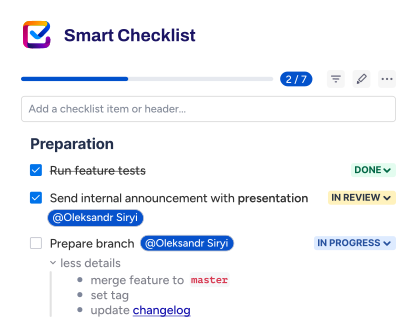
Inside each issue (CC1–CC9), use Smart Checklist to:
- Break the work into granular, testable items
- Attach or link evidence (Confluence docs, exports, screenshots)
- Mark critical items as mandatory and use workflow validators so the issue can’t move to “Ready for Audit” until they’re complete
This is especially useful for areas like logical access and change management where auditors will sample specific items.
3. Use automation and dashboards for real-time status
With Jira automation, you can:
- Auto-assign issues to control owners when the Epic is created
- Set due dates based on {{period_end}} minus a buffer for fieldwork
- Send reminders if checklists aren’t progressing
With dashboards, you can track:
- Progress by CC area
- Open corrective actions from prior-year audit findings
- Time to close findings and deviations
This turns your SOC 2 work from “rushed fieldwork” into a continuous, measurable part of your security and financial health story.
Tips from Our Security Team for Recurring SOC 2 Audits
From our own SOC 2 journey and talking with other teams, a few patterns stand out.
1. Treat SOC 2 as an ongoing workflow, not a year-end project
If everything happens during the last month of the audit period, you’ll struggle to produce high-quality evidence and a smooth audit. Spread your work across the year:
- Quarterly access reviews
- Regular policy and risk reviews
- Continuous documentation of key events (incidents, major changes, vendor updates)
2. Centralize evidence in one place
Use Jira as the backbone of your compliance program, with:
- One Epic per audit period
- Issues mapped to CC1–CC9
- Smart Checklists to track detailed tasks and evidence
- Links to Confluence pages, storage locations, and system exports
You avoid chasing bank statements, logs, and screenshots across email, local drives, and chat.
3. Make ownership and status visible
Every control area should have:
- A clear owner (not “security team”)
- A current status: Not started / In progress / Ready for auditor
- Due dates aligned with your audit firm’s timeline
This helps you spot bottlenecks early and gives stakeholders a realistic view of audit readiness.
4. Reuse and refine the checklist every year
Your first year’s template might be rough. That’s fine. After each successful audit, do a short retrospective:
- Where did auditors push hardest?
- Which controls had weak evidence?
- Where did you over-collect or under-collect documents?
Update the template so each year’s audit preparation checklist gets better and more streamlined.
For a deeper look at structuring long-running compliance projects in Jira, check out our Template for Compliance Audit in Jira.
Why Use an Audit Checklist Template in Jira
A good audit checklist template helps you:
- Streamline the audit process
You avoid hunting for spreadsheets, email threads, or outdated folders. Everything lives in a single project with clear status and owners. - Connect internal controls to real workflows
Instead of treating controls as abstract bullets in a PDF, you tie them to actual Jira workflows, automation rules, and system changes. This helps both auditors and internal teams see how financial reporting and security controls work in practice. - Improve audit readiness year over year
The template becomes a living artifact. After each successful audit, you refine tasks, checklists, and metrics based on audit findings and management feedback. - Support multiple use cases
The same structure works for external audit, internal audit, SOC 2 readiness, or a focused review of a specific area (e.g., revenue recognition, IT general controls). You clone the template, set a new scope, and assign a new audit owner.
 Note
Note
TitanApps has launched a Trust Center, where you can check how our solutions handle security, compliance, and data protection – all in one place. This information covers all TitanApps products – in particular, Smart Checklist for Jira, Smart Templates, and Smart Hierarchy. Explore our Trust Center to learn more.
Final Thoughts: Make Audits Boring (in a Good Way)
Audits will always bring pressure. Your goal is not to remove all the work, but to remove the chaos.
A well-designed audit checklist template in Jira gives you:
- A single, shared plan for internal auditors, finance, security, and external auditors
- A step-by-step flow from pre-audit to follow-up
- Clear visibility into risks, internal controls, and status at any moment
For teams that are already SOC 2 certified, the real win here is making the annual audit feel predictable without last-minute chasing of supporting documents and any surprises during fieldwork.
A structured SOC 2 audit checklist template in Jira helps you get there. It keeps your internal controls, evidence, and corrective actions in one place and gives stakeholders a clear view of audit readiness in real time
Smart Templates give you the structure. Smart Checklist turns each step into concrete, verifiable tasks. Together, they help you move from last-minute scramble to a smooth audit that supports your long-term financial health and regulatory compliance.
When you are ready to operationalize your audit process inside Jira, start by mapping your existing audit preparation checklist into a template. Then let Smart Checklist and Smart Templates handle the repeatable work, so your audit team can focus on judgment, not manual tracking.
FAQ: SOC 2 Audit Checklist Template
Is this checklist only for SOC 2, or can we reuse it for financial audits?
The structure is designed around SOC 2 and internal controls, but you can adapt the same Jira template for a financial audit as well. For SOC 2, you focus on security controls and evidence. For a financial reporting audit under GAAP or other accounting standards, you’d swap in tasks for financial statements, trial balance, balance sheet, accounts payable/receivable, fixed assets, depreciation, bank statements, and tax returns. The idea is the same: a single, reusable audit preparation checklist that keeps all supporting documents and owners in one place.
How detailed should our audit checklist be for a comprehensive audit?
Start from two inputs: your auditor’s PBC list and your own control catalog. A comprehensive checklist usually covers:
- Design and operation of key internal controls
- Evidence for financial records (invoices, contracts, ledgers) where relevant
- Samples for fieldwork (e.g., change tickets, access reviews, reconciliations)
You don’t need a separate Jira item for every control test. Instead, use a step-by-step issue with a Smart Checklist that groups related work (for example: “Pre-audit review of revenue recognition controls”, “Year-end review of liabilities and accruals”, “Tie-out of prior year audit findings and corrective actions”). That keeps the audit process manageable while still supporting a successful audit.
How does this template support internal audit vs external audit?
For internal audit teams, the template helps you plan and execute reviews across the fiscal year: risk assessment, control testing, and follow-up. For external audit, the same issues and checklists become your single source of truth during fieldwork:
- The audit firm and CPAs see clearly which controls are in scope
- The audit committee and other stakeholders can track progress
- You can quickly answer questions about specific workflows, accounting policies, or configurations
You’ll still sign an engagement letter and work through the standard external audit steps, but the template gives your audit team and external auditors a shared map instead of scattered files.
How can we use this template to streamline year-end audit readiness?
The easiest way to get a smooth audit is to avoid doing everything at year-end. Use Jira automation to spread work across the year:
- Quarterly reviews of access, liabilities, and high-risk processes
- Pre-audit checks on trial balance, receivable, and key reconciliations
- Ongoing tracking of regulatory requirements and compliance program updates
With Smart Checklist and dashboards, you get real-time visibility into which areas are ready for fieldwork and which still need evidence.
What kinds of documents should we attach for SOC 2 vs financial audits?
For SOC 2, common supporting documents include:
- Policies and procedures (security, change management, incident response)
- System configs, access review exports, and change logs
- Incident tickets and postmortems
For a financial audit, you’ll layer on:
- Financial statements, trial balance, bank statements, and tax returns
- Schedules for fixed assets, depreciation, liabilities, and equity
- Detail for accounts payable / receivable
All of these can be linked to Jira issues so internal auditors and external auditors always know where to look during fieldwork.