





 Tools for Jira
 Tools for monday.com





There is no straightforward answer to this question. Jira’s pricing is as flexible as its capabilities, catering to a wide range of organizations, from small teams to large enterprises. Therefore, the answer will depend on the customer’s user count and needs. What’s more, the vanilla Jira cost is only one part of the actual total budget. This article will guide you through Jira licensing cost calculation, including the key pricing principles and additional expenses to be aware of for efficient license management.
TL;DR
- As of mid-2026, Jira Cloud is the only option for new Jira users, as Jira Data Center licenses are available for existing customers.
- Jira Cloud costs depend on the pricing plan, the number of users, the billing cycle, whether you buy it as a standalone subscription or as part of Atlassian’s Teamwork Collection, and available discounts.
- Atlassian ecosystem and Marketplace apps augment Jira’s capabilities but also add significantly to Jira licensing costs.
- The cost of other Atlassian products and Atlassian Marketplace apps is largely guided by the same principles as the core Jira cost.
What is Jira Licensing?
Jira licensing is a subscription-based pricing model that governs how a customer can use Jira and how much they pay. The available capabilities vary by the feature tier you select (Free, Standard, Premium, or Enterprise). The subscription cost, aside from tier, also depends on the total number of users and the billing cycle.
Jira Licensing vs Jira Pricing: What is the difference?
Licensing determines what you get: admin controls, storage capacity, cross-team planning capabilities, etc. Jira Pricing is the framework that determines how much you pay, depending on your tier, team size, payment frequency, and other factors.
What Does the Total Jira Licensing Cost Consist of?
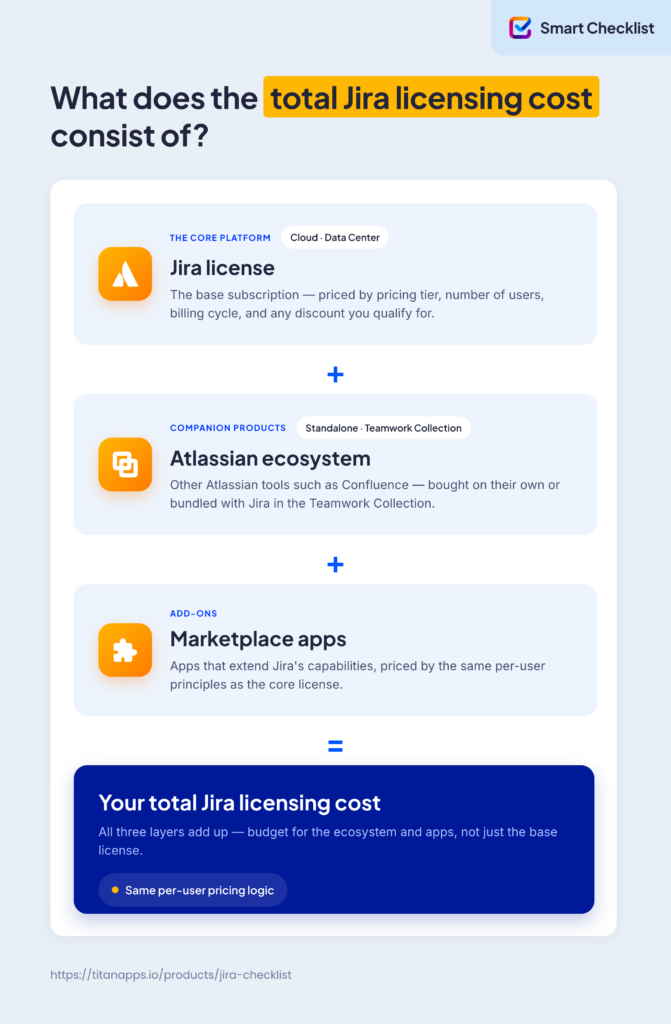
To evaluate total Jira licensing cost, take into account not only core Jira subscription pricing, but also other Atlassian solutions and third-party Marketplace apps. Usually they operate as an interconnected system – if you buy a Jira license, you are likely to buy some other tools to tailor it to your needs.
Cloud, Server, Data Center: What Jira Can You Buy in 2026?
Historically, Jira came in two options depending on the hosting: cloud (Jira Cloud) and self-managed (Jira Server and Data Center). However, Jira Server was officially discontinued in 2024. Also, Atlassian stopped selling new Data Center licenses on March 30, 2026, as part of the Data Center phasing-out process. Thus, Jira Cloud is now the only viable option for new customers.
Existing customers can purchase new Data Center subscriptions, Marketplace apps, and subscription expansions till March 30, 2028. The majority of Data Center products will reach their end of life on March 28, 2029. After that, support and bug fixes will no longer be available. Atlassian states that some customers will be able to purchase extended maintenance for an additional cost, “but only upon exception”.
Note. Some older sources still refer to Jira as Jira Software, Jira Work Management, or Jira Core. All those were merged into a single Jira product. You can no longer buy them separately.
What Influences the Jira Cloud License Cost?
The Jira Cloud license cost is determined by the pricing tier, number of users, billing cycle, whether you buy it as a standalone product or as part of Atlassian’s Teamwork Collection, and the organization’s eligibility for a discount.
Pricing Tiers
Jira Cloud subscriptions come in four tiers:
- Free with basic project management functions for small teams up to 10 people.
- Standard for growing teams in need of a comprehensive project management tool.
- Premium for teams requiring more advanced features than the Standard plan can offer, particularly to support cross-team collaboration.
- Enterprise for teams with hundreds or thousands of users, with special requirements for scalability, compliance, and security.
Our previous article on Jira pricing summarizes the differences between plans in pricing and features.
 Note
Note
As of July 2026, for a team of up to 100, the Jira Standard plan will cost you $9.05 per user/month, and Jira Premium – $18.30 per user/month. Annual pricing is 10 times higher than the total monthly subscription cost. Enterprise is available to teams with more than 800 users only on an annual subscription, starting at $166,000/year. The most detailed and up-to-date pricing information is on the official Jira pricing page.
Number of users
The number of users is the most significant factor influencing the Jira Cloud costs. Simply put, the larger your team, the more you will have to pay for Jira. However, the cost per user drops as the team size grows. For the largest organizations, it may be up to three times lower than for the smallest, as reflected in the table below.
| Jira pricing range for the Standard and Premium plans (July 2026) | |||
|---|---|---|---|
| N of users | Standard | Premium | |
| Max price per user per month | 1-100 | $9.05 | $18.30 |
| Min price per user | 99,651-100,000 | $3.01 | $5.91 |
Atlassian uses a tiered pricing model, meaning the Jira Cloud price changes once your team’s user count exceeds certain limits. For instance, a Jira Standard annual subscription for a team of 10 will cost $900, but adding another user increases the price to $1,350. The tier sizes vary, going up as the total number of users grows.
| Jira Cloud Annual Price (July 2026) | |||
|---|---|---|---|
| User tier | Pricing Plan | ||
| Standard | Premium | Enterprise | |
| 1-10 | $900 | $1,850 | Not available |
| 11-15 | $1,350 | $2,750 | Not available |
| 16-25 | $2,250 | $4,600 | Not available |
| ... | ... | ... | ... |
| 800-100 | $68,500 | $110,500 | $166,000 |
| ... | ... | ... | ... |
| 90,000-100,000 | $3,013,000 | $5,910,000 | $9,078,000 |
Note
Atlassian bills monthly Jira Cloud subscriptions based on the number of users at the start of each billing cycle. This is called maximum quantity billing. If you add users mid-cycle, they are charged on a prorated basis for the remainder of the cycle.
Let’s consider an example to understand what it means. Imagine your billing cycle runs from the 1st to the 30th of the month, and you add five new users on the 20th. You don’t pay the full price for those users for the whole month – only for the 10 days left in the cycle, the 20th through the 30th.
If, however, you remove five users on the 20th, your monthly Jira licensing cost won’t change. You don’t get any credit for users removed mid-cycle. The count resets only at the start of the next billing cycle.
Billing cycle
Annual subscriptions may allow you to save up to 17% on Jira Cloud licensing cost. However, the savings are not guaranteed. For instance, teams with several dozen users may be better off with a monthly subscription. This pricing quirk stems from user-tier differences between monthly and annual subscriptions. Otherwise, an annual Jira subscription is cheaper. To make sure that holds for your particular case, check the Jira pricing calculator. See the table below for the Standard plan annual cost comparison, which illustrates pricing differences between monthly and annual subscriptions.
| Jira Standard cost comparison for monthly and annual subscriptions (July 2026) | ||||
|---|---|---|---|---|
| N of users | Monthly pricing per user per month | Monthly subscription annual cost = Monthly pricing * Team size * 12 months | Annual subscription cost | Annual vs monthly subscription |
| 10 | $9.05 | $1,086 | $900 | 17% |
| 30 | $9.05 | $3,258 | $4,550 | -40% |
| 50 | $9.05 | $5,430 | $4,550 | 16% |
| 100 | $9.05 | $10,860 | $9,050 | 17% |
| 1,000 | $6.85 | $82,200 | $68,500 | 17% |
| 10,000 | $5.38 | $645,600 | $538,000 | 17% |
| 100,000 | $3.01 | $3,612,000 | $3,013,000 | 17% |
Note that the Enterprise plan, unlike the Standard and Premium plans, is billed annually only.
Buying Jira as Part of the Teamwork Collection
Teamwork Collection bundles Jira, Confluence, Loom, and Rovo into a single license. It offers significant savings compared to buying standalone licenses. For example, a Standard Teamwork Collection license for a team of 100 will cost you $15 per user per month. Standalone Standard licenses for Jira (Rovo included), Confluence, and Loom will total at $33,75 per user per month. While those offers are not identical in terms of features and limits, they are mostly close. In some respects, the bundled license is even superior, offering, for instance, 10 times as many Rovo credits as the Jira Standard plan.
The table below summarizes the pricing ranges for the Teamwork Collection. For more information, check the Teamwork Collection pricing page.
| Teamwork Collection pricing (July 2026) | |||||
|---|---|---|---|---|---|
| Billing | Price range | Plan | |||
| Free | Standard | Premium | Enterprise | ||
| Monthly (per user per month) | Max (1-100 users) | $0 (up to 10 users) | $15 | $29 | NA |
| Min (around 100,000 users) | $4.66 | $11.10 | NA | ||
| Annual | Max (100,000 users) | $4,656,000 | $11,096,000 | $16,640,000 | |
| Min (1-10 users) | $1,500 | $2,900 | $343,500 (801-1,000 users) |
||
Discounts
Atlassian offers special Jira subscription prices to nonprofits and social enterprises, students and teachers, academic institutions, Open Source projects, and Atlassian Partners. Find details in the table below.
| Category | Eligibility criteria | Discount amount | How to apply |
|---|---|---|---|
| Jira special licensing prices | |||
| Nonprofits and social enterprises | Independent from government control, non-political, recognized as a nonprofit in the country of registration, have a social mission. | 50-100% | Atlassian Social Impact License request |
| Academic institutions | Schools, colleges, administrative offices and boards of education, research institutes, teaching hospitals, certified teaching and training organizations. | 50% | Atlassian Academic License Request Form |
| Students and teachers | Collegiate students, graduate students, and teachers | 75% | Atlassian Classroom license request |
| Open Source | A license approved by the Open Source Initiative; the source code is available for download; publicly accessible website; Atlassian's software is publicly accessible. | 100% (Standard plan) | Open Source Cloud Subscription Request |
| Atlassian Partners | Corporate resellers and official Atlassian Partners. | Custom | Become an Atlassian Partner |
H2 Atlassian ecosystem cost
Why Is the Atlassian Ecosystem Important to Jira Licensing Cost?
Jira is rarely used as a standalone solution. Teams pair it with Confluence for documentation, Bitbucket for code management, or Jira Service Management (JSM) to deal with customer requests. Each connected tool extends what Jira can do, but also adds its own subscription cost on top of the basic Jira plan. Some Atlassian solutions are more expensive than Jira Cloud – see the table below for examples.
Atlassian Solutions That May Interest Jira Users and Their Pricing
- Confluence – collaborative workspace for creating, organizing, and sharing documentation. For Jira users, it offers a central place for requirements, meeting notes, technical documentation, project plans, and decision records.
- Service Collection – integrated suite for IT service management, enterprise service management, and customer service, combining Jira Service Management (Jira Service Desk), Customer Service Management, Assets, and Rovo. It connects service teams with development, facilitating collaboration and speeding up issue resolution.
- Bitbucket – Git-based source code management platform. It connects development work to Jira by linking branches, commits, and pull requests.
- Jira Product Discovery (JPD) – product management tool for capturing and prioritizing ideas, and planning product roadmaps. It is a useful tool at the discovery stage, and the selected ideas can be linked to Jira work items to handle the delivery.
- Atlassian Guard – a security and identity management solution that helps protect and govern access to Atlassian Cloud products, including Jira. It offers single sign-on (SSO), automated user provisioning, two-step verification, security monitoring, and other capabilities.
- Loom – video messaging platform. It allows Jira users to add visual context to work items by embedding demos, bug reproductions, and design walkthroughs.
| Atlassian Licensing Cost (per 100 users) | |||||
|---|---|---|---|---|---|
| Product | Billing | Free | Standard | Premium | Enterprise |
| Confluence | Monthly (per user/month) | $0 (up to 10 users) | $6.70 | $13.20 | NA |
| Annual | $6,700 | $13,200 | $127,000 (800+ users) |
||
| Service Collection | Monthly (per user/month) | $0 (up to 3 agents) | $19.69 | $51.05 | NA |
| Annual | $19,700 | $51,000 | $168,500 (200+ users) | ||
| Bitbucket | Monthly (per user/month) | $0 (up to 5 users) | $3.65 | $7.25 | NA |
| Jira Product Discovery | Monthly (per user/month) | $0 (up to 3 users) | $9.25 | $23.50 | NA |
| Annual | $9,250 | $23,500 | $87,000 (200+ users) | ||
| Atlassian Guard | Monthly (per user/month) | NA | $4.20 | $8.18 | NA |
| Annual | $4,200 | $8,200 | |||
| Loom | Monthly (per user/month) | $0 (25 recordings, 5-minute video recording limit) | $18 | $24 | Custom |
| Annual | $18,000 | $24,000 | |||
H2 Marketplace Apps Cost
Why Do Third-Party Marketplace Apps Matter to Jira Licensing Cost?
Base Jira licensing covers the core platform, which, while highly customizable, can’t meet all user needs. Therefore, thousands of Marketplace apps exist to augment it.
For instance, let’s consider a common project management problem: process steps that live in someone’s head, on a wiki page, or in an external document. Jira’s native subtasks can handle all the details, but each step becomes a separate work item, adding clutter to the board and setup overhead for routine checklists. Action items in work item descriptions resemble checklists, but have limited functionality.
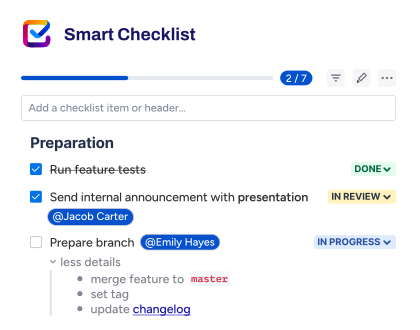
Checklist apps like Smart Checklist for Jira by TitanApps exist to address this gap. In particular, Smart Checklist allows you to add full-fledged checklists within work items with assignees and due dates, segment them into tabs, and even use them to gate work item status transitions.
Reporting, requirement management, time-tracking apps, and other Marketplace offerings close similar gaps elsewhere. These solutions carry their own per-user pricing, and that cost scales with your team size the same way Jira licensing does.
How Marketplace App Cost is Calculated
- Marketplace apps use a subscription-based pricing model with monthly or annual billing options.
- They are priced based on the maximum number of users of the Jira app (Jira, JSM, JPD, etc.) on your instance. For example, if you have Jira (40 users) and Jira Service Management (10 agents) on the same instance, you pay the 40-user price for apps. More details in Understand billing for Marketplace apps.
- You can trial any Marketplace app for free for 30 days, regardless of team size. However, some apps are free forever. For instance, Titanapps offers a free Smart Checklist app with limited functionality. The paid Smart Checklist for Jira is free for teams up to 10 users.
- Customers with up to 10 users pay a flat monthly rate, regardless of exact user count. Customers with more than 10 users pay a per-user rate for their entire user count.
- Annual pricing is tiered and calculated automatically at 10 times the monthly rate.
- Enterprises with multiple Jira instances can benefit from multi-instance billing. It allows them to be charged based on the number of unique app users across multiple instances. In other words, a single user will be counted only once, even if they have access to multiple app instances.
- If app pricing changes after the initial purchase, you can renew at the previous price for 60 days.
To see how much Jira might cost with add-ons in different scenarios and how to reduce add-on cost without losing functionality, check out our article on Jira pricing.
How to Get a Jira License?
You can either get a Jira License directly from Atlassian or via an Atlassian Solution Partner.
Get a Jira License Directly from Atlassian
Start with the Jira pricing page. For a Free, Standard, and Premium license:
- Choose the tier you need and click Get it now / Start free trial
- Enter your work email or log in via a Google, Microsoft, Slack, or Apple account.
- Verify your email.
- Specify your name and password
- Create your Atlassian site. Now you are ready to set up your Jira space and start working.
For an Enterprise license, you will need to contact sales to get a quote.
To use the Free plan or start a paid subscription trial, you don’t have to enter credit card details. You’ll need to add them before the Standard or Premium trial ends, or to buy paid Marketplace apps. Exceeding 10 users on Free moves you into a Standard plan trial, and you’ll then need to add a card before that trial ends.
Credit cards aren’t the only payment method. For monthly payments, you can also use a debit card, PayPal, or ACH Debit from a US bank account. Annual plans on approved payment terms unlock more options: ACH credit, domestic or international wire transfers, and checks. See Atlassian payment methods and payment terms for more information.
Get a Jira License via an Atlassian Solution Partner
An Atlassian Solution Partner is an official partner company authorized by Atlassian to provide consulting, sales, and technical services around Atlassian products. To find a suitable partner to configure your Jira and provide ongoing support, you can consult the Atlassian Partner Directory. Note that, depending on your cooperation terms, you may get a Jira license at a discounted price.
Summary: How Much Does Jira Cost in 2026?
Jira licensing costs start with your Jira Cloud or Data Center plan. However, the total depends on the Atlassian tools and the Marketplace apps you add, which may significantly impact the final bill. User count and the billing cycle drive most of the cost both for Jira and adjacent solutions. Before budgeting, map out which Atlassian products and third-party apps your team needs, then check current pricing through relevant pricing calculators and each app’s Marketplace listing.
FAQ
Is Jira free for commercial use?
Yes. Jira Cloud’s Free plan has no restriction on commercial use. It supports up to 10 users on a single site and includes 2 GB of storage. There’s no dedicated support, and some features available on paid plans, like customizable permission schemes and audit logs, aren’t included. For businesses that outgrow the 10-user limit or need those features, Jira’s Cloud Standard, Premium, or Enterprise plans remove these caps.
How do I upgrade to Jira Cloud Premium?
Go to Atlassian Administration, select your organization if you have more than one, then go to Billing. Find Jira in your list of subscriptions and select Manage. Choose Premium on the plan selection page and follow the prompts to confirm. You’ll start with a 30-day free trial, after which your Premium plan will switch to a monthly subscription.
How can I manage and renew my Jira license?
For Jia Cloud, go to Atlassian Administration, then Billing, and find Jira in the list to see your plan. Click Manage to view, change, or deactivate your subscription. Monthly Cloud subscriptions bill at the end of each cycle and continue until you deactivate them. Annual subscriptions can be set to renew automatically, so no manual renewal step is needed. For Data Center subscriptions, licenses expire at the end of your billing cycle and don’t renew automatically. Atlassian sends a renewal quote 90 days before your subscription ends, which you use to renew through admin.atlassian.com/billing.
How can I check the expiration date of my Jira license?
For Jira Cloud, there’s no traditional expiration date to check. What matters is your subscription’s renewal date, visible under Atlassian Administration – Billing – Jira – Manage. Monthly subscriptions are automatically charged each cycle. Annual subscriptions include an option to enable automatic renewal. For Jira Data Center, go to Applications, then Versions and Licenses in your instance’s admin settings. This shows the expiry date for each installed license.