


 Tools for Jira
 Tools for monday.com




Industry
Employees
Teams

The problem:
one Jira, many ways of working
Untis builds software that helps schools digitize their working day: timetabling tools plus web and mobile apps for teachers and students. All software development runs in Jira.
Every team has its own company-managed Jira project and shapes it however it likes. The Atlassian Application Owner & Product Owner supports the teams and sets only a few global rules.
“Every team has its own project. We use company-managed projects, but still on a team basis. They can structure their whole project however they like, and I'm mostly here for enabling.”
That freedom produces very different workflows: some teams use three statuses, others about ten. It created four challenges:
- Different levels of rigor. Some teams prefer a light process, others want clear entry and exit criteria for every issue.
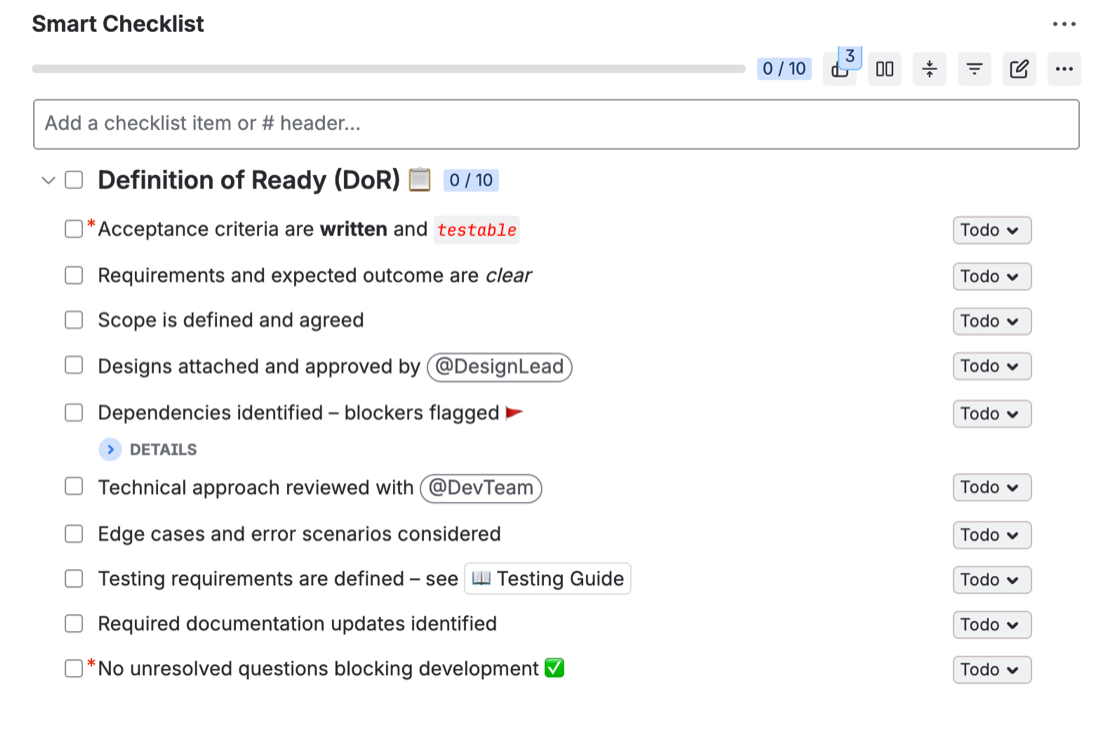
- Readiness and completion criteria. Stricter teams need a Definition of Ready and a Definition of Done inside each issue.
- Enforcement at transitions. Those teams also want to block issues from moving forward until the criteria are met.
- Team autonomy. Any tool has to fit each team's own workflow instead of forcing one global process.
The solution:
Definition of Ready and Definition of Done in every issue
Untis has been a Smart Checklist customer since 2022. It started with one team using the free version of Smart Checklist for Jira for shared notes everyone could check off. As their processes grew more complex, the way they used Smart Checklist grew with them.
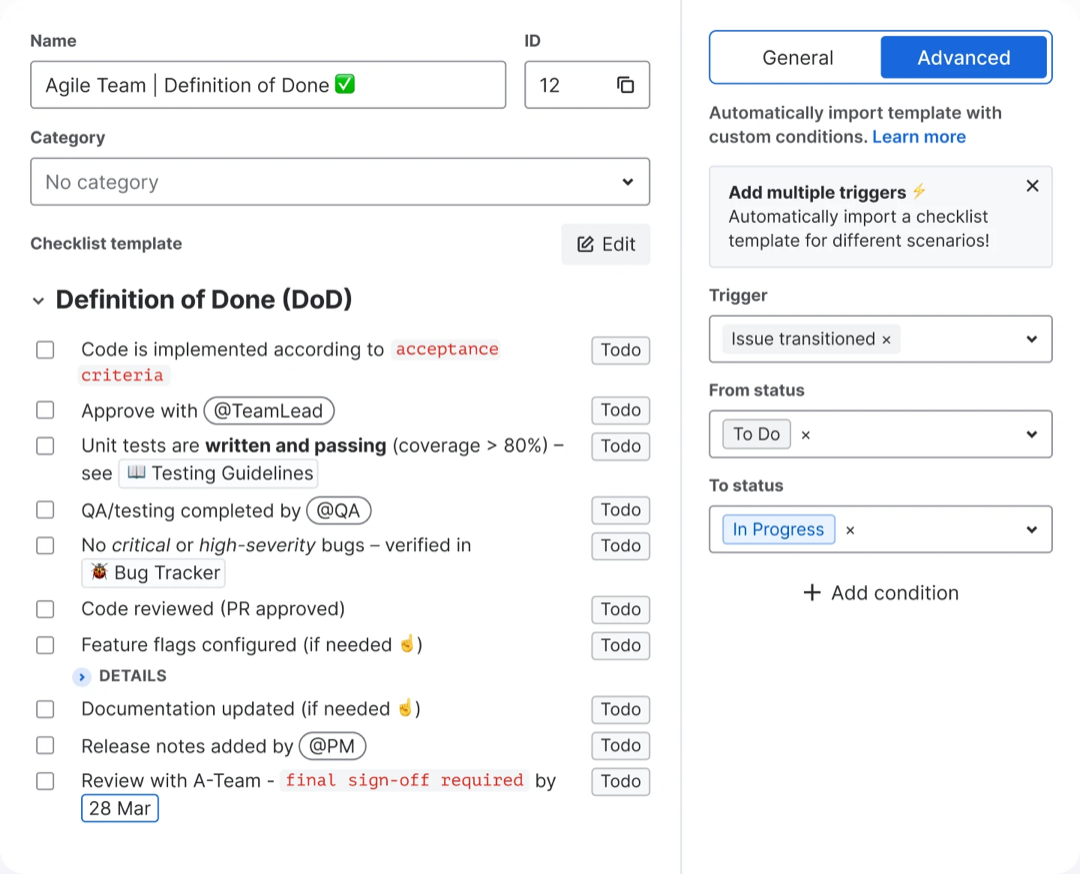
Today, teams that want a structured process combine reusable templates, automatic import, and workflow validators, so their Definition of Ready and Definition of Done are part of how work moves through Jira.
“Our primary use case right now is more process-oriented. Some teams use Smart Checklist to enact a definition of ready and a definition of done in their workflow.”
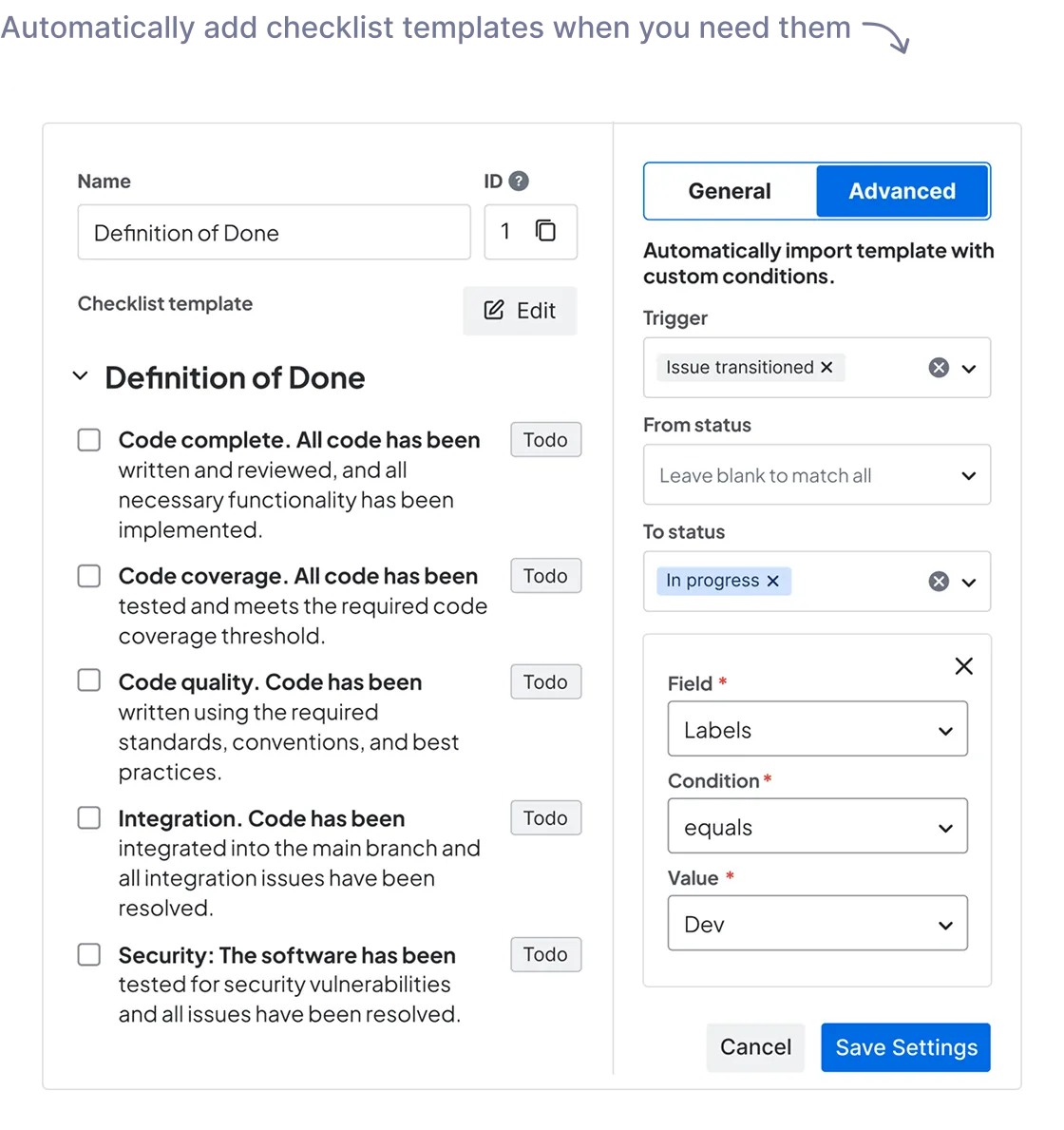
Reusable templates, added to every new issue automatically
Instead of writing a checklist for every ticket, teams save their recurring criteria as templates:
- Most projects need only two templates: one for Definition of Ready, one for Definition of Done
- Most templates are project-specific, with only a few maintained globally
- Templates are added automatically when an issue is created, so nobody imports them by hand
- The whole setup is managed inside Smart Checklist, without separate automation rules
“So it's mostly templates we use, it's mostly automatically putting the templates into the issue when it's created, and then using that for definitions of ready and definitions of done.”

Workflow validators that block transitions until the checklist is done
For teams that want stricter control, the Atlassian Application Owner configures workflow validators based on the Smart Checklist custom field:
- Jira transitions are tied to checklist completion, so the checklist is more than a visual reminder
- Only the teams that want this control turn validators on
- Day to day it stays simple: people check items off, with no custom checklist statuses to learn
The results
Repeatable process checks
Project-specific templates give each team a reusable Definition of Ready and Definition of Done instead of one-off checklists.
Automatic checklist setup
Templates appear as issues are created, so the criteria are always in the ticket without a manual import.
Enforceable workflow rules
Validators connect checklist completion to transition restrictions for teams that want structured controls.
Team autonomy, preserved
Stricter checks don't need a company-wide workflow redesign. Teams adopt them only where they help.
What's next
for Untis
The setup keeps growing one team at a time. Untis plans to keep developing its processes the same way, with each team adding structure when it needs it.
Teams that want strict control get it, and teams that prefer a lighter process keep their freedom. Reusable templates, automatic import, and workflow validators work together to make Definition of Ready and Definition of Done part of the workflow.
Want your Definition of Done enforced in Jira?




Trusted by 4000+ clients



Yuliia Tkachenko
How Kateryna’s QA Team Brought Their Entire Testing Process Into Jira
May 14, 2026

Viktoriia Golovtseva
How a Financial Services IT Team Made Onboarding and Offboarding Auditable in Jira
October 22, 2026
Yuliia Tkachenko
Why Companies Chose Smart Checklist Over Subtasks: Case Study
October 31, 2025
Yuliia Tkachenko
How QA Team Turned an Onboarding Process into a Repeatable System
May 9, 2026
Frequently Asked Questions 🤔
Haven't found an answer? Try our blog or contact support
Untis keeps its Definition of Ready (DoR) and Definition of Done (DoD) as two Smart Checklist templates per Jira project. The templates are added to every new issue automatically, and teams that want strict control add a workflow validator, so an issue can't move forward until its checklist is complete. Teams that prefer a lighter process simply don't turn the validator on.
Definition of Ready (DoR) is the list of conditions an issue must meet before work starts, such as testable acceptance criteria, agreed scope and identified dependencies. Definition of Done (DoD) is the list of conditions it must meet before it counts as finished, such as code review, passing tests and updated documentation. In Jira, DoR guards the move into development and DoD guards the move to Done.
Jira has no built-in Definition of Done field, so teams either paste it into the issue description or add it as a checklist. With Smart Checklist for Jira you: 1) write the DoD once and save it as a checklist template, 2) set the template to import automatically for the issue types that need it, and 3) optionally add a workflow validator so the issue can't be closed until every item is checked. See the full guide to Definition of Done in Jira.
Create a Smart Checklist template named Definition of Ready, add one item per readiness condition, and mark the critical ones as mandatory. Then set the template to import automatically when an issue is created, so it is in the ticket before refinement starts. At Untis, each project keeps its own DoR template next to its DoD template.
A practical Definition of Ready checklist in Jira includes: acceptance criteria that are written and testable, clear requirements and expected outcome, agreed scope, designs attached and approved, dependencies and blockers identified, the technical approach reviewed with the team, edge cases considered, testing requirements defined, documentation updates identified, and no unresolved questions blocking development. Mark the items that must never be skipped as mandatory.
A typical Definition of Done for a Jira story covers: code implemented according to the acceptance criteria, approval from the team lead, unit tests written and passing, QA testing completed, no critical or high-severity bugs, code review approved, feature flags configured, documentation and release notes updated, and a final sign-off. For more examples, see Definition of Done examples and antipatterns.
Acceptance criteria are specific to one user story and describe what that feature must do. Definition of Done applies to every story and describes the quality bar all work must meet, such as review, testing and documentation. The two work together: at Untis, the Definition of Ready checks that acceptance criteria are written and testable, and the Definition of Done checks that the code meets them.
Yes. Smart Checklist for Jira adds a workflow validator that checks the checklist before a transition, so an issue can't move to the next status until the checklist is complete. You can also mark individual items as mandatory, so only the critical checks block the transition while optional items stay flexible.
Yes. Smart Checklist templates can be project-specific or global. At Untis, most templates are project-specific, so every team defines its own criteria, and a typical project needs only two templates: one for Definition of Ready and one for Definition of Done.
No. Smart Checklist can import a template automatically when an issue is created or transitioned, filtered by issue type, status or other conditions. Untis manages this entirely inside Smart Checklist, without writing Jira Automation rules.