Tools for Jira
 Tools for monday.com





Launching a new product or feature without structured market research is a gamble. You might get lucky once. But you definitely won’t be able to scale it.
For most products, marketing, and growth teams, the real challenge isn’t “how to do market research” in theory. It’s how to run it as a repeatable, traceable workflow inside the tools you already use every day – Jira, Confluence, and the rest of your Atlassian stack.
In this article, we’ll walk through a Market research to launch a new product template you can run in Jira Cloud or Data Center. It’s built to help you:
- Plan research as a proper project
- Capture data in one place
- Turn insights into clear go / refine / stop decisions and track progress at a glance
What is a Market Research Template in Jira?
A market research template is a reusable structure in Jira:
- an Epic for the research project
- a set of Jira issues for each research step
- and checklists inside those issues to guide execution
Instead of starting from scratch every time, you spin up the template, personalize a few variables (product name, target market, persona), and your whole research workflow is ready.
This fits into your market research process as the operational layer:
- Strategy lives in Notion / Confluence / slide decks
- Raw data may come from survey tools, CSV exports, or interview notes
- The Jira template keeps “who does what by when” transparent, with clear metrics and decision gates
If you like structured workflows, you might also want to look at our Template for Compliance Audit in Jira – the different use case for compliance teams.
What the Market Research Template Includes
The template covers the full discovery flow for a new product or major feature. At a high level, it includes issues and checklists for:
- Product overview & goals – why we’re doing this research and what decisions it should support
- Target market & segmentation – what customers we target, how we slice the market, and which segment comes first
- Personas & customer needs – demographics, roles, workflows, pain points, and desired outcomes
- Problem statements & pain points – clear statements like “{{primary_persona}} struggles with {{problem}} in {{context}}”
- Research plan – which methods we’ll use (surveys, interviews, focus groups, social scans) and how we collect data
- Competitive landscape & SWOT – alternatives, pricing, positioning, gaps
- Market trends & opportunities – macro factors that affect demand and timing
- Pricing hypotheses & tests – willingness-to-pay, packaging, and pricing model assumptions
- Total Addressable Market (TAM) and market share potential – are we chasing a niche or a real opportunity?
- Risk assessment – product, go-to-market, and operational risks
- Synthesis & report – summarizing insights and making a go / refine / stop call
This structure can be scaled depending on your specific needs but stays consistent across projects.
Example: Market Research for {{product_name}} (Template Structure)
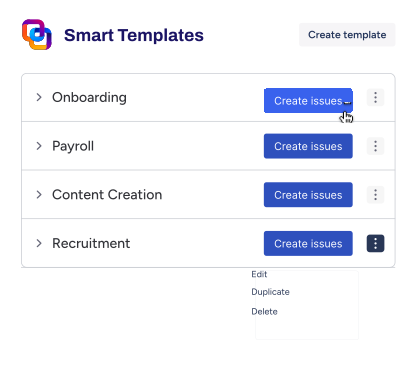
In Jira, we usually model this with Smart Template: Issue templates for Jira as:
Epic: Market Research for {{product_name}}
Under that Epic, Smart Templates creates a pre-defined set of issues such as:
- Define research plan for {{target_market}}
- Identify primary persona
- Run market survey
- Conduct interviews / focus groups
- Competitive landscape & SWOT
- Market trends & opportunities
- Pricing analysis for {{pricing_model}}
- Assess potential market share & profit
- Risk assessment
- Synthesize insights & write report
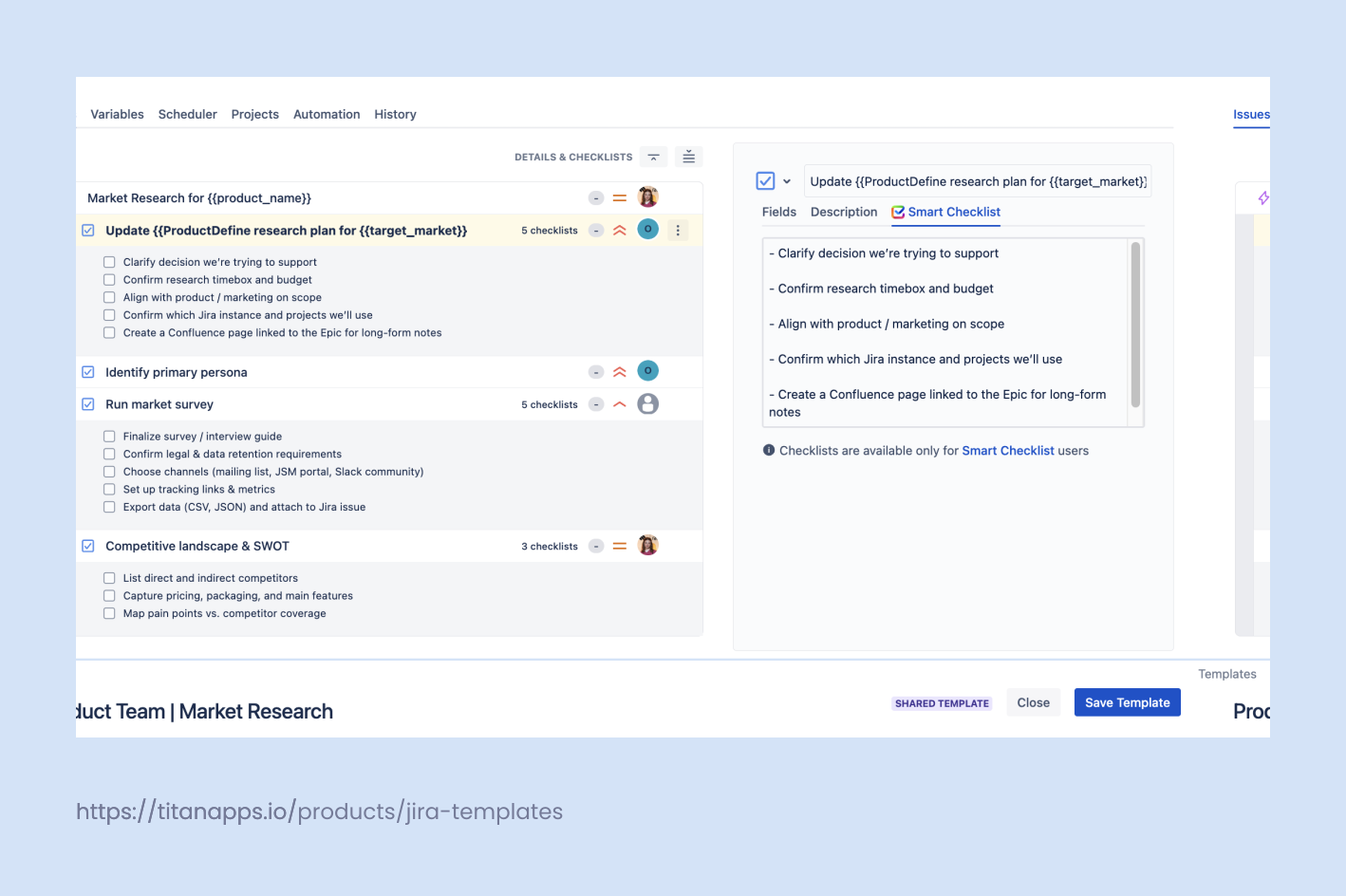
We use variables to make the template reusable:
- {{product_name}} – the app, feature, or service
- {{target_market}} – e.g. “US mid-market DevOps teams”
- {{primary_persona}} – “Jira admin”, “Head of IT”, “Content lead”
- {{pricing_model}} – “per user”, “per project”, “usage-based”
- {{research_owner}} – owner for the whole Epic
- {{due_date}} – end of research window
This structure works whether you’re validating:
- New product
- New module of the product
- Repositioning
- Expanding to new market
- Repositioning of an existing product.
Building the Template in Jira with Smart Tools
You can build this manually with standard Jira features, or automate it using Smart Templates and Smart Checklist.
A typical setup on Jira Cloud:
- Add a Smart Template for the research Epic
- Template name: Market Research – New Product
- Epic with all child issues pre-defined
- Prefilled fields: summary, description, labels (market-research, discovery), {{due_date}}
- Add template to a Jira project
- Template name: Market Research – New Product
- Break down tasks with checklists
For example, the “Run market survey” issue might have:
- Draft survey in Confluence
- Align questions with product goals
- Export responses as CSV / JSON
- Import key metrics into Jira custom fields
- Add notes from Splunk / analytics dashboards if relevant
- Draft survey in Confluence
- Use Jira Automation
- Assign issues based on project roles and user management rules
- Send Slack and email notifications when milestones are reached
- Assign issues based on project roles and user management rules
Please note that a checklist is also a practical replacement for subtasks in research work. It lets you list all to-dos inside one Jira issue, without the subtasks overhead.
This works especially well for market research because most steps are small, sequential, and context-heavy. Keeping them inside one issue helps you:
- avoid clutter on the board and in the backlog (no dozens of subtasks per research step)
- keep all context in one place (links, notes, attachments, and outcomes stay together)
- track progress without fragmenting work across multiple tickets
- standardize execution with checklist templates, instead of copying subtasks manually
- reduce admin work for team members who just need a clear list of next actions
Checklists That Keep Research On Track
The power of this approach is in checklists inside issues, not just issue titles. Here’s how we usually structure them.
1. Kickoff checklist
Inside Define research plan for {{target_market}}:
- Clarify decision we’re trying to support
- Confirm research timebox and budget
- Align with product / marketing on scope
- Confirm which Jira instance and projects we’ll use
- Create a Confluence page linked to the Epic for long-form notes
2. Data collection checklist
Inside Run market survey / Conduct interviews:
- Finalize survey / interview guide
- Confirm legal & data retention requirements
- Choose channels (mailing list, JSM portal, Slack community)
- Set up tracking links & metrics
- Export data (CSV, JSON) and attach to Jira issue
You can connect Jira to Microsoft Forms, Typeform, or other tools via webhook, OAuth, or custom plugins. Use Jira Service Management if you want to collect research feedback through a portal your customers already know.
3. Analysis checklist
Inside Competitive landscape & SWOT and Market trends & opportunities:
- List direct and indirect competitors
- Capture pricing, packaging, and main features
- Map pain points vs. competitor coverage
4. Reporting checklist
Inside Synthesize insights & write report:
- Write an executive summary in Confluence
- Include the key metrics
- Document risks and dependencies
- Make the go / refine / stop recommendation
- Log final decision and who approved it (via comment + @mentions)
All of this lives in normal Jira issues, traceable through the audit log, Jira audit log, and configuration changes history if you ever need to understand “who did what and when?”.
Metrics and Decision Gates
Good research workflows define what success looks like before data arrives. In the template, we usually track:
- Response metrics – survey response rate, number of interviews, share of qualified respondents
- Problem metrics – top 3–5 pain points, frequency and severity per persona
- Willingness to pay – price ranges, preferred pricing model, discount sensitivity
- Market metrics – rough TAM, target market share, and expected revenue envelope
Then come the decision gates. The template suggests a simple scale:
- Go – strong signal: clear pain, reachable segment, viable pricing, acceptable risks
- Refine – some signal, but gaps in data or positioning; we do another iteration
- Stop – weak signal or poor economics; we archive the Epic and move on
How This Fits into Jira Workflows
Jira issues are best suited for distributing research tasks, tracking their status, and visualizing progress.
Smart Templates and Smart Checklist help structure this:
- Assign tasks and roles clearly
- Track status of each step
- Ensure nothing gets missed
- Enable visibility for stakeholders
But they are not documentation tools.
Jira is designed for tracking. Not for storing insights, final decisions, or documenting the “why” behind choices. For that, use Confluence or another dedicated documentation tool.
In market research workflows, Jira gives you control over the process and responsibilities – who did what, when, and what comes next. It doesn’t replace structured research outputs or analysis artifacts.
Why Use a Market Research Template in Jira?
You could run your research in slides, emails, and ad-hoc docs. Most teams do. The result is usually:
- Inconsistent process
- Poor alignment on progress and steps
- Overlooking some steps
Putting market research into a Jira template changes that:
- Enforces a consistent research process
- Clarifies task distribution
- Helps track what’s done and what’s missing
- Keeps the project transparent to stakeholders
- Enables scaling discovery across teams
But remember:
- Use Jira to manage tasks and roles
- Use Confluence or similar for long-form research data, documentation, and insight synthesis
Smart Templates take care of the issue hierarchy, Smart Checklist keeps every step actionable, and Jira Automation glues it all together.
Conclusion & Next Steps
Structured market research plan doesn’t require a new platform. You can use Jira as the backbone:
- Smart Templates to spin up a full research workflow in seconds
- Smart Checklist to make each step clear and testable
Start your next research initiative with a repeatable, structured Jira template. Then use the right tools for documentation and data storage alongside it.
FAQ: Making Your Market Research Template Work in Real Life
How many respondents do we need for a market survey?
For most market research projects in Jira, 30–50 qualified respondents is enough to spot clear patterns in pain points, pricing ranges, and customer needs. If you’re validating a high-risk new product or multiple pricing models, aim for 100+ to get more reliable metrics. What matters most is that respondents match your target market and market segmentation volume.
When should we use interviews vs focus groups vs surveys?
Think of research methods as tools for different questions:
- Use surveys when you need quantitative market data (e.g. pricing sensitivity, feature importance) from a larger sample.
- Use 1:1 interviews for deeper context on customer experiences, hidden pain points, and decision criteria.
- Use focus groups when group dynamics matter (e.g. B2B buying committees) or you want to test messaging and reactions in real time.
You can combine these inside one research plan: start with qualitative work (interviews / focus groups), then validate findings with a market survey.
How do we turn raw market data into actionable insights?
A good analysis template in Jira helps you move from noise to decisions:
- Cluster insights by persona, demographics, and use cases.
- Map findings to market trends, competitive landscape, and SWOT (strengths, weaknesses, opportunities, threats).
- Tie each insight to a product or pricing implication (e.g. “raise entry price for SMB segment”, “de-scope feature X for first release”).
If you like structured, repeatable workflows, check out our Template for Compliance Audit in Jira – the same template mindset works great for market research projects that need clear owners, checklists, and decision gates.
How do we keep personas, segmentation, and market research templates up to date?
Treat your market research report template, personas, and target audience profiles as living assets, not one-off files. In practice:
- Revisit core personas when you ship a new product, change your pricing model, or see drops in conversion.
- Refresh key market segmentation assumptions yearly (or sooner if you enter a new region / vertical).
- Update the Jira template itself whenever your team learns a better way to run a research project (e.g. new methodologies, better metrics, or improved data collection steps).
For inspiration on how to keep long-running processes fresh in Jira, see how we manage structured onboarding flows with employee onboarding template:
What’s the best way to mix “classic” research with social media, podcasts, and webinars?
For small business teams and lean product squads, you don’t always need big formal studies. You can enrich your market research efforts by:
- Logging quotes and objections from social media, webinars, and podcast appearances as qualitative market data.
- Tagging issues by stakeholders, persona, and topic so team members can see patterns in real time.
- Using checklists to make sure every initiative runs through the same data collection and decision-making steps.
This mix works especially well when you’re close to customers and iterating fast on product development.
How do we use this template across different markets and use cases?
The same market research template can support multiple use cases: testing a new product, repositioning an existing one, exploring a new target market, or validating a change in pricing. Use variables like {{target_market}}, {{primary_persona}}, or {{research_owner}} to personalize each run, and keep the core structure identical.
If you already document requirements in Jira with acceptance criteria, this will feel familiar – it’s the same idea of turning fuzzy customer needs into structured, testable work.